1. Introducere
The FOSCAM BP4 is a 2K (4MP) wireless outdoor security camera designed for home surveillance. It features a built-in rechargeable battery and is powered by a high-efficiency solar panel, offering a truly wire-free installation. With advanced features like color night vision, PIR human detection, and sound and light alarms, the BP4 provides reliable and intelligent monitoring for your property. This manual will guide you through the setup, operation, and maintenance of your FOSCAM BP4 camera.
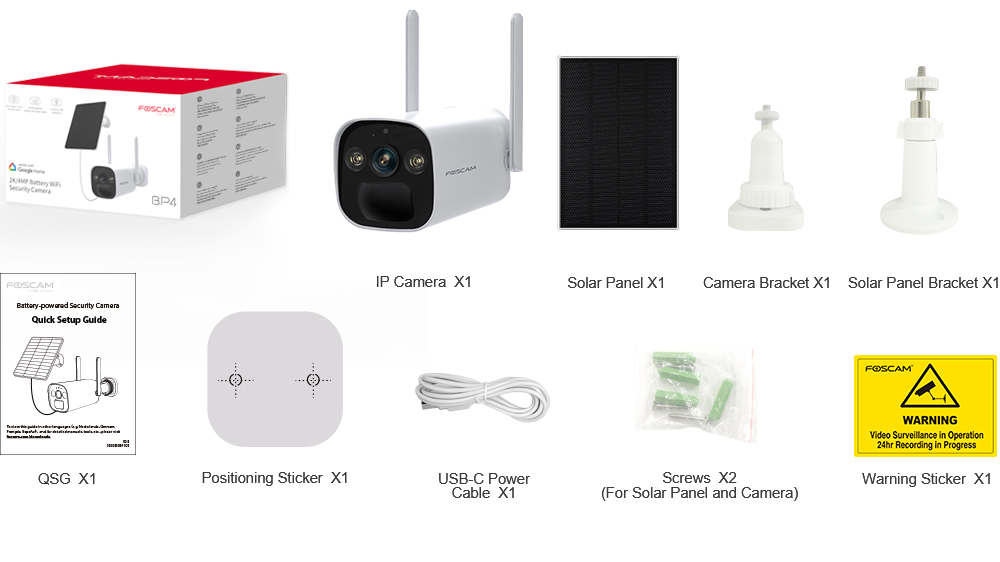
2. Conținutul pachetului
Please check the package carefully to ensure all items are present and in good condition. If anything is missing or damaged, please contact FOSCAM support.
- IP Camera (BP4) x1
- Panou solar x1
- Suport pentru cameră x1
- Suport panou solar x1
- Ghid de configurare rapidă (QSG) x1
- Autocolant de poziționare x1
- USB-C Power Cable x1
- Screws x2 (for Solar Panel and Camera)
- Autocolant de avertizare x1
3. Caracteristici cheie
- Video Quad HD 2K (4MP): Surprinde imagini clare și detaliatetage with a resolution of 2560 x 1440 pixels at 20 frames per second.
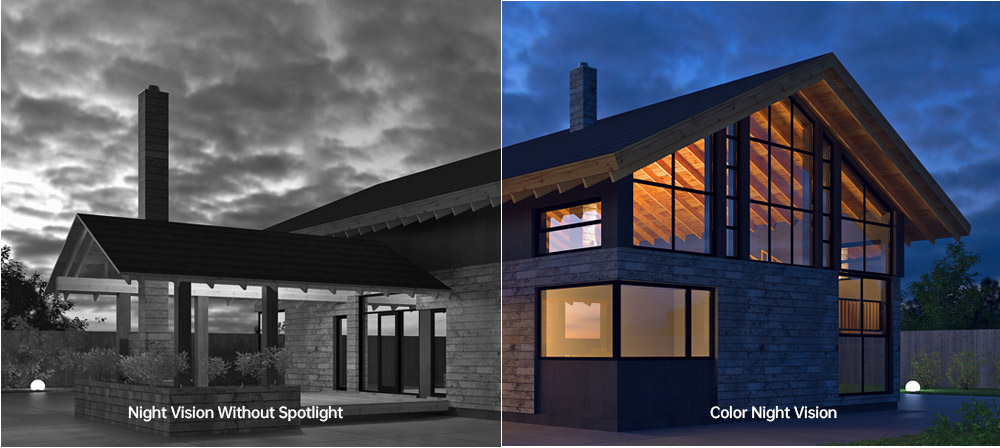
- Vedere de noapte color: Equipped with 2pcs Spotlight IR LED, providing a night vision range up to 10m (33ft) and supporting full-color images even in low-light conditions.
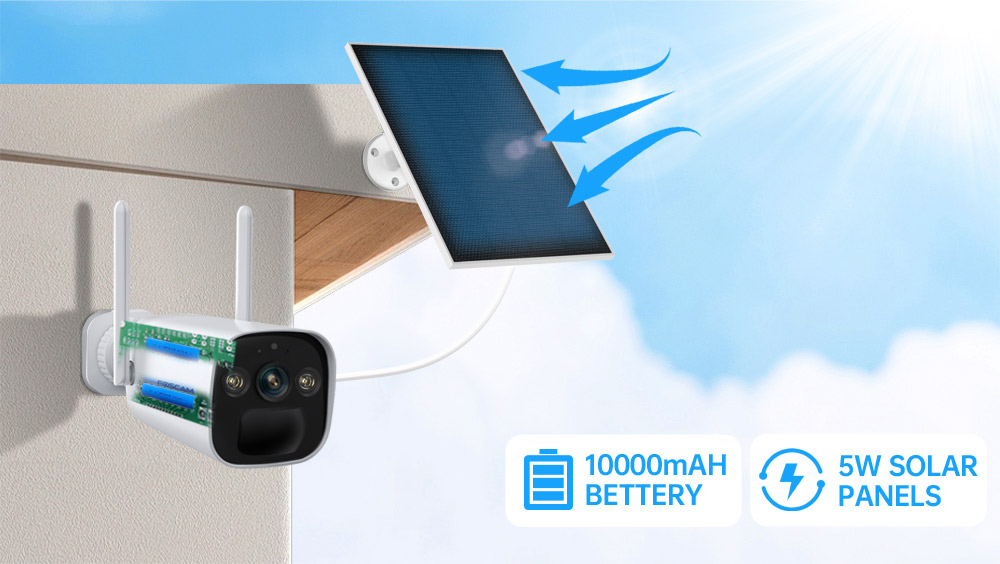
- Rechargeable Battery & Solar Panel: Features a 10000mAh rechargeable battery (4pcs 18650 battery included) and a 5W high-efficiency solar panel for continuous power, ensuring truly wire-free operation.
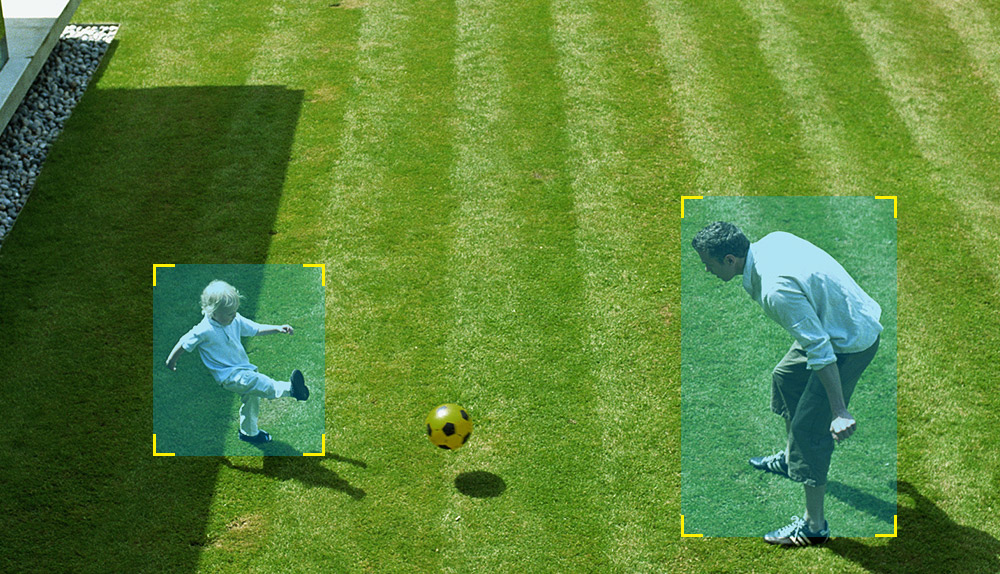
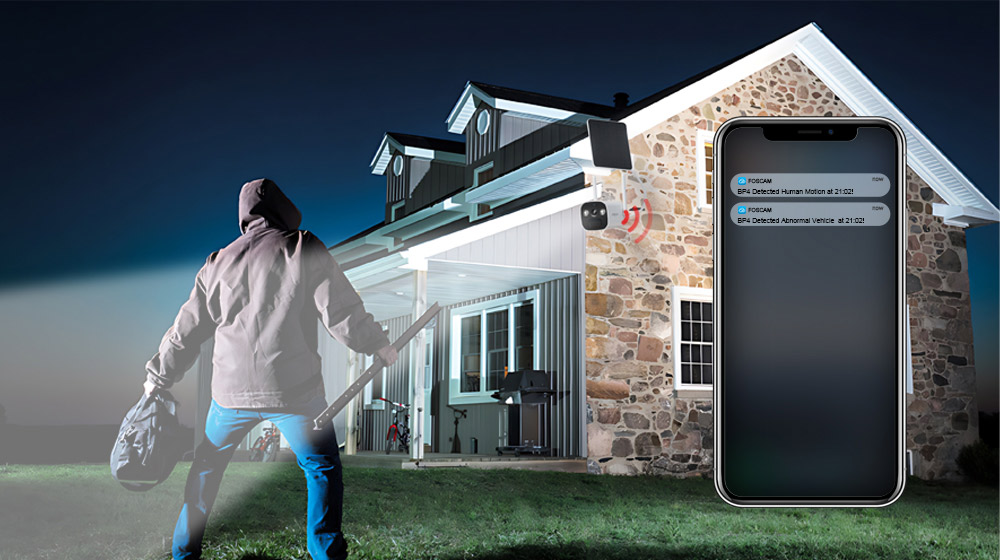
- Detectare PIR umană: Advanced Passive Infrared (PIR) sensor distinguishes human movement from other objects, reducing false alarms and sending accurate alerts.
- Alarmă sonoră și luminoasă: Triggers a spotlight and a siren (up to 110dB) upon detection of an intruder, acting as a deterrent. Can also be manually activated.
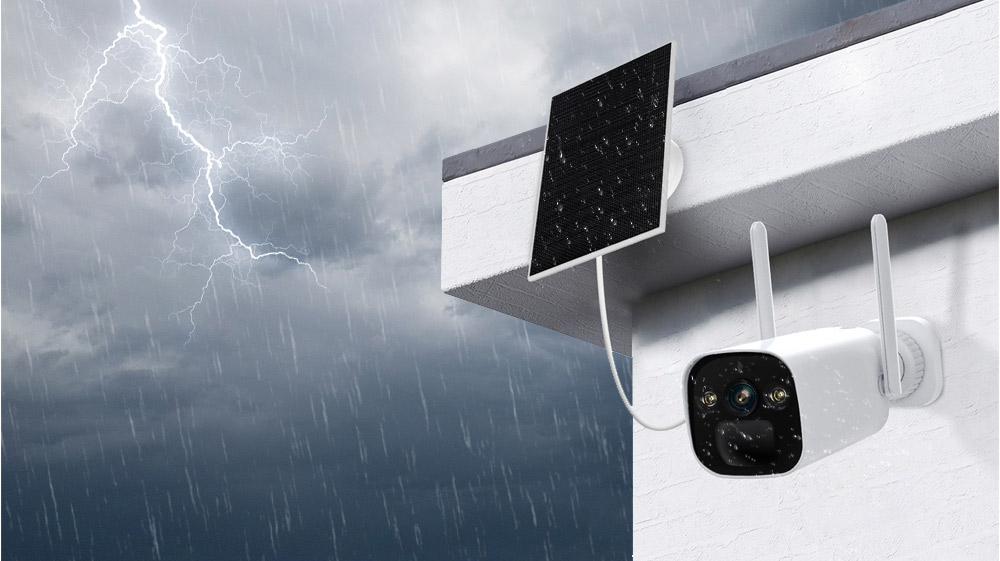
- IP66 Rated Weatherproof: Designed to withstand harsh outdoor weather conditions, operating reliably in temperatures from -20°C to 60°C (-4°F to 140°F).
- Audio bidirecțional: Built-in microphone and speaker allow for real-time communication with visitors or intruders.
- Integrare Smart Home: Supports integration with Alexa and Google Home for convenient voice control and smart home automation.
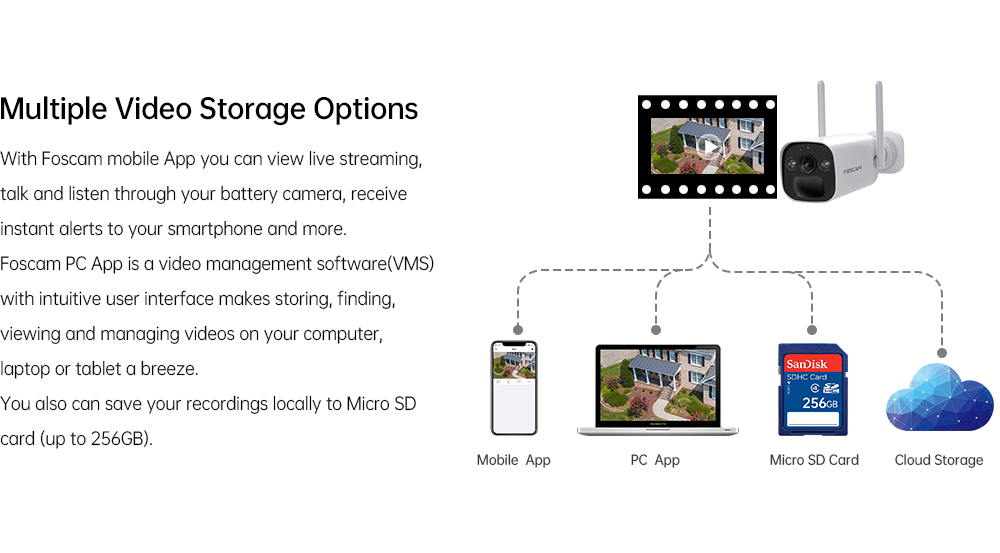
- Opțiuni multiple de stocare: Supports local storage via Micro SD Card (up to 256GB) and Foscam cloud storage for flexible video recording and backup.
- Compresie video H.264: Efficient video compression technology to save storage space and bandwidth.
- P2P Feature: Enables easy remote access to your camera feed from anywhere.
- Mobile App & VMS Compatibility: Compatible with the free Foscam iOS and Android APP, as well as Foscam Video Management Software (VMS) for Windows and macOS.

4. Ghid de instalare
4.1 Instalare fizică
- Alegeți o locație: Selectați o locație în aer liber care oferă calitatea dorită viewunghiul de înclinare și primește ampEvitați expunerea la lumina directă a soarelui pentru panoul solar. Asigurați-vă că camera se află în raza de acțiune a rețelei Wi-Fi de 2.4 GHz.
- Montați suportul camerei: Use the positioning sticker to mark drill holes. Drill holes and insert wall plugs if necessary. Secure the camera bracket to the wall using the provided screws.
- Mount the Solar Panel Bracket: Similarly, choose a location for the solar panel that maximizes sun exposure. Mount the solar panel bracket using the provided screws.
- Atașați camera și panoul solar: Attach the FOSCAM BP4 camera to the camera bracket and the solar panel to its bracket. Adjust their angles for optimal coverage and sun exposure.
- Conectați panoul solar: Connect the USB-C cable from the solar panel to the USB-C port on the camera.
4.2 Instalarea aplicației și configurarea inițială
- Descărcați aplicația Foscam: Caută 'Foscam' in the App Store (iOS) or Google Play Store (Android) and download the official Foscam app.
- Creează cont: Open the app and register for a new Foscam account if you don't have one.
- Adăugați o cameră: Tap the '+' icon in the app to add a new device. Follow the on-screen instructions to scan the QR code on your camera or manually enter its details.
- Conectați-vă la Wi-Fi: The app will guide you through connecting the camera to your 2.4GHz Wi-Fi network. Ensure your phone is connected to the same 2.4GHz network during this process.
- Configurați setările: Once connected, you can name your camera, set a password, and configure initial settings like time zone and recording preferences.
5. Instrucțiuni de utilizare
5.1 În direct View
Open the Foscam app and select your BP4 camera from the device list. You will see the live video feed. From here, you can:
- Take Snapshots: Capturați imagini statice din fluxul live.
- Record Manually: Start and stop video recording manually.
- Use Two-Way Audio: Tap the microphone icon to speak through the camera's speaker, and listen through your phone.
- Zoom digital: Pinch to zoom in on the live video feed.
5.2 Înregistrare și redare
The FOSCAM BP4 supports event-triggered recording (motion/human detection) and continuous recording (with cloud subscription or local storage). Recorded footage can be accessed via the app or Foscam VMS.
- Acces înregistrări: In the app, navigate to the camera's settings or playback section to view videoclipuri stocate.
- Filter Events: Use filters to quickly find recordings based on date, time, or event type (e.g., human detection).
5.3 Setări de alarmă
Configure the camera's detection and alarm features for optimal security.
- Detectare PIR umană: Enable or disable human detection. Adjust sensitivity levels and detection zones to minimize false alarms.
- Alarmă sonoră și luminoasă: Set the camera to automatically trigger its spotlight and siren when an intruder is detected. You can also manually activate these alarms from the app.
- Notificări: Ensure push notifications are enabled in the Foscam app and your phone's settings to receive instant alerts.
6. Întreținere
- Încărcarea bateriei: The solar panel will continuously charge the internal battery. If the camera is in a shaded area or during prolonged cloudy weather, you may need to manually charge the battery using the USB-C power cable and a DC 5V/2A USB power adapter (not included).
- curatenie: Curățați periodic lentila camerei și suprafața panoului solar cu o lavetă moale și drăguță.amp o lavetă pentru a asigura o performanță optimă. Evitați substanțele de curățare abrazive.
- Actualizări firmware: FOSCAM regularly releases firmware updates to improve performance and add new features. Check the Foscam app for available updates and follow the instructions to install them.
- Gestionarea cardului Micro SD: If using a Micro SD card, ensure it is formatted correctly (FAT32 recommended for cards over 32GB, check app for specific instructions). Regularly review și faceți o copie de rezervă a alimentelor importantetage, and consider setting up automatic overwriting for continuous recording.
7. Depanare
7.1 Camera nu se conectează la Wi-Fi
- Ensure your Wi-Fi network is 2.4GHz. The BP4 does not support 5GHz Wi-Fi.
- Verificați dacă camera se află în raza de acțiune a routerului Wi-Fi.
- Verificați dacă parola Wi-Fi introdusă în aplicație este corectă.
- Reporniți routerul și camera, apoi încercați să vă conectați din nou.
7.2 Calitate video slabă
- Verificați puterea semnalului Wi-Fi. Un semnal slab poate afecta calitatea video.
- Asigurați-vă că obiectivul camerei este curat și fără obstrucții.
- Reglați poziția camerei pentru a evita strălucirea directă sau iluminarea puternică din spate.
7.3 Battery Not Charging / Draining Quickly
- Ensure the solar panel is receiving direct sunlight for several hours a day. Clear any obstructions.
- Verificați conexiunea dintre panoul solar și cameră.
- Temperaturile extrem de scăzute pot afecta performanța bateriei.
- Frecvente live-uri view access or excessive motion detections can drain the battery faster. Adjust detection sensitivity and recording schedules.
7.4 Alarme false
- Adjust the PIR detection sensitivity in the app.
- Define specific detection zones to exclude areas with frequent non-human movement (e.g., trees swaying, passing cars).
- Ensure the camera is not pointing directly at heat sources or reflective surfaces that could trigger the PIR sensor.
8. Specificații

| Categorie | Articol | Caietul de sarcini |
|---|---|---|
| În lumina reflectoarelor | Temperatura de culoare | 6500K |
| Senzor de imagine | Tip senzor | Senzor CMOS color de înaltă definiție |
| Rezoluția afișajului | 4.0 Megapixels (2560*1440) | |
| Min. Iluminare | 0 Lux (cu iluminator IR) | |
| Obiectiv | Tip de lentile | f:3.3 mm; F2.0 |
| Unghiul de view | Diagonală: 104°, Orizontală: 89°, Verticală: 48° | |
| Video | Compresia imaginii | H.264 |
| Rezoluţie | 2K (2560*1440) 20fps, VGA (640 x 360) | |
| Flux | Flux dublu | |
| Întoarce imaginea | Flip și oglindă | |
| Zoom digital | Zoom digital de 20× | |
| Mod infraroșu | Automatic / Color Night / Night Vision | |
| Vizibilitate pe timp de noapte | With 2pcs Spotlight and IR LED, Night Vision Range up to 10m (33ft) | |
| Audio | Intrare/Ieșire | Full Duplex two-way audio |
| Sirenă | Supports maximum 110dB alarm siren | |
| Reţea | standard wireless | IEEE802.11b/g/n |
| Securitate fără fir | WPA, WPA2 | |
| Acces de la distanță | P2P | |
| Protocol de rețea | IP, TCP, UDP | |
| Cerințe de sistem | Sistem de operare | Microsoft Windows (Foscam VMS), Mac OS (Foscam VMS), Android (Foscam app), iOS (Foscam app) |
| Alte caracteristici | Distanța de detectare PIR | Ajustabil până la 8 m (26.2 ft) |
| Unghiul de detectare PIR | 110 ° orizontală | |
| Alarmă inteligentă | PIR Detection/Human Detection | |
| Depozitare | Support max 256G Micro SD card, Foscam cloud storage | |
| Blocare confidențialitate | Da | |
| Asistent inteligent | Suporta Alexa, Google Home | |
| Putere | Baterie | 10000mAh rechargeable battery (battery life varies based on settings, usage & temperature) |
| Solar | Panou solar de 5W | |
| Alimentare DC | DC 5V/2A USB power adapter (Not included) | |
| Fizic | Dimensiune (Lxlxh) | 67mm*67mm*203mm |
| Greutate netă | 690 g | |
| Mediu | Impermeabil | IP66 |
| Temperatura de operare | -20°C ~ 60°C (-4°F ~ 140°F) | |
| Umiditatea de funcționare | 10% ~ 80% fără condensare | |
| Temperatura de depozitare | -20°C ~ 60°C (-4°F ~ 140°F) | |
| Umiditatea de depozitare | 0% ~ 90% fără condensare | |
| Temperatura de încărcare a bateriei | 0°C ~ 45°C (32°F ~ 113°F) | |
| Certificare | Certificari | FCC, CE, RoHS, WEEE, IP66 |
9. Sfaturi pentru utilizatori
- Amplasarea optimă a panourilor solare: For best battery performance, ensure the solar panel is installed in a location that receives at least 4-6 hours of direct sunlight daily. Avoid shaded areas.
- Puterea semnalului Wi-Fi: Before final installation, use your smartphone to check the Wi-Fi signal strength at the camera's intended location to ensure a stable connection.
- Personalizați zonele de detectare: To reduce unwanted notifications, utilize the Foscam app to draw specific detection zones, focusing on critical areas and excluding public pathways or moving foliage.
- Verificări regulate ale aplicației: Periodically check the Foscam app for battery status, recording history, and any available firmware updates to keep your camera running smoothly.
10. Garanție și asistență
FOSCAM products come with a standard manufacturer's warranty. For detailed warranty information, technical support, or service inquiries, please visit the official FOSCAM website-ul lor web sau contactați direct serviciul lor de asistență pentru clienți. Păstrați bonul fiscal ca dovadă a achiziției pentru reclamațiile în garanție.


