
1. Introducere
Mulțumesc pentru achizițieasing the Audizio Laredo Bluetooth Turntable. This manual provides essential information for the safe and correct operation of your device. Please read it thoroughly before use and keep it for future reference.
Caracteristici cheie:
- Integrated HiFi speakers with 160W total power output.
- Bidirectional Bluetooth for wireless audio streaming (in and out).
- High-quality Audio Technica cartridge for precise playback.
- Supports 7, 10, and 12-inch vinyl records at 33 and 45 RPM.
- Adjustable counterweight on the aluminum tonearm.
- RCA Line Out for external amplifier/difuzoare.
- AUX Input for connecting external audio sources.
- Elegant bamboo finish.
Ce este în cutie:
- Audizio Laredo Turntable Unit
- Manual de instructiuni
- Adaptor de alimentare
- 45 RPM Adapter for singles
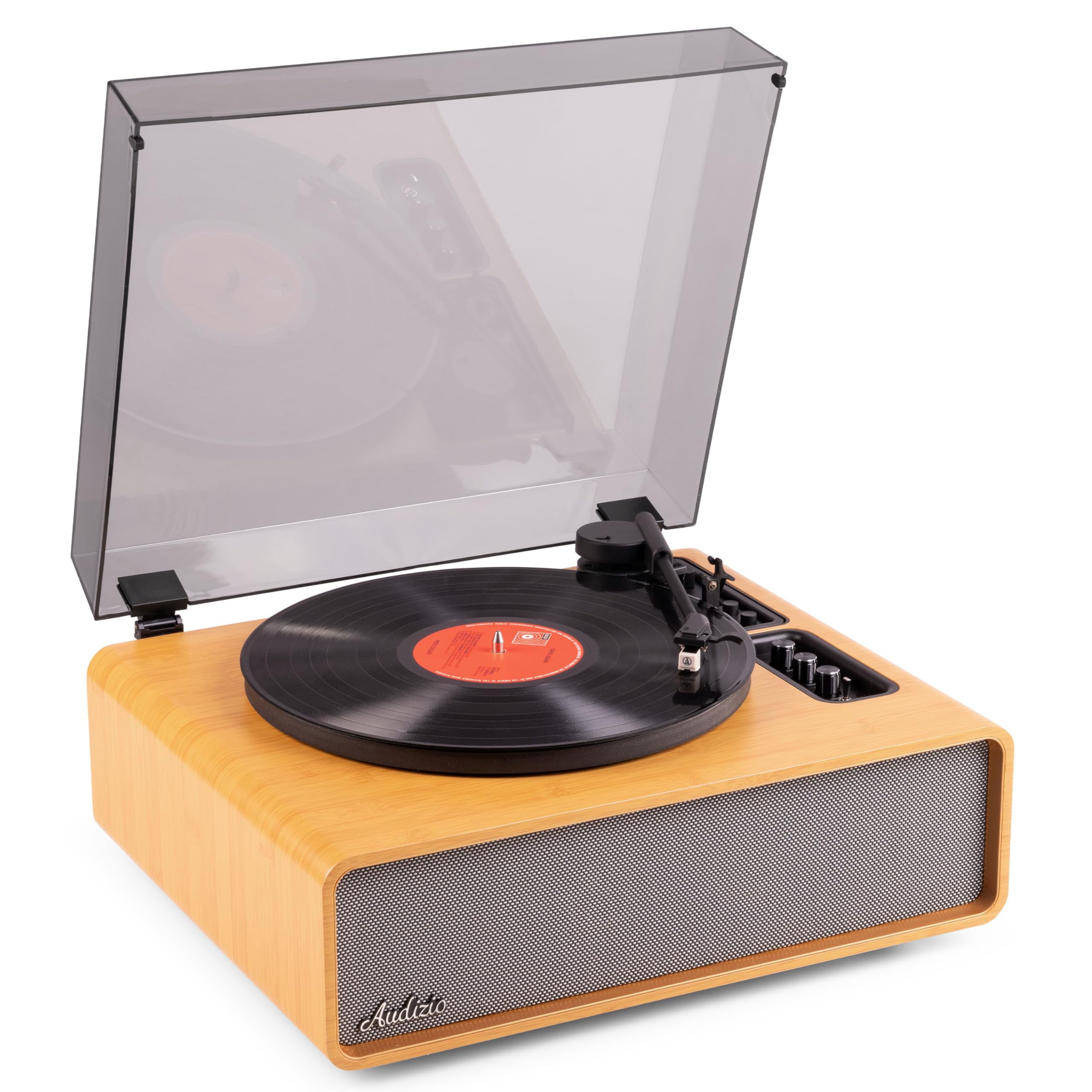
Figure 1.1: Audizio Laredo Turntable, overall view.
2. Instrucțiuni de siguranță
Please read and follow these safety instructions carefully to prevent damage to the unit and ensure your safety.
- Nu expuneți unitatea la ploaie sau umezeală pentru a preveni incendiul sau electrocutarea.
- Nu deschideți c.asing. În interior nu există piese care să poată fi reparate de utilizator. Apelați la personal calificat pentru orice service.
- Place the unit on a stable, level surface to prevent it from falling.
- Țineți unitatea departe de lumina directă a soarelui, surse de căldură și praf excesiv.
- Asigurați o ventilație adecvată în jurul unității. Nu blocați orificiile de ventilație.
- Utilizați numai adaptorul de alimentare furnizat.
- Deconectați unitatea în timpul furtunilor cu descărcări electrice sau când nu este utilizată pentru perioade lungi de timp.
3. Produs terminatview
Familiarize yourself with the components and controls of your Audizio Laredo turntable.
Componentele principale:
- platou: Supports the vinyl record.
- Arme de ton: Ține cartusul și stiloul.
- Cartridge & Stylus: Reads the grooves of the record. (Audio Technica ATN-3600)
- Capac de praf: Protejează platanul și brațul de praf.
- Difuzoare integrate: Pentru redare audio directă.
- Panou de control: For power, volume, tone, and mode selection.
- Conexiuni din spate: RCA Line Out, AUX In, Power Input.

Figura 3.1: Sus view of the turntable with key components visible.

Figure 3.2: Control Panel for volume, bass, and treble adjustments.

Figure 3.3: Audio Technica ATN-3600 Cartridge and Stylus.

Figure 3.4: Tonearm base with speed and auto-stop controls.

Figure 3.5: Rear connection panel.
4. Configurare
4.1 Despachetarea
- Scoateți cu grijă platanul din ambalaj.
- Remove all protective materials, including the stylus guard.
- Păstrați ambalajul pentru transport sau depozitare ulterioară.
4.2 Plasarea
- Place the turntable on a stable, level surface to prevent vibrations and ensure proper playback.
- Avoid placing the unit near strong magnetic fields, heat sources, or areas with high humidity.
4.3 Instalarea capacului anti-praf
- Align the hinges of the dust cover with the slots on the back of the turntable.
- Gently push down until the cover is securely in place.
- The dust cover can be removed for playback if desired.

Figure 4.1: Turntable with dust cover.
4.4 Conexiune la alimentare
- Connect the power adapter to the DC IN port on the rear of the turntable.
- Plug the adapter into a suitable wall outlet (220V).
4.5 Configurarea brațului și a cartușului
- The Audio Technica cartridge is pre-installed.
- The tonearm features an adjustable counterweight. Refer to the detailed instructions in the included manual for precise counterweight adjustment to optimize tracking force.
5. Instrucțiuni de utilizare
5.1 Redarea unui disc
- Place a vinyl record on the platter. If playing a 7-inch single, use the included 45 RPM adapter.
- Select the appropriate speed (33 or 45 RPM) using the speed selector switch near the tonearm base.
- Ridicați ușor brațul folosind maneta de repornire.
- Poziționați brațul deasupra piesei dorite de pe disc.
- Coborâți încet brațul folosind maneta de reper. Stylus-ul va face contact cu discul, iar redarea va începe.
- La sfârșitul înregistrării, funcția de oprire automată va opri automat rotirea platanului. Ridicați brațul și readuceți-l în poziția de repaus.

Figure 5.1: Playing a vinyl record.
5.2 Bluetooth Operation (Bidirectional)
The Laredo turntable supports both Bluetooth input (receiving audio from a device) and Bluetooth output (sending audio to a Bluetooth speaker/headphones).
Bluetooth Input (BT IN):
- Press the MODE/POWER button to select Bluetooth mode. The LED indicator will flash.
- On your smartphone or tablet, enable Bluetooth and search for 'Audizio Laredo'.
- Select the turntable to pair. Once connected, the LED will glow solid.
- You can now stream audio from your device to the turntable's integrated speakers.
Bluetooth Output (BT OUT):
- Asigurați-vă că boxele sau căștile Bluetooth sunt în modul de asociere.
- Set the BT OUT switch (located near the tonearm base) to 'ON'.
- The turntable will automatically search for and connect to the nearest Bluetooth audio device.
- Once connected, the audio from your vinyl record will be transmitted to your Bluetooth device.

Figure 5.2: Bidirectional Bluetooth functionality.
5.3 Intrare AUX
- Connect an external audio device (e.g., MP3 player, CD player) to the AUX IN port on the rear of the turntable using a 3.5mm audio cable.
- Press the MODE/POWER button to select AUX mode.
- Audio from the external device will play through the turntable's speakers.
5.4 RCA Line Out
- Pentru a conecta platanul la o sursă externă amplifier or powered speakers, use an RCA cable (not included) to connect the LINE OUT ports on the rear of the turntable to the corresponding input on your audio system.
- Ensure the 'Speaker ON/OFF' switch on the rear is set to 'OFF' if you only want sound from external speakers.
5.5 Controlul volumului și tonului
- Use the VOLUME knob on the control panel to adjust the overall playback volume.
- Adjust the BASS and TREBLE knobs to fine-tune the audio output to your preference.
6. Întreținere
6.1 Curăţarea unităţii
- Wipe the dust cover and cabinet with a soft, dry cloth.
- Nu utilizați agenți de curățare abrazivi, ceară sau solvenți.
- For the platter, use a slightly damp cârpă și se usucă bine.
6.2 Stylus Care and Replacement
- The stylus is a delicate component. Handle it with care.
- Clean the stylus regularly using a soft brush designed for stylus cleaning, brushing from back to front.
- A stylus typically lasts for approximately 300-500 hours of playback. If you notice a decrease in sound quality or increased skipping, it may be time to replace the stylus.
- Replacement styli (e.g., Audio Technica ATN-3600L or compatible) can be purchased from authorized dealers. Refer to the detailed instructions provided with the replacement stylus for installation.
7. Depanare
If you encounter issues with your turntable, please consult the following table before contacting support.
| Problemă | Cauza posibila | Soluţie |
|---|---|---|
| Fără putere | Adaptorul de alimentare nu este conectat; Priza de alimentare nu funcționează. | Asigurați-vă că adaptorul de alimentare este conectat corect la unitate și la o priză funcțională. |
| Fără sunet din difuzoare | Volume too low; Speaker ON/OFF switch is OFF; Incorrect mode selected. | Increase volume; Set 'Speaker ON/OFF' switch to ON; Select correct input mode (Phono, BT IN, AUX). |
| Skipping records | Record is dirty or damaged; Stylus is worn or dirty; Turntable not level; Tracking force incorrect. | Clean record; Clean or replace stylus; Place turntable on a level surface; Adjust tonearm counterweight. |
| Probleme de asociere Bluetooth | Device too far; Turntable not in pairing mode; Interference. | Ensure devices are within range; Re-enter pairing mode; Turn off other Bluetooth devices. |
| Distorsiunea sunetului | Volume too high; Stylus worn; Record damaged. | Reduce volume; Replace stylus; Try a different record. |
8. Specificații
Technical specifications for the Audizio Laredo Turntable.
| Caracteristică | Caietul de sarcini |
|---|---|
| Numele modelului | Laredo (101.537) |
| Dimensiuni (L x l x H) | 43.2 x 43.2 x 21 cm (17 x 17 x 8.3 țoli) |
| Greutatea produsului | 7.65 kg (16.86 lbs) |
| Material | Wood (Bamboo finish) |
| Viteze de rotație | 33 RPM, 45 RPM |
| Tip cartuș | Audio Technica (ATN-3600) |
| Tip motor | Transmisia cu centură |
| Formatul semnalului | Analogic |
| Boxe integrate | Yes, 160W total output |
| Versiune Bluetooth | 5.4 (Bidirectional) |
| Conectivitate | Bluetooth (In/Out), RCA Line Out, AUX In |
| Sursa de alimentare | Electric cu fir |
| Voltage | 220 volți |
| Dispozitive compatibile | Speakers, Headphones, Smartphone, Tablet |
9. Garanție și asistență
9.1 Informații despre garanție
This Audizio Laredo Turntable comes with a 2 an garanție from the date of purchase. This warranty covers manufacturing defects and faults under normal use. It does not cover damage caused by misuse, accidents, unauthorized modifications, or normal wear and tear (e.g., stylus wear).
Vă rugăm să păstrați dovada achiziției pentru cererile de garanție.
9.2 Asistență pentru clienți
If you have any questions, require technical assistance, or need to make a warranty claim, please contact your retailer or visit the official Audizio website pentru resurse de asistență și informații de contact.
Official Audizio Website: www.audizio.com