
Introducere
This manual provides detailed instructions for the safe and proper installation, operation, and maintenance of your PERLESMITH PSAT3B Tilting TV Wall Mount. Please read this manual thoroughly before beginning installation and retain it for future reference. This wall mount is designed for televisions ranging from 42 to 100 inches and supports a maximum weight of 160 lbs.
Informații de siguranță
AVERTIZARE: Instalarea necorespunzătoare poate duce la vătămări corporale grave și daune materiale. Dacă nu înțelegeți aceste instrucțiuni sau aveți îndoieli cu privire la siguranța instalării, vă rugăm să contactați un instalator calificat.
- This product is intended for installation on wood studs (16"-24" spacing), solid concrete, or brick walls only. Do not install on drywall alone.
- Ensure the mounting surface can safely support the combined weight of the mount and your television.
- Nu depășiți capacitatea maximă de greutate de 72.5 kg.
- Verify your TV's VESA pattern (mounting hole spacing) is compatible with the mount (200x200mm to 600x600mm).
- Folosiți întotdeauna un detector de grinzi pentru a localiza cu precizie grinzile de lemn.
- Purtați echipament de protecție adecvat, inclusiv protecție pentru ochi, în timpul instalării.
- Țineți copiii și animalele de companie departe de zona de lucru în timpul instalării.

The PERLESMITH PSAT3B Tilting TV Wall Mount provides a secure and flexible viewing solution for large televisions.
Conținutul pachetului
Please check to ensure all components are present and undamaged before installation. Refer to the included hardware bags for specific screw sizes and quantities.
- Ansamblu placă de perete
- Suporturi TV (2)
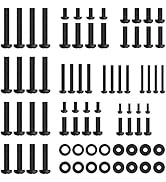
- Kit de montare (diverse șuruburi, șaibe, distanțiere, ancore)
- Nivel
- Manual de instructiuni
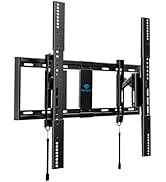
Pesteview of the PERLESMITH PSAT3B wall mount components and included hardware.
Specificații
| Caracteristică | Caietul de sarcini |
|---|---|
| Numărul de model | PSAT3B |
| Tip de montare | Montare pe perete |
| Tipul de mișcare | Rotire, înclinare |
| Material | Oțel aliat |
| Culoare | Negru |
| Dispozitive compatibile | Televiziune |
| Maximum Supported Screen Size | 100 inci |
| Minimum Supported Screen Size | 42 inci |
| Capacitate maximă de încărcare | 160 lbs (72.5 kg) |
| Compatibilitate VESA | 200x200mm până la 600x600mm |
| Unghi de înclinare | +5°/-15° |
| Unghi pivotant | ±5° |
| Extensie de la perete | 3" (retracted) to 6.5" (extended) |

This diagram illustrates the available VESA patterns and compatible wall types for the mount. Do not install on drywall alone.
Configurare și instalare
Follow these steps carefully to ensure a secure installation. It is recommended to have two people for TV mounting.
Pasul 1: Verificare înainte de instalare
- Verificați tipul de perete: Ensure your wall is suitable for mounting (16"-24" wood studs, concrete, or brick).
- Check TV Size: Confirm your TV is between 42-100 inches.
- Verify VESA Pattern: Measure the horizontal and vertical distance between the mounting holes on the back of your TV. This must be between 200x200mm and 600x600mm.
Always perform these checks before beginning the installation process.
Pasul 2: Atașați suporturile la spatele televizorului
- Așezați cu grijă televizorul cu fața în jos pe o suprafață moale și curată pentru a preveni deteriorarea ecranului.
- Align the TV brackets with the mounting holes on the back of your TV.
- Select the appropriate screws, washers, and spacers from the hardware kit that fit your TV's VESA holes.
- Securely fasten the brackets to the TV using a screwdriver, ensuring they are centered and tight. Do not overtighten.
Pasul 3: Instalați placa de perete
- Determine the desired height for your TV. Use a pencil to mark the center of the desired location on the wall.
- Use a stud finder to locate the center of two adjacent wood studs (for wood stud installation) or mark drill points for concrete/brick.
- Hold the wall plate against the wall, aligning the center with your mark and ensuring it is level using the included bubble level. Mark the drill holes.
- Drill pilot holes at the marked locations. For wood studs, drill 7/32" (5.5mm) holes. For concrete/brick, drill 3/8" (10mm) holes and insert concrete anchors.
- Attach the wall plate to the wall using the lag bolts and washers. Tighten securely.
Step 4: Hang TV onto Wall Plate
- Cu ajutor, ridicați cu grijă televizorul folosind suporturile atașate.
- Prindeți suporturile televizorului de marginea superioară a plăcii de perete.
- Coborâți ușor televizorul până când suporturile se fixează complet în placa de perete.
- Engage the safety latches located at the bottom of the TV brackets to secure the TV to the wall plate. The magnetic pull tabs can be used to lock or release the TV.

Simplified three-step installation process for the PERLESMITH TV mount.

The mount extends 6.5 inches from the wall for easy cable access and retracts to 3 inches for a low-profile Uite.
Video demonstrating the ease of installation and functionality of the PERLESMITH Tilting TV Wall Mount.
Instrucțiuni de operare
Reglarea înclinării
The PERLESMITH PSAT3B mount allows for a tilt range of +5° to -15°. To adjust the tilt, loosen the tilt knobs on the side of the TV brackets, adjust the TV to your desired angle, and then tighten the knobs securely. This helps reduce glare and optimize viewunghiuri de ing.
Reglare rotativă
The mount offers a ±5° swivel adjustment. This feature allows for minor horizontal adjustments to achieve a perfectly level screen after installation. Simply grasp the sides of the TV and gently rotate it to the desired position.
Reglarea nivelării
After installation, you can fine-tune your TV's alignment with a ±2° leveling adjustment. This ensures your TV is perfectly horizontal, even if the wall plate was not installed perfectly level.

The mount offers a ±5° swivel for optimal viewflexibilitate.

Achieve a perfectly level TV with the ±2° leveling adjustment feature.

The secure latch system with magnetic pull tabs allows for quick and tool-free locking and unlocking of the TV.
Prezentare videoasing the tilting functionality of the PERLESMITH TV Wall Mount.
Întreţinere
Întreținerea regulată asigură longevitatea și funcționarea în siguranță a suportului de perete pentru televizor.
- curatenie: Ștergeți suportul cu o cârpă moale și uscată. Evitați utilizarea de produse de curățare abrazive sau solvenți.
- Verificări periodice: Verificați periodic toate șuruburile și bolțurile pentru a vă asigura că rămân strânse. Strângeți-le din nou dacă este necesar.
- Verificați pentru daune: Regularly inspect the mount for any signs of wear, damage, or corrosion. If any issues are found, discontinue use and contact customer support.
Depanare
Dacă întâmpinați probleme în timpul sau după instalare, consultați următoarele soluții comune.
- Televizorul nu este nivelat: Use the ±2° leveling adjustment feature to fine-tune the TV's horizontal position. Ensure the wall plate was installed as level as possible.
- Difficulty Tilting: Ensure the tilt knobs on the TV brackets are sufficiently loosened before attempting to adjust the tilt. Tighten them firmly after adjustment.
- TV Feels Loose: Double-check that all mounting bolts to the wall and screws to the TV are securely tightened. Ensure the safety latches are engaged.
- Găurile de montare nu se aliniază: Verify your TV's VESA pattern against the mount's specifications. If incompatible, the mount cannot be used.
- Părți lipsă: If any parts are missing from the package, contact PERLESMITH customer support immediately.
Video review highlighting the features and installation process, which may assist with troubleshooting common issues.
Garanție și suport
This PERLESMITH product comes with a 5-year warranty. For warranty claims or technical assistance, please contact PERLESMITH customer support. You can typically find contact information on the product packaging or the official PERLESMITH website-ul.
For additional support, you may visit the PERLESMITH store on Amazon: PERLESMITH Store