
1. Produs terminatview
The Edifier CC300 is a professional Bluetooth 6.0 communicator headset designed for reliable and high-quality audio communication in various professional environments. It features AI-enhanced dual-microphone noise filtering, a 30mm dynamic driver for clear sound, and multiple connectivity options for versatile use.
2. Conținutul pachetului
- Edifier CC300 Headset
- Dongle USB-C
- Cablu de încărcare USB-A la USB-C
- Manual de utilizare
3. Caracteristicile produsului
The Edifier CC300 headset is engineered for comfort and performance, featuring a lightweight design and a flexible microphone arm.

Figura 3.1: Edifier CC300 Headset with included USB-C dongle and charging cable.

Figura 3.2: Latura view of the Edifier CC300 Headset with the microphone arm extended.

Figura 3.3: The microphone arm can rotate 240 degrees for flexible positioning on either the left or right side.
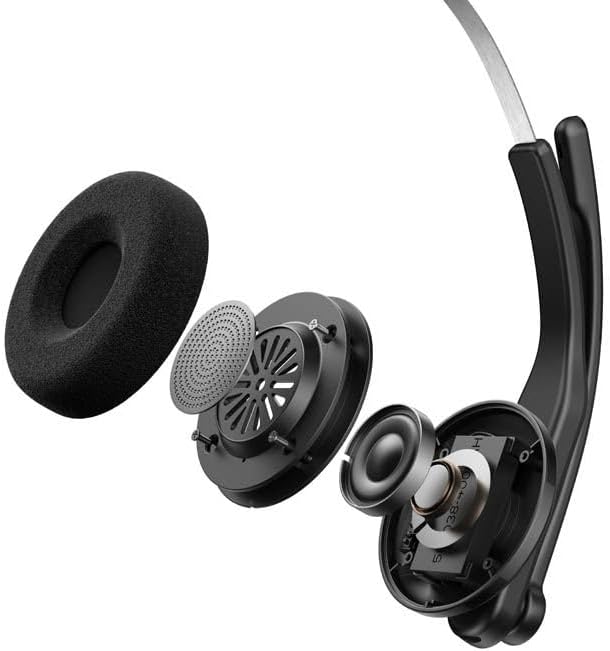
Figura 3.4: A explodat view showing the internal components of the earcup, including the 30mm dynamic driver.
4. Configurare
4.1 Încărcare inițială
Before first use, fully charge the headset using the provided USB-A to USB-C cable. Connect the USB-C end to the headset and the USB-A end to a power source (e.g., computer USB port or wall adapter). The charging indicator light will show the charging status.
4.2 Pornire/Oprire
- Pentru a porni: Apăsați și țineți apăsat butonul de Pornire/Oprire până când se aprinde indicatorul luminos.
- Pentru a opri: Apăsați și țineți apăsat butonul de Pornire/Oprire până când indicatorul luminos se stinge.
4.3 Purtarea căștilor
Adjust the headband for a comfortable fit. The microphone arm can be rotated 240 degrees to be positioned on either the left or right side of your face. Position the microphone approximately 2-3 cm from your mouth for optimal voice pickup.
5. Instrucțiuni de utilizare
The Edifier CC300 features intuitive controls for managing calls and audio playback.

Figura 5.1: Diagram illustrating the control buttons and their functions on the Edifier CC300 Headset.
5.1 Funcțiile butoanelor
| Acţiune | Funcţie |
|---|---|
| Press and hold (Power Button) | Pornire/Oprire |
| Press 1x (Mute Button) | Activate/Deactivate Mute (during calls) |
| Press 1x (Volume Up) | Creșteți volumul |
| Press and hold (Volume Up) | Următoarea piesă |
| Press and hold (Volume Down) | Scade volumul |
| Press 1x (Volume Down) | Piesa anterioară |
| Press 1x (Call Button) | Play/Pause Audio; Answer/End Call |
| Press and hold (Call Button) | Respinge apelul |
| Press 2x (Call Button) | Reapelează ultimul număr |
6. Opțiuni de conectivitate
The Edifier CC300 offers three versatile connection methods:
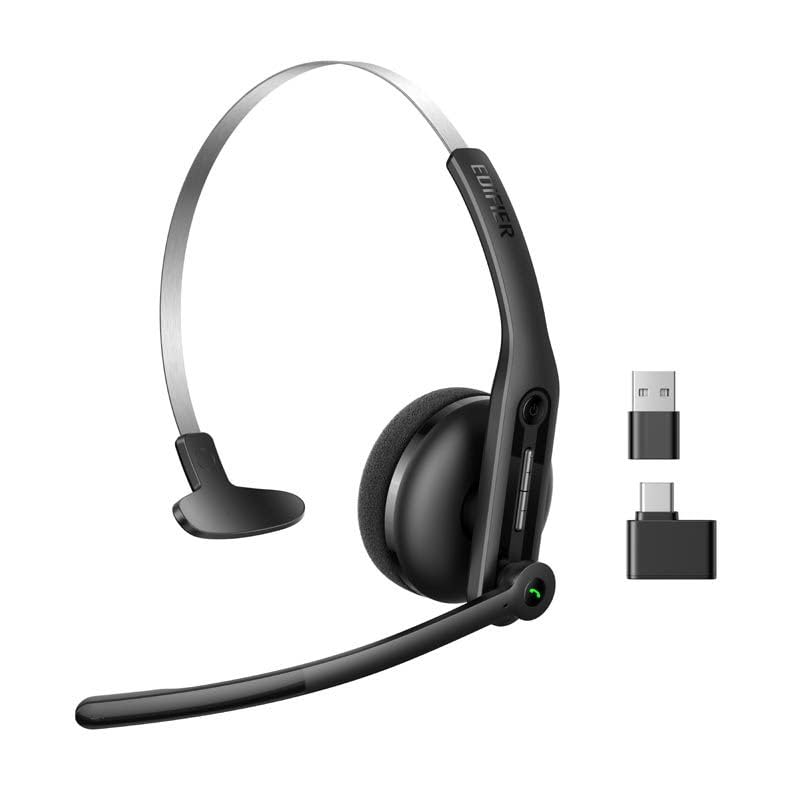
Figura 6.1: Visual representation of the three connectivity options: Bluetooth, USB-C dongle, and wired USB-A.
6.1 Conexiune Bluetooth
- Ensure the headset is powered on and in pairing mode (indicator light flashing).
- On your device (smartphone, laptop), enable Bluetooth and search for "EDIFIER CC300".
- Select the headset to pair. Once connected, the indicator light will turn solid blue.
6.2 USB-C Dongle Connection
- Plug the provided USB-C dongle into an available USB-C port on your computer.
- Power on the headset. It will automatically connect to the dongle for a stable, low-latency connection.
6.3 Wired USB-A Connection
- Connect the headset to your computer using the provided USB-A to USB-C cable.
- The headset will function as a wired audio device, providing zero interference.
7. Baterie și încărcare
The CC300 headset is designed for extended use with a long-lasting battery.
- Durata de viață a bateriei: Up to 72 hours for audio playback, or 36 hours for talk time.
- Timp de încărcare: Aproximativ 1.5 ore pentru o încărcare completă.
- Indicator de încărcare: Refer to the LED indicator on the headset for charging status.
To charge, connect the headset to a power source using the USB-A to USB-C cable.
8. Întreținere
- curatenie: Folosiți o lavetă moale și uscată pentru a curăța setul cu cască. Nu utilizați agenți de curățare lichizi sau aerosoli.
- Depozitare: Depozitați setul cu cască într-un loc răcoros și uscat, ferit de lumina directă a soarelui și de temperaturi extreme.
- Evitați umezeala: Keep the headset away from water and high humidity to prevent damage.
- Manipulați cu grijă: Evitați să scăpați căștile sau să le supuneți la impacturi puternice.
9. Depanare
9.1 Fără sunet sau calitate audio slabă
- Ensure the headset is powered on and properly connected (Bluetooth, dongle, or wired).
- Verificați nivelurile de volum atât pe căști, cât și pe dispozitivul conectat.
- If using Bluetooth, ensure the headset is within range of your device.
- Încercați să reporniți atât setul cu cască, cât și dispozitivul conectat.
9.2 Microfonul nu funcționează
- Asigurați-vă că microfonul nu este dezactivat (verificați butonul de dezactivare a sunetului).
- Verify that the headset is selected as the input device in your computer's or device's sound settings.
- Ensure the microphone arm is positioned correctly near your mouth.
9.3 Headset Not Pairing via Bluetooth
- Asigurați-vă că setul cu cască este în modul de asociere (indicatorul luminos clipește).
- Dezactivați Bluetooth pe alte dispozitive din apropiere pentru a evita interferențele.
- Eliminați dispozitivul din lista Bluetooth a dispozitivului și încercați din nou asocierea.
10. Specificații
| Caracteristică | Detaliu |
|---|---|
| Marca | Edificator |
| Numele modelului | CC300 |
| Culoare | Negru |
| Tehnologia de conectivitate | Wireless (Bluetooth), Wired (USB-A), USB-C Dongle |
| Versiune Bluetooth | 6.0 |
| Protocoale Bluetooth | A2DP, AVRCP, HFP |
| Codec audio | SBC |
| Tip șofer | Driver dinamic de 30 mm |
| Raspuns in frecventa | 20Hz - 20KHz |
| Nivel de presiune sonoră | 94 ± 3dB(A) |
| Capacitatea bateriei | 400mAh |
| Timp de redare a muzicii | Aproximativ. 72 ore |
| Timp de vorbire | Aproximativ. 36 ore |
| Timp de încărcare | Aproximativ. 1.5 ore |
| Intrare de putere | 5 V/500 mAh |
| Greutate | 70 grame |
| Caracteristici speciale | AI-enhanced Dual-Mic Noise Cancellation |
| Dispozitive compatibile | Mobile Phones, Desktops, Laptops |
11. Garanție și asistență
11.1 Informații despre garanție
The Edifier CC300 Headset comes with a 1 an garanție de la data achiziției, acoperind defectele de fabricație. Vă rugăm să păstrați dovada achiziției pentru reclamațiile în garanție. Garanția nu acoperă daunele cauzate de utilizarea necorespunzătoare, accidente, modificări neautorizate sau uzură normală.
11.2 Asistență pentru clienți
For technical assistance, troubleshooting, or warranty inquiries, please contact Edifier customer support through their official website or the contact information provided with your product packaging. You may also visit the Magazinul Edifier pe Amazon pentru mai multe informații.