
1. Introducere
Thank you for choosing the Cillso GTR3 Fitness Smart Watch. This manual provides essential information for the proper setup, operation, and maintenance of your device. Please read it thoroughly to ensure optimal performance and a complete understanding of all features.
2. Conținutul pachetului
Verificați dacă toate articolele sunt prezente în colet:
- 1 x Cillso GTR3 Smart Watch
- 1 x cablu de încărcare magnetic
- 1 x Detailed User Manual (this document)
3. Ghid de instalare
3.1 Încărcarea ceasului inteligent
Before first use, fully charge your Cillso GTR3 Smart Watch. Connect the magnetic charging cable to the charging points on the back of the watch and plug the USB end into a standard USB power adapter (not included).

Image: The Cillso GTR3 Smart Watch connected to its magnetic charging cable, indicating a 350 mAh battery and 3ATM waterproof rating.
A full charge typically takes approximately 2 hours. The watch has a standby time of up to 45 days and can last up to 10 days with heavy usage.
3.2 Descărcarea aplicației și asocierea
To unlock the full functionality of your smart watch, download the "Runmefit" application on your smartphone.
- Descărcați aplicația: Caută "Runmefit" in your smartphone's app store (compatible with iOS 12.0+ and Android 7.0+).
- Activați Bluetooth: Activați Bluetooth pe smartphone-ul dvs.
- Open Runmefit App: Launch the app and follow the on-screen instructions to search for your device. Select "GTR3" from the list of available devices.
- Confirmați împerecherea: Confirmați solicitarea de asociere atât pe telefon, cât și pe ceasul inteligent.

Image: Visual guide demonstrating the steps to download the "Runmefit" app, enable Bluetooth, and connect the GTR3 smart watch.
3.3 Enabling Bluetooth Call Function
For Bluetooth calling functionality, an additional connection is required:
- Ensure the watch is successfully bound to the "Runmefit" app.
- Go to your smartphone's Bluetooth settings.
- Find and select "GTR3" (or a similar identifier) in the list of available devices and click to bind. This creates a separate audio connection.
- Once connected, you can use the watch to answer and make calls.
4. Instrucțiuni de utilizare
4.1 Navigare de bază
The Cillso GTR3 features a 1.46-inch AMOLED Ultra-HD full touchscreen display. Swipe across the screen to navigate through menus and functions. Use the physical buttons for quick access or to return to the home screen.

Image: The 1.46-inch AMOLED display of the GTR3 Smart Watch showcasing different customizable watch faces.
4.2 Monitorizarea sănătății
Ceasul monitorizează continuu diverse valori ale stării de sănătate:
- Ritmul cardiac: Îți urmărește ritmul cardiac 24/7. View real-time data and historical trends in the Runmefit app.
- Oxigenul din sânge (SpO2): Monitors blood oxygen levels to help ensure vital signs stay within a healthy range.
- Monitorizarea somnului: Automatically tracks sleep patterns, including deep sleep, light sleep, and awake times, providing insights into sleep quality.
- Monitorizarea stresului: Analyzes stress levels throughout the day.
- Memento ciclului fiziologic: Provides reminders for women's health tracking when configured in the app.

Imagine: Pesteview of the GTR3's 24/7 health tracking capabilities, including heart rate, SpO2, body energy, and sleep monitoring.

Imagine: Detaliată view of the heart rate monitoring feature on the GTR3 Smart Watch and its companion app.

Image: The GTR3 Smart Watch showing continuous blood oxygen monitoring, with data also visible in the app.

Image: The GTR3 Smart Watch's sleep monitoring interface, showing duration of deep sleep, light sleep, and awake periods.
4.3 de moduri sportive
The GTR3 supports over 110 sports modes, including walking, running, cycling, soccer, and hiking. Select your desired activity to track specific metrics such as steps, distance, calories burned, and exercise duration.

Image: The GTR3 Smart Watch highlighting its 110+ sports modes and detailed tracking of steps, calories, heart rate, blood oxygen, and stress.
4.4 Apeluri și notificări Bluetooth
Once the Bluetooth call function is enabled (see Section 3.3), you can answer, reject, or make calls directly from your watch. The watch also displays notifications from your smartphone, including messages and app alerts.
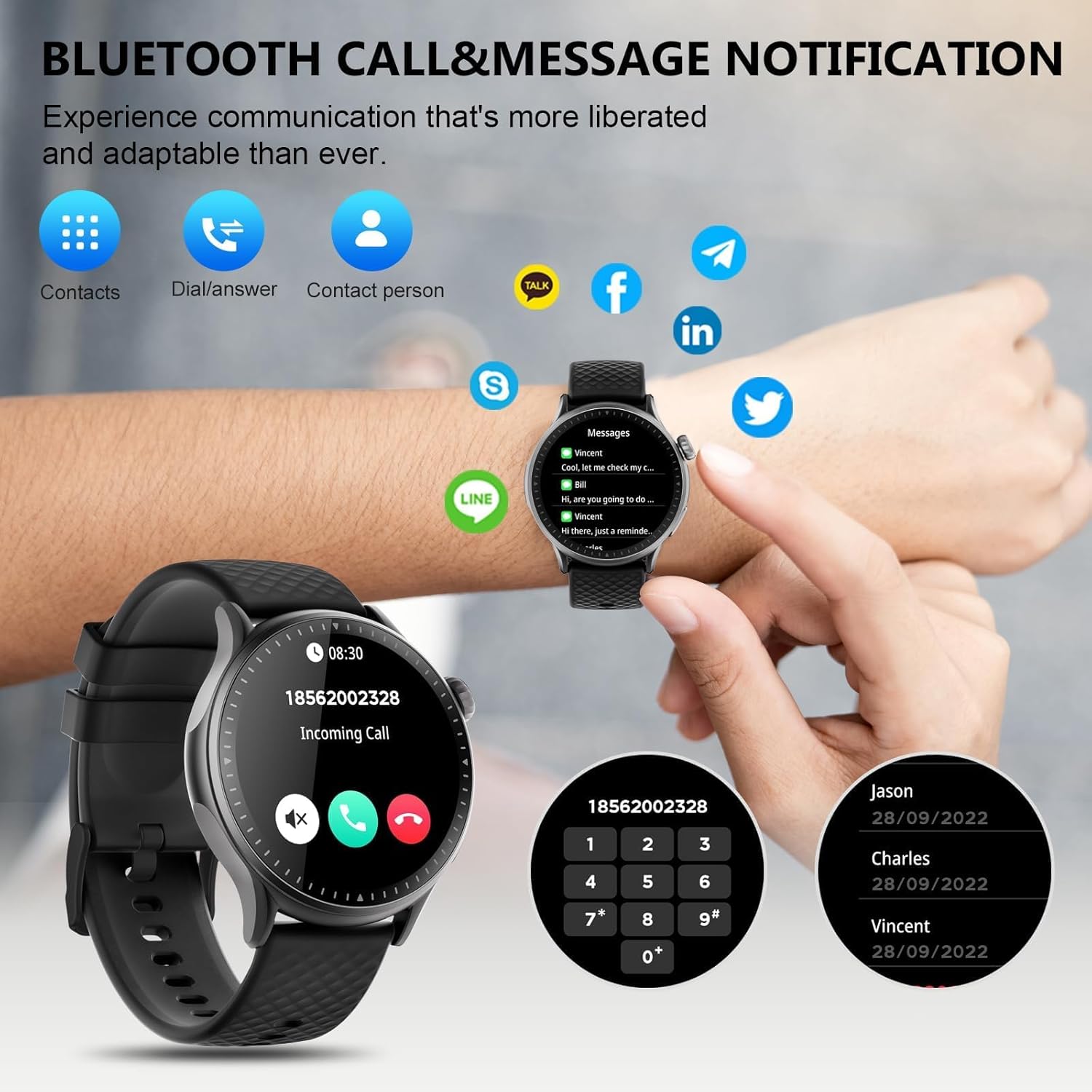
Image: The GTR3 Smart Watch displaying an incoming call and various message notification icons from social media and communication apps.
Asistent vocal AI 4.5
The built-in AI assistant allows for hands-free control. Use voice commands to check the weather, control music playback on your phone, set alarms, and more.

Image: The GTR3 Smart Watch's AI Voice Assistant interface, illustrating how to use voice commands for tasks like checking weather or setting alarms.
4.6 funcții suplimentare
The Cillso GTR3 offers a range of other useful features:
- Prognoza meteo
- Găsiți telefon
- Cronometru și temporizator
- Calculator
- Ceas cu alarmă
- Telecomanda telecomanda
- Music Control (for your phone's music player)
- Exerciții de respirație

Image: The GTR3 Smart Watch's app menu, showcasing icons for various functions including Find Phone, Weather, Calculator, Remote Camera Shutter, Breathing Exercises, Women's Health, and Alarm Clock.
4.7 Personalizarea fețelor de ceas
Personalize your watch with a variety of watch faces. The "Runmefit" app offers over 200 watch faces to choose from. You can also upload your favorite photos to create custom watch faces.
5. Întreținere
5.1 Impermeabilizare
The Cillso GTR3 has a 3ATM waterproof rating, meaning it is resistant to splashes, rain, and sweat. It is suitable for daily use and can withstand brief immersion in water. However, it is nu recommended for hot showers, saunas, diving, or high-speed water sports, as steam or high water pressure can compromise the seals.
5.2 Curățare și îngrijire
Pentru a menține aspectul și funcționalitatea ceasului:
- Ștergeți ecranul și cureaua în mod regulat cu o lavetă moale,amp pânză.
- Evitați utilizarea substanțelor chimice dure, a agenților de curățare abrazivi sau a solvenților.
- Asigurați-vă că contactele de încărcare sunt curate și uscate înainte de încărcare.
- Evitați expunerea ceasului la temperaturi extreme sau la lumina directă a soarelui pentru perioade lungi de timp.
5.3 Longevitatea bateriei
To maximize battery life, avoid fully discharging the watch frequently. Charge it when the battery level is low, and disconnect it once fully charged.
6. Depanare
If you encounter issues with your Cillso GTR3 Smart Watch, refer to the following common problems and solutions:
| Problemă | Soluție posibilă |
|---|---|
| Watch not connecting to phone via Bluetooth. | Ensure Bluetooth is enabled on your phone. Restart both the watch and phone. Make sure the "Runmefit" app is open and running in the background. Check if the watch is already paired with another device. |
| Funcția de apel Bluetooth nu funcționează. | Verify that the watch is connected via Bluetooth in ambele the "Runmefit" app and your phone's native Bluetooth settings (as a separate audio device). |
| Notifications or calls only vibrate, no sound. | Check the sound settings on your watch and in the "Runmefit" app. Ensure the watch's speaker volume is not muted or set too low. Note that the speaker volume may be limited in noisy environments. |
| Inaccurate step count or health data. | Ensure the watch is worn snugly on your wrist. Calibrate the watch in the "Runmefit" app if available. Keep the app connected to sync data regularly. |
| Informațiile meteo nu se actualizează. | Ensure your phone's location services are enabled and the "Runmefit" app has permission to access your location. The app must be connected and running in the background to sync weather data. |
| Watch disconnects frequently. | Maintain close proximity between your watch and smartphone. Avoid obstacles that may interfere with the Bluetooth signal. Ensure the "Runmefit" app is not being closed by your phone's power-saving features. |
| Cannot customize watch faces. | Ensure the watch is connected to the "Runmefit" app. Follow the app's instructions for selecting or uploading watch faces. Some watches may have limitations on the number of custom faces stored simultaneously. |
7. Specificații
| Caracteristică | Detaliu |
|---|---|
| Numele modelului | GTR3 |
| Marca | Cillso |
| Tip de afișare | AMOLED |
| Dimensiunea ecranului | 1.46 inchi |
| Rezoluţie | 1.46" AMOLED Ultra-HD |
| Sistem de operare | iOS 12.0+ și Android 7.0+ |
| Capacitate de stocare a memoriei | 128 MB |
| Tehnologia de conectivitate | Bluetooth |
| Comunicare wireless standard | Bluetooth |
| Capacitatea bateriei | 350 mAh (approximate, based on image) |
| Durata medie a bateriei | Up to 10 days (heavy usage), 45 days (standby) |
| Nivel de rezistență la apă | 3ATM (30 Meters) |
| Metrici măsurate | Heart Rate, Sleep Duration, Blood Oxygen Monitor |
| Caracteristici speciale | 24/7 Activity Tracker, Heart Rate Monitor, Sleep Monitor, AI Voice Control, Message Notifications, Answer/Make Call, AMOLED Touchscreen, Cycle Tracking, Alarm Clock, Blood Oxygen Monitor, 110+ Sport Modes, Music Control, Distance Record/Pedometer/Calories, Distance Tracker |
| Tipul materialului benzii | Silicone, Rubber, or Fluoroelastomer |
| GPS | GPS prin Smartphone |
| Publicul țintă | Adulți unisex |
8. Informații despre garanție
The Cillso GTR3 Smart Watch comes with a Garanție standard de 1 an de la data achiziției. Această garanție acoperă defectele de fabricație și defecțiunile în condiții normale de utilizare. Nu acoperă daunele cauzate de utilizarea necorespunzătoare, accidente, modificări neautorizate sau nerespectarea instrucțiunilor din acest manual.
Vă rugăm să păstrați dovada achiziției pentru cererile de garanție.
9. Asistență pentru clienți
For further assistance, technical support, or warranty inquiries, please refer to the contact information provided with your purchase or visit the official Cillso website. Ensure you have your product model (GTR3) and proof of purchase ready when contacting support.