
1. Produs terminatview
The G-Shock Casio GD010 digital watch is engineered for durability and functionality, designed to withstand demanding conditions while providing essential timekeeping features. This timepiece incorporates bio-based resin components and a CORDURA re/cor band, reflecting a commitment to environmental considerations.
This manual provides detailed instructions for setting up, operating, maintaining, and troubleshooting your GD010 watch.
Caracteristici cheie
- Shock Resistant Construction: Designed to endure impacts and vibrations.
- Carbon Core Guard Structure: Enhances durability and protection for the internal module.
- Rezistență la apă de 200 de metri: Potrivit pentru înot, snorkeling și scufundări (fără SCUBA).
- Durată lungă de viață a bateriei: Aproximativ 10 ani cu o baterie CR2025.
- Bio-based Resin Components: Case and bezel made with environmentally conscious materials.
- CORDURA re/cor Band: Durable strap made from recycled PET plastic fiber.
- Ecran digital: Clear and easy-to-read time and function information.
- Funcții multiple: Includes alarm, chronograph (stopwatch), and timer.

Image 1.1: The G-Shock GD010 watch, showcasing its core features including shock resistance, Carbon Core Guard structure, and a 10-year battery life.
2. Noțiuni introductive: Configurare
Funcțiile butoanelor
Your GD010 watch features several buttons for navigation and function control. Familiarize yourself with their locations and primary roles.

Imaginea 2.1: Laterală view of the G-Shock GD010, illustrating the location of the control buttons.
- REGLARE (Stânga sus): Folosit pentru a intra și a ieși din modurile de setare și pentru a confirma setările.
- MOD (Stânga jos): Cycles through the watch's various modes (Timekeeping, Stopwatch, Timer, Alarm).
- INVERS (Dreapta sus): Used to decrease values or move backward through options during setting.
- FORWARD / START (Bottom Right): Used to increase values or move forward through options during setting. Also used to start/stop stopwatch or timer.
- LIGHT (Center Bottom): Activează lumina de fundal pentru iluminare.
Setarea inițială a orei și datei
- În modul de măsurare a timpului, apăsați și mențineți apăsat butonul REGLA apăsați butonul până când codul orașului începe să clipească, indicând modul de setare.
- Utilizați VERSO şi REDIRECŢIONA buttons to select your desired Home City Code. This will automatically set the correct time zone.
- Apăsați tasta MOD button to cycle through the settings: DST (Daylight Saving Time) → 12/24-hour format → Seconds → Hour → Minute → Year → Month → Day.
- For each setting, use the VERSO şi REDIRECŢIONA butoane pentru a modifica valoarea.
- După ce toate setările sunt configurate, apăsați butonul REGLA butonul pentru a ieși din modul de setare.
3. Utilizarea ceasului
The GD010 offers various modes for different functions. Press the MOD pentru a le parcurge.
Modul de cronometrare
Acesta este modul implicit, care afișează ora curentă, ziua săptămânii și data.
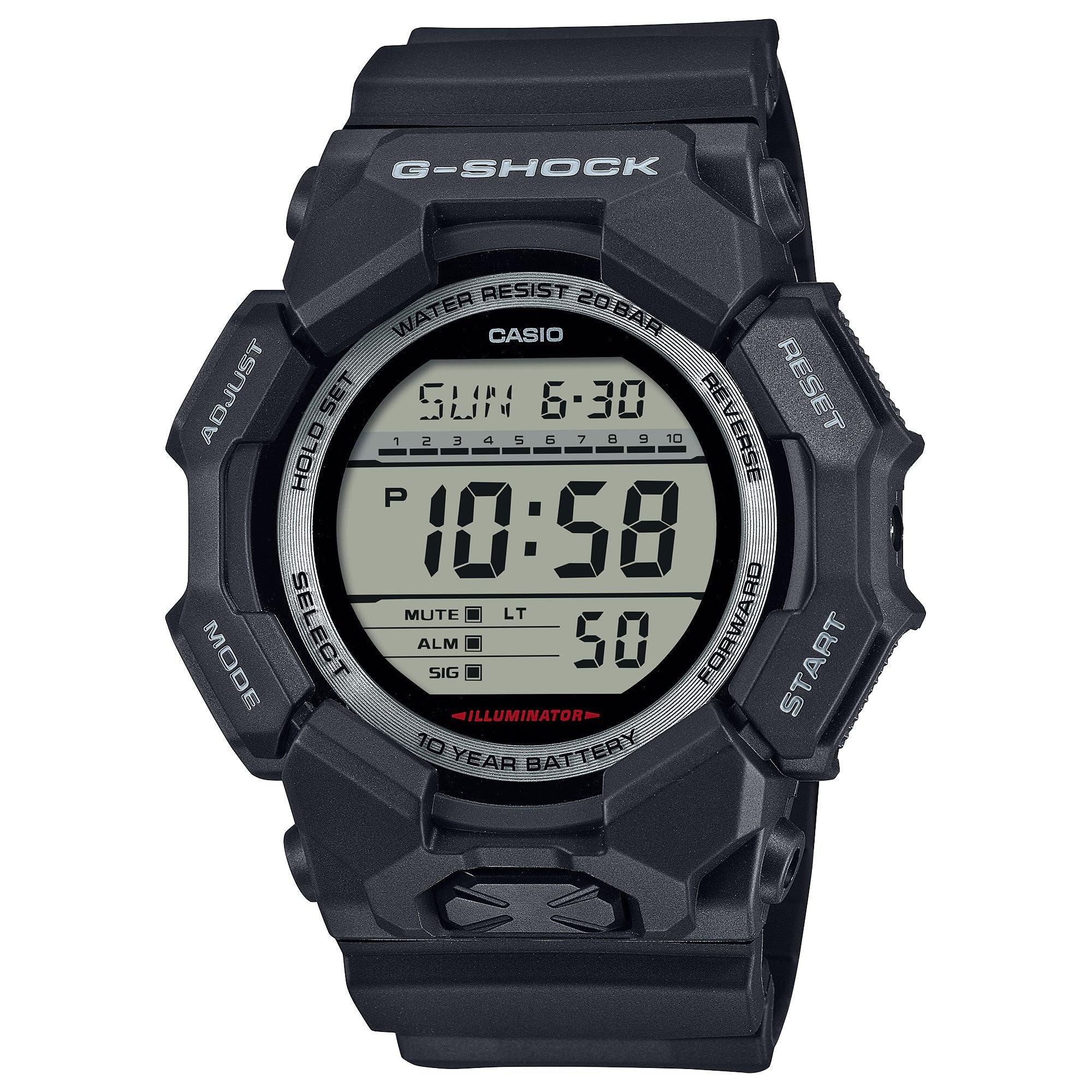
Image 3.1: The G-Shock GD010 watch face in Timekeeping Mode.
Utilizarea cronografului
- Din modul de măsurare a orei, apăsați butonul MOD apăsați butonul până când pe afișaj apare „STW” sau „STOPWATCH”.
- Apăsați tasta FORWARD / START buton pentru a porni cronometrul.
- Apăsați tasta FORWARD / START Apăsați din nou butonul pentru a opri cronometrul.
- Pentru a reseta cronometrul la zero, apăsați butonul VERSO butonul în timp ce cronometrul este oprit.
Setarea cronometrului de numărătoare inversă
- Din modul de măsurare a orei, apăsați butonul MOD apăsați butonul până când apare „TMR” sau „TIMER”.
- Țineți apăsat butonul REGLA button until the current timer setting starts to flash.
- Utilizați MOD pentru a selecta setarea orei sau minutelor.
- Utilizați VERSO şi REDIRECŢIONA butoane pentru a seta timpul de numărătoare inversă dorit.
- Apăsați tasta REGLA butonul pentru a ieși din modul de setare.
- Apăsați tasta FORWARD / START pentru a începe numărătoarea inversă. O alarmă va suna când cronometrul ajunge la zero.
Funcții de alarmă
- Din modul de măsurare a orei, apăsați butonul MOD apăsați butonul până când apare „ALM” sau „ALARM”.
- Țineți apăsat butonul REGLA button until the alarm time starts to flash.
- Utilizați MOD pentru a selecta setarea orei sau minutelor.
- Utilizați VERSO şi REDIRECŢIONA butoane pentru a seta ora dorită a alarmei.
- Apăsați tasta REGLA butonul pentru a ieși din modul de setare.
- Pentru a activa/dezactiva alarma, apăsați butonul FORWARD / START button while in Alarm Mode (without holding ADJUST).
Liniile directoare de rezistență la apă
Your GD010 watch is rated for 200-meter water resistance. This means it is suitable for recreational diving (excluding saturation diving), swimming, snorkeling, and water sports.
- Nu acționați butoanele în timp ce ceasul este scufundat în apă sau ud.
- Avoid exposing the watch to hot water, steam, or extreme temperature changes, as this can compromise water resistance.
- După expunerea la apă sărată, clătiți ceasul bine cu apă curată și ștergeți-l.
4. Îngrijire și întreținere
Îngrijire generală
- Ștergeți ceasul în mod regulat cu o cârpă moale și uscată pentru a îndepărta murdăria și umezeala.
- Avoid exposing the watch to strong chemicals, solvents, or detergents, as these can damage the resin materials.
- Depozitați ceasul într-un loc răcoros și uscat, ferit de lumina directă a soarelui și de temperaturi extreme, atunci când nu îl utilizați.
- The watch's resin components and band are designed for durability, but prolonged exposure to UV light may cause discoloration over time.
Înlocuirea bateriei
The GD010 watch is equipped with a CR2025 battery, providing an approximate battery life of 10 years. When the display becomes dim or functions become erratic, it may be time for a battery replacement.
Battery replacement should ideally be performed by a qualified watch technician to ensure proper sealing and maintain water resistance. Attempting to replace the battery yourself may void the warranty and compromise the watch's water resistance.
Curatenie
To clean your watch, use a soft cloth dampened with mild soap and water. Gently wipe the case and band. For stubborn dirt, a soft brush can be used. Rinse thoroughly with fresh water and dry completely with a soft cloth.
5. Ghid de depanare
If you encounter issues with your GD010 watch, refer to the following common problems and their solutions.
| Problemă | Cauza posibila | Soluţie |
|---|---|---|
| Afișajul este gol sau întunecat. | Baterie descărcată. | Înlocuiți bateria (CR2025). Consultați un tehnician profesionist în domeniul ceasurilor. |
| Timpul este incorect. | Fus orar incorect sau eroare de setare manuală. | Reajustați setările de oră și dată așa cum este descris în Secțiunea 2. |
| Butoanele nu răspund. | Watch is wet, or internal module error. | Ensure the watch is dry. If the problem persists, a reset may be required (consult support), or professional service. |
| Alarma nu sună. | Alarm is turned off or volume is too low (if adjustable). | Verify the alarm is set to ON in Alarm Mode. Check watch settings for alarm volume if applicable. |
If the problem persists after attempting these solutions, please contact G-Shock customer support for further assistance.
6. Specificațiile produsului
| Numele modelului | GD010 |
| Numărul de model | GD010-1 |
| Case Size (L× W× H) | 54.9 × 51.9 × 16.1 mm |
| Greutate | 73 g (aproximativ 2.57 oz) |
| Case and Bezel Material | Bio-based Carbon / Bio-based Resin |
| Tipul materialului benzii | Resin (CORDURA re/cor) |
| Constructii | Shock Resistant, Carbon Core Guard structure |
| Rezistenta la apa | Rezistenta la apa de 200 de metri |
| Alimentare electrică | CR2025 (1 Lithium Metal battery, included) |
| Durata de viață aproximativă a bateriei | 10 ani |
| Cristal | Sticla minerala |
| Tip de afișare | Digital |
| Tipul de mișcare | Cuarț japonez |
| Caracteristici suplimentare | Alarm, Chronograph, Timer |
| Tip de închidere | Cataramă |
| Culoarea benzii | Negru |
| Culoare cadran | Negru |
7. Garanție și asistență pentru clienți
Informații despre garanție
Your G-Shock GD010 watch comes with a Garanție limitată. The terms and conditions of this warranty cover manufacturing defects under normal use. Please refer to the warranty card included with your purchase for specific details regarding coverage duration, exclusions, and how to make a claim. Keep your proof of purchase for warranty validation.
Contactarea asistenței pentru clienți
For technical assistance, warranty service, or any other inquiries regarding your G-Shock GD010 watch, please contact G-Shock customer support.
- Visit the official G-Shock website for support contact information, FAQs, and service center locations.
- Have your watch model number (GD010-1) and proof of purchase ready when contacting support.