
1. Introducere
Mulțumesc pentru achizițieasing the Samsung 55-Inch Class M70H Series Mini LED Smart TV. This manual provides essential information for setting up, operating, and maintaining your new television. Please read these instructions carefully to ensure optimal performance and safe use of your device. The Samsung M70H Series offers a stunning visual experience with Mini LED technology, 4K resolution, and smart features powered by Samsung Vision AI Companion.
2. Ce se află în cutie
Carefully unpack your TV and ensure all items are present. If any items are missing or damaged, contact your retailer.

Image: Samsung 55-Inch M70H Series TV with remote, stand, and power cable.
- Samsung 55-Inch Class M70H Series Mini LED Smart TV
- Telecomanda
- Cablu de alimentare
- Suport TV (2 bucăți)
- Manual de utilizare (acest document)
- Card de garanție
- Batteries for Remote Control (2 AAA)
3. Configurare
Follow these steps to set up your new television.
3.1 Atașarea suportului sau a dispozitivului de montare pe perete
If using the included stand, carefully attach the stand feet to the bottom of the TV using the provided screws. Ensure the TV is placed on a stable, level surface. For wall mounting, use a VESA-compatible wall mount (200 x 200 mm) and follow the wall mount manufacturer's instructions. Always ensure proper ventilation around the TV.

Image: Samsung M70H TV properly set up in a living room environment.
3.2 Conectarea puterii
Connect the power cable to the TV's power input and then to a wall outlet. Do not plug in the TV until all other connections are made.
3.3 Configurare inițială
Once powered on, the TV will guide you through the initial setup process, including language selection, network connection (Wi-Fi or Ethernet), and channel scanning. You will also be prompted to sign in to your Samsung account to access smart features.
4. Conexiuni
The Samsung M70H TV offers various ports for connecting external devices.

Imagine: Detaliată view of the TV's rear connection panel.
| Port | Descriere |
|---|---|
| HDMI 1 (eARC) | Enhanced Audio Return Channel for high-quality sound and advanced formats. Connect soundbars or AV receivers. |
| HDMI 2, 3 | Connect Blu-ray players, game consoles, or other HDMI devices. |
| USB-A | Port dreptunghiular standard pentru alimentare sau redare media de pe dispozitive de stocare USB. |
| Cablu/ANT | Connect an over-the-air antenna or cable TV signals. |
| Ethernet (LAN) | Wired internet connection for stable streaming, updates, and smart features. |
5. Instrucțiuni de utilizare
This section details how to use the various features of your Samsung M70H Smart TV.
5.1 Caracteristici de calitate a imaginii
Experience superior visual performance with advanced display technologies.
- Mini LED Processor 4K: The advanced processor delivers brighter highlights and deeper blacks, enhancing every detail with stunning clarity. This processor also upscales content to crisp 4K clarity.

Image: The Mini LED Processor 4K, responsible for image optimization.
- Pure Spectrum Color: Enjoy one billion true-to-life colors, powered by advanced color technology and Mini LED precision. This ensures rich reds, deep blues, and vibrant greens for breathtaking realism.

Image: Visual comparison demonstrating the enhanced color range with Pure Spectrum Color.
- Mini LED HDR: Experience HDR picture quality with brighter highlights and deeper blacks than traditional HDR TVs. This technology enhances brightness and contrast, making every image stand out with remarkable depth.

Image: A vibrant sunset scene highlighting the dramatic detail provided by Mini LED HDR.
- Supreme Mini LED Dimming: This feature delivers deep contrast and bright highlights for a truly superb picture by precisely controlling the Mini LEDs.

Image: A tiger in a jungle, showcasing the deep contrast from Supreme Mini LED Dimming.
- Amplificator de culoare: Transforms your content into a visual masterpiece by making every color come to life with intensity, from fiery reds to sparkling blues.
5.2 Motion and Gaming Features
Optimized features for smooth action and immersive gaming.
- Motion Xcelerator + DLG 120Hz: Enjoy smooth visuals and fast motion clarity with technology that analyzes and optimizes the refresh rate. Designed for gaming and sports, it keeps every scene sharp and fluid. DLG 120Hz increases the refresh rate up to 120Hz, optimal for fast-paced gaming, though visual quality may vary by title.

Image: A motocross scene demonstrating the smooth motion provided by Motion Xcelerator + DLG 120Hz.
- Centrul de jocuri: A central hub that brings together your favorite games from consoles, cloud services, and gaming apps, all in one place. It offers personalized recommendations to help you find what to play next.
- Soccer Mode: Enjoy a stadium-like experience with optimized settings for sports. This mode delivers clearer motion and more vibrant greens for realistic turf, putting you right in the stadium.
5.3 Smart Features and AI Companion
Access a world of entertainment and smart home control.
- Conținut gratuit nelimitat (Samsung TV Plus): Watch over 2,700 free streaming options, including 750+ subscription-free channels on Samsung TV Plus. Enjoy news, sports, movies, kids' shows, and reality TV without a subscription.
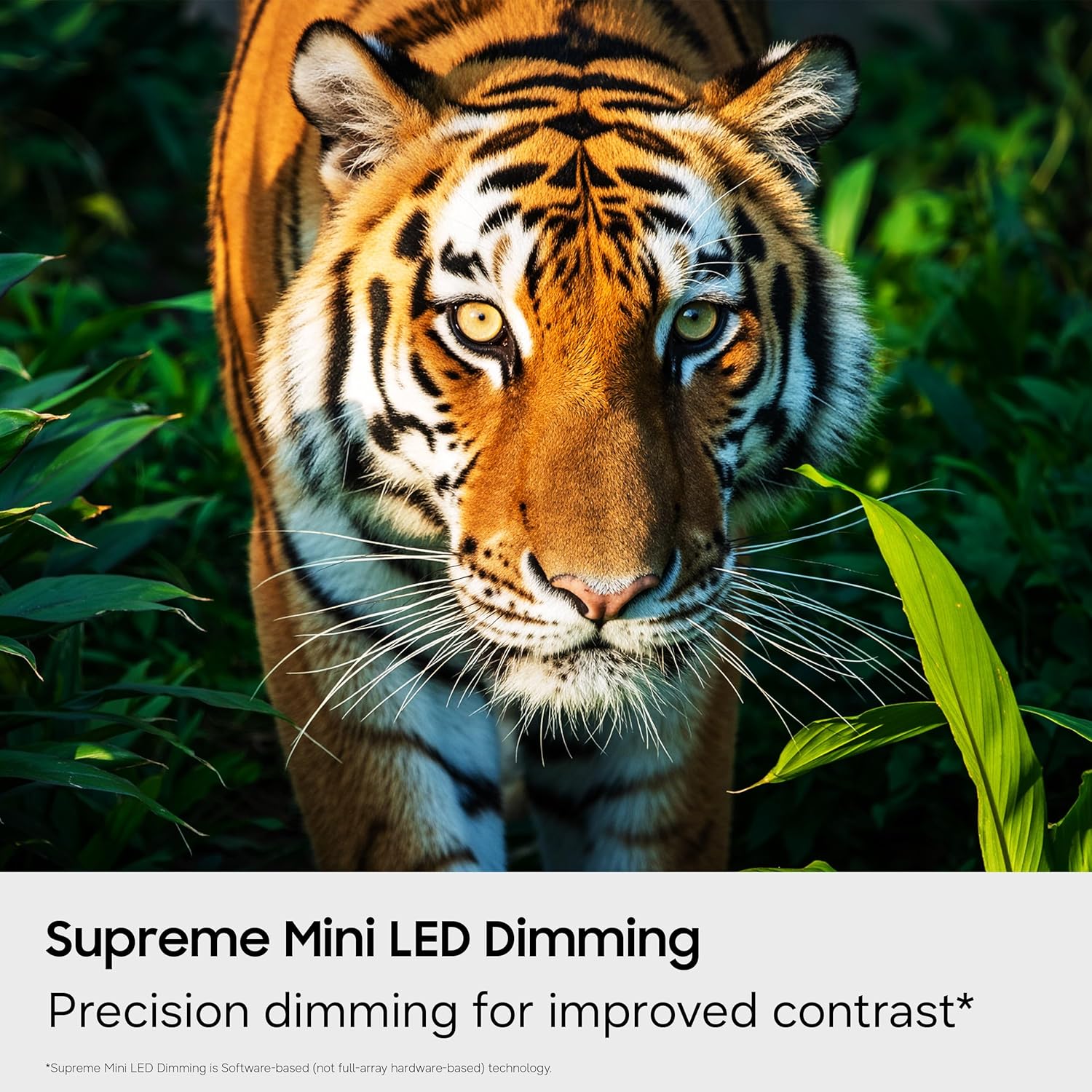
Image: The Smart TV home screen displaying a variety of streaming services and free content options.
- Samsung Vision AI Companion: Ask your TV anything and access powerful AI features. This AI-enhanced system provides personalized experiences, optimizing picture and sound, and allowing deeper engagement with content.

Image: The Vision AI Companion interface showing options like Copilot, Generative Wallpaper, and AI Mode.
- One UI Tizen: Stream, game, and explore all your favorite content on One UI Tizen, an intuitive smart TV platform you can customize.
- Securitate Samsung Knox: Built-in triple-layer data protection defends against harmful apps and phishing sites, keeping sensitive data like PIN-codes and passwords secure. It also safeguards your IoT devices connected to your TV.
- Centrul SmartThings: Connect and control smart devices through your TV to simplify daily life. Get notifications about your devices on screen, including a 3D Map View of your smart home ecosystem.
- Telecomandă rapidă: Use your smartphone to change channels, adjust volume, and access key Samsung Tizen TV features such as media, ambient mode, and menu.
- Mod de energie AI: Save energy with intelligent analysis. This mode helps reduce power consumption by auto-adjusting brightness based on the room's lighting and your user activity.
- Karaoke Feature: Have fun with friends and family using the karaoke feature in Samsung Daily+. You can connect your phone as a mic without separate equipment.
5.4 Videoclip oficial al produsului
Urmărește acest videoclip oficial pentru mai mult de...view of the Samsung Mini LED M70 features.
Video: Official Samsung video highlighting the key features of the Mini LED M70H TV.
6. Întreținere
Întreținerea corectă asigură longevitatea și performanța televizorului dumneavoastră.
6.1 Curățarea televizorului
- Deconectați întotdeauna televizorul înainte de curățare.
- Folosește o lavetă din microfibră moale și uscată pentru a șterge ecranul și carcasa.
- Pentru pete persistente, frecați ușorampClătiți laveta cu apă sau cu un produs specializat de curățare a ecranelor (evitați substanțele chimice dure).
- Nu pulverizați lichid direct pe televizor.
6.2 Actualizări de software
Ensure your TV's software is up to date for the best performance and latest features. You can usually find the update option in the TV's settings menu under 'Support' or 'Software Update'.
7. Depanare
Dacă întâmpinați probleme cu televizorul, consultați următoarele soluții comune.
7.1 Fara putere
- Verificați dacă cablul de alimentare este conectat corect atât la televizor, cât și la priza de perete.
- Asigurați-vă că priza de perete funcționează conectând un alt dispozitiv.
- Încercați o priză diferită.
7.2 Fără imagine sau imagine distorsionată
- Verificați dacă este selectată sursa de intrare corectă (de exemplu, HDMI 1, TV).
- Verificați toate conexiunile cablurilor (HDMI, antenă) pentru a vedea dacă sunt slăbite sau deteriorate.
- Reporniți televizorul și toate dispozitivele conectate.
- Reglați setările de imagine (luminozitate, contrast, claritate) în meniul TV.
7.3 Fără sunet sau sunet slab
- Asigurați-vă că volumul nu este pe dezactivare și este dat la maximum.
- Check audio cable connections to external sound systems (if applicable).
- Verify audio output settings in the TV menu (e.g., TV Speaker, Optical, HDMI eARC).
7.4 Telecomanda nu funcționează
- Înlocuiți bateriile din telecomandă.
- Asigurați-vă că nu există obstacole între telecomandă și senzorul televizorului.
- Dacă este o telecomandă Bluetooth, încercați să o reconectați conform instrucțiunilor de pe ecranul televizorului.
7.5 Probleme de conexiune la rețea
- Check your Wi-Fi router and modem to ensure they are powered on and working correctly.
- Reporniți routerul și modemul.
- Go to the TV's network settings and try reconnecting to your Wi-Fi network or re-establishing a wired connection.
- Asigurați-vă că parola Wi-Fi este introdusă corect.
8. Specificații
Key technical specifications for the Samsung 55-Inch Class M70H Series Mini LED Smart TV.
| Caracteristică | Detaliu |
|---|---|
| Marca | Samsung |
| Numele modelului | M70H |
| Numărul de model | UN55M70HAFXZA |
| Dimensiunea ecranului | 55 inchi |
| Tehnologia de afișare | Mini-LED |
| Rezoluţie | 4K (3840 x 2160) |
| Rata de reîmprospătare | 60 Hz (DLG 120Hz supported) |
| Format HDR acceptat | HDR10+ |
| Sistem de operare | Tizen |
| Tehnologia de conectivitate | Bluetooth 5.3, HDMI (3 ports), USB (1 port), Wi-Fi, Ethernet |
| Canale audio | 2.0 difuzor încorporat |
| Dimensiuni produs (D x L x H) | 7.8" D x 48.2" L x 29.9" H |
| Greutatea articolului | 22.5 lire sterline |
| Standard de montare VESA | 200 x 200 mm |
9. Garanție și asistență
Your Samsung M70H Series TV comes with a manufacturer's warranty and access to customer support.
9.1 Informații despre garanție
Acest produs este acoperit de a 1 an garanție limitată de producător. Please refer to the included Warranty Card for detailed terms and conditions, including coverage specifics and how to make a claim. Keep your proof of purchase for warranty validation.
9.2 Asistență pentru clienți
For technical assistance, troubleshooting beyond this manual, or warranty inquiries, please contact Samsung Customer Support. Visit the official Samsung website pentru informații de contact, întrebări frecvente și resurse suplimentare.
Suport online: www.samsung.com/us/support/