
1. Introducere
Thank you for choosing the Sharp 40HF2265E Full HD Google TV. This manual provides essential information for setting up, operating, and maintaining your television. Featuring integrated Google TV, HDR10 support, Dolby Digital audio, and Bluetooth connectivity, your new TV offers a rich entertainment experience. Please read this manual thoroughly before use to ensure proper operation and to maximize your viewplăcere.

Imaginea 1.1: Față view of the Sharp 40HF2265E Full HD Google TV.
2. Ce se află în cutie
Despachetați cu grijă televizorul și verificați dacă sunt incluse toate articolele următoare:
- Sharp 40HF2265E Television
- Cablu de alimentare
- Remote Control (requires 2 AAA batteries, not always included)
- Manual de utilizare (acest document)
- Card de garanție
If any items are missing or damaged, please contact your retailer or Sharp customer support immediately.
3. Configurare
3.1 Instalarea standului
To install the TV stand, place the TV screen-down on a soft, flat surface to prevent scratches. Align the stand feet with the corresponding slots on the bottom of the TV and secure them with the provided screws. Ensure the stand is firmly attached before placing the TV upright.

Imaginea 3.1: Față view of the TV with stand feet attached.
3.2 Montare pe perete
If you prefer to wall-mount your TV, you will need a VESA-compatible wall mount (not included). The Sharp 40HF2265E supports a VESA mounting standard of 200 x 200 mm. Refer to the wall mount's instructions for installation. Always ensure the wall can support the weight of the TV and the mount.

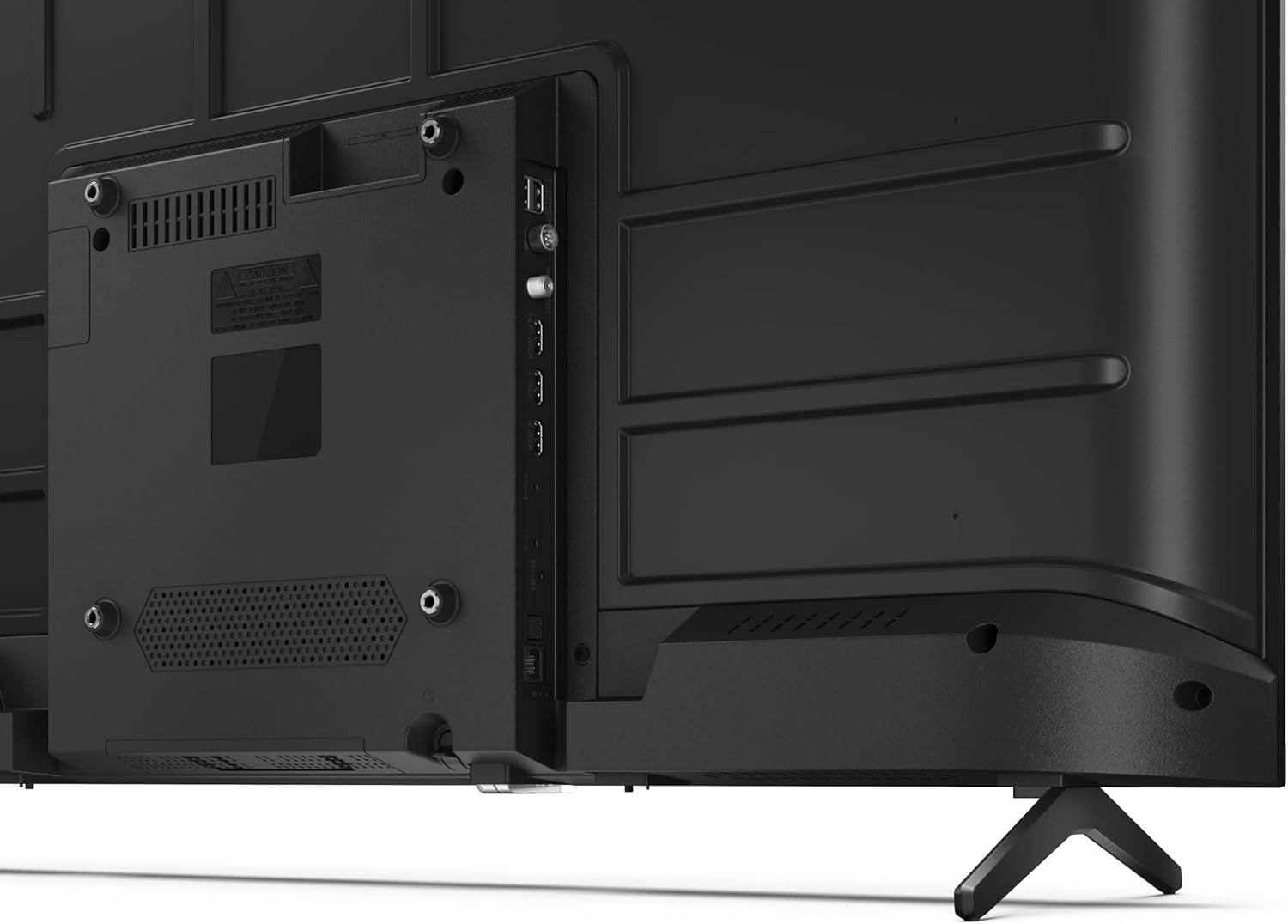
Imaginea 3.2: Spate view of the TV, highlighting VESA mounting points and ports.
3.3 Conectarea perifericelor
Connect your external devices to the appropriate ports on the back and side of the TV. The TV features multiple HDMI, USB, and other connectivity options.
- Porturi HDMI: Pentru conectarea playerelor Blu-ray, consolelor de jocuri, set-top box-urilor etc.
- Porturi USB: Pentru conectarea dispozitivelor de stocare USB pentru redarea de fișiere media sau pentru actualizări de software.
- Port Ethernet: Pentru o conexiune la internet prin cablu.
- Intrare antenă/cablu: Pentru conectarea unei antene sau a unui semnal TV prin cablu.
- Ieșire audio: Pentru conectarea sistemelor audio externe.
Imaginea 3.3: Detaliată view al porturilor de conectivitate ale televizorului.
3.4 Pornirea inițială și configurarea Google TV
After connecting all necessary cables, plug the power cable into an electrical outlet. Press the power button on the remote control or on the TV. Follow the on-screen instructions to complete the initial setup, including network connection, Google account login, and channel scanning.
4. Operare
4.1 Funcții de control de la distanță
The remote control allows you to navigate the TV's features. Common buttons include Power, Volume Up/Down, Channel Up/Down, Input Source, Home (Google TV), Navigation (directional arrows, OK), Back, and Google Assistant.
4.2 Interfața Google TV
Your Sharp TV runs on Google TV, providing a personalized home screen with content recommendations from your subscriptions. Use the remote's navigation buttons to browse movies, shows, apps, and your library.

Image 4.1: The Google TV home screen on the Sharp 40HF2265E.
4.3 Selectarea intrării
To switch between connected devices (e.g., HDMI 1, HDMI 2, TV tuner), press the 'Input' or 'Source' button on your remote control and select the desired input from the on-screen menu.
4.4 Setări de imagine și sunet
Access the TV's settings menu to adjust picture modes (Standard, Vivid, Cinema, Game), brightness, contrast, color, and sound modes (Standard, Music, Movie, Speech). The TV supports HDR10 for enhanced contrast and color, and Dolby Digital for rich audio.

Image 4.2: Visual representation of HDR (High Dynamic Range) technology.
4.5 Google Assistant and Chromecast
Use the built-in Google Assistant for voice control. Press the Google Assistant button on your remote and speak your commands, such as searching for content, controlling smart home devices, or getting information. Chromecast allows you to cast content directly from compatible devices like smartphones or tablets to your TV.

Image 4.3: Google Assistant integration for voice commands.
4.6 Conectivitate Bluetooth
Pair Bluetooth-enabled devices such as headphones or soundbars with your TV for a wireless audio experience. Navigate to the TV's settings menu, select 'Remotes & Accessories', and then 'Pair new device' to connect.
5. Întreținere
5.1 Curățarea televizorului
Deconectați întotdeauna televizorul de la priză înainte de curățare. Folosiți o cârpă moale și uscată pentru a șterge ecranul și carcasa televizorului. Pentru petele persistente, ștergeți ușor.ampClătiți laveta cu apă sau cu o soluție specială de curățare a ecranelor. Nu folosiți niciodată produse de curățare abrazive, ceară sau solvenți.
5.2 Actualizări de software
Your Google TV may receive automatic software updates. Ensure your TV is connected to the internet to receive these updates, which can improve performance and add new features. You can also manually check for updates in the settings menu.
6. Depanare
Dacă întâmpinați probleme cu televizorul, consultați următoarele soluții comune:
- Fără putere: Check if the power cable is securely plugged into both the TV and the wall outlet. Ensure the outlet is functional.
- Fără imagine/sunet: Verify that the correct input source is selected. Check all cable connections (HDMI, antenna). Try restarting the TV.
- Telecomanda nu funcționează: Înlocuiți bateriile (2 AAA). Asigurați-vă că nu există obstacole între telecomandă și senzorul IR al televizorului.
- Probleme de conexiune la rețea: For Wi-Fi, check your router and ensure the TV is within range. For wired connections, check the Ethernet cable. Try restarting your router and the TV.
- Probleme de calitate a imaginii: Ajustați setările imaginii (luminozitate, contrast, claritate). Asigurați-vă că sursa de intrare furnizează un semnal de înaltă calitate.
For more complex issues, consult the comprehensive troubleshooting section in the full digital manual or contact Sharp customer support.
7. Specificații
Below are the technical specifications for the Sharp 40HF2265E Full HD Google TV:

Image 7.1: Dimensions of the Sharp 40HF2265E TV.
| Caracteristică | Caietul de sarcini |
|---|---|
| Marca | Ascuțit |
| Numărul de model | 40HF2265E |
| Numele modelului | Seria HF |
| Anul modelului | 2025 |
| Dimensiunea ecranului | 40 inci (81 centimetri) |
| Tehnologia de afișare | LED |
| Rezoluţie | 1080p (Full HD) |
| Rata de reîmprospătare | 60 Hz |
| Raportul de aspect | 16:9 |
| Raport de contrast | 100000:1 |
| Screen Finish | Mate |
| Timp de răspuns | 8 de milisecunde |
| Tehnologie de iluminare de fundal | LED |
| Supported HDR Format | HDR10, HLG |
| Îmbunătățirea calității imaginii | Dynamic Contrast, HDR10, HLG |
| Motion Enhancement Technology | Motion Interpolation |
| Sistem de operare | Google TV |
| Internet Applications | Apple TV, Google TV, Hulu, Prime Video, YouTube |
| Caracteristici speciale | Bluetooth, Chromecast, Dolby Digital, HD Tuner |
| Tehnologia de conectivitate | Ethernet, USB, Wi-Fi |
| Tehnologia fără fir | Bluetooth |
| Versiune Bluetooth | 5.0 |
| Screen Mirroring Technology | Chromecast, Google Cast |
| Total porturi HDMI | 3 |
| Total USB 2.0 Ports | 2 |
| Number of Composite Video Inputs | 1 |
| Intrare audio | Mini composite/CVBS + audio input |
| Total Audio Output Ports | 2 |
| Mod ieșire audio | Stereo |
| Codificare audio | DD |
| Integrated Surround Sound Format | Dolby AC-4, Dolby Digital, Dolby Digital Plus |
| Putere maximă de ieșire a difuzorului | 16 wați (2x8W) |
| Numărul de canale audio | 2.0 |
| Sistem de difuzare | DVB-T2/C/S/S2 |
| Codificare video | MKV |
| Dimensiuni produs (Dxlxh) | 8.4P x 89.2L x 50.9H cm |
| Greutatea articolului | 5.4 kilograme |
| Greutate fără suport | 5.4 kilograme |
| Lățimea bazei | 765 milimetri |
| Standard de montare VESA | 200 x 200 mm |
| Consumul de energie | 37 wați |
| Voltage | 230 volți |
| Remote Control Battery Size | AAA |
| Remote Control Battery Quantity | 2 |
| Parental Control Technology | Kindersicherung Über Google Tv |
| Disponibilitatea pieselor de schimb în UE | 7 ani |
8. Garanție și asistență
8.1 Garanția produsului
The Sharp 40HF2265E television comes with a 2-year manufacturer's warranty. Please refer to the included Warranty Card for detailed terms and conditions regarding coverage and service. Keep your proof of purchase for warranty claims.
8.2 Asistență pentru clienți
If you require further assistance, have questions not covered in this manual, or need technical support, please contact Sharp customer service. Contact information can typically be found on the Warranty Card or the official Sharp website-ul.