
1. Produs terminatview
The ULANZI MA93 is a versatile 10000mAh battery grip designed to extend the operational time of your camera and provide stable handheld or tabletop support. It features an integrated tripod, a real-time LCD battery display, and a universal 1/4-inch screw mount for broad compatibility.
Caracteristici cheie:
- Capacitate 10000mAh: Provides extended power for long shooting sessions.
- Afișaj LCD în timp real: Shows the exact remaining battery percentage (1-100%).
- Integrated Hidden Tripod: Fold-out legs provide instant tabletop stability.
- Universal 1/4"-20 Mount: Compatible with action cameras, mirrorless cameras, and smartphone rigs.
- Design ergonomic: Comfortable for handheld use, reducing fatigue during extended vlogging or shooting.
- Cablu de încărcare încorporat: Allows for effortless charging of connected devices.
- Gata de călătorie: 10000mAh (approx. 37 Wh) capacity is within FAA carry-on limits for U.S. domestic flights.
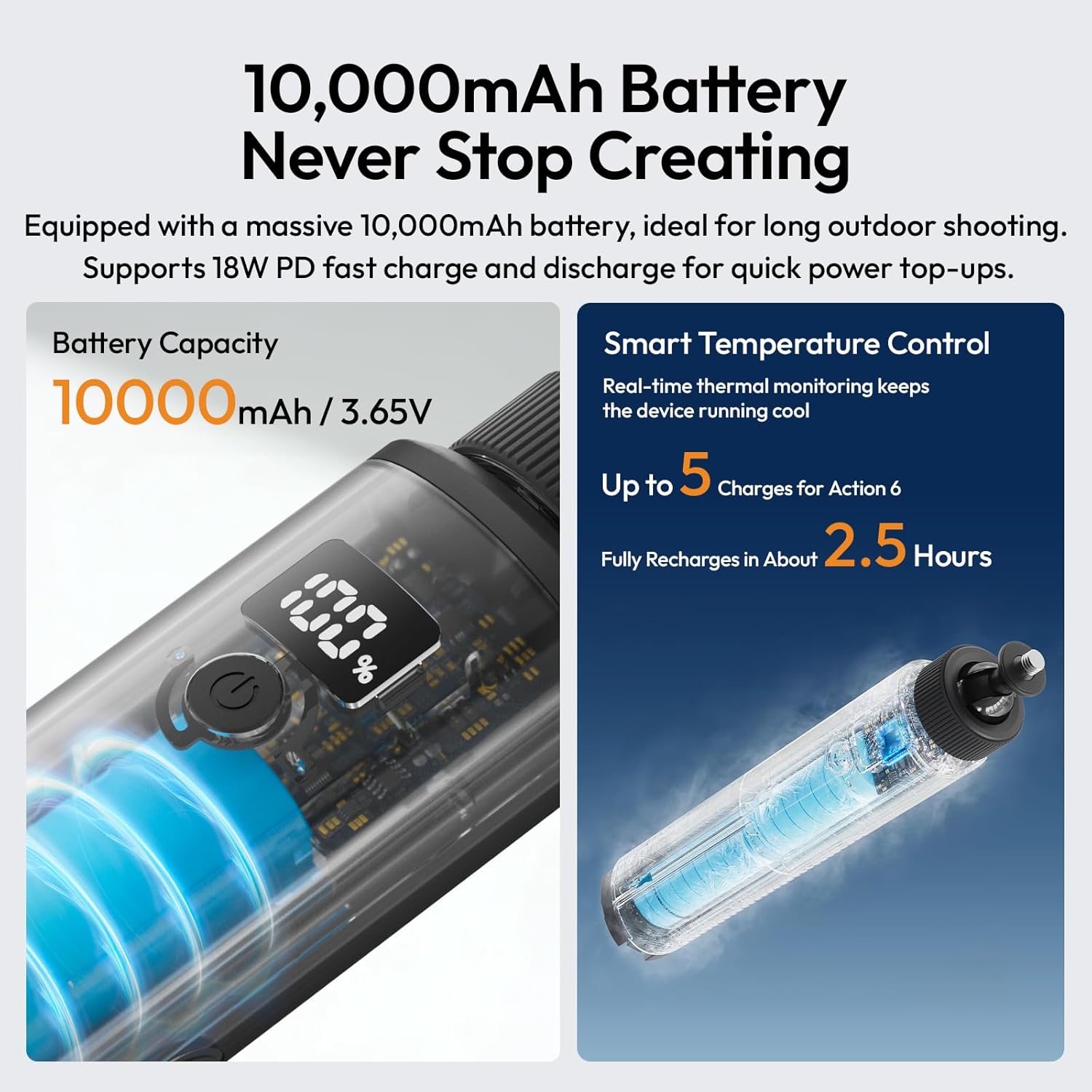
Image 1.1: The ULANZI MA93 Battery Grip with a camera attached, demonstrating its use as a handheld power source.
2. Conținutul pachetului
Verificați dacă toate articolele sunt prezente în colet:
- ULANZI MA93 Handheld Battery Grip x 1
- (Additional accessories may vary based on specific product bundles)
3. Identificarea componentelor

Image 3.1: Diagram showing the ULANZI MA93 Battery Grip with its main features highlighted, including the LCD display, power button, and integrated cable.
- Montare cu șurub de 1/4"-20: Located at the top for attaching cameras and accessories.
- Display LCD: Afișează procentul baterieitage.
- Buton de alimentare: Activează afișajul și inițiază încărcarea.
- Cablu USB-C integrat: For connecting to devices for power.
- Port de intrare USB-C: For charging the MA93 battery grip.
- Hidden Tripod Legs: Fold out from the base for tabletop stability.
- Gaură filetată de 1/4"-20: Located at the bottom for mounting on larger tripods or stands.
4. Instrucțiuni de configurare
4.1 Charging the Battery Grip
- Locate the USB-C input port on the side of the MA93 Battery Grip.
- Connect a USB-C charging cable (not included) to this port and to a compatible USB power adapter (e.g., 18W PD fast charger).
- The LCD display will show the charging status and current battery percentage.
- A full charge takes approximately 2.5 hours with an 18W PD charger.

Image 4.1: The LCD screen displaying battery percentage during charging, indicating the 10000mAh capacity and fast charging capability.
4.2 Attaching a Camera or Device
- Ensure your camera or device has a standard 1/4"-20 threaded hole.
- Align the 1/4"-20 screw mount on top of the MA93 with the threaded hole on your device.
- Rotate the camera or the grip until it is securely fastened. Do not overtighten.
- For devices requiring power, connect the integrated USB-C cable from the grip to your device's charging port.
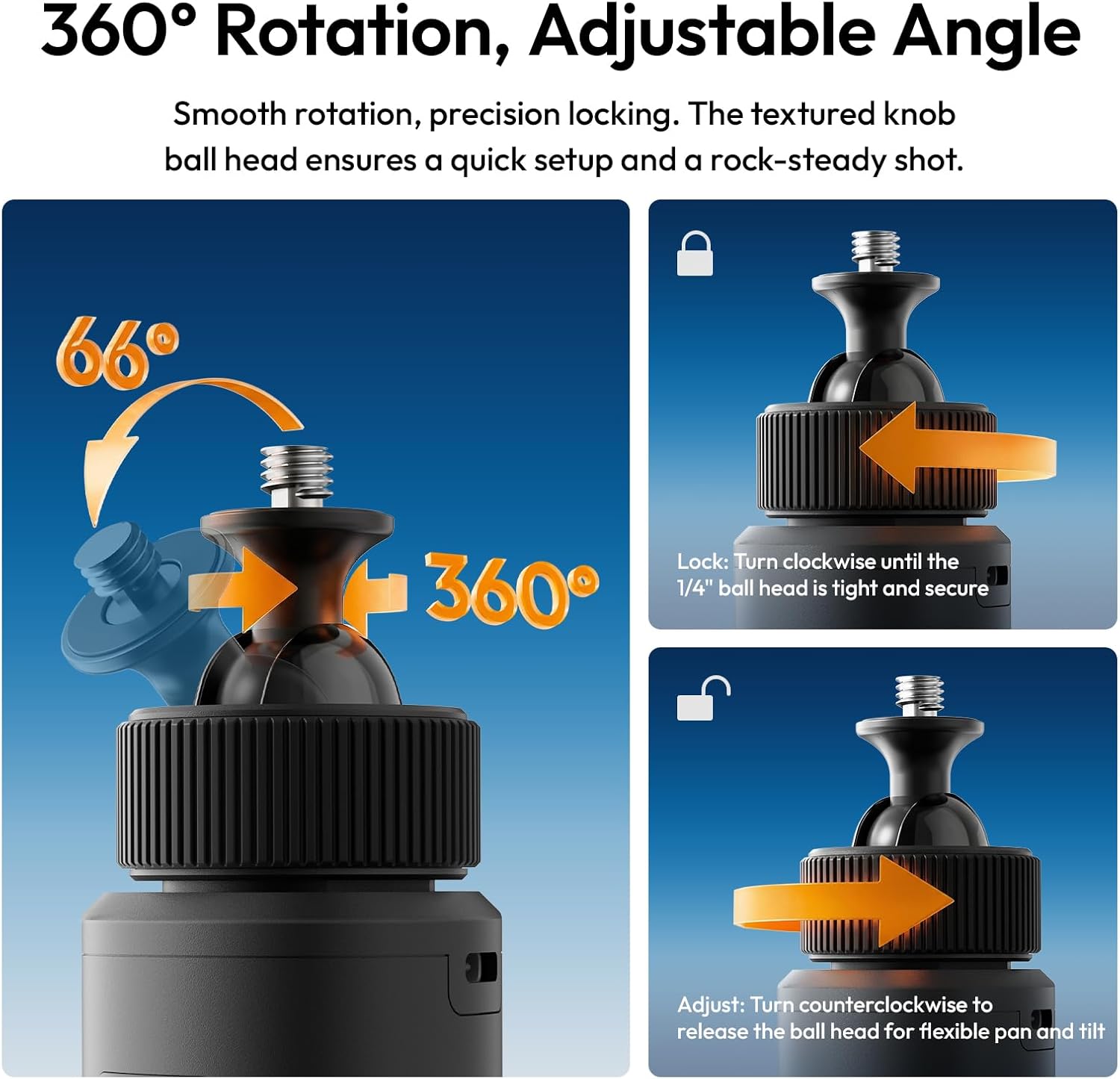
Image 4.2: A camera securely mounted on the ULANZI MA93 Battery Grip, ready for use.
4.3 Deploying the Integrated Tripod
- Locate the three hidden legs at the bottom of the grip.
- Gently pull the three support feet outwards until they are fully extended and locked into position.
- Place the grip on a flat, stable surface for tabletop use.
- To retract, push the legs back into the grip until they are flush.

Image 4.3: The ULANZI MA93 Battery Grip with its integrated tripod legs extended, supporting a camera on a flat surface.
5. Instrucțiuni de utilizare
5.1 Verificarea nivelului bateriei
Tap the power button once to activate the LCD display. The screen will show the exact remaining battery percentage (1-100%). The display will automatically turn off after a few seconds to conserve power.

Image 5.1: Close-up of the MA93's LCD screen indicating a full 100% charge.
5.2 Powering/Charging External Devices
- Connect your camera, smartphone, or other compatible device to the MA93 using the integrated USB-C cable.
- Press the power button on the MA93 to initiate power delivery. The grip will begin charging the connected device.
- The MA93 supports pass-through charging, allowing it to be charged while simultaneously powering an external device.
5.3 Adjusting the Camera Angle (360° Rotation)
The top 1/4"-20 mount features a ball head for flexible positioning:
- Pentru a ajusta: Turn the textured knob counter-clockwise to loosen the ball head. Adjust your camera to the desired angle (360° pan, 66° tilt).
- A incuia: Turn the textured knob clockwise until the ball head is tight and secure, preventing movement.

Image 5.2: Illustration of the 360-degree rotation and adjustable angle feature of the MA93's ball head mount.
6. Întreținere
- Keep the device clean and dry. Avoid exposure to water or excessive humidity.
- Folosiți o cârpă moale și uscată pentru curățarea exteriorului. Nu utilizați substanțe chimice dure sau materiale abrazive.
- Store the grip in a cool, dry place when not in use.
- Evitați să scăpați dispozitivul sau să îl supuneți la impacturi puternice.
- Nu încercați să dezasamblați sau să reparați unitatea singur, deoarece acest lucru va anula garanția.
7. Depanare
| Problemă | Cauza posibila | Soluţie |
|---|---|---|
| Device not charging from MA93. |
|
|
| MA93 not charging. |
|
|
| Afișajul LCD nu funcționează. |
|
|
| Tripod legs not deploying/retracting smoothly. |
|
|
8. Specificații
| Caracteristică | Detaliu |
|---|---|
| Numele modelului | MA93 Battery Grip |
| Capacitatea bateriei | 10000mAh (aprox. 37 Wh) |
| Intrare/Ieșire | 18W PD Fast Charge/Discharge (USB-C) |
| Interfață de montare | Universal 1/4"-20 Screw Mount (top), 1/4"-20 Threaded Hole (bottom) |
| Afişa | Real-time LCD Percentage Afișaj |
| Caracteristici integrate | Hidden Tripod, Built-in USB-C Cable |
| Dimensiunile produsului | 8.86" D x 1.66" L x 2.29" H |
| Greutatea articolului | 12 uncii |
| Dispozitive compatibile | Cameras, Action Cameras, MagSafe Phones (with adapter) |
| Producător | Shenzhen Vijim Technology Co.,Ltd. |
9. Garanție și asistență
9.1 Informații despre garanție
The ULANZI MA93 Battery Grip comes with a 12 luni garantie de la data achiziției. Această garanție acoperă defectele de fabricație și defecțiunile în condiții normale de utilizare. Nu acoperă daunele cauzate de utilizarea necorespunzătoare, accidente, modificări neautorizate sau dezastre naturale.
Vă rugăm să păstrați dovada achiziției pentru cererile de garanție.
9.2 Asistență pentru clienți
For technical assistance, warranty claims, or product inquiries, please contact ULANZI customer support through the official ULANZI website-ul sau punctul dvs. de vânzare.
You can also visit the official ULANZI Store on Amazon for more information and products: Magazinul oficial ULANZI din SUA
10. Videoclipuri cu produse
ULANZI MA93 Handheld Battery Grip Overview
Video 10.1: An official video from ULANZI demonstrating the features and usage of the MA93 Handheld Battery Grip.