
1. Introducere
Thank you for choosing the BLUETTI Elite 300 Portable Power Station. This manual provides essential information for the safe and efficient use of your device. Please read it thoroughly before operation and retain it for future reference.
The BLUETTI Elite 300 is a compact 3 kWh portable power station designed for reliable energy supply in various scenarios, including home backup, camping, and RV travel. It features a LiFePO4 battery, high power output, and smart app control.

Image: The BLUETTI Elite 300, highlighted as the world's most compact 3 kWh portable power station, shown in an outdoor setting with a camper and tent at night.
2. Instrucțiuni de siguranță
Your safety is our top priority. Please observe the following safety guidelines:
- Nu dezasamblați, reparați sau modificați unitatea.
- Evitați expunerea la ploaie, umezeală sau lumina directă a soarelui pentru perioade lungi de timp.
- Keep away from heat sources, open flames, and flammable materials.
- Folosiți doar accesorii și cabluri de încărcare aprobate de BLUETTI.
- Asigurați o ventilație corespunzătoare în timpul utilizării și încărcării.
- A nu se lăsa la îndemâna copiilor și a animalelor de companie.
- A se păstra într-un loc răcoros și uscat atunci când nu este utilizat.
- The BLUETTI Elite 300 utilizes ultra-safe LiFePO4 battery cells and premium BMS technology for enhanced reliability and durability.
3. Conținutul pachetului
La despachetare, vă rugăm să verificați dacă sunt incluse toate articolele enumerate mai jos:
- Stație de alimentare portabilă BLUETTI Elite 300
- Cablu de încărcare AC
- Șurub de împământare
- Manual de utilizare (acest document)
If any items are missing or damaged, please contact BLUETTI customer support.
4. Produs terminatview
The BLUETTI Elite 300 is equipped with various ports and a clear display for intuitive operation. Familiarize yourself with the layout:
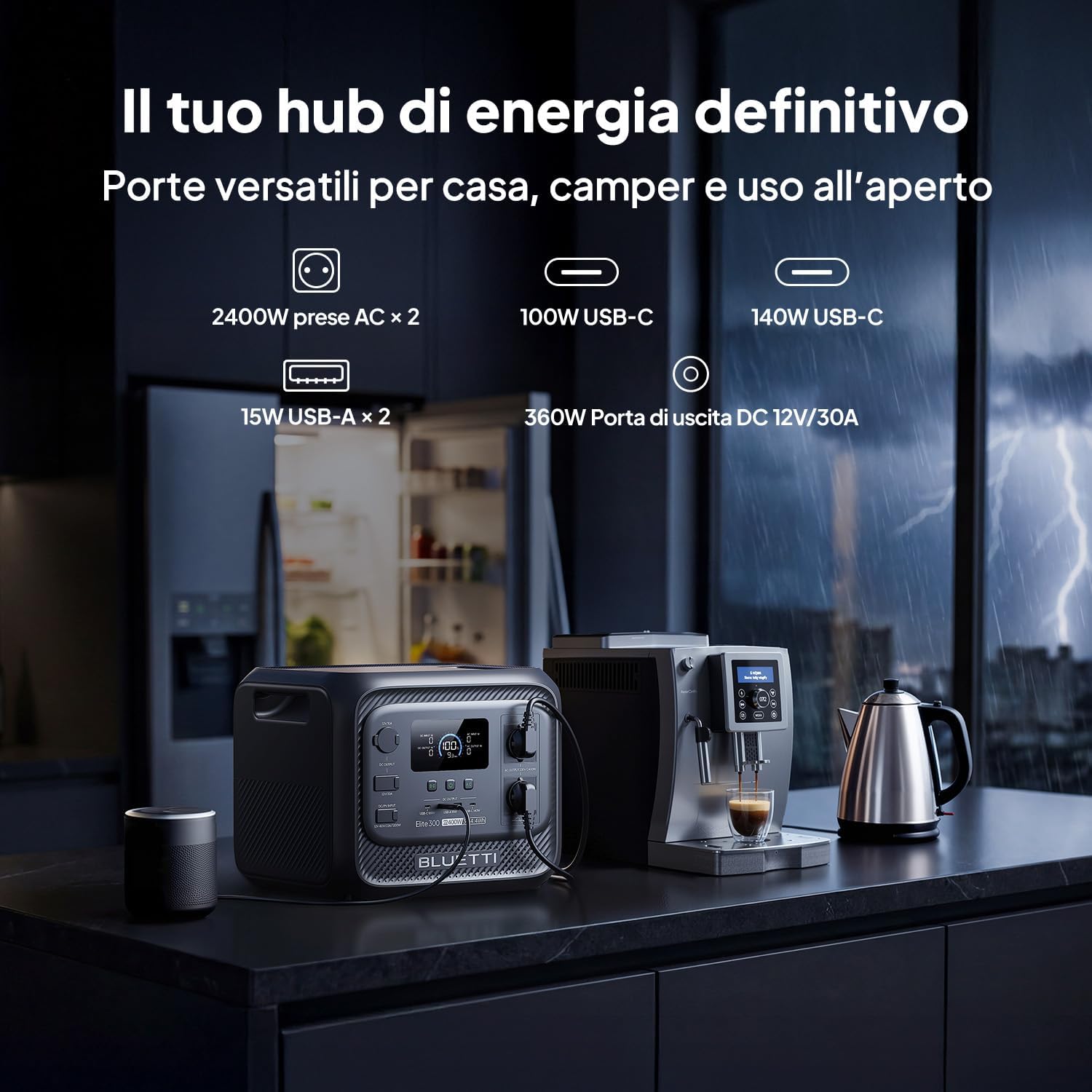
Imagine: față view of the BLUETTI Elite 300, illustrating its versatile ports including AC outlets, USB-C, USB-A, and a 12V/30A DC output, alongside its digital display.
Porturi și ieșiri:
- Prize de curent alternativ (x2): 2400W continuous AC power, 4800W peak.
- Porturi USB-C: 100W and 140W for fast charging compatible devices.
- Porturi USB-A (x2): 15W total for standard USB devices.
- Ieșire CC 12V/30A: 360W dedicated port for RV appliances and other essential outdoor gear.
The integrated display provides real-time information on battery level, input/output power, and operational status.
5. Configurare
Before first use, ensure the power station is fully charged. Follow these steps:
- Despacheta: Carefully remove the BLUETTI Elite 300 and all accessories from the packaging.
- Taxă inițială: Connect the AC charging cable to the power station and then to a wall outlet. The display will indicate charging status.
- Încărcare completă: Allow the unit to charge completely before its first use. This typically takes approximately 1.8 hours for 0-80% AC charging.
6. Instrucțiuni de utilizare
6.1 Încărcarea centralei electrice
The Elite 300 supports multiple charging methods:
- Priză AC de perete: Connect the AC charging cable to a standard wall outlet. Max 2300W input.
- Panouri solare: Connect compatible solar panels (up to 1200W Max) to the solar input port.
- Încărcarea mașinii: Charge the unit while driving using a compatible car charger (Max 1200W input, full charge in 3.2 hours).
- Încărcare dublă (CA + Solar): Combine AC and solar charging for faster recharge times (up to 2400W Max, 80% in 78 minutes).

Image: Visual representation of the BLUETTI Elite 300 being charged via AC wall outlet, a car charger, and solar panels, highlighting rapid charging capabilities.

Image: An illustration showing the BLUETTI Elite 300 being charged inside an RV while the vehicle is in motion, demonstrating the 'Charge while driving' feature.
6.2 Discharging and Powering Devices
To power your devices:
- Porniți: Press the main power button to turn on the unit.
- Selectați ieșirea: Activate the desired output ports (AC, DC, USB) by pressing their respective buttons.
- Conectați dispozitive: Plug your devices into the appropriate ports.
- Monitor: The display will show the current output wattage și timpul de execuție rămas estimat.
The Elite 300 delivers 2400W of continuous AC power with a 4800W peak, capable of running high-demand appliances like kettles, air conditioners, and power tools.

Image: The BLUETTI Elite 300 connected to and powering a refrigerator, oven, air conditioner, induction hob, chainsaw, and drill, indicating estimated runtimes for each.

Image: A person using a power saw outdoors, powered by the BLUETTI Elite 300, demonstrating its capability to run demanding tools with prolonged autonomy.

Image: The BLUETTI Elite 300 powering an air conditioner, microwave, refrigerator, and coffee machine in an RV kitchen, illustrating its use for off-grid comfort.
6.3 Funcția de alimentare neîntreruptibilă (UPS)
The Elite 300 features a reliable UPS function with a <10ms switchover time. In the event of a power outage, it instantly switches to battery power, ensuring critical devices like routers, computers, and refrigerators remain operational without interruption.

Image: A BLUETTI Elite 300 connected to a computer setup, illustrating its instant power switchover (<10ms) during a power outage to prevent data loss or work interruption.

Image: A person working on a computer during a simulated blackout, with the BLUETTI Elite 300 powering the computer, router, and refrigerator, emphasizing continuous power supply.
6.4 Control inteligent al aplicației
Manage your power remotely with the BLUETTI app. The app allows you to:
- Monitor power usage and battery status.
- Control output ports.
- Set charging schedules.
- Primește notificări.

Image: A hand holding a smartphone displaying the BLUETTI app interface, showing remote control and monitoring features for the power station in a kitchen setting.
7. Întreținere
To ensure the longevity and optimal performance of your BLUETTI Elite 300, follow these maintenance guidelines:
- Curățare regulată: Wipe the exterior with a dry, soft cloth. Do not use abrasive cleaners or solvents.
- Depozitare: If storing for extended periods, charge the unit to 50-80% every 3-6 months to preserve battery health. Store in a cool, dry environment.
- Ventilare: Asigurați-vă că orificiile de ventilație sunt lipsite de praf și resturi.
- Sănătatea bateriei: Evitați descărcarea completă frecventă a bateriei, deoarece acest lucru îi poate reduce durata de viață.
8. Depanare
If you encounter issues with your BLUETTI Elite 300, refer to the following common problems and solutions:
| Problemă | Cauza posibila | Soluţie |
|---|---|---|
| Unitatea nu pornește | Battery is completely discharged; Power button not pressed correctly. | Charge the unit using the AC adapter; Press and hold the power button for 3 seconds. |
| Ieșirea AC nu funcționează | AC output not enabled; Overload protection activated; Device power exceeds 2400W. | Press the AC output button; Reduce the load; Check device wattage. |
| Încărcare lentă | Using a low-power charger; High ambient temperature; Solar input insufficient. | Use the provided AC charger or higher wattage solar panels; Ensure good ventilation; Check solar panel orientation. |
| Probleme de conectare la aplicație | Bluetooth/Wi-Fi off; App not updated; Unit too far from phone. | Ensure Bluetooth/Wi-Fi is active on your phone; Update the BLUETTI app; Move closer to the unit. |
For further assistance, please contact BLUETTI customer support.
9. Specificații
Detailed technical specifications for the BLUETTI Elite 300 Portable Power Station:
| Caracteristică | Caietul de sarcini |
|---|---|
| Numele modelului | BLUETTI Elite 300 |
| Tip baterie | LiFePO4 |
| Capacitate | 3014.4 Watt-hours (3 kWh) |
| Puterea de ieșire AC | 2400W (continuu), 4800W (vârf) |
| Ieșire CA Voltage | 230 volți (CA) |
| Ieșire USB-C | 100W, 140W |
| Ieșire USB-A | 15 W (x2) |
| Ieșire continuă | 12 V/30 A (360 W) |
| Intrare AC max | 2300W |
| Intrare solară maximă | 1200W |
| Max Combined Input (AC+Solar) | 2400W |
| Funcția UPS | <10ms Switchover Time |
| Dimensiuni (L x l x H) | 36.5L x 30.5W x 29.5H cm |
| Greutate | 26.3 kg |
| Țara de origine | China |
10. Garanție și asistență
For warranty information, please refer to the warranty card included with your product or visit the official BLUETTI website. BLUETTI is committed to providing reliable power solutions and excellent customer service.
If you require technical support, have questions about your product, or need to claim warranty service, please contact BLUETTI customer support through their official channels. Contact details are typically found in the included user manual or on the BLUETTI website-ul.