
1. Introducere
This manual provides detailed instructions for the installation, operation, and maintenance of your ANJIELO SMART 4-Wire Video Door Intercom System. Please read this manual thoroughly before installation and use to ensure proper function and safety. Keep this manual for future reference.
2. Produs terminatview
The ANJIELO SMART 4-Wire Video Door Intercom System offers enhanced security and convenience for your home. It features a 7-inch WiFi-enabled monitor and a 1080p outdoor doorbell camera. Key functionalities include two-way audio communication, remote monitoring via the Tuya app, night vision, and multiple unlocking methods.
Caracteristici cheie:
- Audio bidirecțional: Communicate with visitors at your door from the indoor monitor or your smartphone.
- 7-Inch Touch Monitor: High-resolution display with touch controls and hands-free function.
- 1080p Doorbell Camera: Features a 120° wide-angle lens, built-in infrared sensor for night vision, and an IP65 waterproof and dustproof rating.
- Tuya WiFi Smart Home Compatible: Seamless integration with the Tuya app for remote monitoring and control.
- Metode de deblocare 3 în 1: Unlock your door using an IC card, the Tuya app, or directly from the indoor monitor.
- Sistem extensibil: Supports up to 1 outdoor unit and 4 indoor monitors, allowing internal communication between monitors.

Imagine: Pesteview of the ANJIELO SMART 4-Wire Video Door Intercom System, highlighting its main components and smart home integration.
3. Ce se află în cutie
Despachetați cu grijă cutia și asigurați-vă că toate articolele sunt prezente și în stare bună. Dacă lipsesc sau sunt deteriorate articole, vă rugăm să contactați serviciul de asistență pentru clienți.
- Outdoor Doorbell Unit
- Monitor de interior de 7 inci
- Adaptor de alimentare (15V 1.2A)
- Manual de instructiuni
- Unlock Cable
- Cablu cu 4 pini
- Screws and Rubber Plugs for mounting
- Hanging Plate for monitor
- Carduri IC (7 incluse)

Image: All components included in the product package, such as the outdoor doorbell, indoor monitor, cables, power supply, mounting hardware, and IC cards.
4. Configurare și instalare
The system uses a 4-wire connection for communication between the outdoor doorbell and the indoor monitor. Ensure power is disconnected before beginning installation.
4.1 Montarea soneriei exterioare
- Choose a suitable location near your entrance, approximately 1.5 meters (5 feet) from the ground, avoiding direct sunlight or rain exposure (though the unit is IP65 rated).
- Use the provided screws and rubber plugs to securely mount the doorbell unit.
- Ensure the camera has a clear, unobstructed view of the entrance.

Image: The outdoor doorbell camera providing a 120-degree ultra-wide-angle view of the entrance area.
4.2 Montarea monitorului interior
- Select a convenient indoor location for the monitor, such as a wall in your living room or kitchen.
- Attach the hanging plate to the wall using screws.
- Connect the wiring to the monitor as per the wiring diagram (refer to the included instruction manual for detailed diagram).
- Mount the monitor onto the hanging plate.
4.3 Conexiuni de cablare
Connect the outdoor doorbell unit to the indoor monitor using the provided 4-pin cable. Ensure correct polarity and secure connections. If connecting an electronic lock, use the unlock cable and refer to the detailed wiring diagram in the included manual.
4.4 Conexiune la alimentare
Connect the 15V 1.2A power adapter to the indoor monitor and plug it into a standard power outlet. The system will power on automatically.
4.5 Configurarea aplicației Tuya
- Descărcați aplicația Tuya Smart sau Smart Life din magazinul de aplicații al smartphone-ului dvs.
- Înregistrați-vă sau conectați-vă la contul dvs.
- Follow the in-app instructions to add your ANJIELO SMART monitor to the app. This typically involves putting the monitor into pairing mode and connecting it to your home WiFi network.
5. Instrucțiuni de utilizare
5.1 Răspunsul la un apel
When a visitor presses the doorbell button, the indoor monitor(s) will ring, and a live video feed from the outdoor camera will appear. Your smartphone (if connected via Tuya app) will also receive a notification.
- From Monitor: Tap the 'Answer' icon on the screen to initiate two-way audio communication.
- De pe smartphone: Open the Tuya app and tap the notification to view the live feed and communicate.

Image: Illustration of the two-way video intercom function, demonstrating communication between a visitor at the doorbell and a resident using the indoor monitor.
5.2 Deblocarea ușii
You have three methods to unlock a connected electronic lock:
- Prin intermediul monitorului interior: În timpul unui apel sau în timp ce viewing the live feed, tap the 'Unlock' icon on the monitor screen.
- Prin intermediul aplicației Tuya: Din live view in the app, tap the 'Unlock' button.
- Via IC Card: Present a pre-programmed IC card to the card reader on the outdoor doorbell unit.
5.3 Monitorizare de la distanță
Using the Tuya app on your smartphone, you can view the live feed from the outdoor doorbell camera anytime, anywhere, as long as your monitor is connected to WiFi and your phone has internet access.

Image: Users accessing the video intercom system remotely via their smartphones, enabling two-way audio and viewing from different locations.
5.4 Surveillance Footage Redare
The system supports 24-hour real-time monitoring and recording. You can review recorded video clips directly from the indoor monitor or through the Tuya app.
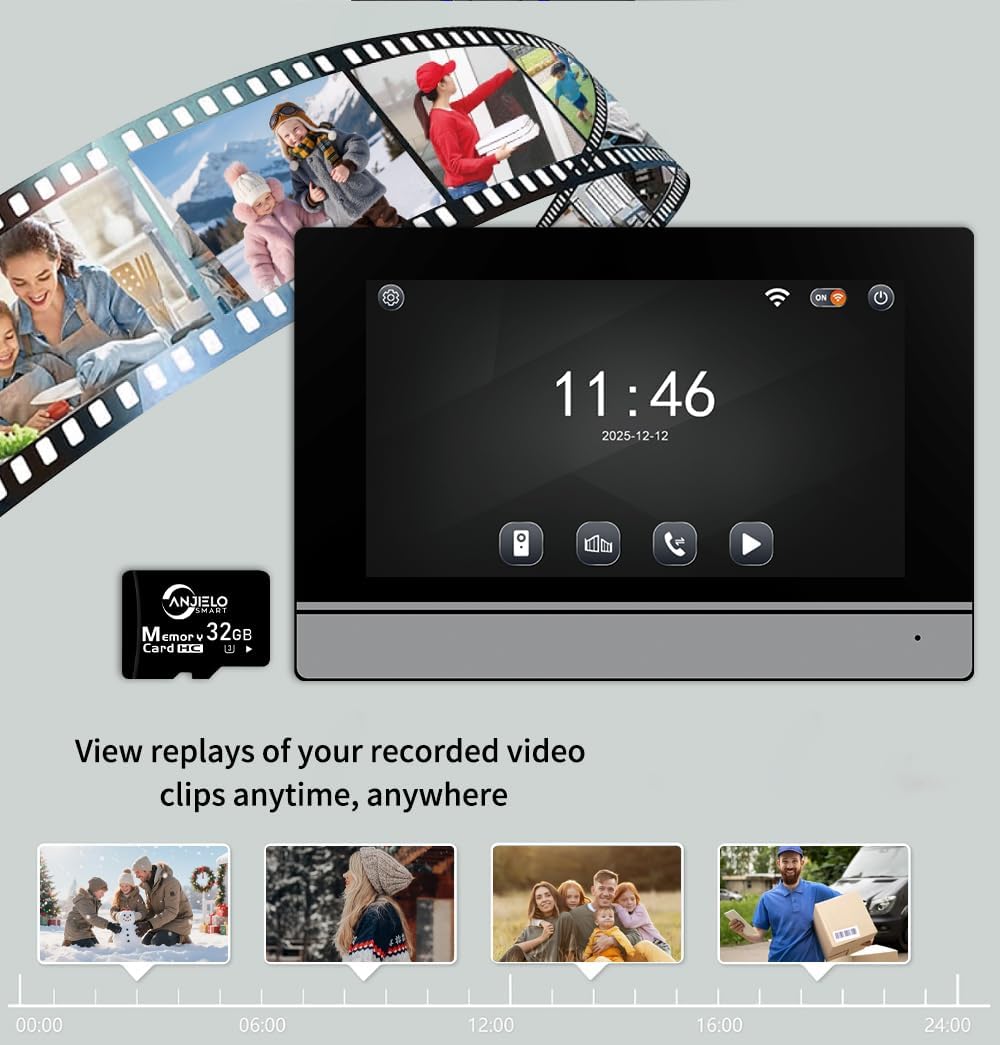
Image: The indoor monitor screen showing a timeline for playback of recorded surveillance footage, demonstrating 24-hour monitoring.
5.5 Internal Communication (Multi-Monitor Systems)
If you have multiple indoor monitors, they can communicate with each other (audio only). Refer to the detailed instructions in the included manual for initiating internal calls.

Image: A diagram illustrating the system's capability to support one outdoor unit and up to four indoor units, with internal communication between monitors.
6. Întreținere
Întreținerea regulată asigură longevitatea și performanța optimă a sistemului dumneavoastră de interfonie.
- curatenie: Folosiți un moale, damp cloth to clean the outdoor doorbell camera lens and the indoor monitor screen. Avoid abrasive cleaners or solvents.
- Verificarea conexiunii: Verificați periodic toate conexiunile cablurilor pentru a vă asigura că sunt sigure și fără coroziune.
- Actualizări de software: Keep the Tuya app updated to the latest version. Check the app or manufacturer's website for any firmware updates for the monitor or doorbell.
- Protecția mediului: While the outdoor unit is IP65 rated, extreme weather conditions can still affect performance. Ensure proper installation to minimize exposure to harsh elements.

Image: The outdoor doorbell unit, showcasing its IP65 protection rating, indicating resistance to dust and water.
7. Depanare
Dacă întâmpinați probleme cu sistemul dvs., consultați următoarele probleme și soluții comune:
| Problemă | Cauza posibila | Soluţie |
|---|---|---|
| Nu există videoclip pe monitor/aplicație | Cablaj slăbit, problemă de alimentare, defecțiune a camerei. | Check all 4-wire connections. Ensure power adapter is plugged in. Restart the system. |
| Fără sunet în timpul apelului | Problemă cu microfonul/difuzorul, problemă cu cablajul. | Verify wiring. Check monitor volume settings. |
| Nu se poate debloca ușa | Electronic lock not connected, wiring issue, IC card not programmed. | Ensure electronic lock is properly wired. Program IC cards as per manual. |
| Conexiune WiFi instabilă | Weak WiFi signal, incorrect password, router issue. | Ensure monitor is within WiFi range. Re-enter WiFi password. Restart router. |
| Vederea de noapte nu funcționează | Infrared sensor blocked or faulty. | Clean the camera lens. Ensure no obstructions. |
If the problem persists after attempting these solutions, please contact ANJIELO SMART customer support.
8. Specificații
| Caracteristică | Detaliu |
|---|---|
| Marca | ANJIELO SMART |
| Numărul de model | 64008F-B+67024C-B |
| Sursa de alimentare | Corded Electric (15V 1.2A) |
| Tehnologia de conectivitate | Cu fir (4 fire), WiFi (pentru aplicație) |
| Rezoluție captură video | 1080p |
| Unghiul camerei soneriei | Unghi larg de 120° |
| Metoda de control | Aplicație, atingere |
| Dispozitive compatibile | Smartphone (Tuya App) |
| Raza maximă | 100 Meters (wired connection) |
| Dimensiuni articol (L x l x H) | 5.9 x 1.9 x 8.6 inci (aproximativ) |
| Protection Rating (Outdoor Unit) | IP65 rezistent la praf și impermeabil |
| Temperatura de operare | -30°C până la +60°C |
| Metoda de instalare | Înșurubați |
9. Garanție și asistență
For warranty information and customer support, please refer to the warranty card included in your product package or visit the official ANJIELO SMART website. You can also contact the seller directly through your purchase platform for assistance.
Producător: ANJIELO SMART
ASIN: B0GL212P4W