
Introducere
This manual provides detailed instructions for the setup, operation, and maintenance of your Dexnor Ultra-Light Magnetic Folio Keyboard Cover. This keyboard case is designed to enhance your tablet experience by providing laptop-like functionality and protection.
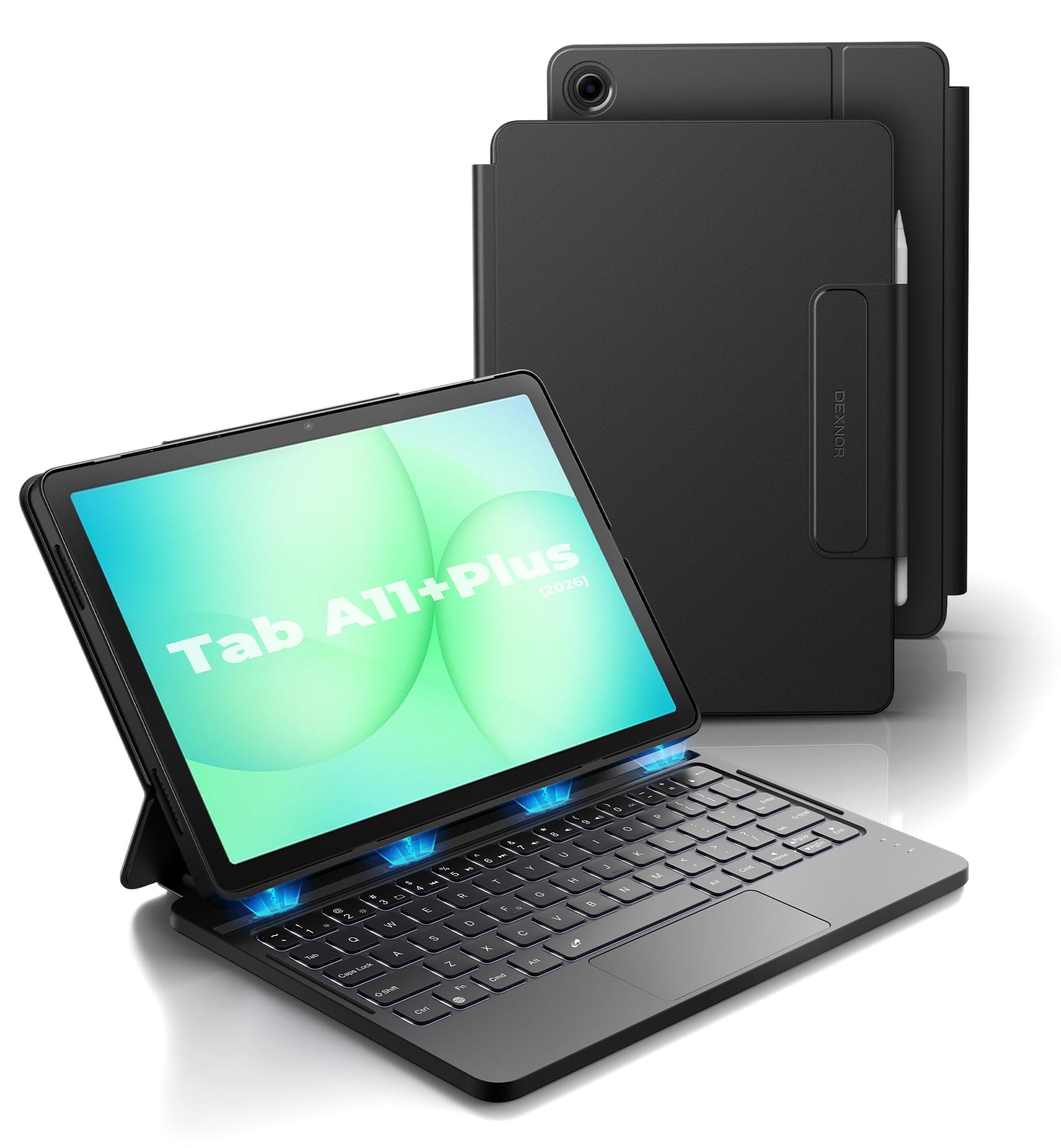
Image: The Dexnor Keyboard Case with a tablet inserted, showcasindesignul său.
Conținutul pachetului
Vă rugăm să verificați pachetul pentru următoarele articole:
- 1 x Dexnor Keyboard Case for Samsung Galaxy Tab A11+/A9+ Plus
- 1 x cablu de încărcare USB
- 1 x Manual de utilizare (acest document)
Compatibilitate
This keyboard case is specifically designed for the following Samsung Galaxy Tab models:
- Samsung Galaxy Tab A11+ Plus (2025) (Model numbers: SM-X230, SM-X236B, SM-X315)
- Samsung Galaxy Tab A9+ Plus (2023) (Model numbers: SM-X210, SM-X215, SM-X216, SM-X218)
Please confirm your tablet's model number before use.
How to Check Your Tablet Model:
- Du-te la Setări > General > Despre tableta.
- Find the specific model number listed.

Image: Visual guide on checking your tablet's model number for compatibility.
Instrucțiuni de configurare
1. Atașarea tabletei
The case features a strong magnetic slot to securely hold your tablet. Gently align your tablet with the magnetic area in the case until it snaps into place. Ensure all ports and buttons are accessible.

Image: The keyboard case providing stable support for the tablet at a 120-degree viewunghiul de ing.
2. Conexiune Bluetooth
- Ensure the keyboard is charged (see 'Charging the Keyboard' below).
- Deschideți carcasa tastaturii. Tastatura se va porni automat.
- Pe Samsung Galaxy Tab, accesați Setări > Dispozitive conectate > Bluetooth.
- Turn on Bluetooth. Your tablet will search for available devices.
- Select "Dexnor Keyboard" (or similar name) from the list of devices.
- Urmați orice instrucțiuni de pe ecran pentru a finaliza procesul de asociere.
Once paired, the keyboard will automatically connect to your tablet when opened and within range.
3. Încărcarea tastaturii
Connect the provided USB charging cable to the keyboard's charging port and to a USB power adapter (not included). The charging indicator light will show the charging status. A full charge takes approximately 3 hours.
For visual guidance on setup and usage, please refer to the video below:
Video: Demonstrating the setup and use of the Dexnor Keyboard Case for Samsung Galaxy Tab A9+ Plus.
Instrucțiuni de operare
Keyboard Layout and Shortcuts
The keyboard features a standard QWERTY layout with responsive scissor-switch keys for comfortable typing. A full row of shortcut keys provides quick access to various tablet functions, including screen brightness, volume control, media playback, and more.
- Taste funcționale (Fn): Use the Fn key in combination with other keys for special functions.
- Mod DeX: Supported by pressing Fn + Enter.

Imagine: Pesteview of the keyboard layout, highlighting the row of shortcut keys for quick access to functions.
Multi-Touch Trackpad Usage
The integrated multi-touch trackpad allows for smooth and precise navigation, similar to a laptop. It supports various multi-finger gestures for enhanced productivity:
- Mărire/Micșorare: Pinch with two fingers.
- Gestionează Files: Swipe with three fingers.
- Răsfoiește Webpagini: Swipe left/right with two fingers.
- Schimbați aplicațiile: Swipe up/down with three fingers.
To prevent accidental input (palm rejection), you can disable the trackpad by pressing FN + bară de spațiu.

Image: Close-up of the multi-touch trackpad, illustrating various gestures and the option to disable it.
Controlul luminii de fundal
The keyboard features a single-color backlight with 3 adjustable brightness levels, allowing for comfortable typing in low-light conditions. Use the dedicated backlight key (often represented by a light bulb icon) to cycle through brightness levels or turn the backlight off.

Image: The keyboard with its backlight illuminated, demonstrating visibility in dim environments.
Managementul energiei
The keyboard case incorporates an upgraded power-saving design:
- Pornire/Oprire automată: Simply open the case to power on the keyboard and wake your tablet. Close the case to turn off the keyboard and put your tablet to sleep. There is no physical power switch.
- Modul Sleep: The keyboard will enter sleep mode after 30 minutes of inactivity to conserve battery. The backlight will sleep after 45 seconds of inactivity.
The built-in 650mAh lithium polymer battery offers extended usage:
- Până la 720 de ore în standby.
- Up to 200 hours of use without backlight.
- Up to 10 hours of continuous working time with the brightest backlight.

Image: A user actively working on the tablet with the keyboard case, demonstrating its utility for productivity.
Întreţinere
- Curatenie: Folosiți un moale, damp o lavetă pentru a șterge exteriorul carcasei și al tastaturii. Evitați substanțele chimice dure sau materialele abrazive.
- Depozitare: When not in use, keep the case closed to protect your tablet and conserve keyboard battery. Store in a cool, dry place away from direct sunlight.
- Suport pentru stylus: The built-in S Pen holder keeps your stylus secure and easily accessible.

Image: The keyboard case in a closed position, highlighting its compact design and integrated stylus holder.
Depanare
Keyboard Not Connecting via Bluetooth:
- Asigurați-vă că tastatura este încărcată.
- Asigurați-vă că Bluetooth este activat pe tabletă.
- Try unpairing and re-pairing the keyboard in your tablet's Bluetooth settings.
- Restart both your tablet and the keyboard (by closing and reopening the case).
Tastele nu răspund:
- Verificați dacă tastatura este conectată corect prin Bluetooth.
- Asigurați-vă că tastatura este încărcată.
- If specific keys are not working, check for any debris under the keys.
Trackpad-ul nu funcționează:
- Ensure the trackpad is not disabled (press FN + bară de spațiu to toggle).
- Verificați conexiunea Bluetooth.
Lumina de fundal nu funcționează:
- Press the backlight key to cycle through brightness levels.
- Asigurați-vă că tastatura este suficient încărcată.
Specificații
| Marca | Dexnor |
| Dispozitive compatibile | Samsung Galaxy Tab A11+ Plus (2025), Samsung Galaxy Tab A9+ Plus (2023) |
| Tehnologia de conectivitate | Bluetooth |
| Descrierea tastaturii | Multi Functional, Backlit, Multi-touch Trackpad |
| Material | PU Leather, Polycarbonate |
| Dimensiuni produs (L x l x H) | 11.08 cm x 4.53 cm x 0.43 cm |
| Capacitatea bateriei | 650mAh polimer de litiu |
| Timp de așteptare | Până la 720 ore |
| Timp de lucru (fără iluminare din spate) | Până la 200 ore |
| Working Time (Brightest Backlight) | Până la 10 ore |
| Timp de încărcare | Aproximativ 3 ore |
| Caracteristici speciale | Backlit keys, Multi-touch trackpad, Auto-wake/sleep, Magnetic attachment, Stylus holder |
Garanție și suport
Dexnor products come with a limited warranty. Please refer to the product packaging or the official Dexnor website for specific warranty terms and conditions. For technical support or customer service inquiries, please contact Dexnor customer support through their official channels.