
1. Introducere
Thank you for choosing the AIYIMA S4000 Active Bookshelf Speakers. These speakers are designed to deliver high-fidelity audio with versatile connectivity options, suitable for various applications including home entertainment, PC audio, and professional studio monitoring. Please read this manual thoroughly before use to ensure proper setup and operation.
2. Instrucțiuni de siguranță
To prevent fire, electric shock, or product damage, please observe the following safety guidelines:
- Nu expuneți acest aparat la ploaie sau umezeală.
- Nu așezați obiecte umplute cu lichide, cum ar fi vaze, pe aparat.
- Asigurați o ventilație corespunzătoare. Nu blocați nicio deschidere de ventilație.
- Nu instalați lângă nicio sursă de căldură, cum ar fi calorifere, registre de căldură, sobe sau alte aparate (inclusiv ampliificatori) care produc căldură.
- Protejați cablul de alimentare pentru a nu fi călcat sau ciupit, în special la prize, prize și la punctul în care acestea ies din aparat.
- Utilizați numai atașamente/accesorii specificate de producător.
- Deconectați acest aparat din priză în timpul furtunilor cu fulgere sau atunci când nu este utilizat pentru perioade lungi de timp.
- Consultați toate lucrările de service către personalul de service calificat. Întreținerea este necesară atunci când aparatul a fost deteriorat în vreun fel.
3. Conținutul pachetului
Vă rugăm să verificați dacă toate articolele sunt prezente în cutie:
- AIYIMA S4000 Studio Monitors (2 units)
- Cablu audio RCA
- XLR Audio Cable
- Manual de utilizare (acest document)
- Magnetic Grilles (2 units)
- Rubber Feet (8 units)
- Cablu de alimentare
- Wireless IR Remote Control
4. Produs terminatview
4.1 Panoul frontal
The front panel features the horn-loaded tweeter and the 4-inch woofer, along with a multi-function rotary control for volume and input selection.

Imagine: Față și spate view of the AIYIMA S4000 speakers. The front shows the tweeter and woofer, while the rear displays all input/output ports and controls.
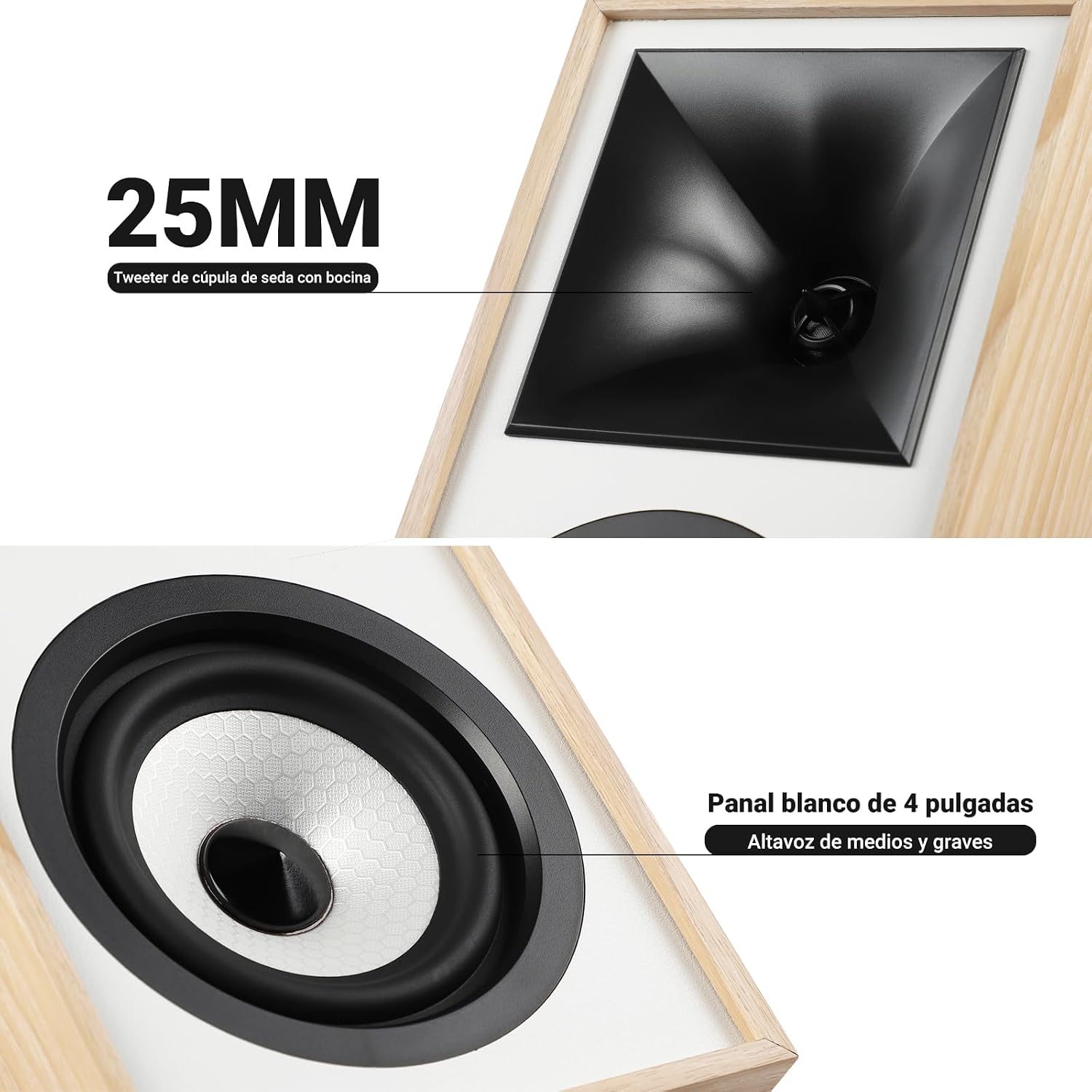
Imagine: Prim-plan view of the 25mm horn-loaded silk dome tweeter and the 4-inch white cone woofer on the AIYIMA S4000 speaker.
The S4000 incorporates a 1.25-inch horn-loaded tweeter for enhanced vocal clarity and a 4-inch woofer for deep bass. The cabinet is constructed from 15mm high-density MDF to reduce resonance and distortion.
4.2 Panoul din spate
The rear panel houses all connectivity ports and additional controls.
Imagine: Detaliată view of the rear panel of the AIYIMA S4000 speaker, showing the volume, treble, and bass knobs, RCA and XLR inputs, SUB OUT, power switch, and power input.
- Volume/Input Selector: Rotary knob for volume adjustment and input source selection (Bluetooth, RCA, XLR).
- Control înalte: Knob to adjust high frequencies.
- Controlul basului: Knob to adjust low frequencies.
- Intrare RCA: For connecting devices via RCA cables.
- Intrare XLR: Professional balanced input for mixers, audio interfaces, etc.
- SUB OUT: Output for connecting an external active subwoofer.
- Întrerupător: Pentru a porni sau opri difuzoarele.
- Intrare alimentare CA: For connecting the power cable (AC 100V-240V).
- SPK-L OUT: Output to connect the passive left speaker.
5. Configurare
5.1 Plasarea difuzoarelor
For optimal sound quality, place the speakers on a stable surface, such as a bookshelf or speaker stands. Position them at ear level and equidistant from your listening position. Ensure there is adequate space behind the speakers for the L-shaped bass reflex port to function effectively.

Image: AIYIMA S4000 speakers positioned on a wooden cabinet, demonstrating a typical home setup with a turntable.
5.2 Conectarea surselor audio
The S4000 offers multiple input options:
- Intrare RCA: Connect your audio source (e.g., CD player, TV, PC) to the RCA ports on the rear panel using the provided RCA cable.
- Intrare XLR: For professional audio equipment like mixers or audio interfaces, use XLR cables to connect to the balanced XLR inputs. This input is resistant to interference.
- Bluetooth 5.0: For wireless connection, refer to section 6.4 for Bluetooth pairing instructions.

Image: AIYIMA S4000 speaker shown connected to a laptop and electronic keyboard, highlighting the professional balanced input capabilities.
5.3 Connecting an External Subwoofer (SUB OUT)
To enhance bass performance, you can connect an active subwoofer to the SUB OUT port on the rear panel. The system will automatically adjust the crossover frequency, converting your setup into a 2.1 audio system.

Image: AIYIMA S4000 speakers set up with a television and an external subwoofer, illustrating the SUB OUT functionality for a 2.1 home cinema experience.
5.4 Conexiune la alimentare
Connect the provided power cable to the AC Power Input on the rear panel of the active speaker, then plug it into a wall outlet (AC 100V-240V). Connect the active speaker to the passive speaker using the SPK-L OUT port.
6. Instrucțiuni de utilizare
6.1 Pornire/Oprire
Flip the Power Switch on the rear panel to the "ON" position to turn on the speakers. Flip it to "OFF" to power them down.
6.2 Volume Control and Input Selection
The multi-function rotary control on the front panel adjusts the volume. Press the knob to cycle through input sources: Bluetooth (BT), RCA, and XLR. The current input will be indicated by an LED.
6.3 Reglarea basului și a înaltelor
Use the independent Bass and Treble knobs on the rear panel to fine-tune the sound according to your preference and audio source. Adjustments range from -6dB to +6dB.
6.4 Asociere Bluetooth
- Turn on the speakers and select Bluetooth input using the front panel knob or remote control. The Bluetooth indicator light will flash.
- On your device (smartphone, tablet, computer), enable Bluetooth and search for "AIYIMA S4000".
- Select "AIYIMA S4000" to pair. Once connected, the Bluetooth indicator light will stop flashing and remain solid.
- Acum poți reda audio fără fir de pe dispozitiv.

Image: AIYIMA S4000 speaker in a room setting, illustrating its Bluetooth 5.0 connectivity for wireless audio streaming.
6.5 Utilizarea telecomenzii
The included wireless IR remote control allows you to adjust volume, select input modes, and control playback (play/pause, next/previous track for Bluetooth) from up to 20 meters away without requiring line-of-sight.

Image: Composite image showing the AIYIMA S4000 speakers, a close-up of the 15mm MDF cabinet construction, an internal view of the L-shaped bass reflex port, and the wireless remote control.
7. Întreținere
- curatenie: Use a soft, dry cloth to clean the speaker cabinets. Do not use liquid cleaners or abrasive materials.
- Depozitare: Dacă depozitați difuzoarele pentru o perioadă lungă de timp, deconectați-le de la priză și depozitați-le într-un loc răcoros și uscat, de preferință în ambalajul original.
- Grile: The magnetic grilles can be removed for cleaning or for a different aesthetic. Handle them gently to avoid damage.
8. Depanare
| Problemă | Cauza posibila | Soluţie |
|---|---|---|
| Nici un sunet |
|
|
| Sunet distorsionat |
|
|
| Probleme de conexiune Bluetooth |
|
|
| Telecomanda nu funcționează |
|
|
If the problem persists, please contact AIYIMA customer support.
9. Specificații

Image: Diagram showing the dimensions of the AIYIMA S4000 speakers: 280mm (11.02 inches) height, 185mm (7.28 inches) depth, and 145mm (5.70 inches) width.
| Caracteristică | Caietul de sarcini |
|---|---|
| Numele modelului | S4000 |
| Marca | AIYIMA |
| Tip difuzor | Bookshelf, Active, 2-way, Surround Sound |
| Canale audio | 2.1 (with SUB OUT) |
| Putere maximă de ieșire | 80 Watts RMS (2x40W RMS: 2x25W Bass/Mid, 2x15W Treble) |
| Raspuns in frecventa | 45 Hz - 20 kHz |
| Diametrul wooferului | 4 inci |
| Tweeter tip | 1.25-inch Horn-loaded Silk Dome |
| Tehnologia de conectivitate | Bluetooth 5.0, RCA, XLR |
| Gama Bluetooth | Up to 20 meters (wireless remote also 20m) |
| Metoda de control | Touch (front knob), Remote Control |
| Material dulap | 15mm High-density MDF |
| Sursa de alimentare | AC 100V-240V (Power Cable) |
| Dimensiuni produs (D x L x H) | 18.5 x 14.5 x 28 cm (7.28 x 5.70 x 11.02 țoli) |
| Greutatea produsului | 6.9 kg (pereche) |
| Culoare | Maro (finisaj lemn) |
| Utilizări recomandate | Home Entertainment, PC Audio, Recording Studios, Home Cinema |
10. Garanție și asistență
AIYIMA products come with a standard manufacturer's warranty. For detailed warranty information, please refer to the warranty card included in your package or visit the official AIYIMA website-ul.
For technical support, troubleshooting assistance, or service inquiries, please contact AIYIMA customer support through their official channels. Please have your product model number (S4000) and purchase information ready when contacting support.
Producător: AIYIMA