
1. Introducere
The GameSir Pocket Taco is a vertical mobile gaming controller designed to transform your Android smartphone into a retro handheld gaming device. It offers a compact, lightweight design with Bluetooth connectivity and a built-in rechargeable battery, providing an authentic arcade experience for mobile gaming.
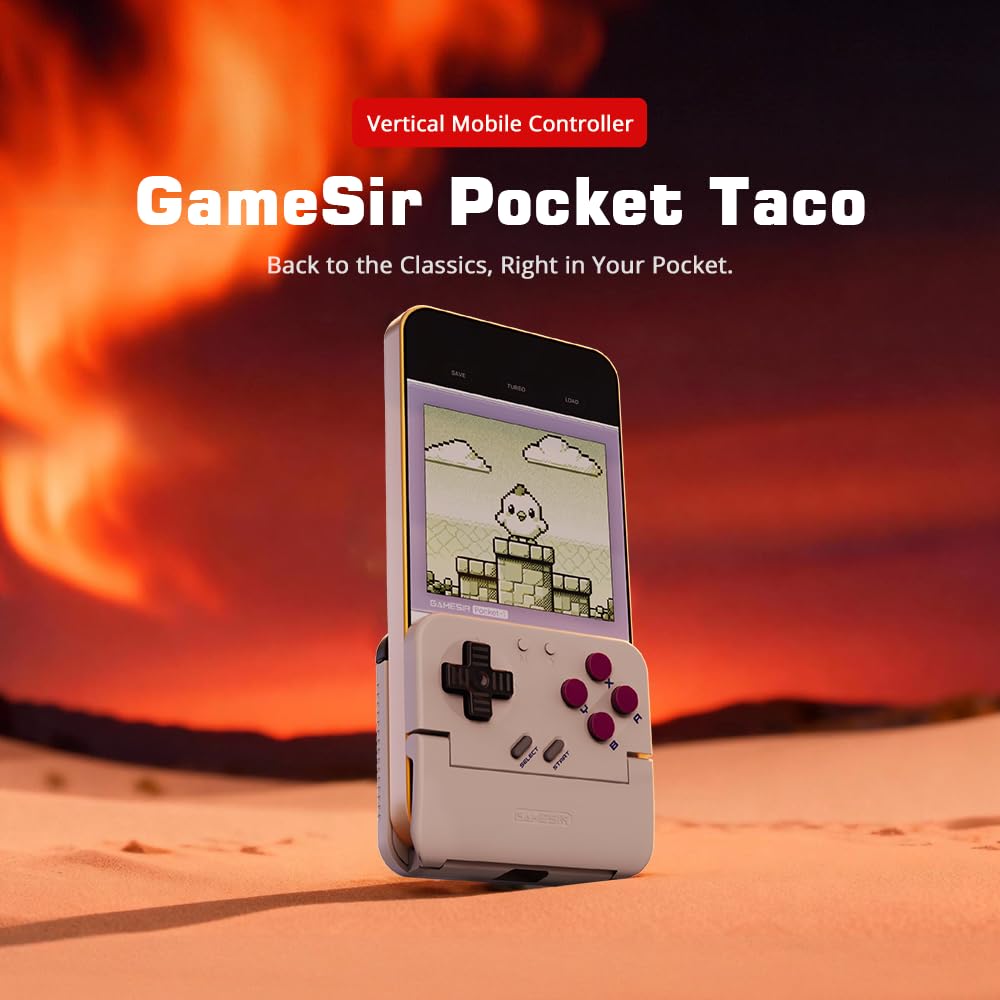
Figure 1: GameSir Pocket Taco attached to a smartphone, ready for vertical gaming.
Videoclipul 1: Terminatview of the GameSir Pocket Taco Vertical Mobile Gaming Controller, showcasindesignul și caracteristicile sale.
2. Caracteristici cheie
- Vertical Retro Arcade Design: Transforms your phone into a classic vertical handheld gaming device, ideal for retro titles and vertical shoot 'em ups.
- Ultraportabil și ușor: Weighing only 62.2g, this compact Bluetooth controller is easy to carry and includes a durable PP storage box for protection.
- Smart Power & Seamless Bluetooth Connectivity: Automatically powers on when unfolded and off when closed. Offers low-latency wireless gaming on Android and other compatible devices.
- Long-Lasting 600 mAh Battery & Pass-Through Charging: Provides hours of gameplay on a single charge. The hollow-bottom design allows simultaneous phone charging while gaming.
- Customizable Controls via GameSir App: Remap buttons, enable D-pad diagonal lock, switch to keyboard mode, and access G-Touch/V-Touch support for precise inputs.
- Phone-Friendly Silicone Protection: Soft silicone pads in the clamp area protect your phone from scratches and ensure a secure fit during intense gaming sessions.

Figure 2: Experience vertical handheld gaming by attaching your smartphone to the GameSir Pocket Taco.
3. Configurare și conectare
3.1 Configurare inițială
- Despacheta: Carefully remove the GameSir Pocket Taco from its packaging.
- Inspecta: Check for any visible damage or missing components.
- Încărca: Ensure the controller is sufficiently charged before first use. Connect the USB-C cable to the charging port on the controller.
- Introduceți telefonul: Gently open the controller's clamp and insert your smartphone. The silicone pads will secure your device and prevent scratches.
3.2 Conexiune Bluetooth
The GameSir Pocket Taco supports multiple connection modes for various platforms. Follow the steps below for your specific device:

Figure 3: The GameSir Pocket Taco offers seamless Bluetooth connectivity across various compatible devices.
3.2.1 iOS Connection (DS4 Mode)
- Țineți apăsat butonul butonul Acasă și implicit Un buton simultaneously for 2 seconds until the indicator light turns solid and flashes rapidly.
- On your iOS device, open Setări Bluetooth.
- Select "DUALSHOCK 4 Wireless Controller" from the available devices to connect.
- A solid indicator light on the controller confirms a successful connection.
3.2.2 Android Connection (Android Mode)
- Țineți apăsat butonul butonul Acasă și implicit Butonul B. simultaneously for 2 seconds until the indicator light turns solid and flashes rapidly.
- On your Android device, open Setări Bluetooth.
- Select "GameSir-Pocket 1" or "GameSir-Pocket 1_G" from the available devices to connect.
- A solid indicator light on the controller confirms a successful connection.
3.2.3 Switch Connection (Switch Mode)
- Țineți apăsat butonul butonul Acasă și implicit butonul X simultaneously for 2 seconds until the indicator light flashes up and down rapidly.
- On your Nintendo Switch, go to the Meniu Acasă, apoi selectați „Controlori”, și apoi „Schimbați prinderea/ordinea” pentru a intra în modul de împerechere.
- Wait for the connection to be established. A solid indicator light on the controller confirms a successful connection.
3.2.4 G-Touch Mode Connection
- Țineți apăsat butonul butonul Acasă și implicit Butonul Y simultaneously for 2 seconds until the indicator light turns solid and flashes rapidly.
- On your Android device, open Setări Bluetooth.
- Select "GameSir-Pocket 1_G" from the available devices to connect.
- A solid indicator light on the controller confirms a successful connection.
4. Instrucțiuni de utilizare
4.1 Pornire/Oprire
- Pornire: Unfold the controller to automatically power it on.
- Oprire: Close the controller to automatically power it off.
4.2 Încărcare
The GameSir Pocket Taco features a 600mAh battery. To charge, connect a USB-C cable to the charging port located on the top of the controller. The hollow-bottom design allows you to charge your phone simultaneously while playing.

Figure 4: Key features of the GameSir Pocket Taco, including pass-through charging and protective silicone pads.
4.3 Customizable Controls (GameSir App)
Download the official GameSir App to unlock advanced customization options:
- Remaparea butoanelor: Assign functions to different buttons for personalized gameplay.
- D-pad Diagonal Lock: Enable or disable diagonal input for the D-pad.
- Modul tastatură: Switch to keyboard mode for a more flexible control experience.
- G-Touch/V-Touch Support: Utilize advanced touch mapping features for specific games.
- Actualizări firmware: Keep your controller up-to-date with the latest software enhancements.

Figure 5: Customize your GameSir Pocket Taco settings and update firmware using the dedicated GameSir App.
5. Îngrijire și întreținere
- curatenie: Folosiți o lavetă moale și uscată pentru a curăța controlerul. Evitați substanțele de curățare abrazive sau solvenții.
- Depozitare: When not in use, store the GameSir Pocket Taco in its durable PP storage box to protect it from dust, scratches, and impacts.
- Manipulare: Do not apply excessive force when opening or closing the controller to prevent damage to the hinge mechanism.
- Temperatură: Avoid exposing the controller to extreme temperatures or direct sunlight for prolonged periods.
6. Depanare
6.1 Probleme de conectare
- Controlerul nu se conectează: If the connection fails, press and hold the 'M' button and the 'Home' button on the controller for 2 seconds to re-enter pairing mode. Ensure Bluetooth is enabled on your device and the correct mode (iOS, Android, Switch, G-Touch) is selected.
- Conexiune intermitentă: Ensure the controller is within range of your device and there are no significant obstructions. Fully charge the controller and your device.
6.2 Reactivitate la apăsarea butoanelor
- Butoanele care nu răspund: Ensure the controller is properly connected. Check for firmware updates via the GameSir App.
- D-pad issues: Some users have reported issues with D-pad responsiveness. Ensure firmware is up-to-date. If issues persist, contact GameSir support.
6.3 Probleme de încărcare
- Controlerul nu se încarcă: Use the provided USB-C cable or a compatible cable. Ensure the cable and power adapter are functioning correctly.
7. Specificații
| Caracteristică | Detaliu |
|---|---|
| Numele modelului | GameSir Pocket Taco |
| Marca | GameDomnule |
| Dispozitive compatibile | Android (also supports iOS, Switch, PC via specific modes) |
| Tip controler | Gamepad |
| Conectivitate | Wireless (Bluetooth) |
| Capacitatea bateriei | 600 mAh |
| Port de încărcare | USB-C (Pass-Through Charging for phone) |
| Greutatea articolului | 0.2 Kilograms (approx. 62.2g) |
| Culoare | Alb |
| Platformă hardware | Smartphone |
8. Garanție și asistență
For warranty information, technical support, or service inquiries, please refer to the documentation included with your product or visit the official GameSir webPăstrați bonul fiscal ca dovadă a achiziției pentru reclamații în garanție.