
Introducere
Mulțumesc pentru achizițieasing the FERIETELF T29 Drone with Camera. This manual provides essential information for the safe operation, setup, and maintenance of your drone. Please read this manual thoroughly before operating the drone to ensure proper use and to prevent damage or injury.
The T29 Drone features a 1080P HD camera, WiFi FPV live video transmission, voice and gesture control, and a foldable design for portability. It comes with two batteries and a carrying case for convenience.
Ghid de siguranță
Always prioritize safety when operating your drone. Failure to follow these guidelines may result in injury, damage to the drone, or property damage.
- Operate the drone in open areas, away from people, animals, buildings, and obstacles.
- Do not fly near airports or restricted airspace. Check local regulations before flying.
- Maintain a visual line of sight with the drone at all times.
- Evitați zborul pe vânturi puternice sau în condiții meteorologice nefavorabile.
- Asigurați-vă că bateriile sunt complet încărcate și instalate corect înainte de fiecare zbor.
- Țineți degetele și hainele largi departe de elicele în rotație.
- Do not operate the drone under the influence of alcohol or drugs.
- Copiii ar trebui să opereze drona doar sub supravegherea directă a unui adult.
Conținutul pachetului
Verificați dacă toate articolele sunt prezente în colet:
- FERIETELF T29 Drone
- Telecomanda
- 1080P HD Camera (integrated)
- Rechargeable Drone Batteries (x2)
- Cablu de încărcare USB
- Elice de rezervă
- Gărzile elice
- Şurubelniţă
- Manual de utilizare (acest document)
- Husă de transport
Înființat
1. Desfacerea dronei
Gently unfold the drone arms until they lock into position. Ensure all four arms are fully extended.
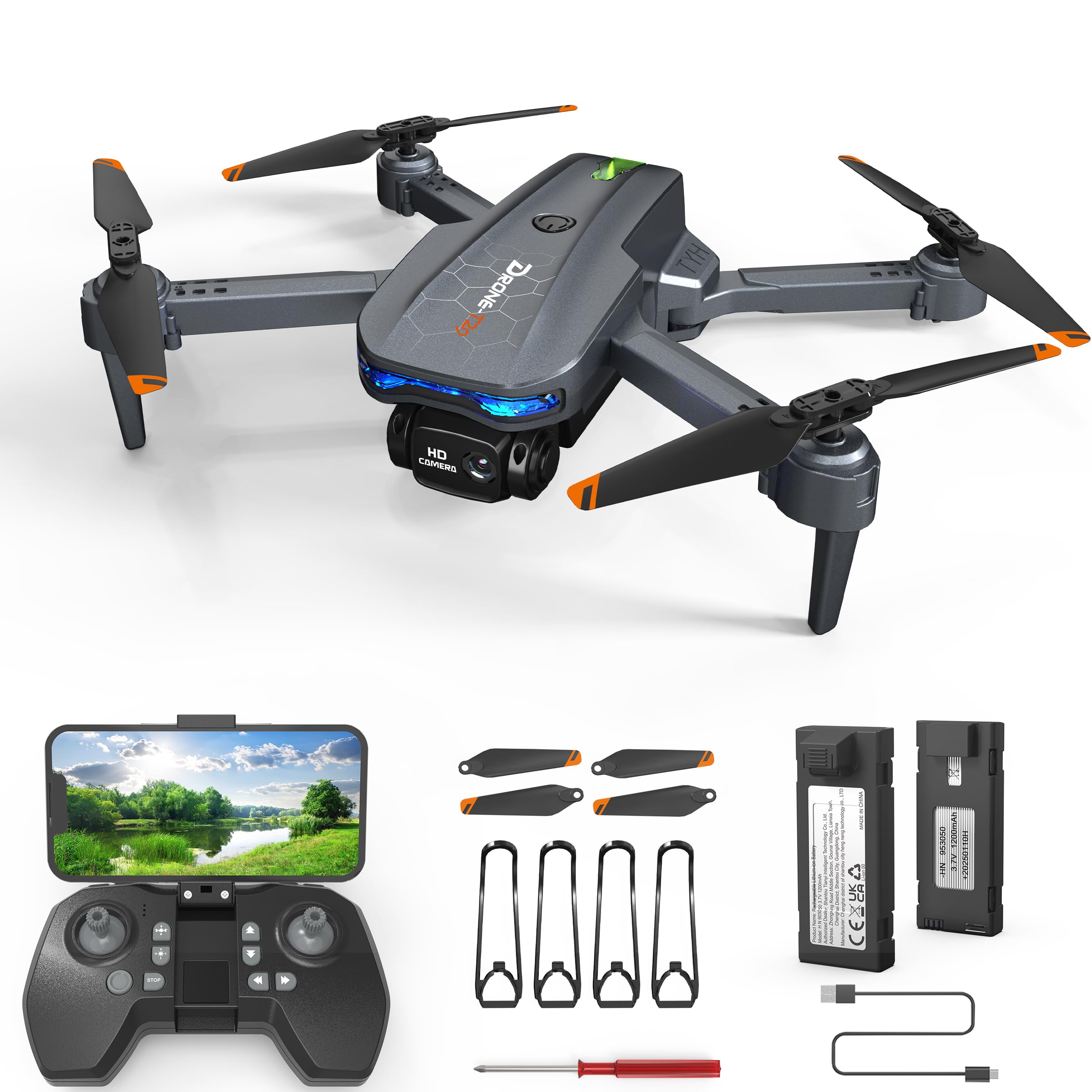
Image: The FERIETELF T29 Drone with its arms unfolded, ready for flight. The propellers are visible at the end of each arm.
2. Installing Propeller Guards
For beginner pilots, it is recommended to install the propeller guards. Attach each guard to the corresponding motor arm by snapping it into place.
3. Încărcarea bateriei dronei
Connect the drone battery to the USB charging cable. Plug the USB cable into a 5V/1A USB adapter (not included). The indicator light on the cable will show charging status. A full charge typically takes 60-90 minutes.
- Indicator de încărcare: Red light ON during charging, OFF when fully charged.
Important: Always use the provided charging cable. Do not leave batteries unattended while charging. Disconnect once fully charged.
4. Instalarea bateriei dronei
Insert the fully charged battery into the battery compartment on the back of the drone until it clicks securely into place.
5. Instalarea bateriilor telecomenzii
Open the battery cover on the back of the remote controller. Insert 3 x AAA batteries (not included) according to the polarity markings. Close the battery cover.
Instrucțiuni de operare
1. Pornire și asociere
- Așezați drona pe o suprafață plană și plană.
- Apăsați și țineți apăsat butonul de pornire de pe dronă până când luminile indicatoare clipesc.
- Turn on the remote controller. The indicator light on the remote will flash.
- Push the left joystick (throttle) up to the maximum position, then pull it down to the minimum position. The drone and remote lights will become solid, indicating successful pairing.
2. Calibrating the Gyroscope
After pairing, place the drone on a flat surface. Push both joysticks down and to the right simultaneously for 2-3 seconds. The drone lights will flash rapidly and then become solid, indicating successful calibration.
3. Connecting to WiFi FPV (First Person View)
- Download the "FERIETELF Drone" app from your smartphone's app store (iOS/Android).
- Porniți drona.
- Go to your smartphone's WiFi settings and connect to the network named "FERIETELF-T29-XXXXXX".
- Open the FERIETELF Drone app. You should see the live video feed from the drone's camera.
4. Decolare și aterizare
- Decolare cu o singură cheie: Press the One-Key Take-off button on the remote controller. The drone will automatically ascend to a certain height and hover.
- Decolare manuală: Push both joysticks down and outwards to start the propellers. Then, gently push the left joystick (throttle) upwards to ascend.
- Aterizare cu o singură tastă: Press the One-Key Landing button. The drone will slowly descend and land automatically.
- Aterizare manuală: Gently pull the left joystick (throttle) downwards to descend. Once landed, pull both joysticks down and inwards to stop the propellers.
5. Comenzi de zbor de bază
| Joystick/Button | Funcţie |
|---|---|
| Left Joystick (Up/Down) | Ascend / Descend (Throttle) |
| Left Joystick (Left/Right) | Rotate Left / Rotate Right (Yaw) |
| Right Joystick (Up/Down) | Fly Forward / Fly Backward (Pitch) |
| Right Joystick (Left/Right) | Fly Left / Fly Right (Roll) |
| Butoane de tăiere | Adjust drone drift (forward/backward, left/right) |
6. Control vocal
With the app connected, activate voice control. Speak commands such as "Take off", "Land", "Forward", "Backward", "Left", "Right". Ensure you are in a quiet environment for best results.
7. Controlul gesturilor
In the app, enable gesture control. Perform specific hand gestures in front of the drone's camera to trigger actions:
- Gestul în formă de „V”: Faceți o fotografie.
- Gestul palmei: Porniți / Opriți înregistrarea video.
Asigurați o iluminare bună și o lumină clară view of your hand for accurate gesture recognition.
8. Mod fără cap
Press the Headless Mode button on the remote. In this mode, the drone's orientation is relative to the pilot, making it easier to control regardless of which way the drone is facing. Press again to exit.
9. Reglarea vitezei
Press the Speed button to cycle through different speed modes (low, medium, high). Adjust according to your skill level and flying environment.
Întreţinere
- curatenie: Use a soft, dry cloth to clean the drone and remote controller. Do not use water or solvents.
- Inspecția elicei: Regularly check propellers for damage (cracks, bends). Replace damaged propellers immediately using the provided screwdriver and spare parts.
- Îngrijirea bateriei:
- Depozitați bateriile într-un loc răcoros și uscat.
- Nu supraîncărcați sau descărcați excesiv bateriile.
- If not used for an extended period, charge batteries to about 50% capacity.
- Depozitare: When not in use, fold the drone and store it in its carrying case to protect it from dust and damage. Remove batteries from the remote controller if storing for long periods.
Depanare
| Problemă | Cauza posibila | Soluţie |
|---|---|---|
| Drona nu răspunde la telecomandă. | Not paired; low battery (drone/remote). | Re-pair drone and remote. Charge drone battery. Replace remote batteries. |
| Drona se deplasează în derivă în timpul zborului. | Gyroscope not calibrated; uneven surface at take-off; wind interference. | Recalibrate gyroscope on a flat surface. Use trim buttons to adjust. Fly in calm conditions. |
| Elicele nu se rotesc. | Drone not powered on; propellers obstructed; motor issue. | Ensure drone is on. Check for obstructions. Contact support if motors are faulty. |
| Fără flux video FPV. | Not connected to drone's WiFi; app not open; weak signal. | Verify WiFi connection. Restart app. Move closer to drone. |
| Timp de zbor scurt. | Bateria nu este complet încărcată; baterie veche; zbor agresiv. | Ensure full charge. Consider replacing old batteries. Fly more conservatively. |
Specificații
- Model: TY29
- Marca: FERIETELF
- Dimensiuni (desfășurat): 30.5 x 25.4 x 4.8 cm (12 x 10 x 1.9 țoli)
- Greutate: 185 grame
- Camera: 1080P HD
- Conectivitate: WiFi FPV
- Caracteristici de control: Voice Control, Gesture Control, Headless Mode, One-Key Take-off/Landing
- Baterii: 2 x Lithium Ion (P76 type, included)
- Baterii telecomenzii: 3 x AAA (nu sunt incluse)
- Producător: SHANTOU TIANYI TEHNOLOGIE INTELIGENTĂ CO., LTD.
Informații despre garanție
This product comes with a standard manufacturer's warranty. For specific details regarding warranty coverage, duration, and claims process, please refer to the warranty card included in your product packaging or contact FERIETELF customer support directly. Keep your proof of purchase for warranty validation.
Asistență pentru clienți
If you encounter any issues or have questions not covered in this manual, please contact FERIETELF customer support. For the most up-to-date contact information, please visit the official FERIETELF website-ul web sau consultați datele de contact furnizate pe ambalajul produsului.
Resurse online: For additional tips, FAQs, and video tutorials, please visit the official FERIETELF support page.
