
1. Introducere
The LYCEBELL LC-100-APP is a wireless Bluetooth anemometer designed for accurate measurement of wind speed, temperature, wind chill, and air flow velocity. This device connects to your smartphone or tablet via a mobile application, allowing for real-time data monitoring, recording, analysis, and processing. It is suitable for a wide range of applications including HVAC system checks, outdoor activities like sailing and climbing, drone operation, and general meteorological observations.
The anemometer features a large LCD with backlight for clear readability, multiple units for wind speed measurement, and functions for displaying current, average, maximum, and minimum wind speeds. It also includes an auto power-off feature and a low battery warning for convenience.
2. Conținutul pachetului
Vă rugăm să verificați dacă toate articolele enumerate mai jos sunt incluse în pachetul dumneavoastră:
- 1 x LYCEBELL LC-100-APP Handheld Anemometer
- 1 x Curea de mână
- 2 baterii AAA de 1.5 V
- 1 x Portable storage case
- 1 x manual de instrucțiuni

Image: The package contents of the LYCEBELL LC-100-APP Anemometer, showing the device, two AAA batteries, a hand strap, a portable storage case, and the instruction manual.
3. Produs terminatview
The LC-100-APP anemometer features a compact design with an integrated fan for wind speed measurement and a clear LCD for displaying readings. The device includes several buttons for controlling its functions.
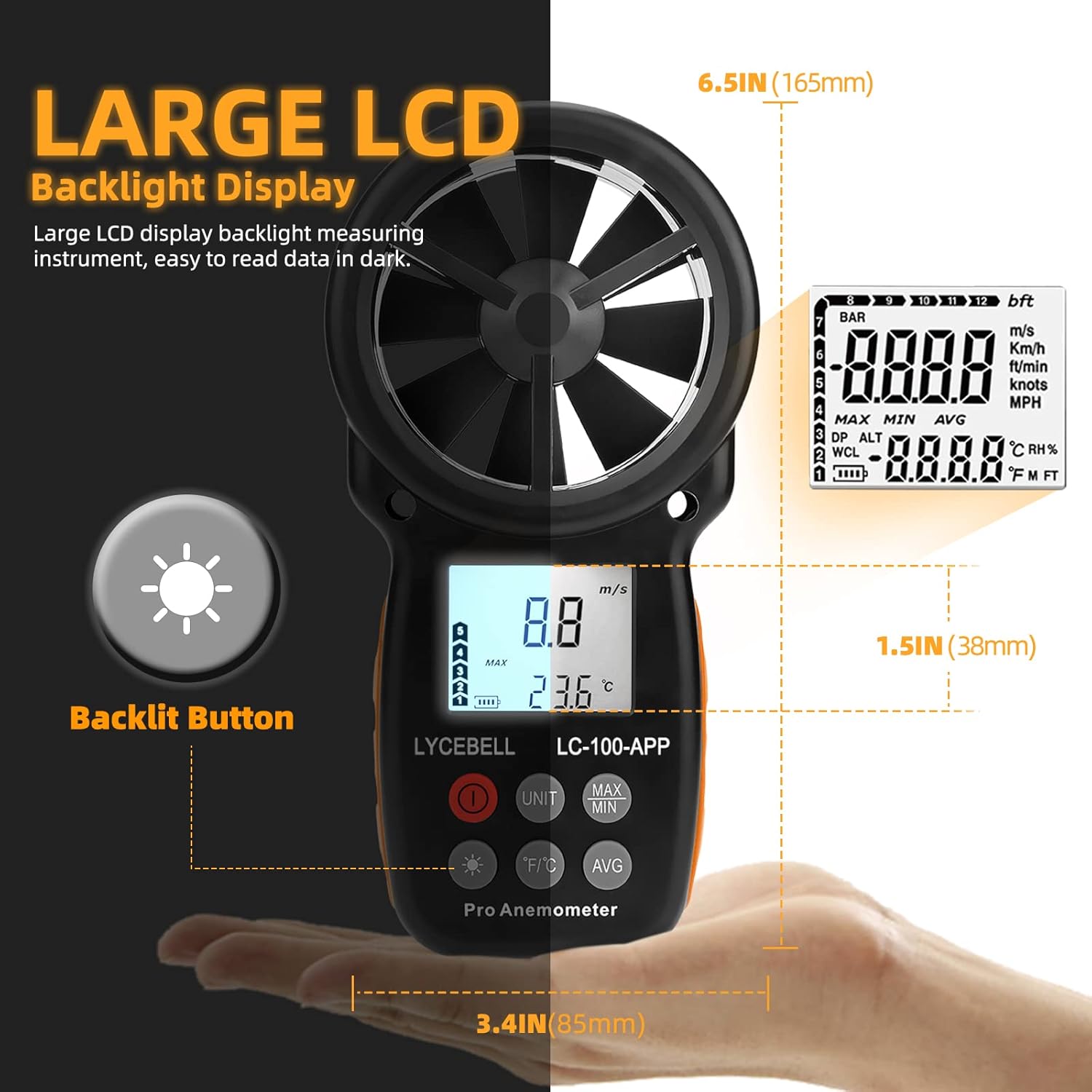
Imagine: O imagine detaliată view of the anemometer's large LCD backlight display, highlighting its readability in various lighting conditions. The image also indicates the device's dimensions: 6.5 inches (165mm) in height and 3.4 inches (85mm) in width.
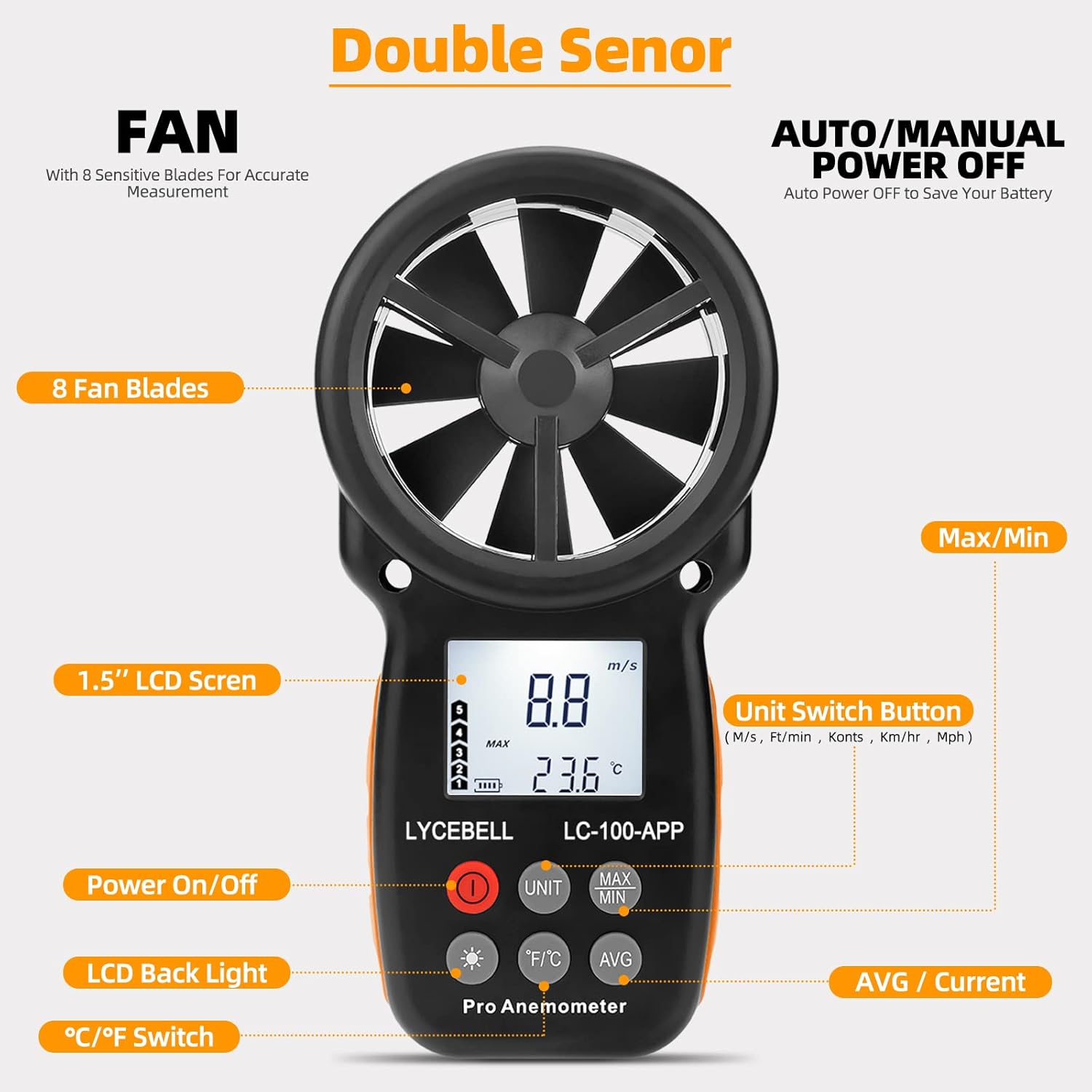
Image: This image illustrates the various buttons and components of the anemometer. It shows the 8-blade fan, the 1.5-inch LCD screen, and labeled buttons for Power On/Off, Unit Switch (m/s, ft/min, knots, km/hr, mph), LCD Back Light, °C/°F Temperature Unit Switch, MAX/MIN value display, and AVG/Current value display.
Descrierea butonului:
- Butonul de pornire (O): Pornește sau oprește dispozitivul.
- Butonul UNIT: Cycles through wind speed units (m/s, km/h, ft/min, knots, mph).
- Butonul MAX/MIN: Displays the maximum or minimum recorded wind speed.
- AVG Button: Displays the average wind speed.
- Butonul °C/°F: Switches between Celsius and Fahrenheit for temperature display.
- Backlight Button (*): Activates or deactivates the LCD backlight.
Video: This video demonstrates the functions of the LYCEBELL LC-100-APP Anemometer's buttons, including power on/off, unit switching, backlight activation, and viewing maximum, minimum, and average wind speed values. It also shows the device connecting to a mobile application.
4. Configurare
4.1 Instalarea bateriei
- Locate the battery compartment on the back of the anemometer.
- Use a small Phillips head screwdriver (often included) to unscrew the two screws securing the battery cover.
- Scoateți cu grijă capacul bateriei.
- Introduceți două baterii AAA de 1.5 V, asigurându-vă că polaritatea este corectă (+/-).
- Puneți la loc capacul bateriei și fixați-l cu șuruburile.
Video: This video demonstrates the unboxing of the anemometer, installation of the AAA batteries into the device, and attachment of the hand strap. It also shows the initial power-on sequence.
4.2 Conexiune la APP
The LC-100-APP anemometer can connect to your mobile device via Bluetooth for enhanced functionality.
- Descărcați aplicația: Caută "Intelligent Anemometer" in your device's app store (iOS App Store or Google Play Store) or scan the QR code provided in the image below. You can also visit http://aicare.net.cn/app/iAnemometer/index.html for direct download links.
- Activați Bluetooth: Activați Bluetooth pe dispozitivul dvs. mobil.
- Power On Anemometer: Turn on the LC-100-APP anemometer.
- Asociere: Open the "Intelligent Anemometer" app. The app will automatically search for and pair with the device. A green light or indicator within the app will confirm successful pairing.

Image: This image displays the mobile application interface for the anemometer, showing real-time wind speed and temperature data, data logging capabilities, and options to download the app from the App Store or Google Play. A QR code for app download is also visible.
5. Instrucțiuni de utilizare
5.1 Pornire/Oprire
Press the red Power button (O) to turn the anemometer on. Press and hold the Power button for a few seconds to turn it off. The device also features an auto power-off function to conserve battery life.
5.2 Measuring Wind Speed and Temperature
Once powered on, hold the anemometer so that the wind flows directly through the fan blades. The current wind speed and temperature will be displayed on the LCD screen.

Image: The anemometer in use, showing its precision in measuring wind speed and temperature. The image highlights the various unit selections available for wind speed: m/s (0.3-30 M/s), Knots (1-55 Knots), Km/h (2-90 Km/h), Mph (0.67-67.1 mph), and Ft/min (59-5905 Ft/min). Temperature range is also indicated as 14°F to 113°F.
5.3 Comutarea unităților
Apăsați tasta UNITATE button to cycle through the available wind speed units: meters per second (m/s), kilometers per hour (km/h), feet per minute (ft/min), knots, and miles per hour (mph).
Apăsați tasta ° C / ° F button to switch the temperature display between Celsius and Fahrenheit.
5.4 MAX/MIN/AVG Readings
Apăsați tasta MAX/MIN butonul pentru a view the maximum or minimum wind speed recorded since the device was powered on or reset. Press the AVG button to display the average wind speed.
5.5 Lumina de fundal
Press the Backlight button (*) to turn the LCD backlight on or off. The backlight will automatically turn off after a short period to save battery.
5.6 Wind Chill Indication
The device provides a wind chill indication, which is calculated based on the measured wind speed and temperature, offering a more accurate perception of cold conditions.

Image: The anemometer is depicted in various practical applications, including general travel environments, surfing or sailing, storm chasing, and meteorological observations, demonstrating its versatility.
6. Întreținere
To ensure the longevity and accuracy of your LYCEBELL LC-100-APP Anemometer, follow these maintenance guidelines:
- curatenie: Ștergeți dispozitivul cu o lavetă moale și uscată. Nu utilizați substanțe de curățare abrazive sau solvenți.
- Depozitare: When not in use for extended periods, remove the batteries to prevent leakage. Store the device in its portable storage case in a cool, dry place, away from direct sunlight and extreme temperatures.
- Îngrijirea ventilatorului: Keep the fan blades free from dust and debris. Avoid touching the blades directly to prevent damage.
7. Depanare
If you encounter issues with your anemometer, refer to the following common problems and solutions:
- Dispozitivul nu pornește:
- Verificați dacă bateriile sunt instalate corect, respectând polaritatea.
- Înlocuiți bateriile cu unele noi dacă sunt descărcate.
- Citiri inexacte:
- Ensure the fan blades are spinning freely and are not obstructed by debris.
- Make sure the device is held correctly, allowing wind to pass directly through the fan.
- Verify that the correct units are selected for measurement.
- Probleme de conectare la aplicație:
- Asigurați-vă că Bluetooth este activat pe dispozitivul dvs. mobil.
- Make sure the anemometer is powered on and within Bluetooth range.
- Restart both the anemometer and the mobile application.
- Verificați dacă aplicația este actualizată la cea mai recentă versiune.
- Lumina de fundal LCD nu funcționează:
- Press the Backlight button (*) to activate it.
- Check battery level; low batteries may affect backlight performance.
8. Specificații
| Caracteristică | Caietul de sarcini |
|---|---|
| Marca | LYCEBELL |
| Numărul de model | 100-APP |
| Material | Acrilonitril Butadien Stiren (ABS) |
| Gama de viteză a vântului | 0.3~30 M/s (0.67~67.1 mph) |
| Precizia vitezei vântului | ±5% |
| Unități de viteză a vântului | m/s, km/h, ft/min, noduri, mph |
| Intervalul de temperatură al vântului | -10 ~ 45 ° C (14 ~ 113 ° F) |
| Wind Temperature Accuracy | ±2°C (35.6°F) |
| Rezoluţie | 0.1 m/s |
| Afişa | LCD mare cu iluminare de fundal |
| Sursa de alimentare | 2 baterii AAA de 1.5 V |
| Dimensiuni articol (L x l x H) | 3.54 x 1.57 x 6.69 inci |
| Greutatea articolului | 153 de grame (5.4 uncii) |
| Caracteristici | Mobile APP, Auto Power Off, Low Battery Warning, Wind Chill Indication, MAX/MIN/Current/Average Wind Speed |
9. Garanție și asistență
LYCEBELL products are designed for reliability and performance. For warranty information, technical support, or service inquiries, please refer to the contact details provided with your purchase or visit the official LYCEBELL webPăstrați bonul fiscal ca dovadă a achiziției pentru reclamații în garanție.