
Introducere
Thank you for choosing the MEETION C9990 Wireless Bluetooth Keyboard and Mouse combo. This product offers versatile connectivity options (2.4GHz USB and dual Bluetooth channels), an ergonomic design for comfort, and rechargeable batteries for extended use. This manual will guide you through the setup, operation, and maintenance of your new device.
Conținutul pachetului
- Tastatură wireless MEETION C9990
- MEETION Wireless Mouse
- Receptor USB (depozitat în compartimentul bateriei mouse-ului)
- Cablu de încărcare USB-C
- Manual de utilizare
Produs terminatview
Caracteristicile tastaturii
- Aspect la dimensiune completă: Includes a numeric pad for comprehensive data entry.
- Low-Noise Scissor-Switch Keys: Provides a quiet and comfortable typing experience.
- Taste multimedia: Dedicated function keys for quick access to media controls and system functions.
- Fixed Anti-Slip Stand: Ensures stability and an ergonomic typing angle.
- Design ultra-subțire: Estetic plăcutasing and space-efficient.

Image: Close-up of the keyboard keys, illustrating the low-noise scissor-switch design for quiet and comfortable typing.

Image: The keyboard features a fixed-angle anti-slip stand for enhanced stability and typing comfort.
Caracteristicile mouse-ului
- Ergonomic Sculpted Design: Contoured shape supports natural wrist and hand posture.
- DPI reglabil: Four DPI settings (800-2400) for precise cursor control.
- Tilt-Scroll Wheel: Allows for horizontal and vertical scrolling.
- Comutator de mod: Easily switch between 2.4GHz and Bluetooth modes.

Image: The mouse features an ergonomic sculpted design to provide comfort during extended use.

Image: Detailed diagram of the mouse highlighting its various components and functions, including buttons, scroll wheel, and switches.
Instrucțiuni de configurare
1. Încărcarea dispozitivelor
Both the keyboard and mouse are equipped with built-in rechargeable batteries. Before first use, or when the battery indicator shows low power, charge both devices using the provided USB-C cable.
- Connect the USB-C end of the charging cable to the charging port on the keyboard and mouse.
- Conectați capătul USB-A al cablului de încărcare la o sursă de alimentare USB (de exemplu, portul USB al computerului, adaptorul USB de perete).
- Indicatorul luminos de încărcare se va aprinde în timpul încărcării și se va stinge când bateria este complet încărcată.
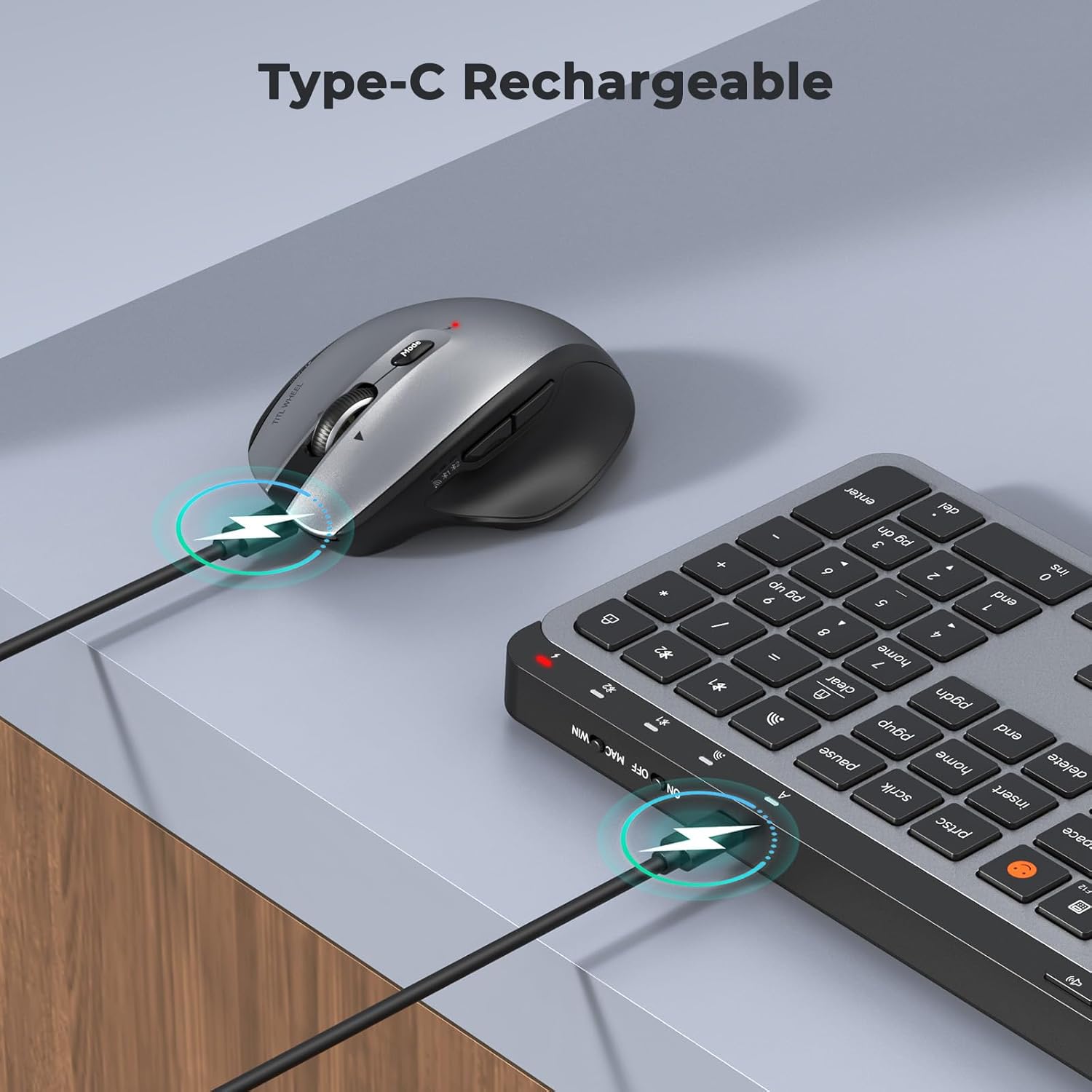
Image: Both the keyboard and mouse are rechargeable via USB-C, ensuring convenience and eliminating the need for disposable batteries.
2. Conectarea la dispozitive
The C9990 combo supports three connection modes: 2.4GHz wireless (via USB receiver) and two Bluetooth channels (BT1, BT2).
2.1. Conexiune wireless de 2.4 GHz
- Locate the USB receiver, typically stored in the mouse's battery compartment.
- Conectați receptorul USB la un port USB disponibil de pe computer.
- Porniți tastatura și mouse-ul folosind comutatoarele de alimentare respective.
- For the keyboard, press the 2.4G button (usually indicated by a USB icon) to switch to 2.4GHz mode.
- For the mouse, switch the mode selector to the 2.4G poziţie.
- The devices should connect automatically.
2.2. Conexiune Bluetooth (BT1 / BT2)
- Porniți tastatura și mouse-ul.
- Pentru tastatură: Țineți apăsat butonul BT1 or BT2 button for 3-5 seconds until the indicator light flashes rapidly, indicating pairing mode.
- Pentru mouse: Switch the mode selector to the BT1 or BT2 position, then press and hold the Bluetooth pairing button (often located on the underside) until the indicator light flashes.
- Pe dispozitivul dvs. (laptop, tabletă, smartphone), accesați setările Bluetooth și căutați dispozitive noi.
- Select "MEETION Keyboard" and "MEETION Mouse" from the list to pair.
- Repeat for the second Bluetooth channel (BT2) if connecting to another device.
3. Comutarea între dispozitive
The C9990 allows seamless switching between up to three connected devices (one 2.4GHz and two Bluetooth).
- Pentru tastatură: Apăsați butonul dedicat 2.4G, BT1, sau BT2 button to switch to the desired connected device.
- Pentru mouse: Use the mode switch on the underside of the mouse to select 2.4G, BT1, sau BT2.

Image: The keyboard and mouse can switch between three devices (PC, tablet, phone) with a single click, indicated by the Bluetooth and 2.4G icons.
Instrucțiuni de operare
Funcțiile tastaturii
- Taste multimedia (F1-F12): These keys provide quick access to functions like brightness control, display window, home, dictation, sleep, app switcher, screen mirroring, screen capture, music player, email, and calculator. Functions may vary slightly depending on the operating system.
- Emoji Key: The dedicated emoji key supports Windows, macOS, iPad (iPadOS), and Android Samsung devices. It does not support iPhone (iOS).

Image: The keyboard features a row of multimedia keys (F1-F12) for quick access to various system functions.
Funcțiile mouse-ului
- Ajustare DPI: Press the DPI switch button (usually located near the scroll wheel) to cycle through the available DPI settings (800, 1200, 1600, 2400). Adjust to your preference for cursor speed and precision.
- Tilt-Scroll Wheel: In addition to vertical scrolling, tilt the scroll wheel left or right for horizontal scrolling in applications that support it (e.g., spreadsheets).
- Butoane Înainte/Înapoi: Folosește butoanele laterale pentru navigare rapidă în web browsere și file exploratori.
Întreţinere
- curatenie: Folosiți o lavetă moale și uscată pentru a curăța suprafețele tastaturii și mouse-ului. Pentru murdăria persistentă, ștergeți ușor.ampClătiți laveta cu apă sau o soluție de curățare delicată. Evitați substanțele chimice dure sau materialele abrazive.
- Îngrijirea bateriei: To prolong battery life, avoid fully discharging the devices frequently. Charge them when the low battery indicator appears. If storing for an extended period, charge them to about 50% and recharge every few months.
- Depozitare: Depozitați dispozitivele într-un loc răcoros și uscat, ferit de lumina directă a soarelui și de temperaturi extreme.
Depanare
Probleme de conectare
- Dispozitivul nu se conectează: Ensure both the keyboard and mouse are powered on and fully charged. Check that the correct connection mode (2.4G, BT1, or BT2) is selected on both devices. For Bluetooth, ensure your host device's Bluetooth is enabled and the devices are in pairing mode.
- Conexiune intermitentă: Move the devices closer to your computer. Avoid using them near strong electromagnetic interference sources (e.g., Wi-Fi routers, other wireless devices).
- 2.4GHz receiver not recognized: Try plugging the USB receiver into a different USB port. Ensure the receiver is fully inserted.
Probleme de funcționalitate
- Keys or mouse unresponsive: Recharge the devices. Restart your computer or device. Re-pair the devices if using Bluetooth or re-insert the USB receiver for 2.4GHz.
- Cursorul mouse-ului este neregulat: Clean the mouse sensor. Ensure you are using the mouse on a suitable surface (not highly reflective or transparent). Adjust DPI settings.
Specificații
| Numărul de model | C9990 |
| Tehnologia de conectivitate | Bluetooth, USB (2.4GHz Wireless) |
| Aspectul tastaturii | QWERTY, Full Size |
| Detectarea mișcării mouse-ului | Optic |
| Setări DPI mouse | 800, 1200, 1600, 2400 |
| Sursa de alimentare | Alimentat cu baterie (reîncărcabilă prin USB-C) |
| Sisteme de operare compatibile | Windows, macOS, Linux, Chrome OS, Android |
| Greutatea articolului | 1.16 Kilograms (combined) |
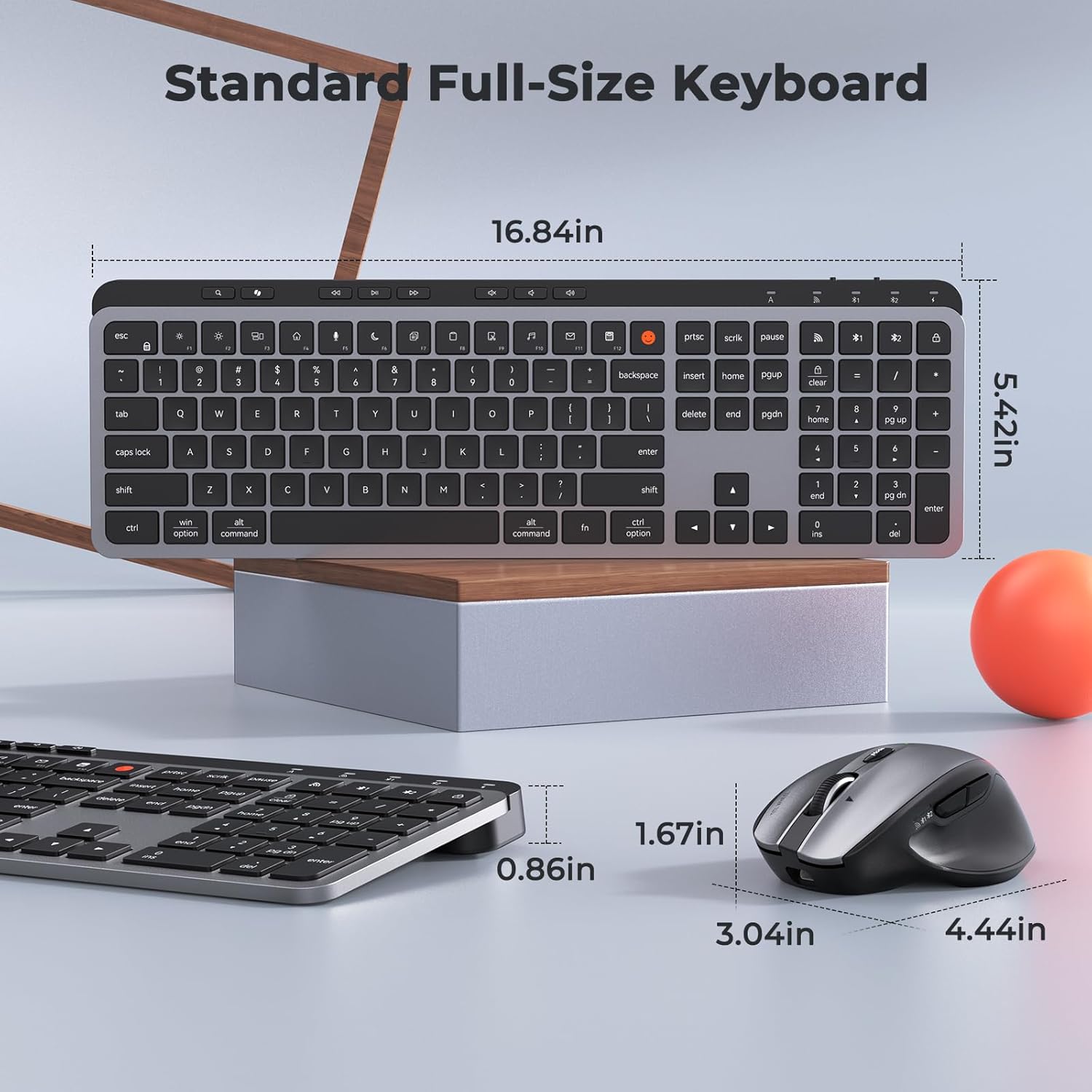
Image: Dimensions of the MEETION C9990 keyboard and mouse for reference.
Garanție și suport
The MEETION C9990 Wireless Bluetooth Keyboard and Mouse comes with a 1 ani garanție de la data achiziției. Această garanție acoperă defectele de fabricație în condiții normale de utilizare.
For technical support, troubleshooting assistance, or warranty claims, please contact MEETION customer service through the retailer where you purchased the product or visit the official MEETION website pentru informații de contact.
Informații de siguranță
- Nu expuneți dispozitivele la apă, umezeală sau temperaturi extreme.
- Evitați să scăpați dispozitivele sau să le supuneți la impacturi puternice.
- Do not attempt to disassemble or repair the devices yourself. Refer to qualified service personnel.
- A nu se lăsa la îndemâna copiilor.
- Eliminați bateriile și componentele electronice în mod responsabil, conform reglementărilor locale.