
Memorex MXTAB11
Memorex MXTAB11 11-inch Android 14 Tablet Bundle User Manual
Model: MXTAB11
1. Introducere
The Memorex MXTAB11 11-inch Android 14 Tablet Bundle is designed for versatile use, supporting work, streaming, gaming, and learning. This tablet offers premium performance with an A523 ARM 8-core Cortex processor, optimized graphics, and comes with essential accessories for immediate use.

Image 1: The Memorex MXTAB11 tablet set up with its Bluetooth keyboard and wireless headphones on a wooden table, ready for use.
Caracteristici cheie:
- Performanță puternică: A523 ARM 8-core Cortex processor (up to 2.0GHz) with optimized graphics for smooth multitasking and responsive app performance.
- Afișaj vibrant: 11-inch FHD IPS display with 1920 x 1200 pixel resolution for clear visuals.
- AmpDepozitare: 128GB internal storage for apps, photos, and files.
- Efficient Memory: 4GB RAM for smooth operation.
- Modern OS: Runs on Android 14.
- Design durabil: Features a metal body for enhanced durability.
- Conectivitate: Supports 802.11a/b/g/n/ac/ax wireless types.
2. Ce se află în cutie
Your Memorex MXTAB11 Tablet Bundle includes the following items:
- Memorex 11” Tablet
- Tastatură Bluetooth
- Căști fără fir
- Husa de protectie cu suport
- AC Adapter Charger & Cable
- Manual de instructiuni
- Ghid de pornire rapidă
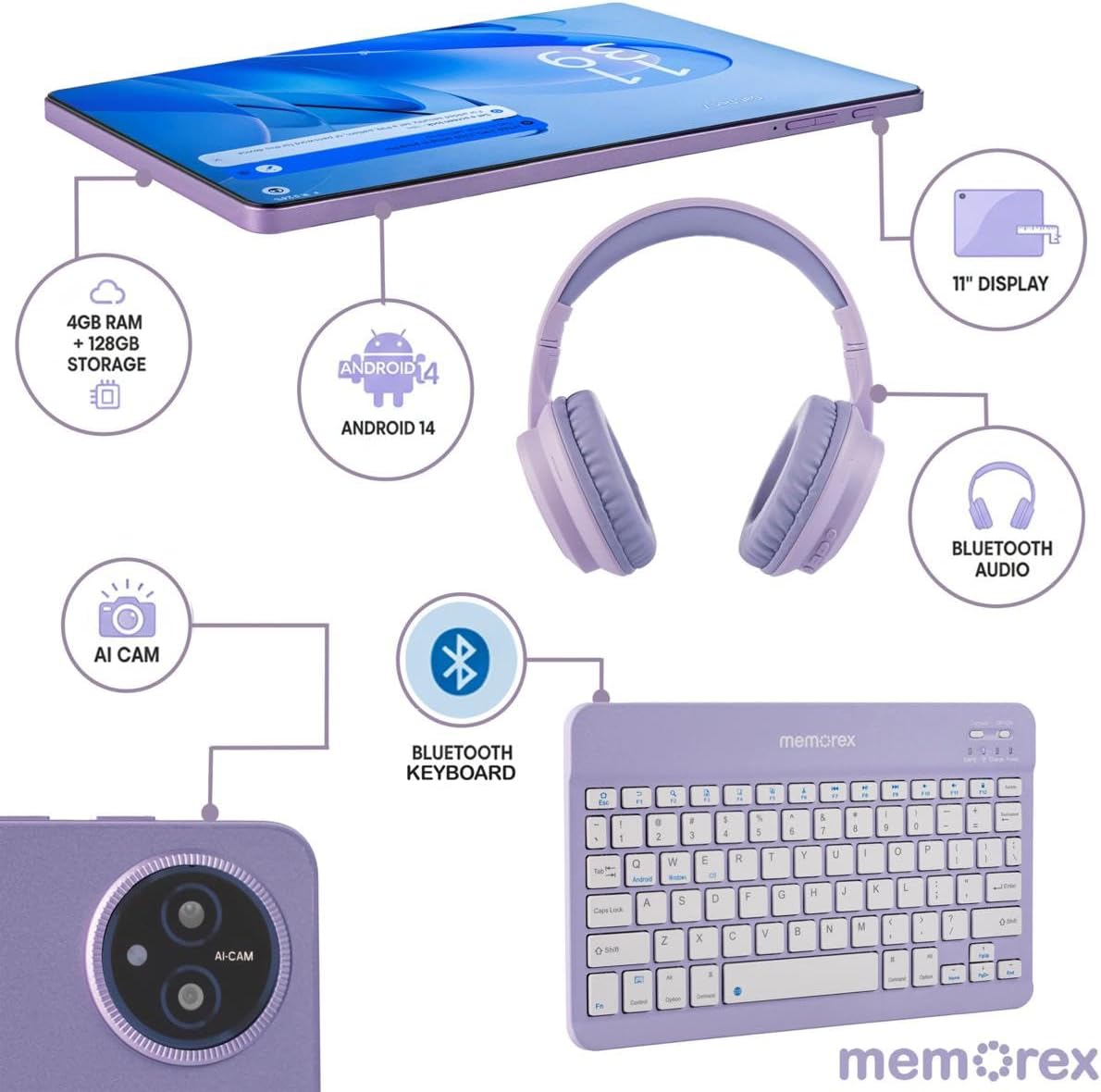
Image 2: A visual breakdown of the Memorex MXTAB11 tablet's features and included accessories, such as 4GB RAM, 128GB storage, Android 14, 11-inch display, AI camera, Bluetooth keyboard, Bluetooth audio, and wireless headphones.
3. Configurare
3.1 Pornirea inițială și configurarea
- Încărcați tableta: Before first use, connect the tablet to the AC adapter charger and cable provided. Allow it to charge fully.
- Pornire: Press and hold the power button (usually located on the side or top edge) until the Memorex logo appears on the screen.
- Urmați instrucțiunile de pe ecran: Tableta vă va ghida prin procesul inițial de configurare, inclusiv:
- Selectarea limbii.
- Conectarea la o rețea Wi-Fi.
- Signing in with your Google account (or creating one).
- Configurarea blocării ecranului (PIN, model, parolă).
3.2 Connecting Bluetooth Keyboard and Wireless Headphones
- Activați Bluetooth: On your tablet, swipe down from the top of the screen to open the Quick Settings panel. Tap the Bluetooth icon to turn it on. Alternatively, go to Setări > Dispozitive conectate > Bluetooth.
- Pair Bluetooth Keyboard:
- Turn on the Bluetooth keyboard (refer to the keyboard's quick start guide for specific instructions).
- On your tablet's Bluetooth settings, tap 'Pair new device'.
- Select the keyboard from the list of available devices. Follow any on-screen prompts to complete pairing.
- Pair Wireless Headphones:
- Put your wireless headphones into pairing mode (refer to the headphones' quick start guide).
- On your tablet's Bluetooth settings, tap 'Pair new device'.
- Select the headphones from the list of available devices. Follow any on-screen prompts to complete pairing.
4. Utilizarea tabletei
4.1 Navigare de bază
- Ecranul principal: Centrul central pentru aplicațiile și widget-urile tale.
- Sertarul de aplicații: Glisați în sus din partea de jos a ecranului pentru a accesa toate aplicațiile instalate.
- Quick Settings & Notifications: Swipe down from the top of the screen to access quick settings (Wi-Fi, Bluetooth, brightness) and view notificări.
- Înapoi, Acasă, Aplicații recente: Use the navigation buttons at the bottom of the screen to go back, return to the home screen, or view aplicații deschise recent.
4.2 Utilizarea aplicațiilor
The tablet comes pre-loaded with essential Google applications and allows you to download more from the Google Play Store.
- Magazin Google Play: Tap the Play Store icon to browse and download new apps, games, movies, and books.
- Web Navigare: Use the pre-installed Chrome browser to access the internet.
- Camera: Tap the Camera icon to take photos or record videos using the tablet's dual cameras.
- Calendaristic: Manage your schedule and events.
- Files: Access and organize your documents, images, videos, and other files.

Image 3: A person comfortably using the Memorex MXTAB11 tablet with its Bluetooth keyboard and wireless headphones, demonstrating its suitability for various activities like work or entertainment.
5. Întreținere
- curatenie: Folosiți o lavetă moale, fără scame, pentru a curăța ecranul și corpul tabletei. Evitați substanțele chimice dure sau materialele abrazive.
- Actualizări de software: Verificați și instalați periodic actualizări de sistem pentru a asigura performanță și securitate optime. Accesați Setări > Sistem > Actualizare sistem.
- Îngrijirea bateriei: Pentru a prelungi durata de viață a bateriei, evitați temperaturile extreme și nu lăsați bateria să se descarce complet frecvent.
- Managementul stocării: Curățați periodic inutilul fileaplicații pentru a elibera spațiu de stocare și a menține performanța.
6. Depanare
6.1 Probleme comune și soluții
- Tableta nu pornește: Ensure the tablet is charged. Connect it to the charger and wait a few minutes before attempting to power it on again.
- Performanță lentă: Închideți aplicațiile neutilizate, goliți memoria cache sau reporniți tableta. Verificați dacă există actualizări de sistem disponibile.
- Probleme de conectivitate Wi-Fi: Reporniți routerul Wi-Fi și tableta. Uitați de rețea în setările tabletei și reconectați-vă.
- Eroare de asociere Bluetooth: Ensure both devices are in pairing mode and within range. Restart Bluetooth on the tablet and try pairing again.
- Aplicațiile se blochează: Clear the app's cache or data via Settings > Apps > [App Name] > Storage > Clear Cache/Data. Reinstall the app if the issue persists.
7. Specificații
| Dimensiunea afișajului | 11 inchi |
| Rezoluția ecranului | 1920 x 1200 pixeli (FHD IPS) |
| Procesor | A523 ARM Cortex-A523 Octa-Core Processor, up to 2.0 GHz |
| RAM | 4 GB |
| Dimensiunea memoriei flash | 128 GB |
| Sistem de operare | Android 14 |
| Tip fără fir | 802.11a, 802.11ac, 802.11ax, 802.11b, 802.11g, 802.11n |
| Greutatea articolului | 5 lire sterline |
| Dimensiunile produsului | 10 x 4 x 13 inci |
| Culoare | Albastru |
8. Garanție și asistență
8.1 Politica de returnare
The product is eligible for a refund or replacement within 30 days of purchase.
8.2 Planuri de protecție
Sunt disponibile planuri de protecție opționale pentru acoperire extinsă:
- Plan de protecție pe 2 ani: Plată unică de 30.99 USD.
- Protecție completă: Monthly payment of $16.99, covering all eligible past and future purchases.
For further support or inquiries, please refer to the contact information provided in your Quick Start Guide or visit the official Memorex support website-ul.
Ask a question about this manual
Ask about setup, troubleshooting, compatibility, parts, safety, or missing instructions. Manuals+ will review the question and use this page’s manual context to help answer it.