
1. Introducere
Mulțumesc pentru achizițieasing the ULTIMEA Aura A60 U2621 7.1ch Dolby Atmos Soundbar System. This manual provides essential information for setting up, operating, and maintaining your new sound system. Please read this manual thoroughly before use to ensure proper functionality and to maximize your audio experience.

Figure 1.1: Immersive audio experience with the ULTIMEA Aura A60 system.
2. Informații de siguranță
Pentru a reduce riscul de electrocutare, incendiu sau deteriorare a dispozitivului, vă rugăm să respectați următoarele măsuri de siguranță:
- Nu expuneți acest aparat la ploaie sau umezeală.
- Nu așezați pe aparat obiecte pline cu lichide, cum ar fi vaze.
- Asigurați o ventilație corespunzătoare. Nu blocați nicio deschidere de ventilație.
- Nu instalați lângă nicio sursă de căldură, cum ar fi calorifere, registre de căldură, sobe sau alte aparate (inclusiv ampliificatori) care produc căldură.
- Protejați cablul de alimentare să nu fie călcat sau ciupit, în special la prize, prize convenabile și la punctul de ieșire din aparat.
- Utilizați numai atașamente/accesorii specificate de producător.
- Deconectați acest aparat din priză în timpul furtunilor cu fulgere sau când nu este utilizat pentru perioade lungi de timp.
- Pentru toate lucrările de întreținere, adresați personalului de service calificat.
3. Conținutul pachetului
Vă rugăm să verificați dacă toate articolele sunt prezente și în stare bună:
- ULTIMEA Aura A60 Soundbar
- Wireless Subwoofer (4-inch, BassMX Technology)
- 4 x Surround Speakers (2 front, 2 rear)
- Telecomanda
- Cablu HDMI
- Adaptor/Cabluri de alimentare
- Manual de utilizare (acest document)
4. Produs terminatview
The ULTIMEA Aura A60 U2621 is a 7.1ch Dolby Atmos soundbar system designed to deliver an immersive home theater audio experience. It features a main soundbar unit, a powerful wireless subwoofer with BassMX technology, and four surround speakers.
4.1 Main Soundbar Unit
The main soundbar unit houses 3 main channels for clear dialogue and primary audio. It serves as the central hub for all audio connections.

Figure 4.1: Main soundbar unit with front surround speakers.
4.2 Subwoofer fără fir
The dedicated 4-inch wireless subwoofer incorporates BassMX technology to enhance low frequencies, providing deep and resonant bass for a more impactful audio experience.

Figure 4.2: Wireless subwoofer with BassMX technology.
4.3 de difuzoare surround
The system includes four surround speakers: two front and two rear. The rear speakers connect wirelessly to the soundbar, minimizing cable clutter and allowing flexible placement to create an expansive acoustic space.

Figure 4.3: Diagram of 7.1ch sound distribution.
4.4 Porturi de intrare/ieșire
The soundbar features multiple input options for versatile connectivity:
- HDMI eARC: For high-quality audio transmission and seamless TV integration.
- Optic: Intrare audio digitală.
- AUX: Intrare audio analogica.
- USB: Pentru redarea fișierelor media.
- Bluetooth: Transmisie audio fără fir.

Figure 4.4: Rear panel connections, including HDMI eARC.
5. Configurare
5.1 Plasarea fizică
Optimal placement of your sound system components is crucial for the best audio experience.
- Soundbar: Place the soundbar centrally below your television. Ensure it is not obstructed.
- Subwoofer: Position the wireless subwoofer on the floor near the soundbar. Experiment with placement to find the best bass response for your room.
- Front Surround Speakers: Place the two wired front surround speakers to the left and right of your TV, ideally at ear level when seated.
- Difuzoare surround spate: Position the two wireless rear surround speakers behind your primary listening position, to the left and right. These speakers will automatically connect wirelessly to the soundbar once powered on.

Figure 5.1: Recommended speaker placement for Dolby Atmos.
5.2 Conexiuni
Follow these steps to connect your soundbar system:
- Conexiune de alimentare: Connect the power cables to the soundbar, subwoofer, and surround speakers, then plug them into a power outlet.
- HDMI eARC (Recomandat): Connect one end of the provided HDMI cable to the HDMI eARC port on your soundbar and the other end to the HDMI eARC/ARC port on your TV. This connection supports Dolby Atmos and allows for TV remote control of the soundbar.
- Conexiune optică (alternativă): If your TV does not have an HDMI eARC/ARC port, connect an optical cable (not included) from your TV's optical output to the OPTICAL input on the soundbar.
- AUX Connection (Alternative): For analog audio sources, connect a 3.5mm AUX cable (not included) from your device's audio output to the AUX input on the soundbar.
- Conexiune USB: Insert a USB drive into the USB port on the soundbar for direct media playback.
- Asociere Bluetooth: To connect a Bluetooth device, select the Bluetooth input on the soundbar. On your device, search for 'ULTIMEA Aura A60' and pair.
6. Instrucțiuni de utilizare
6.1 Pornire/Oprire
Apăsați butonul de pornire/oprire de pe soundbar sau de pe telecomandă pentru a porni sau a opri sistemul.
6.2 Selectarea intrării
Use the 'Input' button on the remote control or the soundbar to cycle through available input sources: HDMI eARC, Optical, AUX, USB, and Bluetooth.

Figure 6.1: Remote control for easy operation.
6.3 Controlul volumului
Adjust the master volume using the 'Volume Up' and 'Volume Down' buttons on the remote control or the soundbar. You can also adjust subwoofer and surround speaker levels independently.
6.4 Sound Modes and EQ Presets
The Aura A60 offers various sound modes and EQ presets to optimize audio for different content and preferences.
- Dedicated Modes: Select from 6 specialized modes: Movie, Music, Voice, Sports, Game, and Night.
- Presetari EQ: Access 121 professional EQ presets for genres like Bass, Pop, Classical, and Rock via the ULTIMEA app.

Figure 6.2: 121 preset EQ matrix for customized audio.
6.5 Controlul aplicației
Download the ULTIMEA app to your smartphone for advanced control and customization options, including a 10-band EQ and access to all EQ presets.
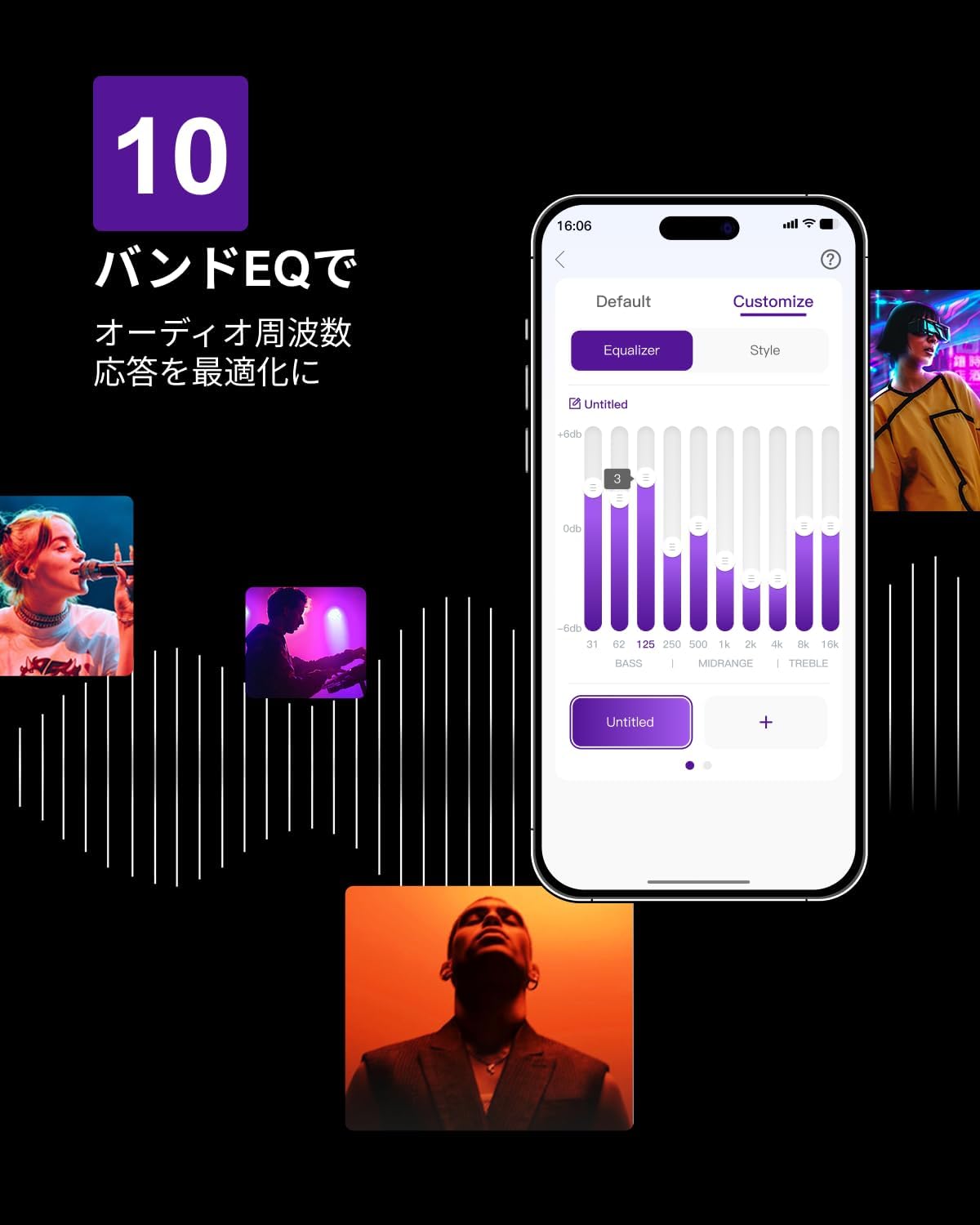
Figure 6.3: ULTIMEA mobile application interface.
7. Întreținere
To ensure the longevity and optimal performance of your ULTIMEA Aura A60 soundbar system, follow these simple maintenance guidelines:
- curatenie: Use a soft, dry cloth to wipe the surfaces of the soundbar, subwoofer, and speakers. Do not use liquid cleaners or abrasive materials, as they may damage the finish.
- Ventilare: Asigurați-vă că toate orificiile de ventilație rămân libere și neobstrucționate pentru a preveni supraîncălzirea.
- Depozitare: Dacă depozitați sistemul pentru o perioadă lungă de timp, deconectați-l de la priză și depozitați-l într-un loc răcoros și uscat, ferit de lumina directă a soarelui și de temperaturi extreme.
8. Depanare
Dacă întâmpinați probleme cu sistemul soundbar, consultați următoarele probleme și soluții comune:
| Problemă | Cauza posibila | Soluţie |
|---|---|---|
| Niciun sunet de la bara de sunet. | Incorrect input selected, volume too low, cables not connected properly. | Verify the correct input source. Increase volume. Check all cable connections (HDMI, Optical, AUX). Ensure the soundbar is powered on. |
| No sound from subwoofer/surround speakers. | Subwoofer/speakers not paired or powered on, volume too low. | Ensure subwoofer and surround speakers are powered on. They should automatically pair. If not, refer to the pairing instructions in the full manual (if available) or contact support. Increase their individual volume levels. |
| Calitate a sunetului distorsionată sau slabă. | Incorrect audio settings, poor source quality, interference. | Adjust EQ settings or try different sound modes. Ensure the audio source is high quality. Check for nearby electronic devices causing interference. |
| Probleme de conexiune Bluetooth. | Device out of range, not in pairing mode, interference. | Ensure the soundbar is in Bluetooth pairing mode. Move your device closer to the soundbar. Disconnect and re-pair the device. |
If the problem persists after trying these solutions, please contact ULTIMEA customer support.
9. Specificații
| Caracteristică | Detaliu |
|---|---|
| Marca | CELE MAI RECENTE |
| Numele modelului | Aura A60 |
| Numărul de model | U2621 |
| Tip difuzor | Soundbar with 7.1ch Surround Sound |
| Tehnologia audio | Dolby Atmos, BassMX Technology |
| Conectivitate | HDMI eARC, Bluetooth, Optical, AUX, USB |
| Subwoofer | 4-inch Wired Subwoofer (integrated BassMX) |
| Difuzoare surround | 4 (2 wired front, 2 wireless rear) |
| Controla | Remote Control, ULTIMEA App |
| Culoare | Negru |
| Dimensiuni (D x W x H) | 9 cm x 40 cm x 7 cm (Soundbar, approximate) |
| Țara de origine | China |
10. Garanție și asistență
ULTIMEA is committed to providing high-quality products and customer satisfaction. Your Aura A60 U2621 soundbar system comes with comprehensive support.
10.1 Informații despre garanție
Specific warranty details may vary by region. Please refer to the warranty card included with your product or visit the official ULTIMEA website-ul pentru cei mai actualizați termeni și condiții de garanție.
10.2 Asistență pentru clienți
For any questions, technical assistance, or troubleshooting not covered in this manual, please contact our dedicated support team:
- 365-Day Support: Our expert staff is available year-round to assist you.
- Chat live: Instant responses are available via live chat on our website-ul.
- Returnări: We offer a 30-day return policy with free shipping for your peace of mind.

365-Day Expert Support

Instant Live Chat

Retururi gratuite în 30 de zile
Pentru asistență suplimentară, vă rugăm să vizitați ULTIMEA Brand Store.