
Introducere
Thank you for choosing the MACAP MI40 Luxe On-Demand Espresso Grinder. This manual provides essential information for the safe and efficient operation, maintenance, and care of your new grinder. Please read all instructions carefully before use and retain this manual for future reference.

The MACAP MI40 Luxe On-Demand Espresso Grinder, featuring a sleek black finish and integrated touchscreen display.
Informații de siguranță
Respectați întotdeauna măsurile de siguranță de bază atunci când utilizați aparate electrice pentru a reduce riscul de incendiu, electrocutare și vătămare corporală.
- Citiți toate instrucțiunile înainte de a utiliza râșnița.
- Do not immerse the grinder, cord, or plug in water or other liquids.
- Deconectați aparatul de la priză atunci când nu îl utilizați, înainte de asamblarea sau dezasamblarea pieselor și înainte de curățare.
- Evitați contactul cu piesele în mișcare.
- Nu utilizați niciun aparat cu un cablu sau un ștecher deteriorat sau după ce aparatul funcționează defectuos sau a fost deteriorat în vreun fel. Contactați asistența pentru clienți pentru asistență.
- Utilizarea atașamentelor nerecomandate sau vândute de producător poate provoca incendii, șocuri electrice sau vătămări.
- Nu utilizați în aer liber.
- Nu lăsați cablul să atârne peste marginea unei mese sau a unui blat sau să atingă suprafețele fierbinți.
- Ensure the hopper lid is securely in place before operating.
- Only grind whole roasted coffee beans. Do not grind other substances such as nuts, spices, or instant coffee.
Înființat
1. Despachetarea
- Scoateți cu grijă toate componentele din ambalaj.
- Inspect the grinder for any signs of damage. If damaged, do not operate and contact your retailer.
- Îndepărtați toate foliile de protecție și materialele de ambalare.
2. Identificarea componentelor
Familiarize yourself with the main parts of your MI40 Luxe grinder:
- Buncăr: Conține boabe întregi de cafea.
- Capac buncăr: Covers the hopper.
- Grind Adjustment Dial: Located below the hopper, used to set grind fineness.
- Ecran tactil: For programming and selecting dosing options.
- Dosing Spout: Unde se prepară cafeaua măcinată.
- Suport pentru portfiltru: Supports the portafilter during grinding.
- Întrerupător: Located on the side of the grinder.
3. Asamblarea inițială
- Install the Hopper: Place the hopper onto the grinder body, ensuring it seats correctly. Rotate it slightly until it locks into position.
- Install the Hopper Lid: Place the lid securely on top of the hopper.
4. Plasare
Așezați râșnița pe o suprafață stabilă, plană și uscată. Asigurați-vă că există o ventilație adecvată în jurul unității.
5. Conexiune la alimentare
Conectați cablul de alimentare la o priză electrică cu împământare. Asigurați-vă că tensiuneatage corespunde specificațiilor de pe eticheta cu datele tehnice ale râșniței.
Instrucțiuni de operare
1. Umplerea buncărului
Lift the hopper lid and pour whole roasted coffee beans into the hopper. Do not overfill. Replace the lid securely.
2. Grind Adjustment (Nice Grind Control Dial)
The MI40 Luxe features a stepless grind adjustment dial for precise control. To adjust the grind fineness:
- Turn the grinder ON using the power switch.
- Rotate the grind adjustment dial. Turning it clockwise results in a finer grind, and counter-clockwise results in a coarser grind.
- For espresso, start with a fine setting and adjust incrementally based on extraction time and taste. It is recommended to adjust the grind while the burrs are running to prevent jamming.

Detaliat view of the Nice Grind Control Dial for precise grind fineness adjustment.
3. Touchscreen Dosing
The touchscreen allows for programmable dosing for single and double shots.
- Pornire: Ensure the grinder is powered on. The touchscreen will illuminate.
- Select Dose: On the main screen, you will see icons for single and double shot doses. Tap the desired dose icon.
- Adjust Dose Time (if needed): To program the dose time, press and hold the desired dose icon until it enters programming mode. Use the '+' and '-' buttons on the screen to adjust the grinding time in seconds. Tap the icon again to save.
- Place Portafilter: Position your portafilter securely in the portafilter holder beneath the dosing spout.
- Începeți măcinarea: Tap the selected dose icon once to start grinding. The grinder will automatically stop after the programmed time.
- Măcinare manuală: Some models may offer a manual grind option, typically by pressing a dedicated button or holding a dose icon briefly. Refer to the on-screen prompts.
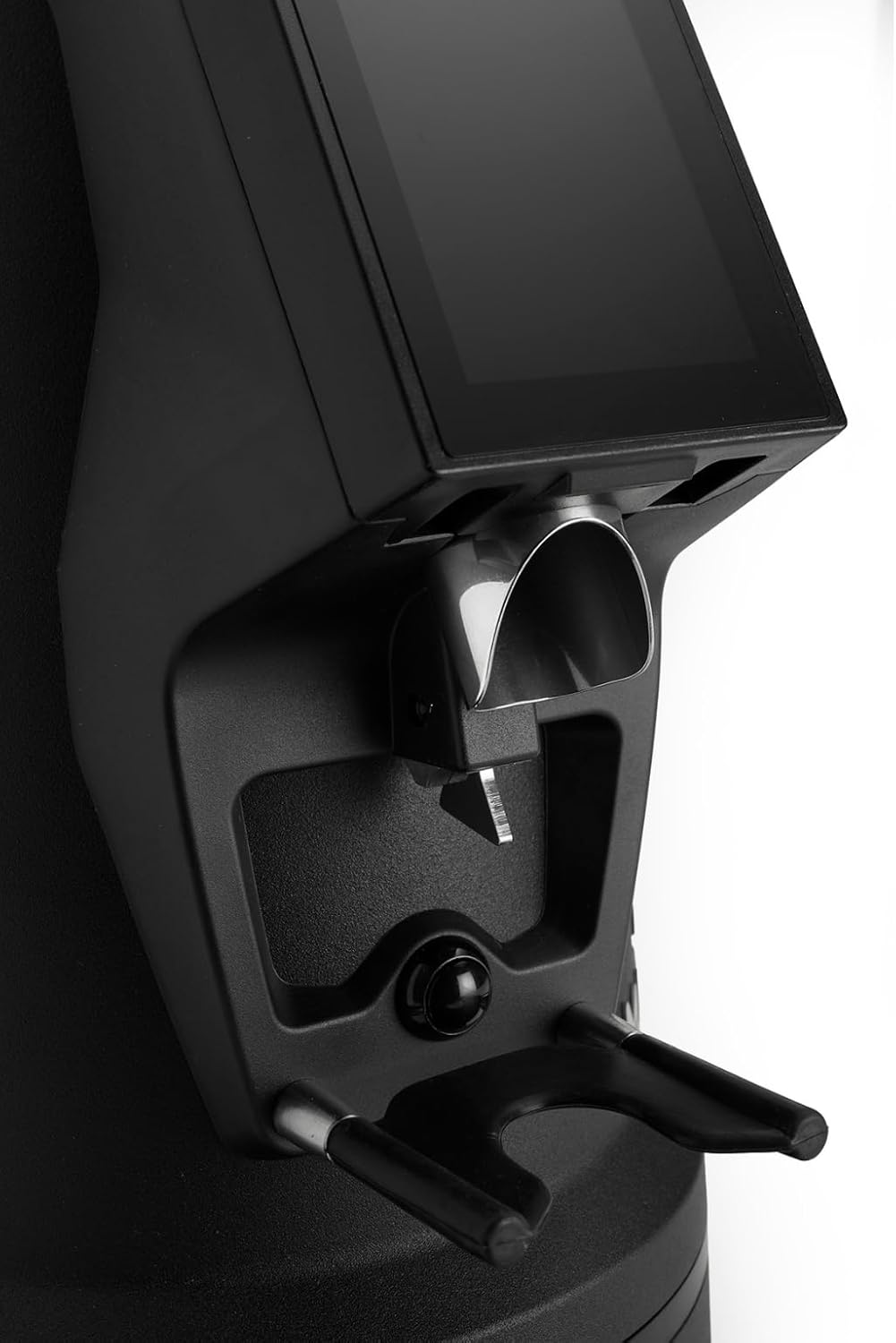
The dosing spout and portafilter holder, designed for efficient and clean coffee dispensing.
Întreţinere
Regular cleaning and maintenance ensure optimal performance and longevity of your grinder.
1. Curățenie zilnică
- Buncăr: Goliți boabele rămase și ștergeți interiorul recipientului cu o cârpă uscată.
- Dosing Spout: Use a brush or vacuum cleaner to remove any residual coffee grounds from the dosing spout and portafilter holder area.
- Exterior: Ștergeți exteriorul râșniței cu adamp Nu utilizați substanțe de curățare abrazive și nu scufundați unitatea în apă.
2. Burrs Cleaning (Weekly/Bi-weekly)
To maintain grind consistency, the burrs should be cleaned regularly.
- Deconectați râșnița: Always disconnect the power before cleaning the burrs.
- Scoateți pâlnia: Empty the hopper and remove it from the grinder body.
- Access Burrs: Depending on the model, you may need to unscrew the top burr carrier. Refer to the specific instructions for your MI40 Luxe model.
- Bavuri curate: Use a stiff brush or a vacuum cleaner to remove all coffee grounds from both the stationary and rotating burrs. Do not use water.
- Reasamblați: Carefully reassemble the burr carrier and hopper, ensuring all parts are securely in place.
3. Îngrijire generală
- Păstrați râșnița într-un loc răcoros și uscat.
- Avoid exposing the grinder to direct sunlight or extreme temperatures.
Depanare
Dacă întâmpinați probleme cu râșnița, consultați următoarele probleme și soluții comune:
| Problemă | Cauza posibila | Soluţie |
|---|---|---|
| Grinderul nu pornește | No power, power switch off, or safety interlock not engaged. | Check power cord connection, ensure power switch is ON, verify hopper is correctly seated. |
| No coffee grinding / Grinder jams | Beans not feeding, burrs clogged, or grind setting too fine. | Ensure hopper has beans. Unplug, remove hopper, clean burrs. Adjust to a coarser setting. |
| Măcinare inconsistentă | Burrs are dirty or worn. | Clean burrs thoroughly. If problem persists, burrs may need replacement. |
| Grinder este zgomotos | Foreign object in burrs or loose components. | Unplug and inspect burrs for foreign objects. Ensure all parts are securely fastened. |
If the problem persists after attempting these solutions, please contact MACAP customer support or your retailer.
Specificații
| Caracteristică | Detaliu |
|---|---|
| Model | MI40 Luxe |
| Marca | Macap |
| Tip de bavură | Freze plate |
| Dimensiunea bavurilor | 65 mm |
| Reglarea măcinare | Stepless (Nice Grind Control Dial) |
| Dozare | Touchscreen Programmable On-Demand |
| Capacitate buncăr | 2.6 lbs (aprox. 1.2 kg) |
| Material | Oţel inoxidabil |
| Greutatea articolului | 19.6 livre (aprox. 8.9 kg) |
| Dimensiuni (L x l x H) | 30.5 cm x 19.3 cm x 55.9 cm (aprox. 12 cm x 7.6 cm x 22 cm) |
| Motor | High-Torque |
Garanție și asistență
Your MACAP MI40 Luxe Grinder is covered by a manufacturer's warranty. For specific warranty terms and conditions, please refer to the warranty card included with your product or visit the official Macap website. For technical support, spare parts, or service inquiries, please contact your authorized Macap dealer or the customer support team.
Informații de contact:
- Refer to your purchase documentation for retailer contact details.
- Visit the official Macap website for global support information.