
1. Informații de siguranță
Please read all instructions carefully before using the LTC MC741 Mini PC. Keep this manual for future reference. Observe all warnings and instructions marked on the product.
- Nu expuneți dispozitivul la ploaie, umezeală sau temperaturi extreme.
- Evitați plasarea dispozitivului în apropierea surselor de căldură sau în lumina directă a soarelui.
- Asigurați o ventilație adecvată pentru a preveni supraîncălzirea. Nu blocați orificiile de ventilație.
- Utilizați numai adaptorul de alimentare furnizat împreună cu dispozitivul.
- Nu încercați să dezasamblați sau să reparați dispozitivul singur. Apelați la personal calificat pentru toate lucrările de service.
2. Conținutul pachetului
Verificați dacă toate articolele sunt prezente în colet:
- LTC MC741 Mini PC
- Adaptor de alimentare
- Ghid de instalare rapidă
3. Produs terminatview
The LTC MC741 is a compact and powerful mini PC designed for various computing tasks, from gaming to productivity. It features a robust AMD Ryzen 7 8845HS processor and Radeon 780M graphics.
3.1 Front and Rear Panel Connections

Imagine: Fata si spate view of the LTC MC741 Mini PC, highlighting all available ports and connections.
- Panoul frontal: 3.5mm Audio Jack, 2x USB 3.2 Gen2 Type-A ports, 1x USB 3.2 Gen2 Type-C port, 1x USB4 Type-C port, Power Button, Power Indicator.
- Panoul din spate: 2x USB 2.0 Type-A ports, HDMI 2.1 port, DisplayPort 1.4, 2.5Gbps RJ45 LAN port, DC Power Input.
3.2 Design compact

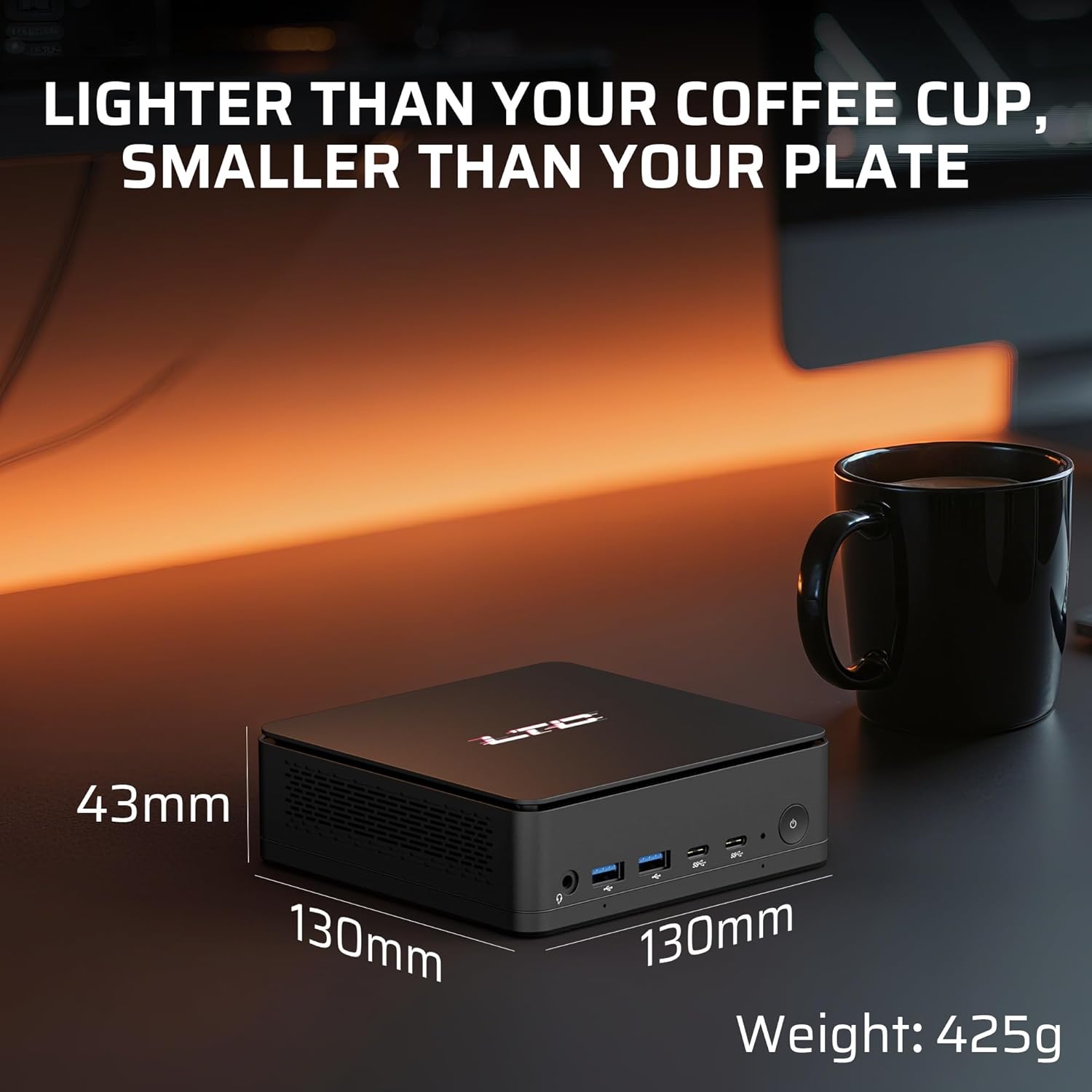
Imagine: The compact dimensions of the LTC MC741 Mini PC, shown next to a coffee cup to illustrate its small footprint.
The mini PC measures approximately 130 x 130 x 42 mm and weighs around 300g, making it highly portable and space-efficient.
3.3 Sistem eficient de răcire

Imagine: An internal diagram illustrating the advanced thermal system with dual heat pipes and intelligent fan control.
Despite its small size, the MC741 incorporates an advanced thermal system with dual heat pipes and intelligent fan control to maintain optimal performance under heavy workloads while keeping noise levels low.
4. Ghid de instalare
4.1 Conectarea inițială
- Connect the power adapter to the DC input port on the rear panel of the Mini PC and then to a power outlet.
- Connect your monitor(s) to the HDMI 2.1, DisplayPort 1.4, or USB4 Type-C ports on the rear panel.
- Conectați tastatura și mouse-ul la porturile USB disponibile.
- Apăsați butonul de alimentare de pe panoul frontal pentru a porni Mini PC-ul.
4.2 Sistem de operare
The LTC MC741 Mini PC typically comes with a Linux operating system pre-installed. If you wish to install Windows or another operating system, please refer to the detailed instructions in the included Quick Installation Guide or the manufacturer's support website for guidance on creating bootable media and installing the OS.
5. Instrucțiuni de utilizare
5.1 Procesor și grafică

Imagine: Close-up of the AMD Ryzen 7 8845HS processor, highlighting its 8 cores, 16 threads, 5.1 GHz boost clock, and 45W TDP.
The Mini PC is powered by an AMD Ryzen 7 8845HS processor (8 cores/16 threads, max boost 5.1GHz) with integrated Radeon 780M graphics. This configuration supports smooth multitasking, creative workloads, and 1080P gaming.
5.2 Triple Display Support
Imagine: The LTC MC741 Mini PC connected to three high-resolution monitors, demonstrating its triple display capabilities.
Connect up to three high-resolution monitors simultaneously using the USB4.0 (4K@60Hz), HDMI 2.1 (8K@60Hz), and DisplayPort 1.4 (4K@120/240Hz) outputs. This is ideal for enhanced productivity or immersive entertainment setups.
5.3 Conectivitate la rețea și wireless

Imagine: Visual representation of the Mini PC's dual-band Wi-Fi 6 and Bluetooth 5.2 capabilities, illustrating seamless wireless connections.
The Mini PC supports 2.5Gbps Ethernet for stable wired connections, Wi-Fi 6 for low-latency wireless networking, and Bluetooth 5.2 for connecting peripherals and devices.
6. Actualizarea componentelor
The LTC MC741 Mini PC offers upgradeability for its memory and storage components.
Actualizare memorie RAM și SSD 6.1

Imagine: Intern view of the LTC MC741 Mini PC, highlighting the slots for upgradable DDR5 RAM and the PCIe 4.0 M.2 2280 SSD.
- The device comes with 16GB DDR5 RAM (5600MHz, dual-channel) and is expandable up to 32GB.
- It is equipped with a 1TB PCIe 4.0 NVMe SSD and is expandable up to 4TB.
- To access the internal components for upgrade, carefully remove the bottom cover by unscrewing the four screws. Exercise caution to avoid damaging any internal cables or components.
7. Specificații
| Caracteristică | Caietul de sarcini |
|---|---|
| Procesor | AMD Ryzen 7 8845HS (8 Cores, 16 Threads, Max Boost 5.1GHz) |
| Grafică | AMD Radeon 780M |
| RAM | 16GB DDR5 (5600MHz, Dual-Channel, Upgradable to 32GB) |
| Depozitare | 1TB PCIe 4.0 NVMe SSD (Upgradable to 4TB) |
| Sistem de operare | Linux (User-installable Windows 11) |
| Ieșire video | 1x HDMI 2.1 (8K@60Hz), 1x DisplayPort 1.4 (4K@120/240Hz), 1x USB4 (4K@60Hz) |
| Porturi USB | 2x USB 3.2 Gen2 Type-A, 1x USB 3.2 Gen2 Type-C, 1x USB4 Type-C, 2x USB 2.0 Type-A |
| Reţea | 2.5Gbps Ethernet, Wi-Fi 6, Bluetooth 5.2 |
| Audio | 3.5mm Audio Jack |
| Dimensiuni | 130 x 130 x 42 mm |
| Greutate | Aproximativ. 300 g |
8. Depanare
If you encounter issues with your LTC MC741 Mini PC, refer to the following common troubleshooting steps:
- Fără putere: Asigurați-vă că adaptorul de alimentare este conectat corect atât la Mini PC, cât și la o priză funcțională. Încercați o altă priză dacă este necesar.
- Fără afișare: Check all display cable connections (HDMI, DisplayPort, USB4) to your monitor(s). Ensure the monitor is set to the correct input source. Try a different cable or monitor if possible.
- Fără conexiune internet: For wired connections, ensure the Ethernet cable is securely plugged into both the Mini PC and your router/modem. For Wi-Fi, check if Wi-Fi is enabled in the operating system settings and ensure you are connected to the correct network with the right password.
- Periferic nedetectat: Ensure USB devices are properly connected. Try a different USB port. For Bluetooth devices, ensure Bluetooth is enabled and the device is in pairing mode.
- Supraîncălzire: Ensure the Mini PC's ventilation openings are not blocked. Operate the device in a well-ventilated area.
9. Garanție și asistență
For warranty information, technical support, or service inquiries, please refer to the warranty card included in your package or visit the official LTC webPăstrați bonul fiscal ca dovadă a achiziției pentru reclamații în garanție.