
1. Introducere și Pesteview
The EPOS Impact 500 ANC Wireless Headset is engineered for professionals requiring clear communication and focus in diverse work environments. This on-ear Bluetooth headset integrates hybrid Active Noise Cancellation (ANC) to minimize distractions and features EPOS AI™ microphones for natural voice clarity during conversations. It offers versatile connectivity via dual USB-C and USB-A options, ensuring compatibility with various devices. Certified for Microsoft Teams Open Office and other UC platforms, it provides a seamless experience for remote and office collaboration. Key benefits include extended battery life, talk-through mode for quick interactions, and EPOS BrainAdapt™ technology designed to reduce listening fatigue.
2. Ce se află în cutie
Upon unboxing your EPOS Impact 500 ANC Wireless Headset, you will find the following components:
- EPOS Impact 500 ANC Wireless Headset
- Cablu de încărcare USB-C la USB-C (1.2 m)
- BTD 900c USB-C Dongle
- Adaptor USB-C la USB-A
- Sustainable Carry Pouch
- Ghid de siguranță
- Fișă de conformitate
- Ghid rapid

Image: All items included in the EPOS Impact 500 ANC Wireless Headset package.
3. Configurare
3.1 Încărcarea căștilor
Before initial use, fully charge your headset. Connect the provided USB-C to USB-C charging cable to the charging port on the headset and to a compatible USB-C power source. If your device only has USB-A ports, use the included USB-C to USB-A adapter with the charging cable. The LED indicator on the headset will show charging status.
3.2 Conectarea la dispozitivul dvs.
The headset offers flexible connectivity options:
- Bluetooth fără fir: Power on the headset. Activate Bluetooth on your device (laptop, tablet, smartphone). Put the headset into pairing mode (refer to the Quick Guide for specific button presses). Select "EPOS Impact 500" from your device's Bluetooth list.
- USB-C Dongle (BTD 900c): Insert the BTD 900c USB-C dongle directly into a USB-C port on your computer. The headset will automatically connect to the dongle. If your computer only has USB-A ports, attach the USB-C to USB-A adapter to the dongle before inserting it.
3.3 Reglarea căștilor
Adjust the headband for a comfortable fit. The earcups are designed to rest gently on your ears. Position the boom microphone approximately 2-3 cm from the corner of your mouth for optimal voice pickup. The boom mic can be rotated up or down.

Image: The EPOS Impact 500 headset with its adjustable boom microphone.
4. Instrucțiuni de utilizare
4.1 Controale de bază
- Pornire/Oprire: Use the dedicated power switch located on one of the earcups.
- Reglarea volumului: Use the volume up and down buttons on the earcup to control audio levels.
- Gestionarea apelurilor: A multi-function button is available for answering/ending calls.
- Dezactivați/activați sunetul microfonului: Lift the boom microphone up to mute and lower it down to unmute.
4.2 Anularea activă a zgomotului (ANC)
The hybrid ANC feature can be activated to reduce background noise, allowing for greater focus during calls and work. Refer to the Quick Guide for specific button controls to toggle ANC on or off.
4.3 Talk-Through Mode
For quick conversations with colleagues without removing the headset, activate Talk-Through mode. This feature allows ambient sounds to pass through, enabling effortless interaction. Consult the Quick Guide for activation instructions.
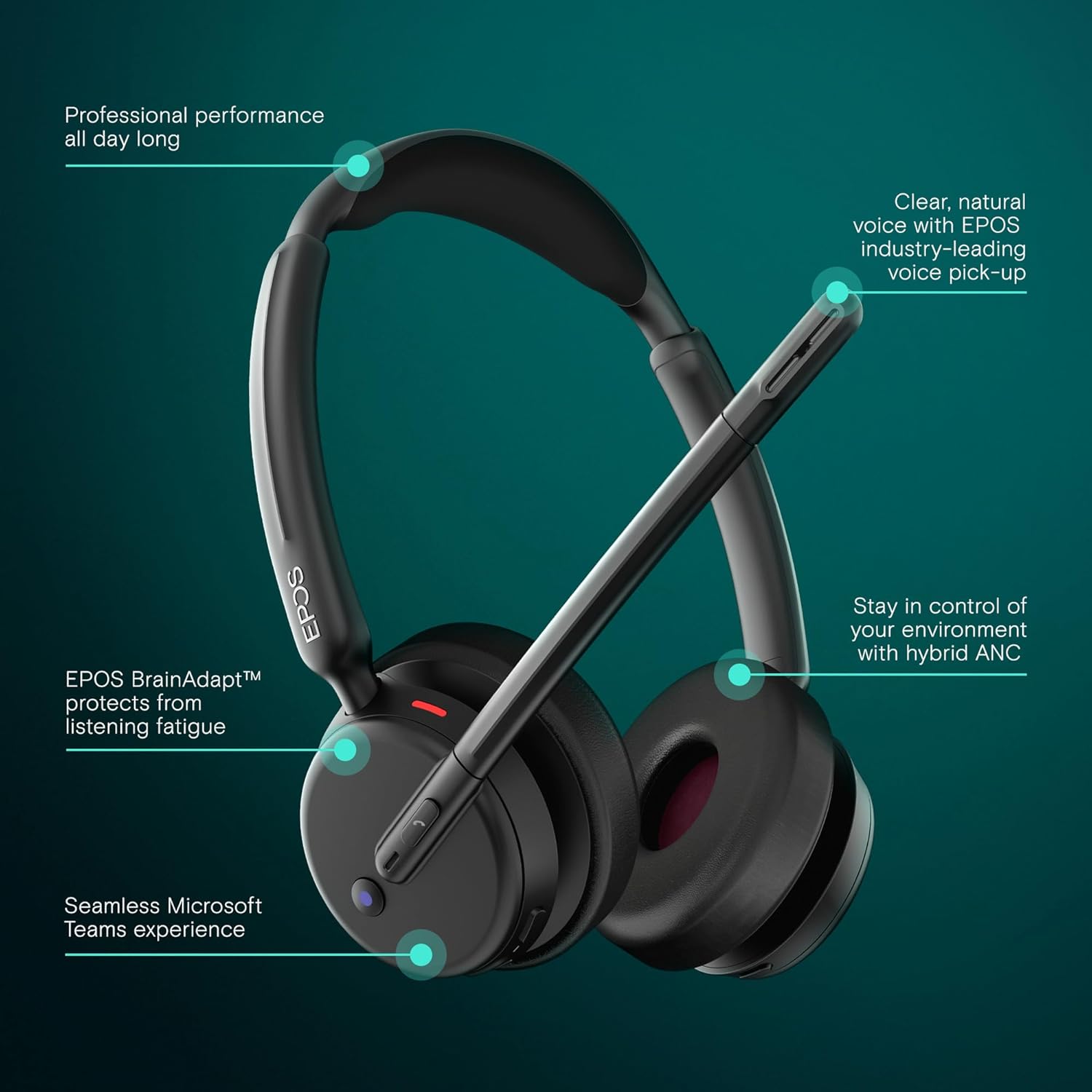
Image: Visual representation of the headset's main operational features.
5. Caracteristici cheie
- Anulare activă hibridă a zgomotului: Adaptively reduces background noise for crystal-clear calls and enhanced focus.
- EPOS AI™ Voice Technology: Advanced microphones isolate your voice from surrounding noise, ensuring natural and professional-sounding calls.
- EPOS BrainAdapt™ Technology: Designed to protect your brain from fatigue caused by poor audio and noise, boosting focus and productivity during long calls.
- Microsoft Teams Certified & UC Compatible: Optimized for Microsoft Teams and compatible with leading Unified Communications platforms like Zoom and Google Meet for effortless collaboration.
- Seamless Dual Connectivity: Includes both USB-C and USB-A options with the BTD 900c dongle and adapter for instant plug-and-play connection to various devices.
- Durată de viață extinsă a bateriei: Offers up to 35 hours of talk time, supporting long hybrid workdays without frequent recharging.
- Design supraauricular ușor: Provides all-day comfort with soft leatherette cushions, minimizing listening fatigue.
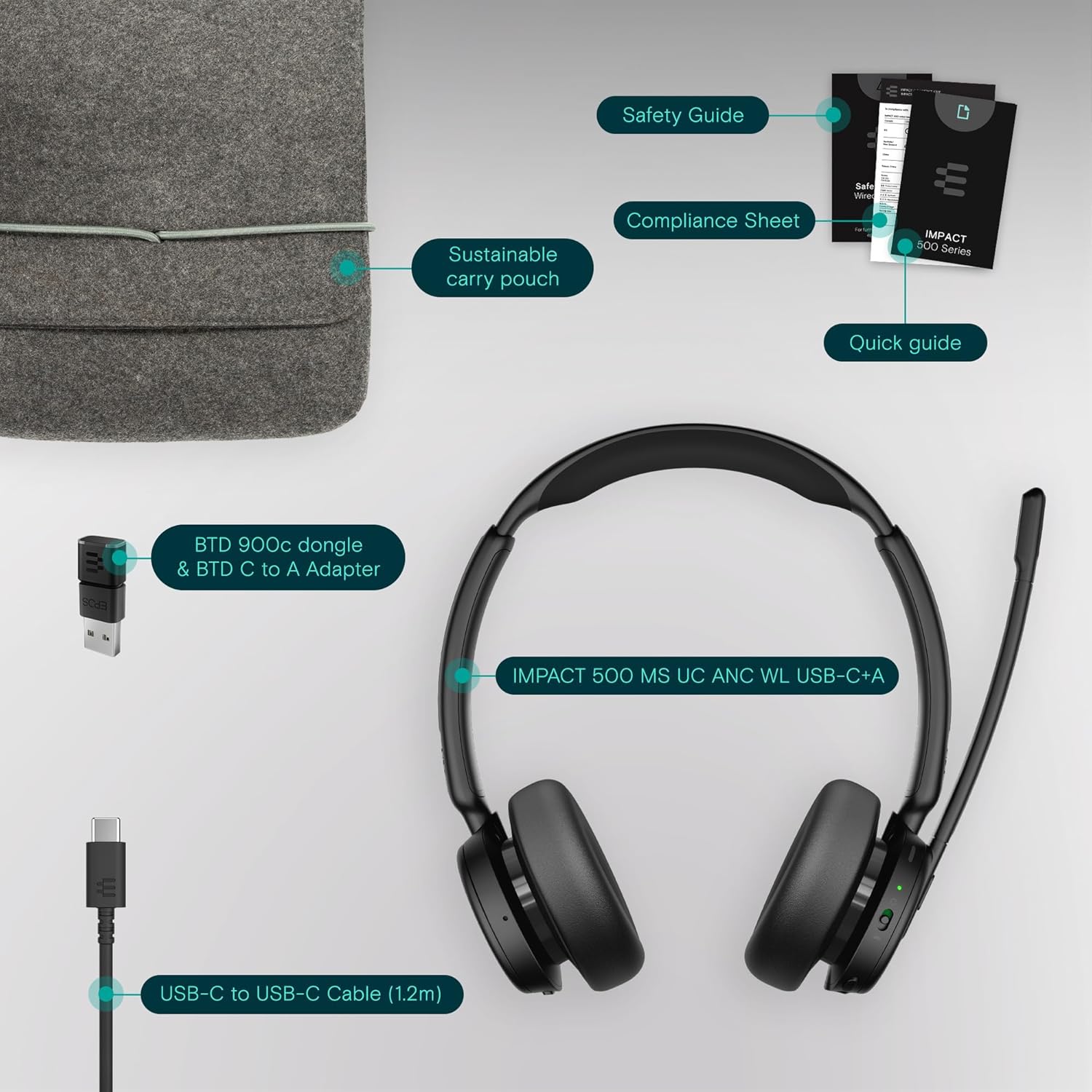
Image: User wearing the headset in a professional setting, highlighting comfort and clarity.
6. Întreținere
To ensure the longevity and optimal performance of your EPOS Impact 500 ANC Wireless Headset, follow these maintenance guidelines:
- curatenie: Folosiți o lavetă moale și uscată pentru a curăța căștile. Pentru căști, ștergeți ușor cu o cârpă ușor uscată.amp cloth if necessary, avoiding excessive moisture. Do not use harsh chemicals or abrasive materials.
- Depozitare: When not in use, store the headset in the provided sustainable carry pouch to protect it from dust, scratches, and impacts.
- Temperatură: Avoid exposing the headset to extreme temperatures (hot or cold) or direct sunlight for extended periods.
- Umiditate: Nu lăsați setul cu cască să intre în contact cu apă și umiditate ridicată.
7. Depanare
Dacă întâmpinați probleme cu setul cu cască, încercați următorii pași de depanare:
- Fără putere: Ensure the headset is fully charged using the provided USB-C cable and a reliable power source.
- Fără sunet/Microfonul nu funcționează:
- Check if the headset is properly paired with your device via Bluetooth or connected via the USB dongle.
- Verify that the headset is selected as the default audio input/output device in your computer's sound settings or communication application (e.g., Microsoft Teams, Zoom).
- Ensure the microphone boom is lowered and not muted.
- Restart your device and the headset.
- Calitate slabă audio:
- Move closer to your connected device to ensure a strong Bluetooth signal.
- Verificați interferența de la alte dispozitive fără fir.
- Asigurați-vă că microfonul este poziționat corect lângă gură.
- ANC nu funcționează: Ensure the ANC feature is activated. Refer to the Quick Guide for specific controls.
- Connectivity Issues with Dongle: Try inserting the USB dongle into a different USB port on your computer. Ensure the dongle is fully inserted.
For further assistance, consult the comprehensive user manual available on the EPOS website or contact EPOS customer support.
8. Specificații
| Caracteristică | Detaliu |
|---|---|
| Marca | EPOPEE |
| Numele modelului | IMPACT 500 |
| Numărul de model | 1001490 |
| Culoare | Negru |
| Plasarea urechii | La ureche |
| Controlul zgomotului | Anulare hibridă a zgomotului |
| Tehnologia de conectivitate | Wireless (Bluetooth) |
| Versiune Bluetooth | 5.0 |
| Metoda de control | Atingere |
| Durata medie a bateriei | 35 de ore |
| Greutatea articolului | 391 grame |
| Material carcasă | Piele falsă |
| Gama de frecvente | 20 Hz - 20,000 Hz |
| Caracteristici suplimentare | Noise Cancellation, AI Voice Technology, BrainAdapt Technology |
| Dispozitive compatibile | Laptop-uri, desktop-uri, tablete, telefoane, difuzoare inteligente, televizoare, telefoane mobile |
9. Garanție și asistență
The EPOS Impact 500 ANC Wireless Headset comes with a 2 an garanție de producător. For warranty claims, technical support, or additional product information, please visit the official EPOS website-ul lor web sau contactați departamentul de asistență pentru clienți. Păstrați dovada achiziției pentru validarea garanției.