
1. Introducere
Mulțumesc pentru achizițieasing the Airbition 10-inch Wall Mount Fan with Light and Remote Control. This manual provides important information regarding the safe installation, operation, and maintenance of your new fan. Please read it thoroughly before use and retain it for future reference.
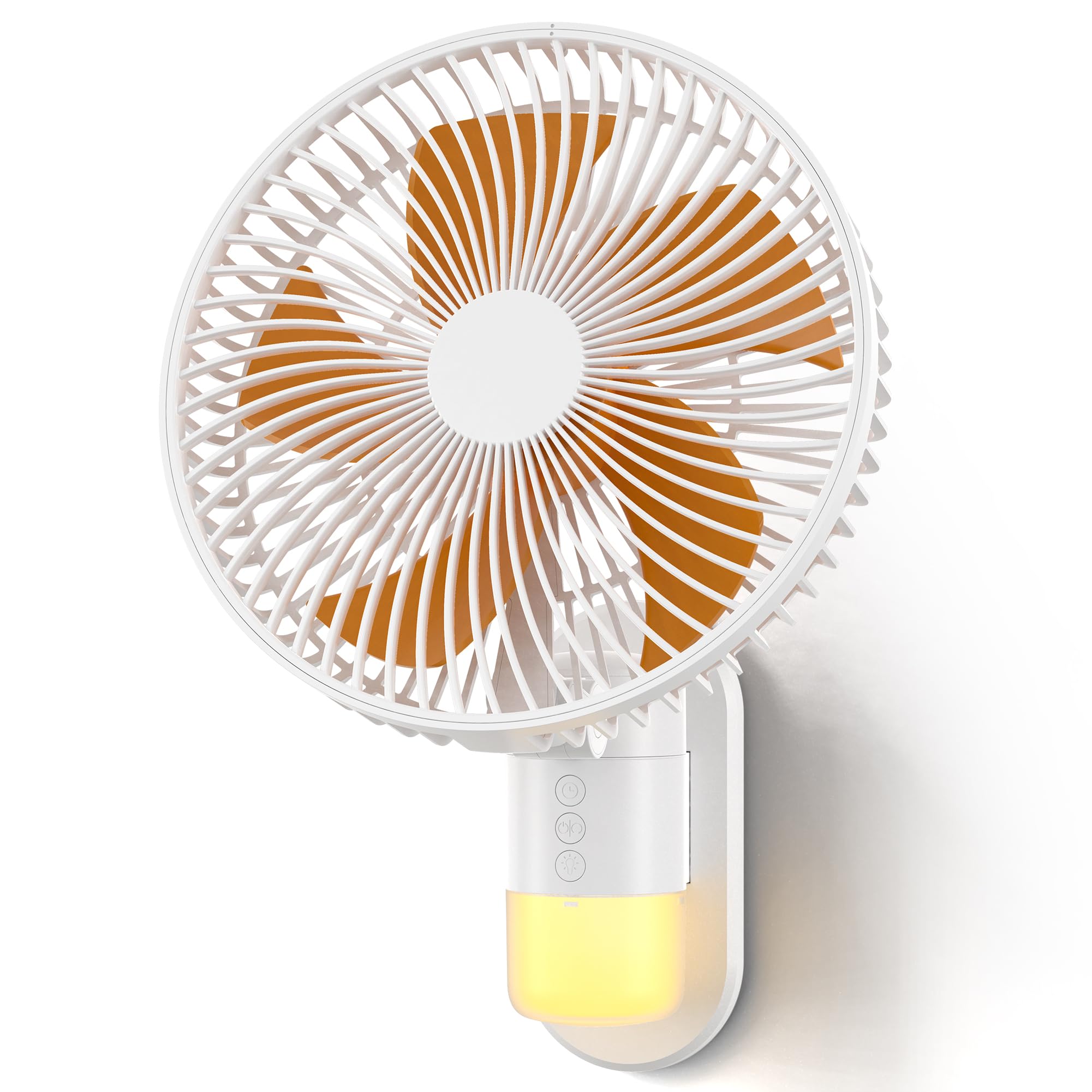
Image: The Airbition 10-inch Wall Mount Fan, showcasing its compact design and integrated light.
2. Instrucțiuni de siguranță
Pentru a reduce riscul de incendiu, electrocutare sau vătămare corporală, vă rugăm să respectați următoarele măsuri de siguranță:
- Deconectați întotdeauna ventilatorul de la priză înainte de curățare sau de efectuarea oricărei operațiuni de întreținere.
- Nu introduceți degetele sau alte obiecte în grila ventilatorului în timp ce acesta funcționează.
- Asigurați-vă că cablul de alimentare nu este deteriorat sau ciupit.
- Nu acționați ventilatorul în zone umede sau damp locații.
- Țineți ventilatorul departe de perdele, draperii sau orice obiecte care ar putea fi atrase în ventilator.
- Acest aparat nu este destinat utilizării de către persoane (inclusiv copii) cu capacități fizice, senzoriale sau mentale reduse sau cu lipsă de experiență și cunoștințe, cu excepția cazului în care acestea au fost supravegheate sau instruite cu privire la utilizarea aparatului de către o persoană responsabilă pentru siguranța lor.
- Copiii trebuie supravegheați pentru a se asigura că nu se joacă cu aparatul.
3. Conținutul pachetului
Verificați dacă toate articolele sunt prezente în colet:
- Airbition 10-inch Wall Mount Fan
- Telecomanda
- Suport de fixare
- Power Cord (78 inches / 6.56 ft)
- Manual de utilizare (acest document)
4. Caracteristicile produsului
- Flux de aer puternic: Equipped with a high-efficiency DC motor and 5 aerodynamic blades for strong, fast cooling.
- 4 moduri de viteza: Choose from Low, Medium, High, and Turbo settings for customized comfort.
- Wide Air Circulation: Features 90° oscillation and 120° adjustable tilt to cover a broad area.
- Telecomanda: Conveniently operate the fan from up to 13 feet away.
- Timer inteligent: Set an auto-off timer for 2, 4, 6, or 8 hours to save energy.
- Lumină de noapte încorporată: Integrated light with 2 tones (Cool White & Warm) and 4 brightness levels for nighttime use.
- Design care economisește spațiu: Wall-mounted design ideal for bedrooms, RVs, home offices, and garages.
- Construcție durabilă: Made with durable ABS blades and reinforced neck support.
Video: Un pesteview of the Airbition 10-inch Wall Mount Fan's features and benefits.

Image: A woman on a bed with the wall-mounted fan providing cooling airflow, highlighting its quiet operation and integrated light.

Image: A child sleeping in a bedroom with the fan's night light providing a soft glow, illustrating the "Cozy Glow for Peaceful Nights" feature.

Image: An illustrative diagram demonstrating how the wall mount fan efficiently circulates air throughout a living space.
5. Configurare și instalare
Follow these steps for proper installation of your wall mount fan:
- Pregătiți ventilatorul: Attach the Type-C plug of the power cord to the rear power port of the fan's backplate.
- Instalarea plăcii de montare: Choose a suitable location on the wall. Use strong adhesive or screws (not included) to securely fix the mounting plate to the wall. Ensure the plate is level and can support the fan's weight.
- Atașați ventilatorul: Align the fan with the installed mounting plate and slide it down until it clicks securely into place.
- Conectare alimentare: Conectați cablul de alimentare la o priză electrică standard.
Video: A step-by-step guide on how to install the Airbition wall mount fan.
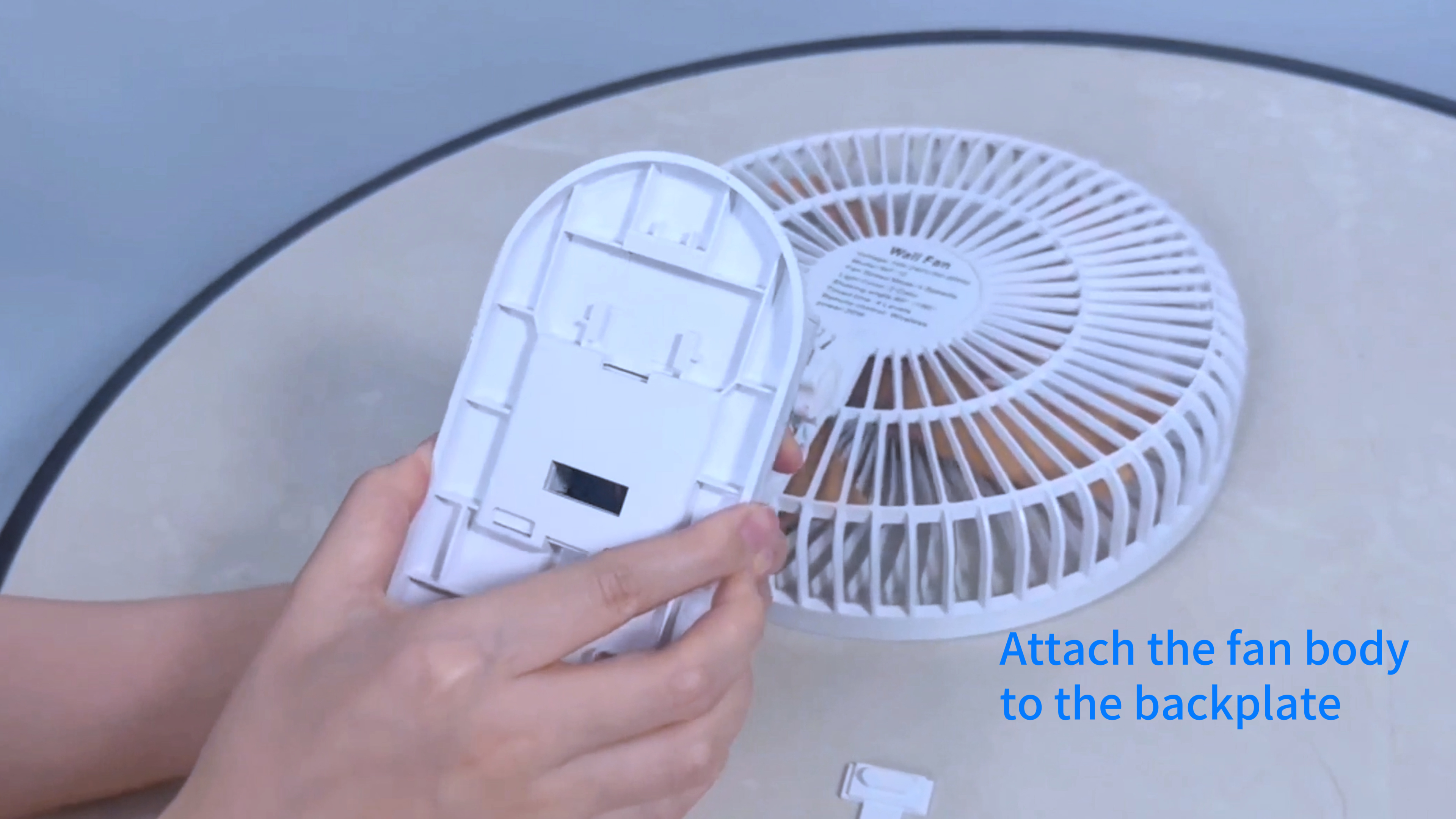
Image: Hands attaching the Type-C power plug to the back of the fan unit.

Image: The Airbition wall mount fan securely installed on a wall.
6. Funcționare
Your Airbition wall mount fan can be operated using the included remote control or the control panel on the fan unit.
Funcții de control de la distanță:
- Butonul de pornire (⏻): Pornește sau oprește ventilatorul.
- Buton de viteză (+/-): Adjusts fan speed through Low, Medium, High, and Turbo modes.
- Buton de oscilație (↔): Activates or deactivates the 90° oscillation feature.
- Buton de lumină (💡): Cycles through light tones (Cool White, Warm) and adjusts brightness levels (4 levels).
- Butonul temporizatorului (⏱): Setează temporizatorul de oprire automată pentru 2, 4, 6 sau 8 ore.
Panou de control manual:
The fan unit features a control panel with buttons for basic functions, mirroring the remote control. Refer to the icons on the fan for specific button functions.

Image: A woman demonstrating the use of the remote control with the wall-mounted fan.
7. Întreținere
Curățarea regulată asigură o performanță optimă și prelungește durata de viață a ventilatorului.
- Deconectați alimentarea: Deconectați întotdeauna ventilatorul de la priză înainte de curățare.
- Detachable Grille and Blades: The front grille and fan blades are detachable for easy cleaning. Gently twist or unclip the front grille to remove it.
- curatenie: Folosiți un moale, damp cloth to wipe down the exterior surfaces. For the blades and inside the grille, use a soft brush or vacuum cleaner to remove dust. The blades can be rinsed under water if heavily soiled, ensuring they are completely dry before reassembly.
- Reasamblare: Ensure all parts are dry before reattaching the blades and front grille. Securely fasten the grille back into place.

Image: Detachable fan blades being cleaned under running water, demonstrating the "Clean with Ease" feature.
8. Depanare
Dacă întâmpinați probleme cu ventilatorul, consultați următoarele probleme și soluții frecvente:
| Problemă | Cauza posibila | Soluţie |
|---|---|---|
| Ventilatorul nu pornește. | No power, loose connection, or remote battery dead. | Check if the power cord is securely plugged in. Ensure the outlet has power. Replace remote control batteries if necessary. |
| Ventilatorul este zgomotos. | Dust accumulation, loose parts, or fan not mounted securely. | Clean the fan blades and grille. Ensure all parts are securely fastened. Re-check mounting. |
| Lumina nu funcționează. | Light function not activated, or electrical issue. | Press the light button on the remote or control panel. If still not working, contact customer support. |
| Telecomanda nu răspunde. | Dead batteries, obstruction, or out of range. | Replace remote batteries. Ensure no obstructions between remote and fan. Operate within 13 ft range. |
9. Specificații
| Caracteristică | Detaliu |
|---|---|
| Marca | Airbition |
| Numele modelului | Aer401 |
| Dimensiuni produs (D x L x H) | 7.08" D x 10.24" L x 14.17" H |
| Dimensiune | 10 inch |
| Sursa de alimentare | AC (Standard Electrical Plug) |
| Wattage | 50 wați |
| Voltage | 15 volți |
| Numărul de viteze | 4 |
| Numărul de lame | 5 |
| Viteză | 5.2 metri pe secundă |
| Oscilaţie | 90° |
| Înclinare reglabilă | 120° |
| Tip controler | Telecomanda |
| Caracteristici speciale | LED Light (2 tones, 4 brightness levels), Timer |
| Material | Plastic |
| Lungimea cablului | 78 inches (6.56 ft) |
| Utilizare în interior/exterior | De interior |
10. Garanție și asistență
Airbition products are designed for reliability and performance. For warranty information or technical support, please refer to the contact details provided with your purchase or visit the official Airbition website-ul.
If you experience any issues not covered in the troubleshooting section, please contact our customer service team for assistance.