
Introducere
This manual provides detailed instructions for the setup, operation, and maintenance of your Tivoli Audio PAL BT (Gen 3) Portable Bluetooth FM Radio. Please read this manual thoroughly before using your device to ensure proper function and longevity.

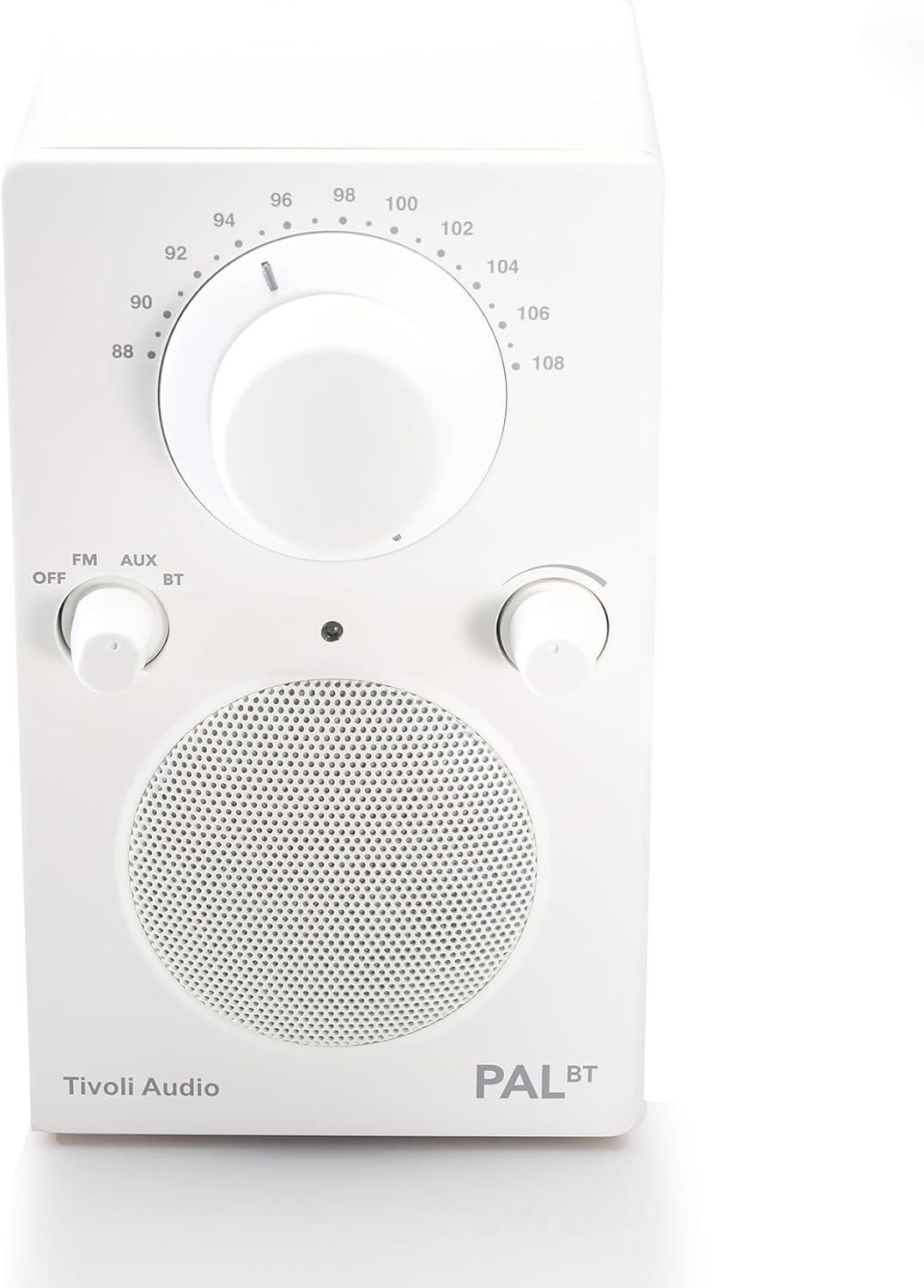
Image: The Tivoli Audio PAL BT (Gen 3) radio, showcasing its compact design and front controls.
Conținutul pachetului
Verificați dacă toate articolele sunt prezente în colet:
- Tivoli Audio PAL BT (Gen 3) Portable Bluetooth FM Radio
- Cablu de încărcare USB-C
- Manualul de utilizare (acest document)
Înființat
1. Încărcarea bateriei
The PAL BT (Gen 3) features a built-in rechargeable battery. Before first use, fully charge the device.
- Locate the USB-C charging port on the back or side of the unit.
- Connect the provided USB-C cable to the radio and to a compatible USB power adapter (not included) or a powered USB port.
- The charging indicator light will illuminate. Allow several hours for a full charge. A full charge provides over 14 hours of playback.
Imagine: Laterală view of the Tivoli Audio PAL BT (Gen 3), illustrating its portable design and potential location for the USB-C charging port.
2. Pornire/Oprire
Use the multi-function knob on the front of the unit to control power and source selection.
- To power on, rotate the knob from "OFF" to "FM", "AUX", or "BT".
- To power off, rotate the knob to "OFF".
Instrucțiuni de operare
1. Controale asupraview
The PAL BT (Gen 3) features three main control knobs:
- Source/Power Knob: Selects between OFF, FM, AUX, and Bluetooth (BT) modes.
- Buton de acordare: Adjusts the FM radio frequency.
- Buton de volum: Controlează nivelul de ieșire audio.

Imagine: față view of the PAL BT (Gen 3) highlighting the control knobs and FM frequency dial.
2. Funcționare radio FM
- Rotate the Source/Power knob to "FM".
- Extindeți antena telescopică pentru o recepție optimă.
- Rotate the Tuning knob to select your desired FM station.
- Reglați butonul de volum la nivelul de ascultare preferat.
3. Bluetooth (BT) Pairing
The PAL BT (Gen 3) uses Bluetooth 5.0 for wireless audio streaming.
- Rotate the Source/Power knob to "BT". The Bluetooth indicator light will begin to flash, indicating it is in pairing mode.
- On your Bluetooth-enabled device (e.g., smartphone, tablet), go to its Bluetooth settings and enable Bluetooth.
- Caută available devices. You should see "Tivoli PAL BT" or similar in the list.
- Select "Tivoli PAL BT" to connect. Once paired, the Bluetooth indicator light on the radio will glow solid.
- You can now stream audio from your device to the PAL BT (Gen 3).
4. Intrare auxiliară
Connect external audio sources using the auxiliary input.
- Rotate the Source/Power knob to "AUX".
- Connect a 3.5mm audio cable (not included) from your external audio device's headphone jack or line-out to the AUX input port on the PAL BT (Gen 3).
- Redați sunet de pe dispozitivul extern.
- Adjust the Volume knob on the PAL BT (Gen 3) and your external device for optimal sound.
5. Ieșire căști
For private listening, connect headphones to the dedicated output.
- Plug a standard 3.5mm headphone jack into the headphone output port.
- The internal speaker will mute automatically.
- Adjust the Volume knob for comfortable listening.
Întreţinere
Curatenie
To maintain the appearance of your PAL BT (Gen 3):
- Deconectați întotdeauna unitatea înainte de curățare.
- Folosiți o lavetă moale și uscată pentru a șterge suprafețele.
- Avoid using abrasive cleaners, solvents, or strong detergents, as these can damage the finish.
Îngrijirea bateriei
Pentru a maximiza durata de viață a bateriei:
- Evitați descărcarea completă frecventă a bateriei.
- If storing the unit for an extended period, charge it to approximately 50% every few months.
- Nu expuneți unitatea la temperaturi extreme.
Rezistență la intemperii
The PAL BT (Gen 3) is designed with a weather-resistant housing, making it suitable for outdoor use. However, it is not waterproof. Avoid submerging the unit in water or exposing it to heavy rain for prolonged periods.
Depanare
| Problemă | Cauza posibila | Soluţie |
|---|---|---|
| Fără putere | Battery discharged; Unit not turned on. | Charge the battery using the USB-C cable; Rotate the Source/Power knob to an active source (FM, AUX, BT). |
| Nici un sunet | Volum prea mic; Sursă selectată incorect; Căști conectate. | Măriți volumul; Selectați sursa corectă; Deconectați căștile. |
| Recepție FM slabă | Antena nu este extinsă; Semnal slab. | Extindeți complet antena telescopică; Repoziționați radioul pentru un semnal mai bun. |
| Bluetooth nu se asociază | Radio not in pairing mode; Device too far; Previously paired device connected. | Ensure radio is in BT mode and indicator is flashing; Move device closer; Disconnect from other devices or forget "Tivoli PAL BT" on your device and re-pair. |
Specificații
- Număr de model: PALBT3-3059-NA
- Conectivitate: Bluetooth 5.0, FM Tuner, Auxiliary Input
- Sursa de alimentare: Battery Powered (USB-C charging)
- Durata de viață a bateriei: Over 14 hours (playback)
- Dimensiuni (L x l x H): 3.6 cm x 4.5 cm x 6 cm
- Caracteristici speciale: Portable, Weather-Resistant Housing
- Componente incluse: Manual de utilizare
Informații despre garanție
The Tivoli Audio PAL BT (Gen 3) comes with a 2 an garanție from the date of purchase. This warranty covers manufacturing defects and workmanship under normal use. Please retain your proof of purchase for warranty claims. For full warranty terms and conditions, please visit the official Tivoli Audio website-ul sau contactați asistența pentru clienți.
Asistență pentru clienți
If you encounter any issues not covered in this manual or require further assistance, please contact Tivoli Audio customer support:
- Website: www.tivoliaudio.com/support
- E-mail: Refer to the Tivoli Audio website pentru informații de contact.
- Telefon: Refer to the Tivoli Audio website pentru informații de contact.
When contacting support, please have your product model number (PAL BT (Gen 3)) and purchase information ready.


