
FREEWELL 17 Pro Max
Freewell Genius Rig Cage for iPhone 17 Pro Max User Manual
Model: 17 Pro Max | Brand: FREEWELL
1. Introducere
The Freewell Genius Rig Cage is designed to enhance your mobile videography and photography experience with the iPhone 17 Pro Max. This versatile rig offers a secure mounting solution, expanded accessory options, and flexible handling for various shooting scenarios.
Caracteristicile cheie includ:
- Instalare ușoară: SnapClamp mechanism for secure and quick phone setup.
- Versatile Handles: TriGenius (tripod with 360° rotation) and MonoGenius (monopod/extension rod).
- Telecomandă convenabilă: GeniusRemote Bluetooth control for recording.
- Interfețe extensibile: Multiple 1/4" threaded holes, quick-connect ports, cold shoes, and Freewell Magnetic Filter Slot & 17mm lens mount.
- Durabil și portabil: Constructed from high-grade aluminum alloy, lightweight for easy transport.
2. Conținutul pachetului
Vă rugăm să verificați dacă toate articolele sunt prezente în coletul dumneavoastră:
- Freewell Genius Rig Cage (for iPhone 17 Pro Max)
- TriGenius Handle
- MonoGenius Handle
- GeniusRemote Bluetooth Control
3. Ghid de instalare
3.1 Attaching Your iPhone 17 Pro Max
The Genius Rig Cage features a SnapClamp mechanism for tool-free installation.
- Gently open the SnapClamp on the rig cage.
- Carefully insert your iPhone 17 Pro Max into the cage, ensuring it is seated securely.
- Release the SnapClamp to lock the phone in place. Verify that the phone is firmly held and does not wobble.

Figure 3.1: Quick Installation and Expansion. The image shows the Freewell Genius Rig Cage holding an iPhone 17 Pro Max, with a light and microphone attached to cold shoe mounts. The bottom of the image highlights a 1/4" threaded hole, a cold shoe expansion port, and the clamping mechanism for the phone.
3.2 Attaching Handles (TriGenius / MonoGenius)
The TriGenius and MonoGenius handles can be attached to either side of the rig cage.
- Identify the quick-connect ports on the sides of the Genius Rig Cage.
- Align the handle's connector with a quick-connect port.
- Push and twist the handle until it clicks securely into place.
- To remove, press the release button (if present) and twist to detach.

Figure 3.2: 360° Rotatable Dual Side Handles. This image illustrates the flexibility of the handles, showing how they can rotate 360 degrees for optimal positioning and comfort during use.
3.3 Pairing the GeniusRemote Bluetooth Control
The GeniusRemote simplifies recording control.
- Ensure the GeniusRemote has power (check battery if necessary).
- Porniți telecomanda.
- On your iPhone 17 Pro Max, go to Bluetooth settings and search for available devices.
- Select "GeniusRemote" from the list to pair.
- Once paired, the remote can be attached to either handle for convenient access.

Figure 3.3: All-in-one Design. This image displays the Freewell Genius Rig Cage in two configurations: as a tripod (TriGenius) and as a monopod/selfie stick (MonoGenius), both utilizing the Bluetooth remote for control.
3.4 Attaching 17mm Lenses and Magnetic Filters
The rig cage supports 17mm threaded lenses and Freewell Sherpa Magnetic Filters.
- For 17mm Lenses: Align the 17mm threaded lens with the lens mount on the rig cage and gently screw it in until secure.
- For Magnetic Filters: Place the Freewell Sherpa Magnetic Filter onto the designated magnetic filter slot. The magnets will automatically secure it.
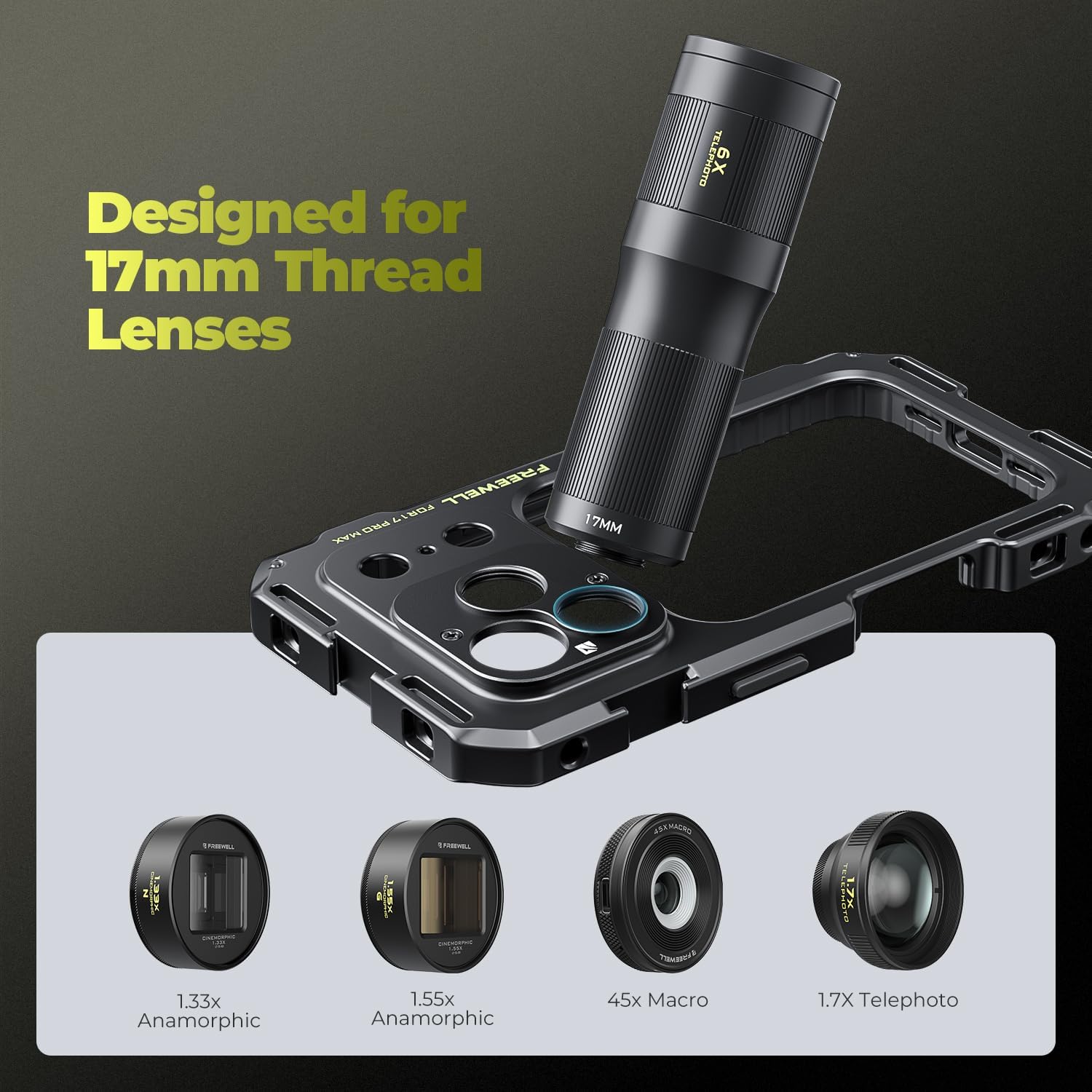
Figure 3.4: Designed for 17mm Thread Lenses. This image highlights the 17mm lens mount on the rig cage and showcases examples of compatible lenses such as Anamorphic, Macro, and Telephoto lenses.

Figure 3.5: Designed for Freewell Sherpa Magnetic Filters. This image demonstrates the magnetic filter slot on the rig cage, showing a filter being attached quickly and easily.
4. Instrucțiuni de utilizare
4.1 Using the TriGenius Handle (Tripod Mode)
The TriGenius handle can be deployed as a stable tripod.
- Attach the TriGenius handle to the rig cage.
- Extend the tripod legs from the base of the handle.
- Place the rig on a flat surface. The 360° rotation allows for flexible camera angles.
4.2 Using the MonoGenius Handle (Monopod/Extension Rod Mode)
The MonoGenius handle functions as a monopod or an extension rod for elevated shots.
- Attach the MonoGenius handle to the rig cage.
- Extend the rod to your desired length.
- Hold the handle firmly for stable handheld shots or use it to extend your reach.
4.3 Using the GeniusRemote
Once paired, the GeniusRemote allows you to start and stop recording remotely within a 10-meter (33ft) range.
- Press the designated button on the remote to start recording.
- Apăsați din nou același buton pentru a opri înregistrarea.
4.4 Utilizing Expansion Interfaces
The rig cage provides multiple points for attaching additional accessories:
- 1/4" Threaded Holes (x11): Use these for mounting external monitors, microphones, lights, or other photographic accessories.
- Cold Shoes (x4): Attach cold shoe compatible accessories like LED lights or microphones.
- Quick-Connect Ports (x6): For rapid attachment and detachment of handles or other compatible accessories.
5. Întreținere
- curatenie: Wipe the rig cage and accessories with a soft, dry cloth. Avoid abrasive cleaners or solvents.
- Depozitare: Depozitați produsul într-un loc răcoros și uscat ferit de lumina directă a soarelui și de temperaturi extreme.
- Inspecţie: Verificați periodic toate conexiunile și piesele mobile pentru a depista orice semne de uzură sau deteriorare.
6. Depanare
- Issue: iPhone not securely held in the cage.
- Soluţie: Ensure the SnapClamp mechanism is fully engaged. Remove and re-insert the phone, making sure it is properly aligned before closing the clamp.
- Issue: Handles are loose or detach easily.
- Soluţie: Verify that the handles are fully pushed and twisted into the quick-connect ports until they click. If the issue persists, inspect the quick-connect mechanism for damage.
- Issue: GeniusRemote not pairing or controlling recording.
- Soluţie:
- Verificați bateria telecomenzii.
- Ensure Bluetooth is enabled on your iPhone and the remote is in pairing mode.
- Try unpairing and re-pairing the remote in your iPhone's Bluetooth settings.
- Ensure you are within the 10-meter (33ft) operating range.
7. Specificații
| Caracteristică | Detaliu |
|---|---|
| Marca | FREEWELL |
| Numele modelului | Genius Rig Cage |
| Numărul de model | 17 Pro Max (FW-IP17PM-GVK) |
| Dispozitive compatibile | iPhone 17 Pro Max |
| Material | High-grade Aluminum Alloy |
| Item Weight (without handles) | 133 g (0.29 lbs) |
| Dimensiune pliată | 18 cm (L) x 4 cm (L) x 4 cm (Î) |
| Rază de acțiune Bluetooth la distanță | Până la 10 metri (33 ft) |
| Porturi de expansiune | 11x 1/4" threaded holes, 6x quick-connect ports, 4x cold shoes |
| Montura pentru obiectiv | 17mm thread mount |
| Filter Slot | Freewell Magnetic Filter Slot |
| Nivel de rezistență la apă | Nu este rezistent la apă |
8. Informații despre garanție
The product specifications indicate "Warranty Description: NO". Please refer to your retailer's return policy for details on returns or exchanges.
9. Asistență pentru clienți
For further assistance, product information, or to explore other Freewell products, please visit the official Freewell store:
Ask a question about this manual
Ask about setup, troubleshooting, compatibility, parts, safety, or missing instructions. Manuals+ will review the question and use this page’s manual context to help answer it.