
1. Introducere
This manual provides detailed instructions for the installation, operation, and maintenance of your MISONDA MSD 6G+128G 9-inch Android 15 Autoradio. This unit is specifically designed for Mercedes Benz GLK-Class X204 models manufactured between 2012 and 2015. Please read this manual thoroughly before using the product to ensure proper function and safety.
The MISONDA Autoradio features an Android 15 operating system, 6GB RAM, 128GB ROM, and an Octa-Core processor for smooth performance. It integrates advanced functionalities such as wireless CarPlay, Android Auto, GPS navigation, DAB+ digital radio, Bluetooth 5.0, and support for various camera systems.

Imaginea 1.1: Pesteview of the MISONDA Autoradio's key features, including Android 15, wireless CarPlay and Android Auto, 4G support, DAB+, AHD and 360 camera compatibility, Octa-core processor, dual-band Wi-Fi, 6GB RAM, 128GB ROM, Bluetooth 5.0, DSP, and 4x50W high power ampmai în viață.
2. Conținutul pachetului
Please check the package contents upon unboxing to ensure all components are present. If any items are missing or damaged, contact customer support immediately.
- Autoradio Unit
- Cablu de alimentare
- RCA Cable Set (A, B, C)
- Antena GPS
- Cabluri USB (x2)
- Microfon extern
- Camera spate
- Manual de utilizare (acest document)
- Suporturi de instalare
- Decodor Canbus (dacă este cazul)
- Frame Kit (if applicable)
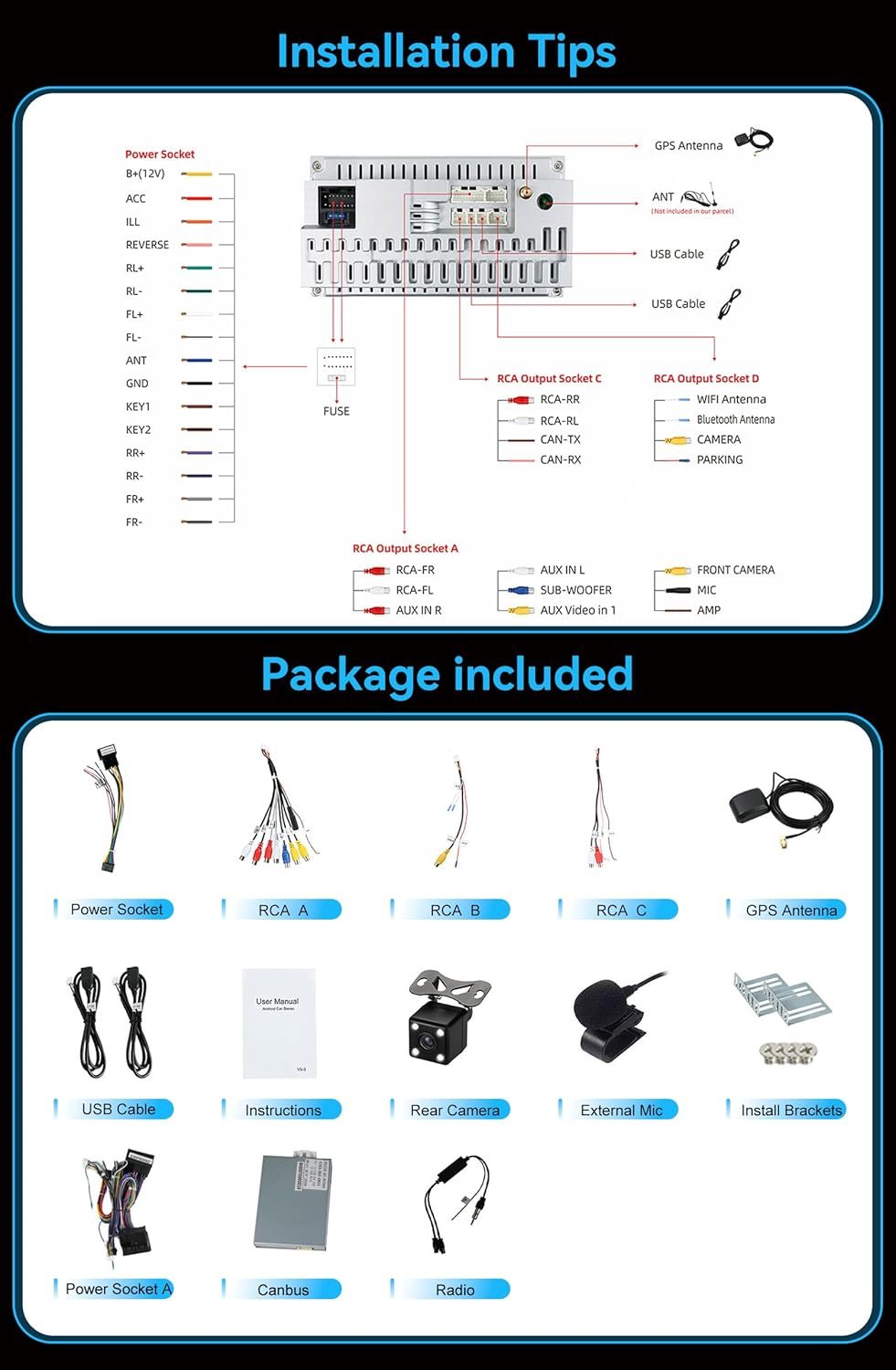
Imaginea 2.1: Visual representation of the components included in the MISONDA Autoradio package, such as the main unit, power socket cables, RCA cables, GPS antenna, USB cables, external microphone, rear camera, installation brackets, and user manual.
3. Specificații
| Caracteristică | Caietul de sarcini |
|---|---|
| Sistem de operare | Android 15 |
| RAM | 6 GB |
| ROM | 128 GB |
| CPU | Rockchip AC8257 A53 Octa-Core, 2.0 GHz |
| Afişa | 9-inch QLED Digital Screen, 1280 x 720 Resolution |
| Ieșire audio | 4 x 50 W Max, DSP (Digital Sound Processor) |
| Bluetooth | Bluetooth 5.0 (Hands-free, Phonebook, Music) |
| Conectivitate | Wi-Fi (Dual Band), 4G LTE (SIM card slot, antenna included), USB |
| Navigare | Integrated GPS, Online/Offline Map Support |
| Radio | FM RDS, DAB+ (Digital Audio Broadcasting) |
| Caracteristici suplimentare | Wireless CarPlay, Android Auto, Mirror Link, Split Screen, Steering Wheel Control, 1080P HD Video Playback, 26 UI Themes, AHD Camera Support, 360 Camera Input (Optional) |
| Dimensiuni | 27 x 24 x 17 cm (Pachet) |
| Greutate | 2 Kilograms (Package) |
4. Instalare
Installation of the MISONDA Autoradio requires technical knowledge. It is recommended to have the unit installed by a qualified professional. Before starting, ensure the vehicle's battery is disconnected to prevent electrical damage.
4.1. Verificare înainte de instalare
- Verify the compatibility of the unit with your Mercedes Benz GLK-Class X204 (2012-2015).
- Asigurați-vă că tot conținutul pachetului este prezent și nedeteriorat.
- Familiarize yourself with the vehicle's dashboard and existing wiring.
4.2. Schema de cablare
Refer to the following diagram for proper wiring connections. Incorrect wiring can damage the unit or the vehicle's electrical system.
Imaginea 4.1: Detailed wiring diagram for the MISONDA Autoradio, showing connections for power (B+/12V, ACC, GND), speaker outputs (RL+, RL-, RR+, RR-, FL+, FL-, FR+, FR-), control wires (REVERSE, ANT, KEY1, KEY2, PARKING), and RCA input/output sockets (AUX IN, SUB-WOOFER, FRONT CAMERA, MIC, AMP, Video Out).
4.3. Pași generali de instalare
- Scoateți cu grijă radioul auto original și ornamentele bordului.
- Connect the main power harness, ensuring correct polarity and secure connections.
- Connect the GPS antenna, USB cables, external microphone, and any optional accessories like the rear camera or DAB+ antenna.
- If your vehicle requires a CANbus decoder, connect it according to the vehicle's specific instructions.
- Mount the new MISONDA Autoradio using the provided installation brackets and frame kit.
- Before fully reassembling the dashboard, perform a functional test of the unit.
- Once confirmed working, reassemble the dashboard trim.
5. Instrucțiuni de utilizare
5.1. Configurare inițială
- Pornire: Turn on the vehicle's ignition. The unit should power on automatically.
- Setări de limbă: Navigate to "Settings" > "System" > "Languages & input" to select your preferred language.
- Ora și data: Set the correct time zone and synchronize time via GPS or network.
- Conexiune Wi-Fi: Go to "Settings" > "Network & internet" > "Wi-Fi" to connect to an available Wi-Fi network or mobile hotspot.
- Conexiune 4G LTE: Insert a 4G SIM card into the designated slot (ensure the device is off before inserting). Configure APN settings if necessary in "Settings" > "Network & internet" > "Mobile network".
5.2. Caracteristici cheie
5.2.1. CarPlay wireless și Android Auto
Connect your iPhone or Android smartphone wirelessly to access navigation, music, calls, and messages directly on the autoradio screen. This feature supports both CarPlay and Android Auto.
- Asigurați-vă că Bluetooth și Wi-Fi sunt activate pe smartphone-ul dvs.
- On the autoradio, open the CarPlay or Android Auto application.
- Follow the on-screen prompts to pair your device via Bluetooth. Once paired, the system will establish a Wi-Fi connection for full functionality.

Imaginea 5.1: Display showing the wireless CarPlay and Android Auto interfaces, along with the Mirror Link function and steering wheel control integration. This allows for seamless smartphone integration and convenient control.
5.2.2. Navigație GPS
The unit comes with integrated GPS for accurate navigation. It supports both online and offline maps. For offline maps, download them via Wi-Fi before traveling to areas with limited network coverage.
- Open the pre-installed navigation application (e.g., Google Maps).
- Enter your destination and select your preferred route.
- Voice guidance will provide turn-by-turn directions.
5.2.3. Radio digital DAB+
Enjoy high-quality digital audio broadcasting with DAB+. Ensure the DAB+ antenna (if included or purchased separately) is properly connected.
- Open the DAB+ application.
- Efectuați o scanare a posturilor pentru a găsi posturile de radio digitale disponibile în zona dvs.
- Selectați stația dorită din listă.

Imaginea 5.2: Visual representation of the DAB+ digital radio interface, showing station lists and signal quality. Also depicted is the Bluetooth 5.0 interface for phone calls and music streaming, and the DSP audio processing for enhanced sound quality.
5.2.4. Bluetooth 5.0
Conectați-vă smartphone-ul pentru apeluri hands-free și streaming audio.
- Enable Bluetooth on your phone and the autoradio.
- On the autoradio, go to the Bluetooth application and search for devices.
- Select your phone from the list and confirm the pairing code.
- Once connected, you can access your phonebook, make/receive calls, and play music.
5.2.5. DSP (Procesor digital de sunet)
The integrated DSP allows for advanced audio customization. Access the equalizer settings to adjust sound profiles, bass, treble, and balance to your preference.
5.2.6. Funcția Split Screen
Multitask by running two applications simultaneously on the screen. For example, use navigation on one side and music playback on the other.
- Deschideți prima aplicație.
- Long-press the recent apps button or drag an app to one side of the screen (depending on UI version).
- Selectați a doua aplicație pentru a umple cealaltă jumătate a ecranului.
5.2.7. Comandă pe volan
The unit supports original steering wheel controls, allowing you to manage audio, calls, and other functions without taking your hands off the wheel. Configuration may be required in the settings menu under "Steering Wheel Control" or "SWC".
5.2.8. Camera Support (Rear View & 360)
The autoradio supports AHD rear view cameras and optional 360-degree camera systems for enhanced parking and safety. The rear camera input automatically displays the view când vehiculul este cuplat în marșarier.

Imaginea 5.3: Illustration of the 360-degree rear view image input options and the high-quality QLED display. The image also highlights AHD camera compatibility, showing various camera angles for comprehensive vehicle surroundings.
6. Întreținere
- Curățarea ecranului: Folosiți o lavetă moale, fără scame, pentru a curăța ecranul tactil. Evitați substanțele de curățare abrazive sau solvenții.
- Actualizări de software: Verificați periodic dacă există actualizări de software prin intermediul setărilor de sistem pentru a asigura performanțe optime și acces la funcții noi. Conectați-vă la Wi-Fi pentru actualizări.
- Îngrijire generală: Păstrați unitatea ferită de praf și umezeală. Evitați expunerea la temperaturi extreme.
7. Depanare
| Problemă | Cauza posibila | Soluţie |
|---|---|---|
| Unitatea nu pornește. | Cablare incorectă, siguranță arsă, problemă cu alimentarea cu energie electrică. | Check power cable connections. Inspect vehicle's fuse box. Consult a professional for wiring verification. |
| Nici un sunet. | Volume too low, mute activated, incorrect speaker wiring, DSP settings. | Increase volume. Check mute status. Verify speaker connections. Adjust DSP equalizer settings. |
| Semnal GPS pierdut sau inexact. | Antena GPS nu este conectată corect sau este obstrucționată, recepție slabă a satelitului. | Asigurați-vă că antena GPS este conectată în siguranță și amplasată într-un loc liber (de exemplu, pe bord). Mutați-vă într-o zonă deschisă. |
| Probleme de conexiune Bluetooth. | Telefonul nu poate fi găsit, asociere incorectă, interferențe. | Ensure phone's Bluetooth is on and discoverable. Delete previous pairings and re-pair. Restart both devices. |
| CarPlay/Android Auto nu se conectează. | Incorrect phone settings, Wi-Fi/Bluetooth issues, app not updated. | Verify phone's Wi-Fi and Bluetooth are active. Ensure CarPlay/Android Auto app is updated. Try restarting the phone and autoradio. |
| Ecranul tactil nu răspunde. | Blocarea sistemului, eroare temporară de software. | Perform a soft reset (refer to device-specific reset instructions, usually a small reset button or holding power button). If issue persists, contact support. |
8. Garanție și asistență
MISONDA provides comprehensive customer support for your autoradio.
- Politica de rambursare: Enjoy a 30-day refund service from the date of purchase.
- Garantie: The product is covered by a 24-month after-sales support warranty.
- Suport tehnic: 24/7 technical support is available to assist with installation and usage issues.
- Contact: For any questions or support needs, please contact us via the provided contact information in your purchase documentation or through the seller's platform.


