
Introducere
This manual provides essential information for setting up, operating, and maintaining your Roku 32-Inch Select Series 1080p Full HD Smart TV. Designed for a delightful streaming experience, this TV offers excellent picture quality, clear sound, and automatic updates. Please read this manual thoroughly before using your television.
Ce este în cutie
Verificați dacă toate componentele sunt prezente în ambalaj:
- Roku 32-Inch Select Series 1080p Full HD Smart TV
- Telecomanda
- Suport (2 bucăți)
- Șuruburi suport (4 bucăți)
- Cablu de alimentare
- Manual de utilizare (acest document)

Image: Contents of the Roku TV box, showing the television, remote control, two stand pieces, and four screws.
Instrucțiuni de configurare
1. Atașarea suportului TV
- Carefully place your TV face-down on a soft, clean surface to prevent damage to the screen.
- Aliniați piesele suportului cu orificiile pentru șuruburi din partea inferioară a televizorului.
- Secure each stand piece with two screws using a Phillips head screwdriver. Do not overtighten.
2. Conectarea alimentării și a dispozitivelor
- Conectați cablul de alimentare la intrarea de alimentare a televizorului și apoi la o priză de perete.
- Connect your external devices (e.g., cable box, gaming console, Blu-ray player) to the available HDMI ports on the back of the TV. This model features 3 HDMI ports.
- For older devices, use the AV input ports (yellow, white, red).
- An optical audio output is available for connecting to soundbars or home theater systems.
- A USB port is provided for media playback.

Imagine: Spate view of the Roku TV displaying HDMI, AV, Antenna, USB, Optical, and Headphone ports.
3. Pornirea inițială și conectarea la rețea
- Apăsați butonul de pornire/oprire de pe telecomandă sau de pe televizor.
- Urmați instrucțiunile de pe ecran pentru a selecta limba și a vă conecta la rețeaua Wi-Fi.
- Activate your Roku account or create a new one. This is required to access streaming channels and features.
Instrucțiuni de operare
1. Interfața sistemului de operare Roku
The Roku OS provides a simple and intuitive home screen for accessing all your entertainment. Easily navigate between streaming apps, live TV, and connected devices.

Image: The Roku TV home screen with a menu on the left and app icons on the right, including Netflix, Disney+, Apple TV, and Roku Channel.
2. Voice Remote
Your Roku TV comes with a voice remote for convenient control. Use your voice to search for content, launch apps, and control playback.
- Căutare vocală: Press the voice button and speak your command (e.g., "Find comedies," "Open Netflix").
- Comenzi rapide pentru aplicații: Dedicated buttons provide quick access to popular streaming services.
- Controlul volumului: Reglați volumul folosind butoanele laterale.
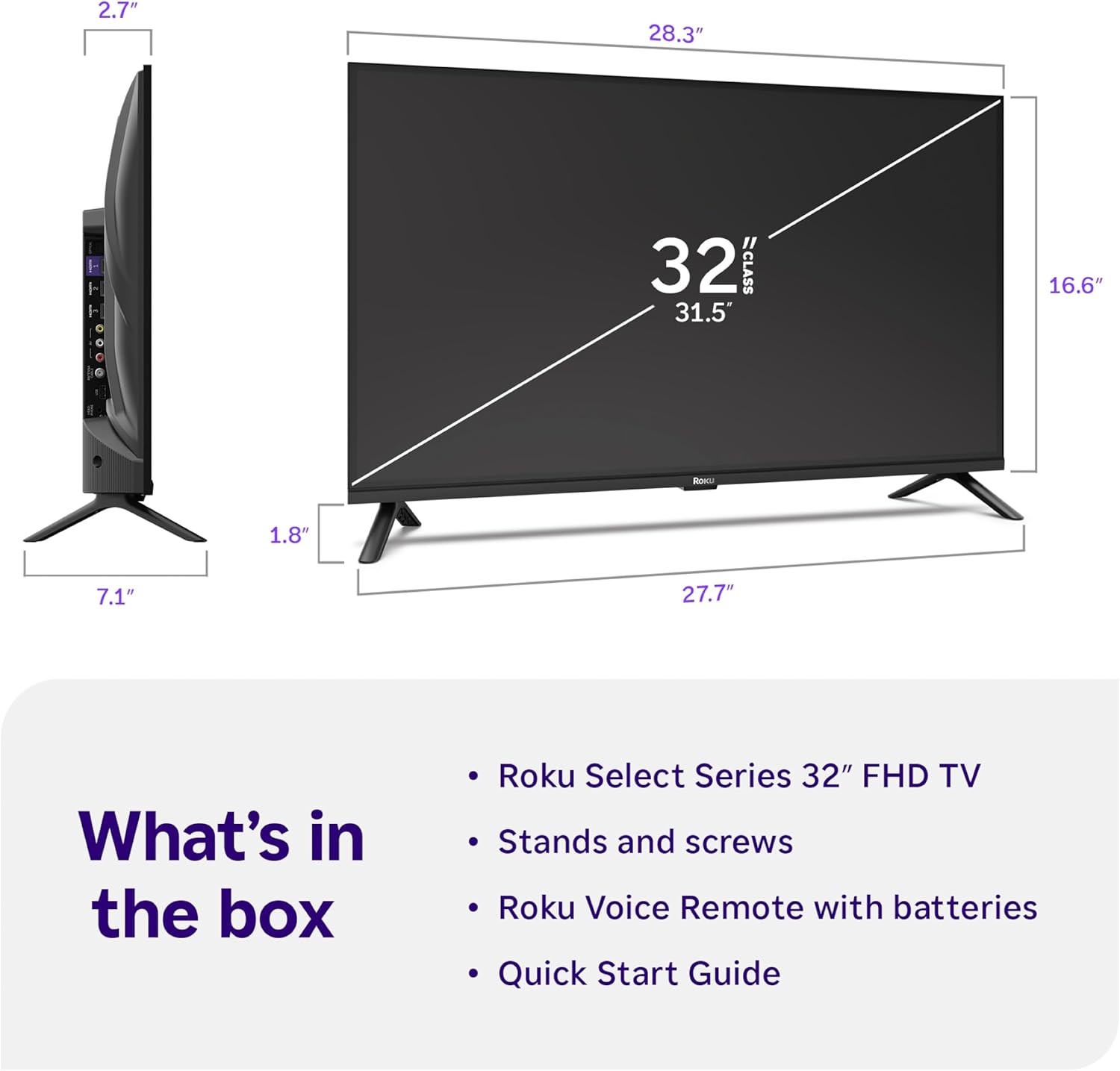
Image: Close-up of the Roku Voice Remote, highlighting buttons for TV power, volume, mute, voice search, instant replay, options, and dedicated app shortcuts.
3. Streaming Apps and Live TV
Access thousands of streaming channels, including Netflix, Disney+, Hulu, Prime Video, and Apple TV+. The Roku Channel also offers free live TV and on-demand content.

Image: A vibrant Roku TV home screen displaying a selection of popular streaming applications and recommended shows.
4. Setări imagine
Optimizați-vă viewexperiență cu diverse setări de imagine:
- Roku Smart Picture: Automatically adjusts picture mode for optimal viewing.
- Moduri de imagine: Choose from presets like Movie, Sports, Vivid, Standard, or Low Power.
- Personalizare: Adjust brightness, contrast, sharpness, color, and tint for a personalized picture.
5. Setări sunet
Îmbunătățiți-vă experiența audio:
- Dolby Audio: Enjoy clear speech and louder sound.
- Moduri de sunet: Select from Standard, Dialogue, Movie, Music, or Night mode.
- Mod căști Bluetooth: Connect your wireless headphones to listen without disturbing others.

Image: A child wearing wireless headphones while watching the Roku TV, demonstrating the Bluetooth Headphone Mode.
6. Integrare Smart Home
Your Roku TV is compatible with various smart home ecosystems:
- Control vocal: Use Roku Voice, Siri, Alexa, or Google Assistant for hands-free control.
- Apple AirPlay: Effortlessly share videos, photos, and music from your Apple devices.
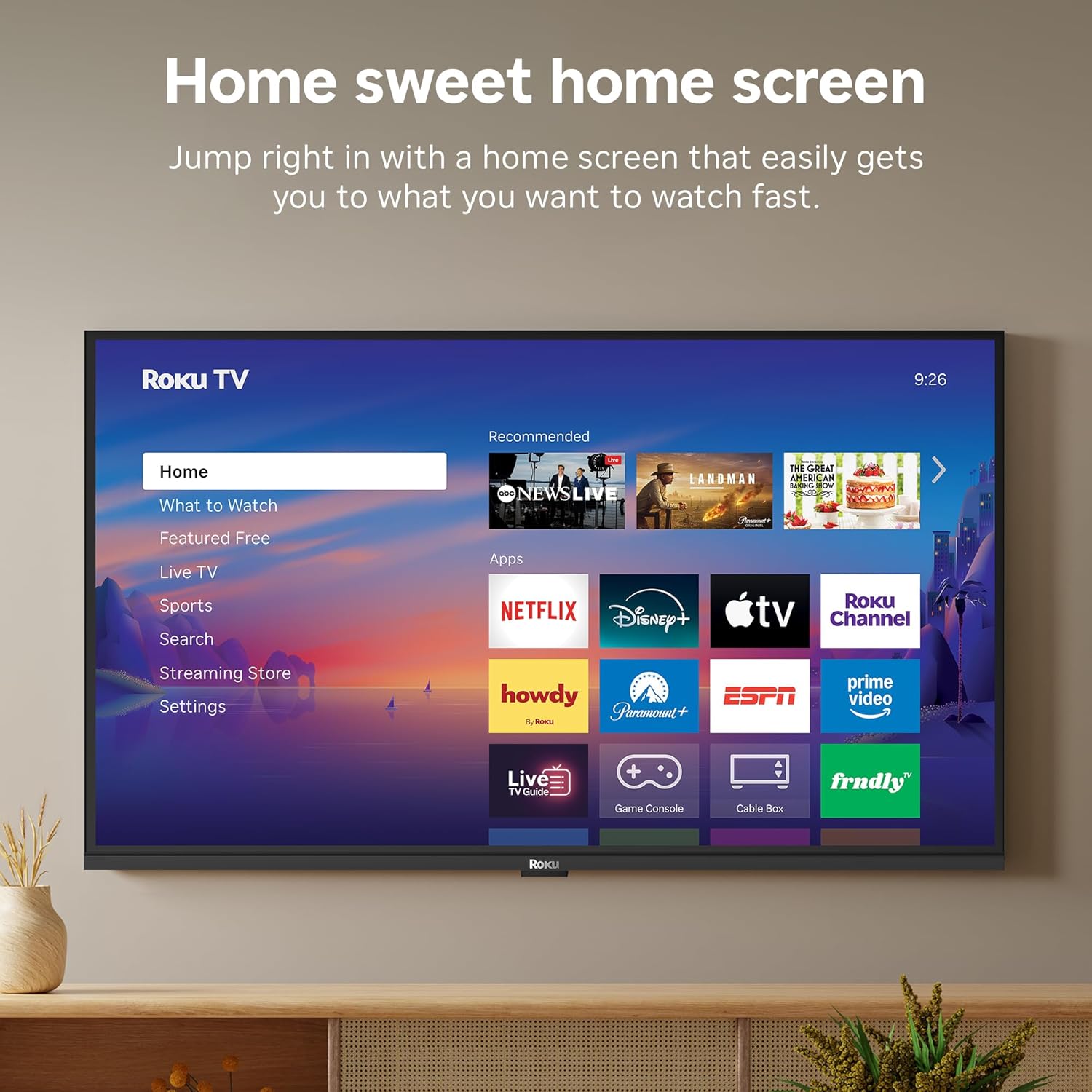
Image: The Roku TV screen displaying smart home compatibility logos for Roku Smart Home, Apple AirPlay, Apple Home, Alexa, and Google Home, with a smart speaker nearby.
7. Control parental
Manage content access with built-in parental controls, including V-Chip technology, to ensure a safe viewmediu pentru copii.
Videoclip oficial al produsului
Video: Un pesteview of the Roku TV OS, demonstrating its user-friendly interface, app selection, and smart features. This video is provided by Roku, Inc.
Specificații
- Dimensiunea ecranului:
- 32 inchi
- Rezoluţie:
- Full HD 1080p
- Tehnologia de afișare:
- LED
- Rata de reîmprospătare:
- 60 Hz
- Caracteristici speciale:
- Bluetooth Headphone Mode, Dolby Audio, Voice Remote, Roku Smart Picture
- Tehnologie de conectivitate:
- Bluetooth, WiFi
- Interfață hardware:
- 3 HDMI Ports, 1 USB Port, S/PDIF (Optical Audio Out)
- Sistem de operare:
- Roku OS
- Dimensiunile produsului (A x L x Î):
- 7.1" D x 28.3" L x 18.4" H
- Greutatea articolului:
- 7.7 de livre (cu suport)
- Standard de montare VESA:
- 200 x 200 mm
- Număr de model:
- 32R3E5
- UPC:
- 829610009469
Depanare
If you encounter issues with your Roku TV, please refer to the following common solutions:
- Fără putere: Asigurați-vă că cablul de alimentare este conectat corect atât la televizor, cât și la o priză electrică funcțională. Încercați o altă priză.
- Fără imagine/sunet: Verify that the correct input source is selected on your TV. Check all cable connections (HDMI, AV, etc.) for looseness.
- Telecomanda nu răspunde: Replace the batteries in your remote control. Ensure there are no obstructions between the remote and the TV.
- Probleme de conexiune la rețea: Restart your Wi-Fi router and modem. Go to the TV's Settings > Network > Check connection to diagnose and reconnect.
- App Not Loading: Restart the app. If the issue persists, try removing and reinstalling the app from the Roku Channel Store.
For more detailed troubleshooting, visit the official Roku support website-ul.
Întreţinere
To ensure the longevity and optimal performance of your Roku TV, follow these maintenance guidelines:
- Curățarea ecranului: Ștergeți ușor ecranul cu o lavetă moale și uscată din microfibră. Pentru pete persistente, ștergeți ușorampClătiți laveta cu apă sau cu o soluție de curățare a ecranelor special concepută pentru electronice. Nu pulverizați lichid direct pe ecran.
- Curățarea corpului televizorului: Folosiți o lavetă moale și uscată pentru a șterge exteriorul televizorului. Evitați substanțele de curățare abrazive sau solvenții.
- Ventilare: Asigurați-vă că orificiile de ventilație ale televizorului nu sunt blocate pentru a preveni supraîncălzirea. Mențineți suficient spațiu în jurul televizorului pentru circulația aerului.
- Actualizări de software: Your Roku TV automatically receives software updates. Ensure your TV is connected to the internet to receive the latest features and performance improvements.
- Gestionare a energiei: Deconectați televizorul de la priză în timpul furtunilor cu fulgere sau când va fi lăsat nesupravegheat pentru perioade lungi de timp.
Garanție și suport
Informații despre garanție
Roku warrants the hardware of this device against defects in materials and workmanship under normal use for a period of one (1) year from the date of purchase ("Warranty Period"). If Roku determines that the device’s hardware is defective during the Warranty Period, Roku’s sole obligation, and your exclusive remedy, will be to either repair or replace the unit with either a new or rebuilt device, at its option. This warranty applies if the device is used in accordance with the provided documentation.
Important information about warranty returns and replacements is available on the Roku support site. You may also return a device for any reason, subject to the terms of the applicable return policy: 1) Within thirty (30) days from the date of purchase from Roku; or 2) within the applicable return period if purchased from an authorized reseller or distributor. Additional details regarding product returns can be found on the Roku support site.
Asistență pentru clienți
For further assistance, technical support, or to access the full range of support resources, please visit the official Roku support website. Puteți găsi acolo întrebări frecvente, ghiduri de depanare și informații de contact pentru serviciul clienți.