
1. Introducere și Pesteview
This manual provides essential information for setting up, operating, maintaining, and troubleshooting your HP 17-inch Business Laptop. This device is designed for productivity and features a 13th Generation Intel Core i5 processor, a 17.3-inch HD+ anti-glare display, a backlit keyboard with a numeric keypad, and a fingerprint reader for enhanced security. It comes pre-installed with Windows 11 Home.
Caracteristicile cheie includ:
- Procesor: 13th Gen Intel Core i5-1334U 10-core processor for efficient multitasking.
- Sistem de operare: Windows 11 Home for a modern and secure computing experience.
- Afişa: 17.3-inch HD+ (1366x768) anti-glare screen with micro-edge design.
- Memorie și stocare: Up to 64GB DDR4 RAM and up to 2TB NVMe M.2 SSD for fast performance and ample depozitare.
- Conectivitate: USB 3.2 Gen 1 Type-C, USB 3.2 Gen 1 Type-A, HDMI 1.4, and a headphone/microphone combo jack.
- Securitate: Integrated fingerprint reader.
- Comoditate: Full-size backlit keyboard with numeric keypad and HP Fast Charge battery technology.
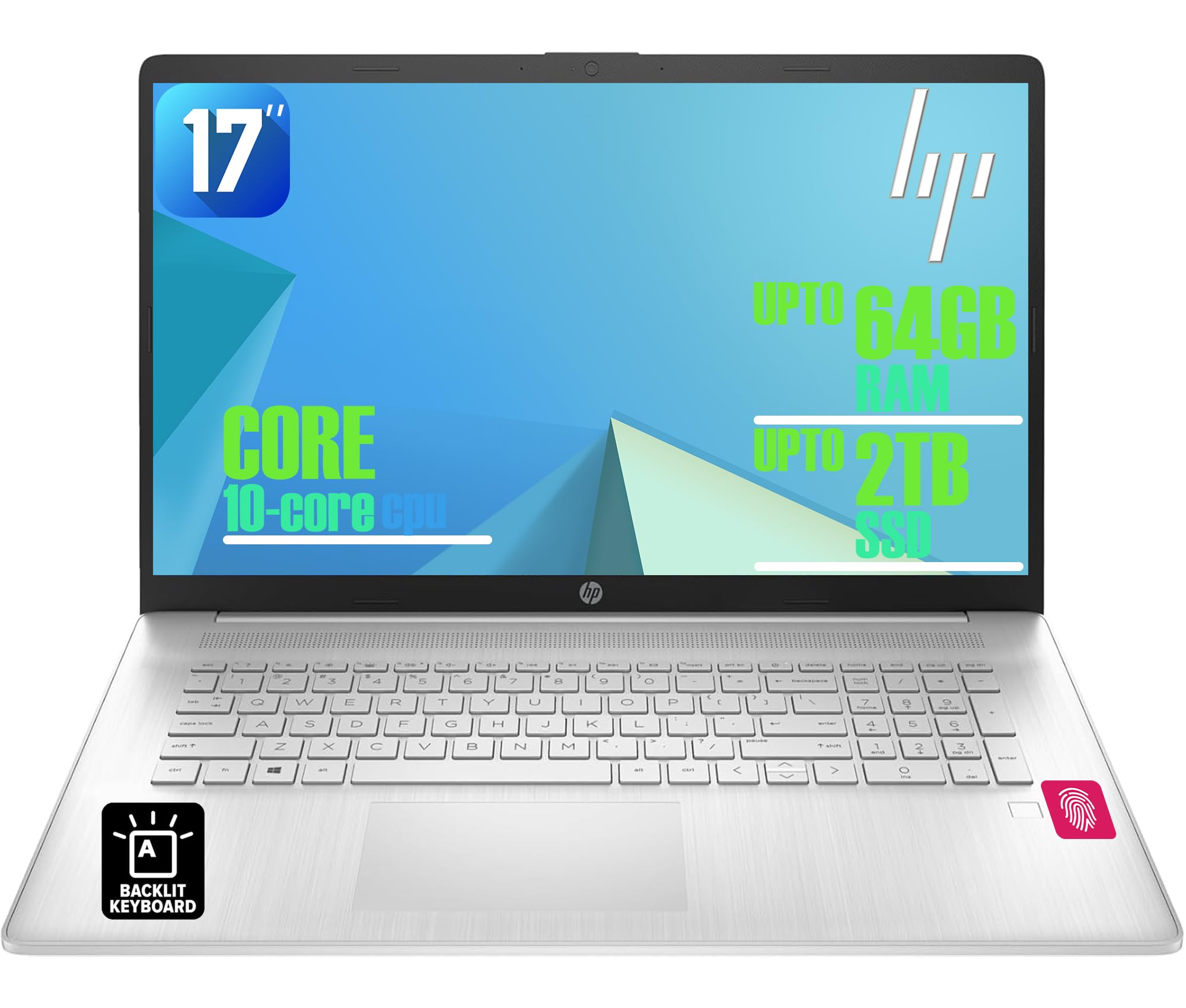
Figure 1: HP 17-inch Business Laptop (Silver)
2. Configurare
2.1 Despachetare și inspecție inițială
Carefully remove the laptop and all accessories from the packaging. Check for any visible damage. The package should include the HP 17-inch laptop, a power adapter, and documentation.
2.2 Conectarea la alimentare
- Connect the power adapter to the AC smart pin port on the side of the laptop.
- Conectați adaptorul de alimentare la o priză de perete.
- Lăsați laptopul să se încarce timp de cel puțin 30 de minute înainte de prima utilizare sau până când indicatorul bateriei arată o încărcare suficientă.
2.3 Pornirea inițială și configurarea Windows
- Deschideți capacul laptopului și apăsați butonul de pornire, situat de obicei în partea dreaptă sus a tastaturii.
- Urmați instrucțiunile de pe ecran pentru a finaliza procesul de configurare Windows 11 Home. Aceasta include selectarea regiunii, a limbii, conectarea la o rețea Wi-Fi și crearea unui cont de utilizator.
2.4 Conectarea perifericelor
Laptopul HP oferă diverse porturi pentru conectarea dispozitivelor externe:
- Porturi USB: Use the USB 3.2 Gen 1 Type-C port or the two USB 3.2 Gen 1 Type-A ports for connecting external drives, mice, keyboards, or other USB accessories.
- HDMI: Connect an external monitor or projector using the HDMI 1.4 port.
- Audio: Plug headphones or an external microphone into the 3.5mm headphone/microphone combo jack.

Figura 2: lateral view illustrating available ports (USB Type-C, USB Type-A, HDMI, Headphone/microphone combo, AC smart pin)
3. Utilizarea laptopului
3.1 Gestionarea energiei
- Pornire: Apăsați butonul de pornire.
- Modul de somn: Închideți capacul sau selectați „Repaus” din meniul Start.
- Închidere: Selectați „Oprire” din meniul Start.
- Repornire: Selectați „Repornire” din meniul Start.
3.2 Tastatură și touchpad
The laptop features a full-size backlit keyboard with a numeric keypad. Use the function keys (Fn) in combination with other keys for specific actions like adjusting screen brightness, volume, or toggling the keyboard backlight.
The integrated touchpad supports multi-touch gestures for navigation. Refer to Windows settings for customizing touchpad behavior.

Figure 3: Backlit keyboard with numeric keypad and integrated fingerprint reader
Cititor de amprente 3.3
The integrated fingerprint reader allows for secure and quick login using Windows Hello. To set up, navigate to Setări > Conturi > Opțiuni de conectare și urmați instrucțiunile pentru a vă înregistra amprenta.
3.4 Conectivitate fără fir
- Wifi: The laptop supports Realtek Wi-Fi 6 (2x2). To connect to a wireless network, click the Wi-Fi icon in the taskbar, select your desired network, and enter the password if required.
- Bluetooth: Bluetooth 5.3 is integrated for connecting wireless accessories like headphones or mice. Enable Bluetooth from Setări > Bluetooth și dispozitive și asociați-vă dispozitivele.
3.5 Afișaj și Webcam
The 17.3-inch HD+ anti-glare display provides a clear viewing experience. The HP True Vision 720p HD webcam with dual microphones is suitable for video calls and online meetings.
3.6 HP QuickDrop
HP QuickDrop allows for wireless file transfer between your laptop and mobile devices without needing cables. Install the HP QuickDrop app on both your laptop and mobile device and follow the in-app instructions to pair and transfer files.

Figure 4: HP QuickDrop for wireless file transfer between laptop and phone
4. Întreținere
4.1 Curățarea laptopului
- Ecran: Utilizați ușor o cârpă moale, fără scame dampCurățați cu apă sau cu un detergent de ecran. Nu pulverizați lichid direct pe ecran.
- Tastatură și șasiu: Folosiți o cârpă moale și uscată. Pentru murdăria persistentă, uscați ușor.amp cloth can be used, ensuring no liquid enters the device. Compressed air can help remove debris from between keys.
4.2 Îngrijirea bateriei
The laptop is equipped with a 41Wh Lithium-Ion Battery. To maximize battery lifespan:
- Evitați temperaturile extreme.
- Nu descărcați complet bateria în mod regulat.
- Utilize HP Fast Charge, which can charge the battery from 0 to 50% in approximately 45 minutes.

Figure 5: Battery life indicator (Up to 8 hours wireless streaming)
4.3 Actualizări de software
Verificați și instalați periodic actualizări Windows pentru a vă asigura că sistemul dvs. are cele mai recente corecții de securitate și îmbunătățiri de performanță. Accesați Setări > Actualizare Windows pentru a gestiona actualizările.
5. Depanare
Această secțiune abordează problemele frecvente pe care le puteți întâmpina cu laptopul HP.
5.1 Probleme legate de alimentare
- Laptopul nu pornește: Asigurați-vă că adaptorul de alimentare este conectat corect atât la laptop, cât și la o priză funcțională. Verificați dacă indicatorul luminos al adaptorului de alimentare este aprins. Încercați o altă priză.
- Bateria nu se încarcă: Verificați conexiunea adaptorului de alimentare. Verificați starea bateriei în setările Windows.
5.2 Probleme de afișare
- Nicio imagine pe ecran: Ensure the laptop is powered on. If an external monitor is connected, try disconnecting it or pressing Fn + F4 (or the corresponding display toggle key) to switch display output.
- Ecran întunecat: Adjust brightness using the function keys (e.g., Fn + F2/F3) or through Windows settings.
5.3 Probleme de conectivitate
- Wi-Fi-ul nu se conectează: Asigurați-vă că Wi-Fi este activat în setările Windows. Reporniți routerul și laptopul. Verificați dacă există drivere de rețea actualizate.
- Dispozitivul Bluetooth nu se conectează: Ensure Bluetooth is enabled on both the laptop and the device. Make sure the device is in pairing mode.
5.4 Probleme generale de performanță
- Performanță lentă: Închideți aplicațiile inutile. Verificați dacă există programe malware. Asigurați-vă că există suficient spațiu liber pe SSD.
- Sistemul se blochează: Presa Ctrl + Alt + Del to open Task Manager and end unresponsive tasks. If unresponsive, perform a hard shutdown by holding the power button for several seconds.
6. Specificații
The following table outlines the key technical specifications for the HP 17-inch Business Laptop (Model: HP laptop).
| Caracteristică | Caietul de sarcini |
|---|---|
| Marca | HP |
| Numele modelului | Laptop HP |
| Procesor | 13th Gen Intel Core i5-1334U (10 Cores, up to 4.6 GHz) |
| Sistem de operare | Windows 11 Home |
| Afişa | 17.3-inch HD+ (1366x768) Anti-glare, 250 nits |
| Grafică | Grafică Intel Iris Xe (integrată) |
| Memoria RAM | Up to 64GB DDR4 SDRAM 3200 MHz |
| Depozitare | Up to 2TB NVMe M.2 SSD |
| Conectivitate wireless | Realtek Wi-Fi 6 (2x2), Bluetooth 5.3 |
| Porturi | 1x USB 3.2 Gen 1 Type-C, 2x USB 3.2 Gen 1 Type-A, 1x HDMI 1.4, 1x Headphone/microphone combo jack |
| Tastatura | Full-size Backlit Keyboard with Numpad |
| Securitate | Cititor de amprente |
| Camera foto | Cameră HD 720p cu obturator de confidențialitate |
| Baterie | 41Wh Lithium-Ion (HP Fast Charge) |
| Dimensiuni (L x l x H) | 15.78 cm x 10.15 cm x 0.81 cm (aprox.) |
| Greutate | 4.6 lbs (aprox.) |
| Culoare | Argint natural |

Figure 6: Laptop dimensions (15.78" W x 10.15" D x 0.78" H) and weight (4.60 lbs)
7. Garanție și asistență
7.1 Garanția producătorului
Your HP laptop is covered by a manufacturer's warranty. Please refer to the warranty documentation included with your product for specific terms, conditions, and duration. Keep your proof of purchase for warranty claims.
7.2 Suport tehnic
Pentru asistență tehnică, descărcări de drivere sau asistență suplimentară, vă rugăm să vizitați site-ul oficial de asistență HP website. You will typically need your product's serial number or model number to access specific support resources.
Suport online: https://support.hp.com