
1. Introducere
This manual provides detailed instructions for the safe and efficient use of your Surfans F20 Pro Android Hi-Res Music Player. Please read this manual thoroughly before operating the device and retain it for future reference.
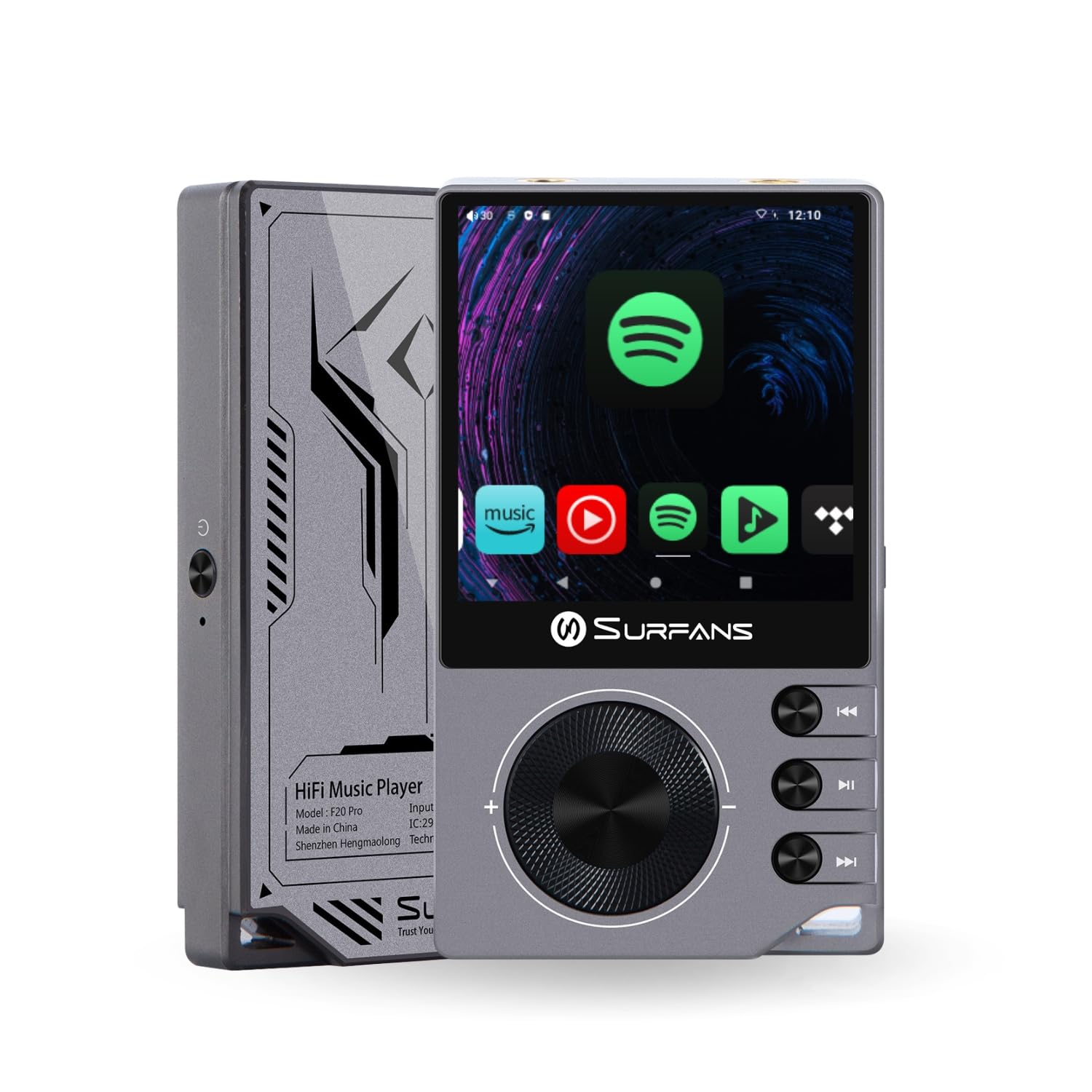
The Surfans F20 Pro Hi-Res Music Player, showcasindatorită designului său compact și interfeței tactile.
2. Conținutul pachetului
Verificați dacă toate articolele sunt prezente în colet:
- Surfans F20 Pro Hi-Res Music Player
- Cablu USB de tip C
- 32 GB MicroSD Memory Card (pre-installed or separate)
- Carcasă de protecție
- Manual de utilizare (acest document)
3. Dispozitiv terminatview
Familiarize yourself with the physical components and ports of your F20 Pro player.

Față și spate view of the Surfans F20 Pro, highlighting its robust CNC metal chassis and button layout.
3.1. Caracteristici cheie
- Dual ESS9018Q2M DACs: For high-fidelity audio processing.
- Octa-Core Android 12 System: Enables streaming app compatibility and smooth operation.
- 3.5mm Single-Ended & 4.4mm Balanced Outputs: Versatile headphone connectivity.
- Bluetooth 5.0 with LDAC: High-quality wireless audio transmission.
- Wi-Fi cu bandă duală (2.4 GHz și 5 GHz): For stable internet connectivity.
- Stocare extensibilă: Supports up to 1TB via MicroSD card.
- Ecran tactil de 2.7 inci: Interfață de utilizator intuitivă.
4. Configurare
4.1. Încărcarea dispozitivului
Before first use, fully charge the F20 Pro. Connect the included USB Type-C cable to the device's charging port and a compatible USB power adapter (not included) or computer USB port. The charging indicator will show the charging status.
4.2. Introducerea unui card MicroSD
The F20 Pro supports MicroSD cards up to 1TB for expanded storage. Locate the MicroSD card slot on the side of the device. Gently insert the card until it clicks into place. To remove, push the card in again until it springs out.
4.3. Pornirea inițială
Press and hold the power button until the screen illuminates. Follow the on-screen prompts to complete the initial setup, including language selection and Wi-Fi connection.
4.4. Conectarea la Wi-Fi
Navigați la Setări > Rețea și internet > Wi-Fi. Select your desired network and enter the password if prompted. The F20 Pro supports both 2.4GHz and 5GHz Wi-Fi bands.

The Surfans F20 Pro demonstrating its dual-band Wi-Fi capability for fast and stable connections.
4.5. Asociere Bluetooth
Pentru a conecta căști sau difuzoare Bluetooth:
- Asigurați-vă că dispozitivul Bluetooth este în modul de asociere.
- On the F20 Pro, go to Setări > Dispozitive conectate > Asociați dispozitivul nou.
- Select your device from the list and confirm pairing.

An illustration of the Bluetooth 5.0 chip, indicating support for high-resolution wireless audio codecs like LDAC.
5. Operarea dispozitivului
5.1. Navigare de bază
The F20 Pro features a 2.7-inch touchscreen for navigation. Swipe to scroll, tap to select, and use the physical buttons for quick controls:
- Buton de alimentare: Pornire/oprire, pornire/oprire ecran.
- Roata de volum: Reglează volumul ieșirii audio.
- Butoane de control al redării: Redare/Pauză, Melodia următoare, Melodia anterioară.
5.2. Redarea muzicii
The F20 Pro supports various audio formats including DSD512, 192kHz/24bit, FLAC, WAV, WMA, M4A, MP3, MP2, and AAC.
5.2.1. Local Files
Transferați muzică files to the device's internal storage or MicroSD card via USB connection to a computer. Use the pre-installed music player application to browse and play your library.
5.2.2. Aplicații de streaming
The Android 12 operating system allows installation of streaming apps like Spotify, Apple Music, Tidal, or YouTube. Connect to Wi-Fi and download apps from the Google Play Store or other compatible sources.

The Surfans F20 Pro's screen showing various streaming application icons, demonstrating its Android capabilities.
5.3. Headphone Connections
The device offers both single-ended and balanced audio outputs.
- Ieșire cu un singur capăt de 3.5 mm: Standard headphone jack (125mW/32Ω).
- Ieșire echilibrată de 4.4 mm: For enhanced audio performance with compatible headphones (500mW/32Ω).

A închide view of the 3.5mm single-ended and 4.4mm balanced audio output ports on the Surfans F20 Pro.
6. Întreținere
6.1. Curatenie
Use a soft, dry, lint-free cloth to clean the device. Avoid using abrasive cleaners or solvents, which may damage the surface.
6.2. Actualizări software
Periodically check for software updates to ensure optimal performance and access to new features. Updates can typically be found in Setări > Sistem > Actualizare sistem.
6.3. Îngrijirea bateriei
Pentru a prelungi durata de viață a bateriei, evitați descărcarea completă frecventă a dispozitivului. Depozitați dispozitivul într-un loc răcoros și uscat atunci când nu îl utilizați pentru perioade lungi de timp.

Un intern view of battery cells, representing the long-lasting battery capacity of the F20 Pro.
7. Depanare
If you encounter issues with your F20 Pro, refer to the following common problems and solutions:
| Problemă | Cauza posibila | Soluţie |
|---|---|---|
| Dispozitivul nu pornește | Baterie descărcată; Prăbușire sistem | Charge the device; Press and hold the power button for 10-15 seconds to force restart. |
| Fără ieșire de sunet | Volume too low; Incorrect output selected; Faulty headphones | Increase volume; Check headphone connection; Test with different headphones. |
| Nu se poate conecta la Wi-Fi | Parolă incorectă; În afara razei de acoperire; Problemă cu routerul | Verify password; Move closer to router; Restart router. |
| Slow performance/App crashes | Prea multe aplicații rulează; Spațiu de stocare insuficient; Software învechit | Close background apps; Free up storage; Check for system updates. |
8. Specificații
Detailed technical specifications for the Surfans F20 Pro:
| Caracteristică | Detaliu |
|---|---|
| Marca | Surfani |
| Numele modelului | F20 PRO |
| Cipuri DAC | Dual ESS9018Q2M |
| op-Amps | Dual OPA1612 |
| Sistem de operare | Android 12 |
| RAM | 3 GB |
| Stocare internă | 32 GB |
| Stocare extensibilă | Până la 1 TB prin card MicroSD |
| Dimensiunea ecranului | 2.73 inchi |
| Conectivitate | Aux, Bluetooth 5.0 (LDAC), USB Type-C, Wi-Fi (2.4GHz & 5GHz) |
| Ieșiri audio | 3.5mm Single-Ended (125mW/32Ω), 4.4mm Balanced (500mW/32Ω) |
| Formate audio acceptate | DSD512, 192kHz/24bit, FLAC, WAV, WMA, M4A, MP3, MP2, AAC |
| Culoare | Gri |

An illustration of the dual ESS9018K2M DAC chips, central to the F20 Pro's high-resolution audio capabilities.
9. Informații despre garanție
The Surfans F20 Pro comes with a 1 ani garanție de la data achiziției. Această garanție acoperă defectele de fabricație și manoperă în condiții normale de utilizare. Nu acoperă daunele cauzate de utilizarea necorespunzătoare, accidente, modificări neautorizate sau uzură normală. Vă rugăm să păstrați dovada achiziției pentru reclamațiile în garanție.
10. Asistență pentru clienți
For further assistance, technical support, or warranty inquiries, please contact Surfans customer service through the official website or your retailer. You may also find additional resources and FAQs online.