
TRYX L-P0CL-DS0M-G0K
Manual de instrucțiuni pentru blocul de apă al procesorului TRYX Panorama WB
Model: L-P0CL-DS0M-G0K
Introducere
This manual provides detailed instructions for the installation, operation, and maintenance of your TRYX Panorama WB CPU Water Block. Designed for custom liquid cooling systems, this water block features a 6.67-inch 2K AMOLED display, microchannel fins, a copper base, and an integrated VRM fan to ensure optimal thermal performance and visual customization. Please read this manual thoroughly before installation and use.
Ce este în cutie
Verificați dacă toate componentele enumerate mai jos sunt prezente în pachet.
- Bloc de apă CPU
- Suporturi de montare AMD/Intel
- Thermal Paste (α-01)
- 90° Rotary Fittings
- Manual de instalare
- Accessories (screws, springs, etc.)

Image: Contents of the TRYX Panorama WB package.
Configurare și instalare
Follow these steps carefully to install the TRYX Panorama WB CPU Water Block into your custom liquid cooling system. Ensure your system is powered off and disconnected from the mains before beginning.
1. Prepare Your CPU and Motherboard
- Remove any existing CPU cooler.
- Clean the CPU surface thoroughly with isopropyl alcohol to remove old thermal paste.
- Install the appropriate backplate and mounting standoffs for your CPU socket (Intel LGA 1851/1700/1200/115x or AMD AM4/AM5). Refer to your motherboard manual for specific backplate installation if needed.
Imagine: Explodată view of the water block components, including mounting hardware.
2. Aplicați pasta termică
Apply a small amount of the provided thermal paste (α-01) to the center of your CPU's integrated heat spreader (IHS). A pea-sized dot is generally sufficient. The pressure from the water block will spread it evenly.

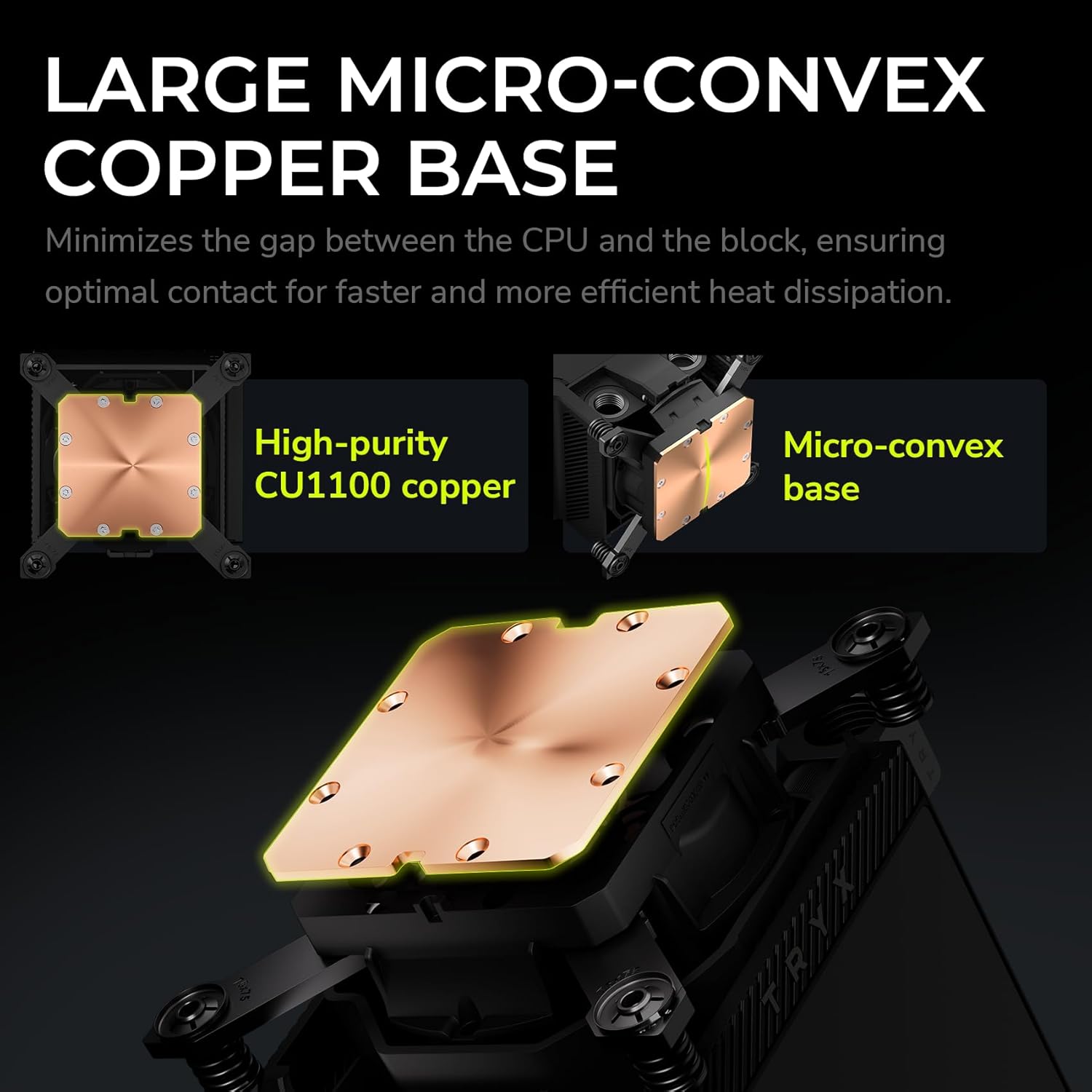
Image: Detail of the water block's copper base, designed for efficient heat transfer.
3. Mount the Water Block
- Carefully align the water block over the CPU and mounting standoffs.
- Place the adjustable mounting bracket over the water block.
- Secure the water block using the provided screws, tightening them in a diagonal pattern until snug. Avoid overtightening.
4. Connect to Your Liquid Cooling Loop
The TRYX Panorama WB features G1/4" threaded outlets for compatibility with standard liquid cooling components.
- Install the included 90° rotary fittings or your preferred G1/4" fittings into the water block's ports. Ensure a secure, leak-free connection.
- Connect your tubing to the fittings, ensuring proper flow direction within your custom loop.

Image: Detail of the 90° rotary fittings and G1/4" threaded ports for loop integration.

Image: The 90° rotary adapter fitting, highlighting its 360° rotation capability.
5. Conexiuni de alimentare
Connect the necessary cables from the water block to your motherboard or power supply. This typically includes a USB header for display and software control, and a fan header for the integrated VRM fan.
Instrucțiuni de operare
The 2K AMOLED Display
The TRYX Panorama WB features a vibrant 6.67-inch 2K AMOLED display operating at 60Hz. This display can show system information, custom images, and videos.

Image: The 6.67-inch curved AMOLED display showcasincapacitățile sale vizuale.

Image: Explanation of the triple-layer screen technology for optimal display quality.
KANALI Software Hub
The KANALI Software Hub is your control center for the Panorama WB. It allows for extensive customization of the display and monitoring of system parameters.
- Monitorizarea sistemului: View real-time CPU temperature, frequency, usage, GPU temperature, and more.
- Content Customization: Upload custom images (PNG, JPG, GIF) and videos (MP4, AVI) up to 1080P and 500MB.
- Funcționalitate ecran divizat: Display different content on separate sections of the screen simultaneously.
- Anamorphic Effects: Apply various visual effects to your content.
- VRM Fan Control: Adjust the speed of the integrated VRM fan.

Image: KANALI software interface displaying system information options.

Imagine: Pesteview of the KANALI Software Hub for display configuration and system monitoring.

Image: The split-screen display feature in action, showing different content simultaneously.

Image: KANALI's content library options, including preloaded 3D content and custom upload.
Integrated VRM Fan
The integrated VRM fan provides additional cooling to your motherboard's Voltage Regulator Modules (VRMs), contributing to system stability, especially during overclocking. Control the fan speed via the KANALI software.

Image: The integrated VRM fan and its adjustable settings in KANALI software.
Întreţinere
Regular maintenance ensures the longevity and optimal performance of your TRYX Panorama WB.
- Curățarea afișajului: Gently wipe the AMOLED display with a soft, lint-free cloth. For stubborn smudges, use a screen-safe cleaning solution. Avoid abrasive materials.
- Coolant System Check: Periodically inspect your liquid cooling loop for any signs of leaks, kinks in tubing, or coolant discoloration. Address any issues promptly.
- Înlocuirea lichidului de răcire: Follow the recommendations of your coolant manufacturer for replacement intervals.
- Îndepărtarea prafului: Use compressed air to clear any dust accumulation around the VRM fan and water block fins to maintain airflow.
Depanare
If you encounter issues with your TRYX Panorama WB, refer to the following common problems and solutions.
| Problemă | Cauza posibila | Soluţie |
|---|---|---|
| Display is blank or not showing content. |
|
|
| Temperaturi ridicate ale procesorului. |
|
|
| VRM fan is noisy or not spinning. |
|
|
| Software (KANALI) not detecting the device. |
|
|
Specificații
| Caracteristică | Detaliu |
|---|---|
| Dimensiunile produsului | 9.1 cm L x 6.1 cm l x 6.1 cm Î |
| Marca | TRYX |
| Tip conector de alimentare | 4-pini |
| Voltage | 12 volți (DC) |
| Metoda de răcire | Apă |
| Dispozitive compatibile | CPU |
| Nivel de zgomot | 22 de decibeli |
| Material | Aluminiu, Cupru, Tereftalat de polibutilenă |
| Maximum Rotational Speed (VRM Fan) | 3300 RPM |
| Air Flow Capacity (VRM Fan) | 17.4 de picioare cubi pe minut |
| Greutatea articolului | 2.62 lire sterline |
| Numărul de model | L-P0CL-DS0M-G0K |
| Tip de afișare | 6.67-inch Curved 2K AMOLED |
| Rata de reîmprospătare a afișajului | 60 Hz |
| Fitinguri | G1/4" Threaded Outlet, 90° Rotary Fittings |
| Compatibilitate socket CPU | Intel LGA 1851/1700/1200/115x, AMD AM4/AM5 |
Produs terminatview Video
Urmăriți acest videoclip oficial pentru o imagine de ansambluview of the TRYX Panorama WB CPU Water Block's features and aesthetics.
Video: Produsul oficial s-a încheiatview of the TRYX Panorama WB CPU Water Block, demonstrating its design and display features.
Garanție și suport
For detailed warranty information, technical support, or to contact customer service, please visit the official TRYX website-ul web sau consultați cardul de garanție inclus împreună cu produsul.
Ask a question about this manual
Ask about setup, troubleshooting, compatibility, parts, safety, or missing instructions. Manuals+ will review the question and use this page’s manual context to help answer it.