
1. Produs terminatview
The USX MOUNT XTL908 is a heavy-duty tilting TV wall mount designed for large televisions ranging from 60 to 120 inches. It supports TVs weighing up to 220 lbs and features a low-profile design, positioning the TV just 2.6 inches from the wall. The mount is compatible with VESA patterns up to 900x600mm and can be installed on wood studs (16-32 inches apart), concrete, or brick walls.

Image 1.1: The USX MOUNT XTL908 TV Wall Mount installed in a modern living room setting.

Image 1.2: The ultra-slim profile of the mount, showing the TV positioned close to the wall.
2. Informații de siguranță
Read all instructions carefully before installation. If you have any questions, consult a qualified installer. Improper installation can result in serious injury or damage.
- Capacitate de greutate: Do not exceed the maximum weight capacity of 220 lbs (100 kg). This mount is intended for use only with the maximum weights indicated.
- Dimensiunea televizorului: Acest suport este conceput pentru televizoare cu diagonala între 60 și 120 de inci.
- Tip de perete: Install only on wood studs, solid concrete, or brick walls. NU install on drywall alone.
- Spațierea dintre știfturi: Ensure wood studs are spaced between 16 and 32 inches apart.
- Hardware de montare: Use only the provided mounting hardware. If you require concrete anchors, please contact customer support.
- Integrity Test: After installation, perform an integrity test by gently pulling on the mount to ensure it is securely fastened to the wall.

Image 2.1: The robust construction of the mount, designed to securely hold TVs up to 220 lbs.
3. Conținutul pachetului
Please verify that all components are present and undamaged before installation. If any parts are missing or defective, contact customer support.
- Ansamblu placă de perete
- Suporturi TV (2)
- Mounting Hardware Kit (screws, washers, spacers, anchors for concrete/brick)
- Șablon de montare
- Manual de instructiuni
4. Specificații
| Caracteristică | Caietul de sarcini |
|---|---|
| Tip de montare | Montare pe perete |
| Tipul de mișcare | Înclinare |
| Marca | MONTAJ USX |
| Material | Metal |
| Culoare | Negru |
| Dispozitive compatibile | Televiziune |
| Unghi maxim de înclinare | 12 Degrees Down, 5 Degrees Up |
| Minimum Supported Screen Size | 60 inchi |
| Maximum Supported Screen Size | 120 inchi |
| Capacitate maximă de încărcare | 220 lbs (100 kg) |
| Compatibilitate VESA | Până la 900x600mm |
| Wall Distance (Low Profile) | 2.6 inci |
| Stud Spacing Compatibility | 16-32 inci |

Image 4.1: Visual representation of VESA patterns supported and the maximum load capacity of 220 lbs.

Image 4.2: Technical drawing showing the dimensions of the TV interface and wall plate.

Imaginea 4.3: O altă view of the product dimensions, highlighting key measurements.
5. Configurare și instalare
Before you begin, ensure you have all necessary tools and that your wall type is suitable for this mount. The installation video below provides a visual guide.
Video 5.1: Official USX MOUNT XTL908 installation video, demonstrating the step-by-step mounting process.
5.1 Verificări înainte de instalare
- Verificați compatibilitatea televizorului: Check your TV's weight and VESA mounting pattern to ensure it falls within the mount's specifications (60-120 inches, up to 220 lbs, VESA up to 900x600mm).
- Identificați tipul de perete: Determine if your wall is wood stud, solid concrete, or brick.
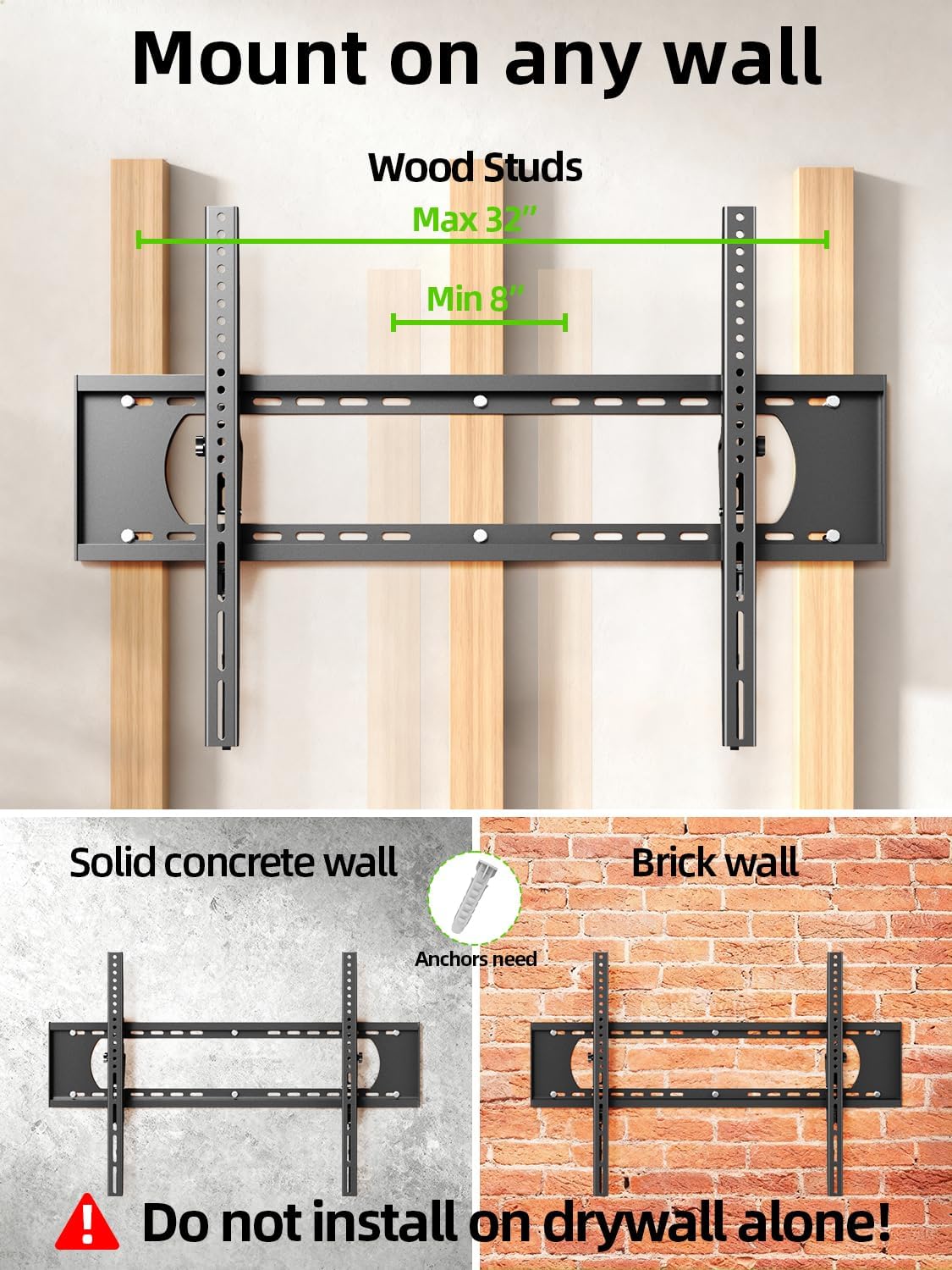
Image 5.2: The mount is suitable for wood studs (16-32" spacing), solid concrete, and brick walls. Not for drywall alone.
5.2 Attaching TV Brackets
Depending on your TV's back, choose the appropriate option:
- For Flat TV Back: Align the TV brackets with the VESA holes on the back of your TV. Secure them using the appropriate screws and washers from the hardware kit. Do not overtighten.
- For Irregular TV Back: If your TV has an irregular or curved back, use the provided spacers to create a flat mounting surface before attaching the brackets.
5.3 Montarea plăcii de perete
Use the provided mounting template to mark the drill holes on your wall. Ensure the template is level before marking.
- Pentru grinzi de lemn: Locate the center of your wood studs. Drill pilot holes (7/32 in. / 5.5mm diameter, 2.5 in. / 64mm depth). Secure the wall plate using lag bolts and washers. Do not use plastic anchors for wood studs.
- Pentru pereți din beton/cărămidă: Drill pilot holes (3/8 in. / 10mm diameter, 2.5 in. / 64mm depth). Insert concrete anchors into the drilled holes. Secure the wall plate using lag bolts and washers.
După fixarea plăcii de perete, efectuați un test de integritate trăgând de suport pentru a vă asigura că este fixată ferm pe perete.

Image 5.3: Simplified 3-step installation process: 1. Attach TV brackets, 2. Mount wall plate, 3. Hang up TV.
5.4 Hanging and Securing the TV
- Carefully lift the TV with the attached brackets and hook them onto the top edge of the wall plate.
- Coborâți ușor televizorul până când suporturile se fixează complet în placa de perete.
- Use the quick lock and release pull tabs to secure the TV to the wall plate, preventing accidental dislodgement.
6. Instrucțiuni de utilizare
6.1 Reglarea unghiului de înclinare
The USX MOUNT XTL908 allows for easy tilt adjustment to optimize your viewing angle and reduce glare. The mount can tilt 5 degrees upwards and 12 degrees downwards.
- To adjust the tilt, loosen the tilting adjustment knobs located on the TV brackets.
- Înclinați televizorul în unghiul dorit.
- Tighten the tilting adjustment knobs to secure the TV in place.
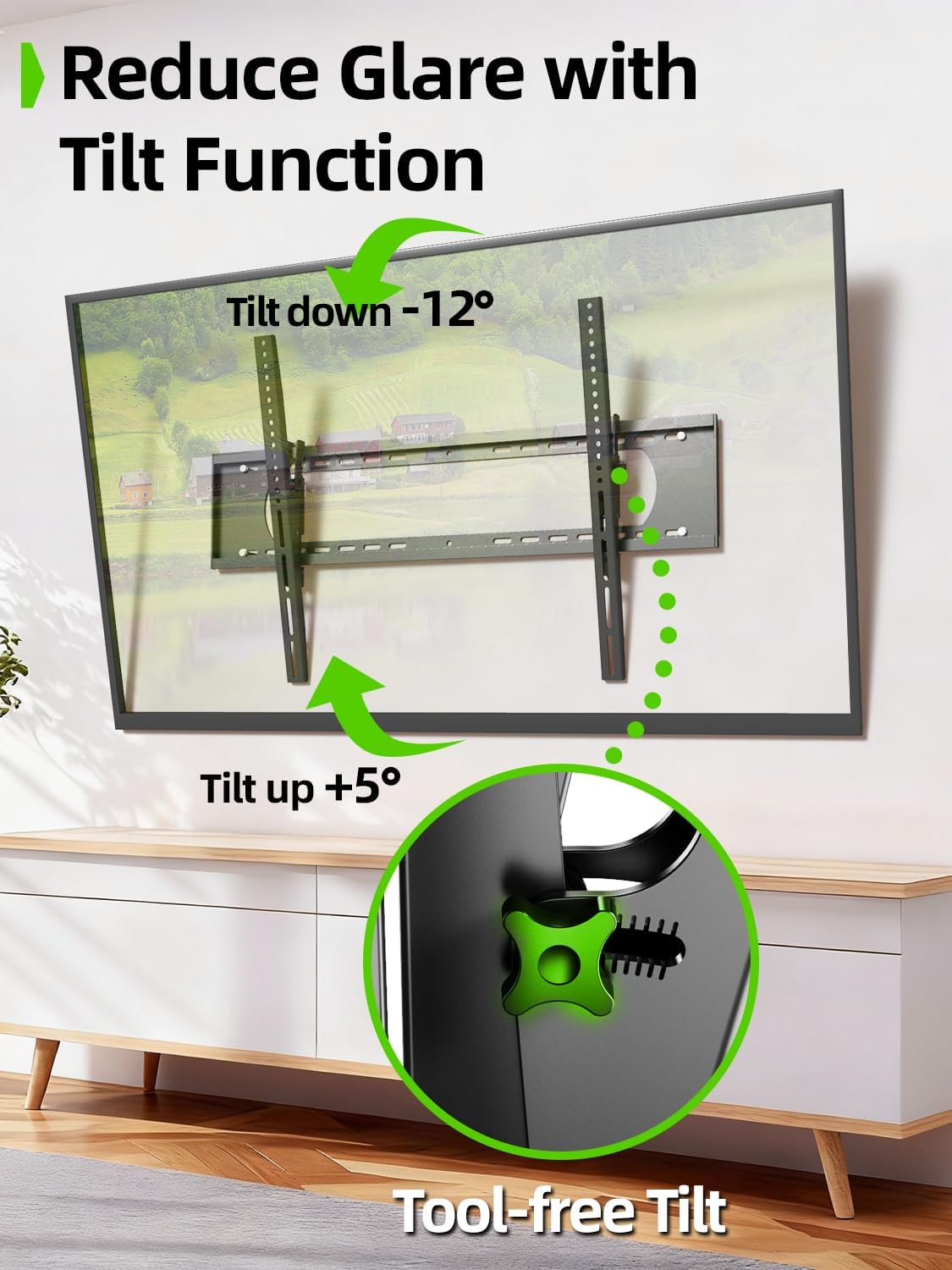
Image 6.1: The tilt function allows for easy adjustment up to +5° and down to -12° to reduce glare.

Image 6.2: The mount's tilt range for optimal viewing din diverse poziţii.
6.2 Quick Lock and Release
The mount features pull tabs for easy locking and releasing of the TV from the wall plate.
- La blocare the TV, ensure the pull tabs are pushed upwards into the locked position after hanging the TV.
- La eliberare the TV, gently pull down on the cords attached to the tabs. This will unlock the TV from the wall plate, allowing you to lift it off.

Image 6.3: The adjustable pull tabs for easy locking and releasing of the TV.

Image 6.4: Illustration of pulling the cords to release the TV from the mount.
7. Întreținere
Întreținerea regulată asigură longevitatea și funcționarea în siguranță a suportului de perete pentru televizor.
- curatenie: Ștergeți suportul cu o cârpă moale și uscată pentru a îndepărta praful. Evitați substanțele de curățare abrazive sau solvenții.
- Verificări periodice: Periodically check all screws and bolts to ensure they are tight and secure. Re-tighten if necessary.
- Verificați pentru daune: Inspect the mount for any signs of wear, corrosion, or damage. If any issues are found, contact customer support and do not use the mount until it is repaired or replaced.
8. Depanare
Dacă întâmpinați probleme în timpul sau după instalare, consultați următoarele probleme și soluții comune.
| Problemă | Cauza posibila | Soluţie |
|---|---|---|
| Televizorul nu este la nivel | Placa de perete nu este la nivel în timpul instalării. | Remove TV, loosen wall plate screws, adjust level, re-tighten. Ensure to use a level during installation. |
| Mount feels loose on the wall | Screws not fully tightened; incorrect wall anchors used; wall material not suitable. | Ensure all lag bolts are fully tightened. Verify correct anchors for concrete/brick. Do not install on drywall alone. If issues persist, consult a professional. |
| TV cannot be tilted | Tilting adjustment knobs are too tight. | Loosen the tilting adjustment knobs on the TV brackets to allow movement. Re-tighten once desired angle is achieved. |
| TV cannot be removed from mount | Quick release pull tabs are in the locked position. | Pull down on the cords attached to the quick release tabs to unlock the TV. |
9. Garanție și asistență
For warranty information or technical support, please refer to the contact details provided with your purchase or visit the official USX MOUNT webPăstrați bonul fiscal ca dovadă a achiziției pentru orice reclamații în garanție.
If you have any questions or require additional assistance, please do not hesitate to contact USX MOUNT customer service.