
Introducere
This manual provides detailed instructions for the safe and effective use of your Digitek DSL 555 RGB Portable LED Stick Light Wand. Please read this manual thoroughly before operating the device and retain it for future reference.
Ce este în cutie
Verificați dacă toate componentele sunt prezente la despachetare:
- Stick Light
- Ușă hambar
- Cablu de încărcare de tip C
- Carry Bag
Produs terminatview
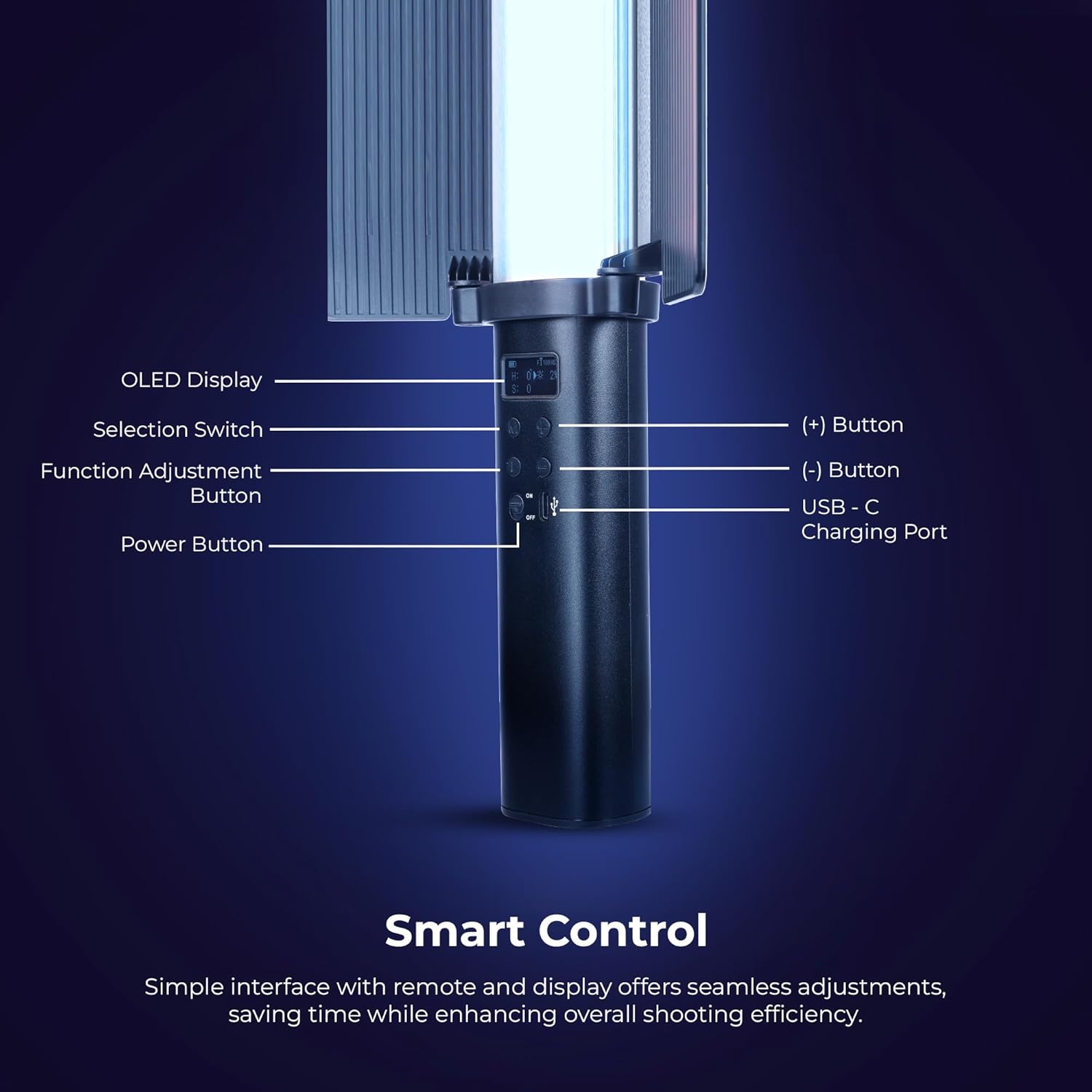
Imagine: Detaliat view of the Digitek DSL 555 RGB control panel with OLED display and buttons.
The Digitek DSL 555 RGB is a versatile LED stick light designed for photography and videography. It features a robust 38W output, dual color temperature (2500K-9900K), full RGB color control, and 24 special effects. The device includes an OLED display for easy adjustments and supports app control for enhanced functionality.
- Afișaj OLED: Afișează setările curente.
- Selection Switch: Navighează prin opțiunile de meniu.
- Function Adjustment Button: Confirms selections and changes modes.
- Butonul (+): Crește valorile sau navighează în sus.
- Buton (-): Scade valorile sau navighează în jos.
- Port de încărcare USB-C: Pentru alimentare și încărcare.
- Buton de alimentare: Pornește sau oprește dispozitivul.
Înființat
Încărcarea dispozitivului

Imagine: Digitek DSL 555 RGB with USB-C Charging Port and Battery Details.
Connect the provided Type-C charging cable to the USB-C port on the light wand and plug the other end into a compatible USB power adapter (not included). The OLED display will indicate charging status. A full charge provides approximately 1.5 hours of operation.
Attaching the Barn Door

Imagine: Digitek DSL 555 RGB with Removable Barn Door and HSI Color Adjustment.
Align the barn door accessory with the light panel and slide it into place until it securely clips onto the light wand. The barn door helps to shape and control the light output.
Montare
The DSL 555 RGB features a 1/4-inch universal mounting thread at its base. This allows for attachment to tripods, light stands, or other compatible rigs for stable positioning during use.
Instrucțiuni de operare
Pornire/Oprire
Țineți apăsat butonul Buton de alimentare located on the handle to turn the light wand on or off.
Basic Adjustments (Button Control)
- Utilizați Comutator de selecție to cycle through different modes (CCT, HSI, FX).
- Apăsați tasta Function Adjustment Button to select a parameter within a mode (e.g., color temperature, brightness, hue).
- Utilizați (+) şi (-) Buttons to adjust the selected parameter's value.
Color Temperature (CCT Mode)
In CCT mode, adjust the color temperature from 2500K (warm light) to 9900K (cool light) using the (+) and (-) buttons. This mode also allows for RGB adjustments.
Reglarea luminozității
The light intensity can be adjusted from 1% to 100% in any mode. Use the (+) and (-) buttons to set the desired brightness level.
HSI Color Mode
The HSI mode offers full creative control over colors:
- Nuanță (H): Adjust from 0-360 degrees to select any color in the spectrum.
- Saturație (S): Adjust from 0-100% to control the purity of the color.
- Intensity (I): Adjust from 0-100% to control the brightness of the color.
Special Effects (FX Modes)

Imagine: Digitek DSL 555 RGB showcasing various special effects modes.
The DSL 555 RGB includes 24 pre-programmed special effects such as Strobe, Police, Flame, Firework, and more. Navigate to FX mode using the Selection Switch and choose your desired effect.
Dual-Sided Brilliance

Imagine: Digitek DSL 555 RGB demonstrating Dynamic RGB and Natural Bi-Color sides.
The light wand features two distinct sides: one for dynamic RGB lighting and the other for natural bi-color (2500K-9900K) output, offering versatile lighting options.
Controlul aplicației
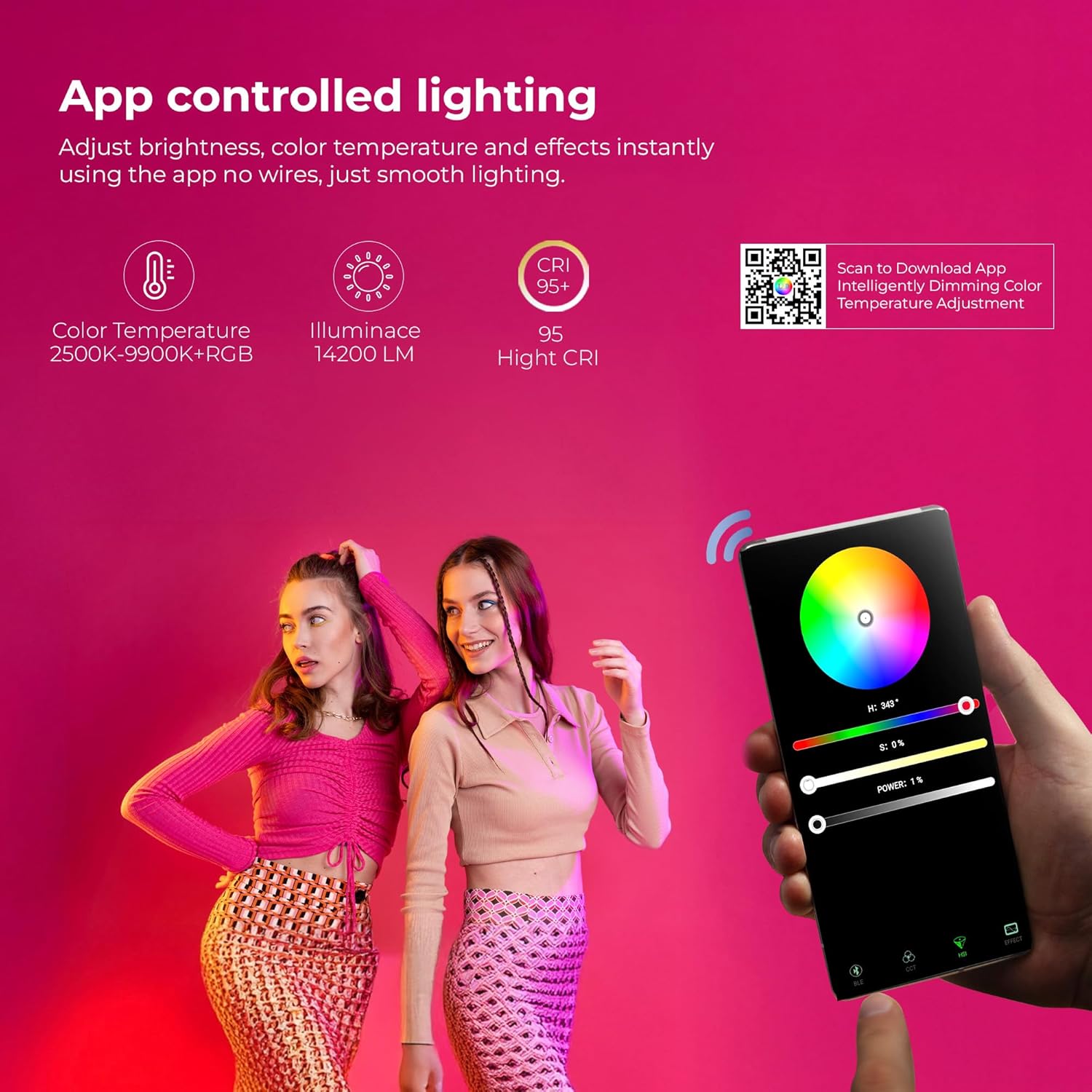
Imagine: Digitek DSL 555 RGB App Control Interface and QR Code for Download.
For advanced control, download the official app. Scan the QR code provided on the product packaging or visit www.ledlyd.com to download the application. The app allows for remote adjustment of brightness, color temperature, and effects.
Întreţinere
Curatenie
Wipe the light wand with a soft, dry cloth. Do not use abrasive cleaners or solvents, as these may damage the surface or internal components.
Depozitare
When not in use, store the light wand in its carry bag in a cool, dry place away from direct sunlight and extreme temperatures.
Îngrijirea bateriei
Pentru a prelungi durata de viață a bateriei, evitați descărcarea completă frecventă a bateriei. Încărcați dispozitivul în mod regulat, chiar dacă nu îl utilizați pentru perioade lungi de timp.
Depanare
- Lumina nu se aprinde: Ensure the device is charged. Connect to a power source using the Type-C cable.
- Probleme de conectivitate la aplicație: Ensure Bluetooth is enabled on your mobile device. Restart both the light wand and the app. Refer to the app's help section for specific pairing instructions.
- Flux luminos inconsistent: Check for any physical damage. Ensure the battery is adequately charged.
Dacă problemele persistă, contactați asistența pentru clienți pentru asistență.
Specificații

Imagine: Key Features of Digitek DSL 555 RGB LED Stick Light Wand.
| Putere de ieșire | 38W |
| Luminanță | Până la 14200LM |
| Temperatura de culoare | 2500K – 9900K + RGB |
| CRI (Indice de redare a culorilor) | RA> 95 |
| Reglarea luminozității | 1% – 100% |
| Durata de viață a bateriei | Aproximativ. 1.5 ore |
| Port de încărcare | USB tip C |
| Opțiune de montare | 1/4” Universal Mount |
| Dimensiunile produsului | 3 x 5 x 59 cm (aprox.) |
| Greutatea articolului | 2 kg |
| Țara de origine | China |
Garanție și suport
For warranty information and technical support, please contact the manufacturer:
Producător: IMS Mercantiles Limited
Adresa: 704, 7th floor, Ring Road Mall, Sec-3, Rohini, Delhi 110085
Customer Helpline (Toll Free): 1800-123-544-444
E-mail: support@digitek.net.in
Vă rugăm să păstrați bonul fiscal ca dovadă a achiziției pentru reclamațiile în garanție.