
1. Introducere
Thank you for choosing the LOEWE Leo Wireless Headphones. These premium headphones are designed to deliver an exceptional audio experience with advanced features such as Hi-Res Audio, adaptive noise cancellation, and real-time voice translation. This manual provides essential information for setting up, operating, and maintaining your headphones to ensure optimal performance and longevity.
2. Conținutul pachetului
Înainte de utilizare, vă rugăm să verificați dacă toate articolele sunt prezente în ambalaj:
- LOEWE Leo Wireless Headphones
- Cablu de încărcare USB-C
- AUX to USB-C Audio Cable
- Geanta de transport din piele
- Geantă de transport dur
- Cable Pouch
- Manual de utilizare (acest document)
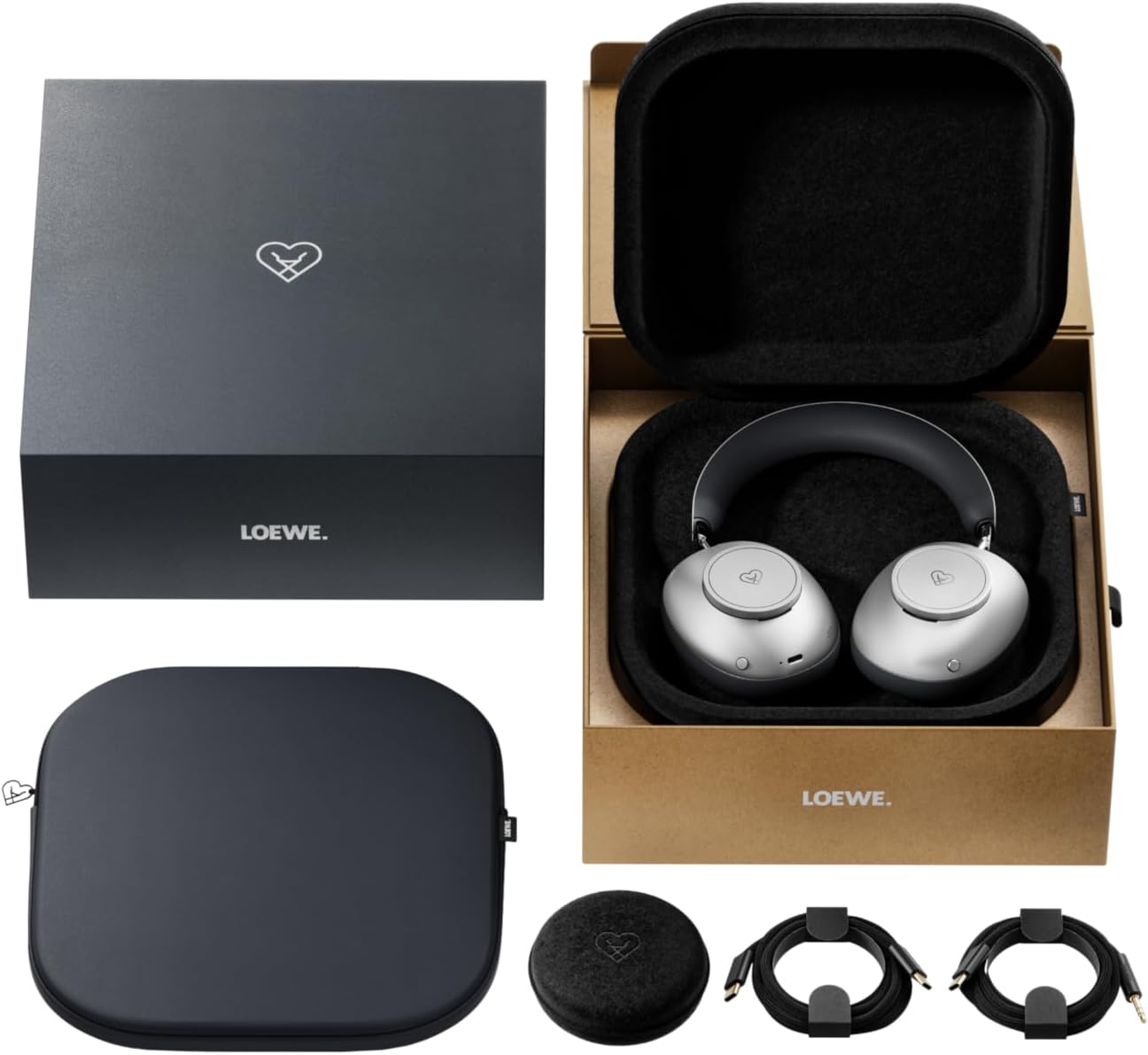
Image: The LOEWE Leo Wireless Headphones package contents, showing the headphones, USB-C cable, AUX cable, leather case, hard case, and cable pouch.
3. Produs terminatview
Familiarize yourself with the physical components and controls of your LOEWE Leo headphones.

Imagine: față view of the LOEWE Leo Wireless Headphones, showcasincăștile și banda pentru cap.
3.1. Comenzi și porturi
Căștile dispun de comenzi intuitive pentru o utilizare ușoară:
- Butoane de control: Two precision-crafted rotary wheels for volume adjustment and navigation.
- Butoane de acțiune: Dedicated buttons for playback control, ANC modes, and voice translation activation.
- Port USB-C: Pentru încărcare și conexiune audio cu fir.
- Mufă de 3.5 mm: For traditional wired audio connection.

Imagine: Detaliată view of the earcup, highlighting the control dial, USB-C port, and 3.5mm audio jack.
4. Noțiuni introductive
4.1. Încărcarea căștilor
Before first use, fully charge your LOEWE Leo headphones. A full charge provides up to 65 hours of continuous playback.
- Conectați cablul de încărcare USB-C furnizat la portul USB-C al căștilor.
- Conectați celălalt capăt al cablului la un adaptor de alimentare USB compatibil (nu este inclus) sau la portul USB al unui computer.
- Indicatorul LED de pe căști va afișa starea de încărcare. De obicei, se va opri sau își va schimba culoarea după ce sunt complet încărcate.
4.2. Pornire/Oprire
- Pentru a porni: Apăsați și țineți apăsat butonul de pornire timp de aproximativ 3 secunde, până când indicatorul LED se aprinde.
- Pentru a opri: Apăsați și mențineți apăsat butonul de pornire timp de aproximativ 3 secunde, până când indicatorul LED se stinge.
4.3. Asociere Bluetooth
The LOEWE Leo headphones utilize Bluetooth Low Energy (BLE) for faster pairing and reduced power consumption.
- Asigurați-vă că căștile sunt oprite.
- Apăsați și mențineți apăsat butonul de pornire timp de aproximativ 5 secunde, până când indicatorul LED clipește rapid, indicând modul de asociere.
- Pe dispozitivul dvs. (smartphone, tabletă, computer), activați Bluetooth și căutați dispozitivele disponibile.
- Select "LOEWE Leo" from the list of found devices.
- Odată conectat, indicatorul LED va înceta să clipească și rămâne albastru continuu.
4.4. Conexiune prin cablu
For a wired audio experience, use the supplied AUX to USB-C cable.
- Connect the USB-C end of the AUX cable to the headphones.
- Connect the 3.5mm end of the AUX cable to your audio source's 3.5mm jack.
- Căștile vor trece automat în modul cu fir.
5. Utilizarea căștilor
5.1. Redare audio și control volum
Use the control dials and action buttons for managing your audio:
- Volum sus/jos: Rotate the designated control dial.
- Redare/Pauză: Press the central action button once.
- Următoarea piesă: Double-press the central action button.
- Pista anterioară: Triple-press the central action button.

Image: Close-up of the earcup's control dial, used for volume and navigation.
5.2. Anulare adaptivă a zgomotului (ANC)
The LOEWE Leo features advanced adaptive noise cancellation that continuously analyzes your environment and adjusts in real-time.
- Activare/Dezactivare ANC: Press the dedicated ANC button once.
- Modul de transparență: Press the ANC button twice to allow ambient sounds to pass through, enhancing situational awareness.

Image: Illustration of the adaptive noise cancellation feature, depicting sound wave management.
5.3. Real-time Voice Translation
Communicate across language barriers with the integrated real-time voice translation feature.
- Ensure your headphones are connected to a device with internet access and the LOEWE companion app installed.
- Activate the translation feature via the dedicated button or the companion app.
- Speak into the headphone's microphone. The translated audio will be played back in real-time.

Image: Earcup detail showing the microphone for voice input and the 'leo' icon, representing the real-time translation function.
5.4. Dolby Atmos and Spatial Audio
Experience immersive sound with Dolby Atmos and spatial audio support. This feature is automatically enabled when compatible content is played through a connected device that supports these audio technologies.
6. Întreținere și îngrijire
6.1. Curatenie
- Ștergeți căștile cu o lavetă moale, uscată și fără scame.
- Nu utilizați agenți de curățare abrazivi, alcool sau solvenți chimici.
- Keep moisture away from openings.
6.2. Îngrijirea bateriei
- Evitați descărcarea completă frecventă a bateriei.
- Store the headphones in a cool, dry place when not in use for extended periods.
- The battery is user-replaceable, contributing to the product's longevity.
6.3. Modular Design
The LOEWE Leo headphones feature a durable modular design with replaceable components, such as ear cushions and headbands. This design allows for easy replacement of worn parts, extending the product's lifespan.

Image: The modular construction of the LOEWE Leo headphones, showing detachable earcups and headband for maintenance or replacement.
7. Depanare
If you encounter issues with your LOEWE Leo headphones, refer to the following common solutions:
- Fără putere: Asigurați-vă că sunt complet încărcate căștile. Conectați-le la o sursă de alimentare folosind cablul USB-C.
- Fără sunet:
- Verificați nivelul volumului atât la căști, cât și la dispozitivul conectat.
- Ensure the headphones are properly paired via Bluetooth or the AUX cable is securely connected.
- Încercați să reporniți atât căștile, cât și dispozitivul sursă audio.
- Deconectare Bluetooth:
- Asigurați-vă că căștile se află în raza de acoperire Bluetooth a dispozitivului (de obicei 10 metri).
- Dezactivați și reactivați Bluetooth pe dispozitiv, apoi încercați să îl reconectați.
- Clear the LOEWE Leo from your device's Bluetooth history and pair again.
- ANC nu funcționează eficient:
- Ensure the earcups form a good seal around your ears. Adjust the fit if necessary.
- Verify that ANC is activated.
- Voice Translation Issues:
- Verificați conexiunea la internet a dispozitivului.
- Ensure the LOEWE companion app is up-to-date and configured correctly.
- Vorbește clar și într-un ritm moderat.
If problems persist, please contact LOEWE customer support.
8. Specificații
| Caracteristică | Descriere |
|---|---|
| Numele modelului | Leu |
| Numărul de model | 64641J10 |
| Tehnologia de conectivitate | Wireless (Bluetooth), Wired |
| Comunicare fără fir | Bluetooth cu consum redus de energie (BLE) |
| Caracteristici de sunet | Hi-Res Audio, Dolby Atmos, Spatial Audio |
| Anularea zgomotului | Adaptive Noise Reduction (ANC) |
| Caracteristici speciale | Real-time Voice Translation, Modular Design with Replaceable Components |
| Durata de viață a bateriei | Până la 65 ore (aproximativ) |
| Tip control | Button Control, Rotary Dials |
| Dispozitive compatibile | Cellular Phone, Tablet, Computer, Laptop |
| Greutate | 3 Kilograms (product weight as listed, may include packaging) |
9. Garanție și asistență
9.1. Garanția producătorului
The LOEWE Leo Wireless Headphones come with a Garanție de 2 an de la producătorAceastă garanție acoperă defectele de materiale și de fabricație în condiții normale de utilizare. Vă rugăm să păstrați dovada achiziției pentru reclamațiile în garanție.
For specific terms and conditions of the warranty, please refer to the warranty card included in your product packaging or visit the official LOEWE website-ul.
9.2. Asistență pentru clienți
For technical assistance, troubleshooting, or warranty inquiries, please contact LOEWE customer support through their official website-ul sau informațiile de contact furnizate în documentația produsului.
Resurse online: Visit the official LOEWE website pentru întrebări frecvente, actualizări de software și resurse suplimentare de asistență.