
1. Introducere
This manual provides detailed instructions for the ANBERNIC RG476H handheld game console. Please read this manual thoroughly before using the device to ensure proper operation and to maximize your gaming experience.

Imaginea 1.1: Pesteview of the ANBERNIC RG476H handheld game console, showcasing its full-screen design and available colors.
2. Produs terminatview
2.1 Caracteristici cheie
- Sistem de operare: Android 13 with built-in game frontend.
- Procesor: Dimensity T820 (6nm EUV 5G SoC chip, 8-core: 1*A76@2.7GHz + 3*A76@2.3GHz + 4*A55@2.1GHz).
- Afişa: 4.7-inch LTPS in-cell OCA full lamination touchscreen, 1280x960 resolution, up to 120Hz refresh rate.
- Memorie și stocare: 8GB LPDDR4X RAM, 128GB UFS2.2 ROM, expandable up to 2TB via TF card.
- Conectivitate: WiFi (2.4G/5G 802.11a/b/g/n/ac), Bluetooth 5.0.
- comenzi: Dual Hall joysticks, 6-axis gyroscope, Hall triggers, vibration motor.
- Baterie: 5000mAh Lithium-ion battery, providing up to 7 hours of continuous use.
- Răcire: Active cooling system with high-speed fan and heat pipe.
- Ieșire: HDMI output, USB Type-C with 1080p DisplayPort output (supports dual-screen display for NDS/3DS games).
- Caracteristici suplimentare: RGB joystick lighting with multiple effects, FOTA wireless upgrades, online multiplayer, streaming, wireless screen projection, 3.5mm stereo headphone jack, power-saving settings.
2.2 Componente și comenzi
Familiarize yourself with the physical components and controls of your RG476H console.

Image 2.1: Technical diagram illustrating the layout of buttons, ports, and internal components of the RG476H.
- Joystick stânga: For directional control in games.
- Joystick dreapta: For camera control or other directional inputs.
- D-pad: Pentru o introducere direcțională precisă.
- Butoane A/B/X/Y: Butoane de acțiune standard.
- Butoane L1/L2/R1/R2: Butoane de umăr și de trăgaci.
- Start/Select Buttons: Game control functions.
- Cheie functionala: For system-specific actions.
- Buton de întoarcere: For navigating back in menus.
- Slot pentru carduri TF: Pentru extinderea spațiului de stocare extern.
- Port USB tip C: For charging, data transfer, and DisplayPort output.
- Mufă pentru căști de 3.5 mm: Pentru ieșire audio.
- Microfon: Pentru intrare vocală.
- Difuzoare: Dual stereo speakers located at the bottom.
- Buton de alimentare: Pentru a porni/opri dispozitivul sau a-l pune în modul repaus.
- Volum sus/jos: Pentru a regla nivelurile audio.
3. Configurare
3.1 Încărcare inițială
Before first use, fully charge your RG476H console.
- Connect the provided USB Type-C cable to the console's charging port.
- Connect the other end of the cable to a compatible 5V/2A power adapter (not included) or a USB port on a computer.
- Indicatorul luminos de încărcare se va aprinde. O încărcare completă durează de obicei aproximativ 3 ore.
3.2 Pornire/Oprire
- Pentru a porni: Țineți apăsat butonul de alimentare până când ecranul se aprinde.
- Pentru a opri: Press and hold the Power button, then select "Power Off" from the on-screen options.
- A dormi/a te trezi: Apăsați scurt butonul de Pornire/Oprire pentru a trece dispozitivul în modul repaus sau pentru a-l activa.
3.3 Instalarea cardului TF (opțional)
To expand storage for games and media, you can install a TF (microSD) card. The device supports up to 2TB.

Image 3.1: The TF card slot for storage expansion, shown alongside other features.
- Localizați slotul pentru card TF de pe dispozitiv.
- Insert the TF card gently into the slot until it clicks into place.
- To remove, push the TF card inward until it clicks, then release. It will spring out.
4. Instrucțiuni de utilizare
4.1 Navigare și interfață utilizator
The RG476H runs on Android 13, providing a familiar and intuitive interface.
- Use the joysticks or D-pad to navigate through menus and select options.
- The touchscreen allows for direct interaction with the Android interface.
- The built-in game frontend organizes your games for easy access.
4.2 Jocuri
The console supports a wide range of Android games and up to 30 types of simulator games.
- Access the game frontend from the main menu.
- Select your desired game from the list.
- Use the physical controls (joysticks, D-pad, A/B/X/Y, L/R buttons) for gameplay.
- For simulator games, you may need to configure controls within the emulator settings.
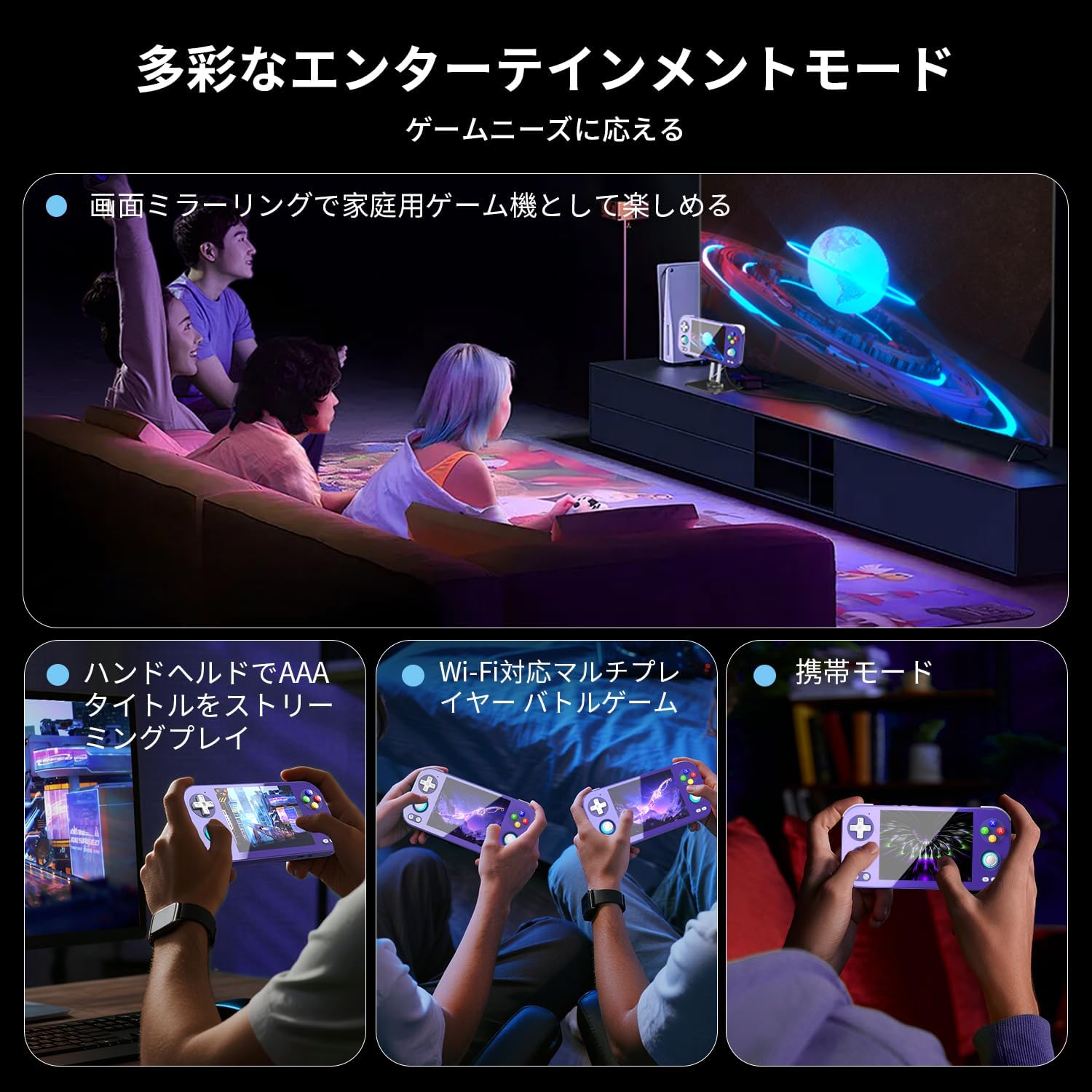
Image 4.1: The RG476H supports various entertainment modes, including handheld play, Wi-Fi multiplayer, and screen mirroring to a TV.
4.3 Caracteristici avansate
- Moonlight Streaming: Supports Moonlight Streaming for playing PC games on your console. Refer to Moonlight documentation for setup.
- Ieșire HDMI: Connect the console to a TV or monitor via HDMI for a larger display.
- USB Type-C DisplayPort: Use a compatible USB-C to DisplayPort cable for 1080p video output. This feature also supports dual-screen display for NDS/3DS games.
- Wi-Fi și Bluetooth: Connect to Wi-Fi networks for online gaming, updates, and browsing. Pair Bluetooth accessories like headphones or controllers.
- RGB Joystick Lighting: Customize the RGB lighting effects of the joysticks (e.g., constant light, breathing, rainbow, marquee, chase, gaming mode) and adjust brightness through system settings.
- ANBERNIC AI Assistant: Utilize the built-in AI features for real-time translation, game assistance, and other smart functions.

Image 4.2: The ANBERNIC AI Assistant offers features like AI Square, real-time translation, game assistance, and image processing.
5. Întreținere
5.1 Curățare
- Use a soft, dry cloth to clean the console's exterior.
- For the screen, use a microfiber cloth specifically designed for electronics. Do not use abrasive cleaners or solvents.
- Păstrați porturile fără praf și resturi.
5.2 Actualizări de software
The RG476H supports FOTA (Firmware Over-The-Air) wireless upgrades.
- Asigurați-vă că dispozitivul este conectat la Wi-Fi.
- Navigate to System Settings and check for available updates.
- Follow the on-screen prompts to download and install updates. Ensure the device has sufficient battery life or is connected to power during updates.
6. Depanare
6.1 Probleme comune și soluții
| Emisiune | Cauză/Soluție posibilă |
|---|---|
| Dispozitivul nu pornește. | Battery may be depleted. Connect to charger and try again. Ensure power button is pressed and held sufficiently. |
| Ecranul nu răspunde. | Perform a soft reset by holding the power button for 10-15 seconds. If issue persists, ensure the screen is clean and free of obstructions. |
| Games are lagging or performing poorly. |
|
| Wi-Fi or Bluetooth not connecting. |
|
| Niciun sunet de la difuzoare. | Check volume settings. Ensure headphones are not connected if you expect sound from speakers. |
7. Specificații
| Caracteristică | Detaliu |
|---|---|
| Model | RG476H |
| Procesor | Unisoc T820, 6nm EUV 5G SoC |
| GPU | Quad-core Mali-G57, 850MHz |
| RAM | 8 GB LPDDR4X |
| Depozitare | 128GB UFS2.2 (Expandable via TF card up to 2TB) |
| Afişa | 4.7-inch LTPS in-cell OCA full lamination touchscreen, 1280x960 resolution, up to 120Hz refresh rate |
| Sistem de operare | Android 13 |
| Conectivitate | 2.4G/5G WiFi 802.11a/b/g/n/ac, Bluetooth 5.0 |
| Baterie | 5000mAh Lithium-ion, up to 7 hours usage |
| Audio | High-quality dual stereo speakers, 3.5mm stereo headphone jack |
| Senzori | 6-axis gyroscope, Hall joysticks, Hall triggers, Vibration motor |
| Porturi | USB Type-C (charging, data, 1080p DisplayPort output), TF card slot |
| Dimensiuni | 21.1 x 11.1 x 4.2 cm |
| Greutate | 470 g |
8. Garanție și asistență
For warranty information and technical support, please refer to the official ANBERNIC website-ul web sau contactați distribuitorul. Păstrați dovada achiziției pentru a putea solicita garanție.
Producător: ANBERNIC
Website: www.anbernic.com (Examplinkul, linkul real poate varia)


