
Înființat
1. Despachetare și componente
The MiLESEEY TP2 package includes the TP2 Wireless Thermal Camera, a USB-C charging cable, and a protective carrying case. Ensure all components are present upon unboxing.

Figure 1: MiLESEEY TP2 Wireless Thermal Camera with dimensions and features.
2. Compatibilitatea sistemului
- iOS 12 / Android 9.0 and above.
- Compatible with iPhone, iPad, and Android devices.

Figure 2: Seamless wireless pairing of the TP2 camera with a smartphone.
3. Instalarea aplicației
Download the "Thermal TP Series" app from the App Store (iOS) or Google Play Store (Android).

Figure 3: Locate and install the 'Thermal TP Series' application from your device's respective app store.
4. Conexiune inițială
Ensure your smartphone's Bluetooth is enabled. Power on the TP2 camera. Open the "Thermal TP Series" app and follow the on-screen instructions to pair your device.
Video 1: This video demonstrates the initial setup and connection process of the TP2 thermal camera with a smartphone, including app pairing and basic functionality.
Instrucțiuni de operare
1. Operare de bază
Once connected, the app will display real-time thermal imagery. The camera automatically tracks maximum, minimum, and central temperatures.

Figure 4: The app interface provides real-time thermal feedback, automatically highlighting the maximum, minimum, and central temperature points within the frame.
2. Image Enhancement and Resolution
The TP2 features MATRIX IV technology, upscaling images to 512x384 resolution from 256x192 for enhanced detail.

Figure 5: The MATRIX IV technology enhances the thermal image resolution, providing clearer and more detailed visuals for improved analysis.
3. Măsurarea temperaturii și precizia acesteia
- Accuracy: ±2% or ±3°F.
- NETD: < 40 mK.
- Temperature Range: -4°F to 752°F.
- Wide F1.1 aperture for capturing subtle temperature variations.

Figure 6: The camera offers high thermal sensitivity and accuracy, capable of detecting subtle temperature differences across a wide range.
4. Custom Area Analysis
Users can add points, lines, or rectangular boxes to monitor specific regions and obtain local temperature readings.

Figure 7: The app allows for advanced analysis by defining custom areas (points, lines, boxes) to precisely measure temperatures in specific regions of interest.
5. Palete de culori
Seven selectable color palettes are available to enhance readability and adaptability across various inspection environments.
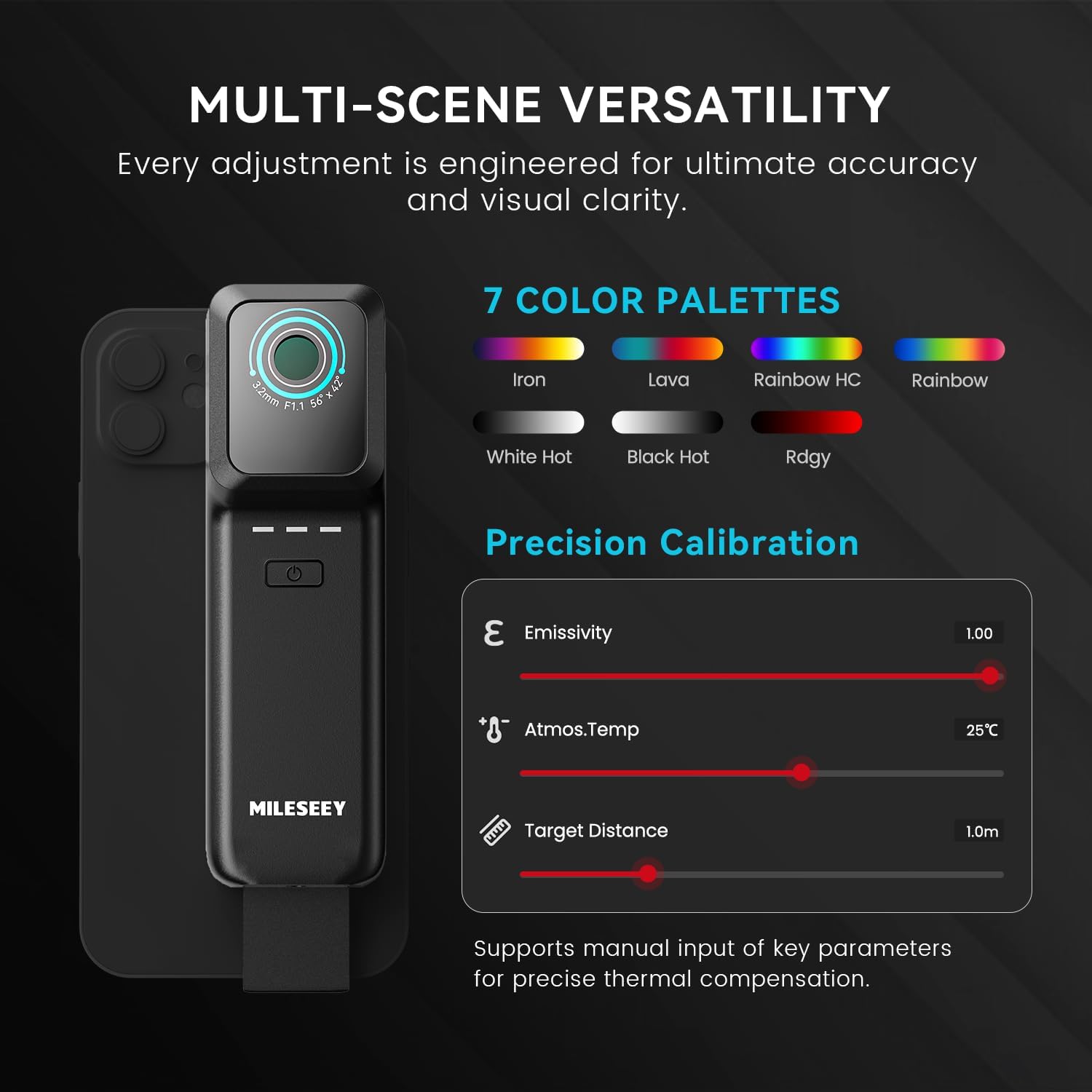
Figure 8: Choose from seven different color palettes to optimize the visual representation of thermal data based on your specific inspection needs.
6. Precision Calibration
Manually input ambient temperature, target emissivity, and target distance for algorithmic compensation and accurate readings.
Figure 9: Adjust parameters like emissivity, ambient temperature, and target distance within the app to ensure the most precise temperature measurements.
7. Înregistrare foto și video
The camera supports photo and video recording, delivering real-time imagery at a 25 Hz frame rate.

Figure 10: Capture still images or record videos of thermal inspections directly through the app, with smooth 25 Hz frame rate.
8. Alarmă de temperatură
Utilize the temperature alarm function to receive alerts when preset temperature thresholds are exceeded.
Întreţinere
1. Curatenie
Ștergeți ușor obiectivul și corpul camerei cu o cârpă moale și uscată. Evitați utilizarea substanțelor chimice dure sau a materialelor abrazive.
Video 2: This video provides general usage instructions for similar thermal cameras, which may include basic cleaning and handling advice.
2. Depozitare
Store the camera in its protective case when not in use to prevent damage. Keep the device in a cool, dry place away from direct sunlight and extreme temperatures.
Depanare
1. Camera Not Connecting
- Asigurați-vă că Bluetooth este activat pe smartphone-ul dvs.
- Verify the TP2 camera is powered on and fully charged.
- Reporniți aplicația și încercați din nou asocierea.
- Check system compatibility (iOS 12 / Android 9.0 and above).
2. Blurry or Unclear Images
- Asigurați-vă că obiectivul camerei este curat și fără praf sau pete.
- Adjust the focus if available (though this model is fixed focus, general advice).
- Ensure proper distance to the target for optimal image clarity.
3. App Functionality Issues
- Update the "Thermal TP Series" app to the latest version.
- Reporniți smartphone-ul.
- If issues persist, reinstall the app.
Specificații
| Caracteristică | Detaliu |
|---|---|
| Rezoluție statică efectivă | 196608 Pixels (Upscaled 512x384 from 256x192) |
| Interval de temperatură | -4°F până la 752°F |
| fișier NETD | < 40 mK |
| Precizie | ±2% or ±3°F |
| Frame Rate | 25 Hz |
| FOV | >56° |
| Dimensiuni | 5.3 × 1.6 × 1.1 in |
| Greutate | 4.4 oz (125 g) |
| baterii | 1 baterie litiu-ion (inclusă) |
| Nivel de rezistență la apă | Impermeabil |
| Dispozitive compatibile | Smartphone, Tablet (iOS 12+ / Android 9.0+) |
| Componente incluse | TP2 Wireless Thermal Camera |
Figure 11: Detailed specifications and physical dimensions of the MiLESEEY TP2 Wireless Thermal Imaging Camera.
garanție
Garanția produsului
The MiLESEEY TP2 Wireless Thermal Imaging Camera comes with a 2-year warranty. For detailed warranty terms and conditions, please refer to the official MiLESEEY website-ul sau contactați asistența pentru clienți.
Sprijin
Serviciu clienți
For any questions, technical assistance, or feedback, please contact MiLESEEY customer service. You can often find support contact information within the "Thermal TP Series" app under the Customer Service or FAQ sections. Visit the official MiLESEEY website pentru resurse suplimentare și întrebări frecvente.