
Introducere
The Rapoo M308 is a versatile multi-mode wireless mouse designed for efficiency and comfort. It features an ambidextrous design, allowing comfortable use for both right-handed and left-handed individuals. With its dual connectivity options, Bluetooth 5.0 and 2.4 GHz wireless, you can seamlessly connect to up to three devices and switch between them with ease. The mouse is engineered for long-lasting performance, offering a battery life of up to 12 months.
Conținutul pachetului
- Rapoo M308 Multi-mode Wireless Mouse
- Receptor USB (stocat în interiorul mouse-ului)
- 2 baterii AA
- Ghid de pornire rapidă (acest manual)
Produs terminatview
Familiarize yourself with the components of your Rapoo M308 mouse.
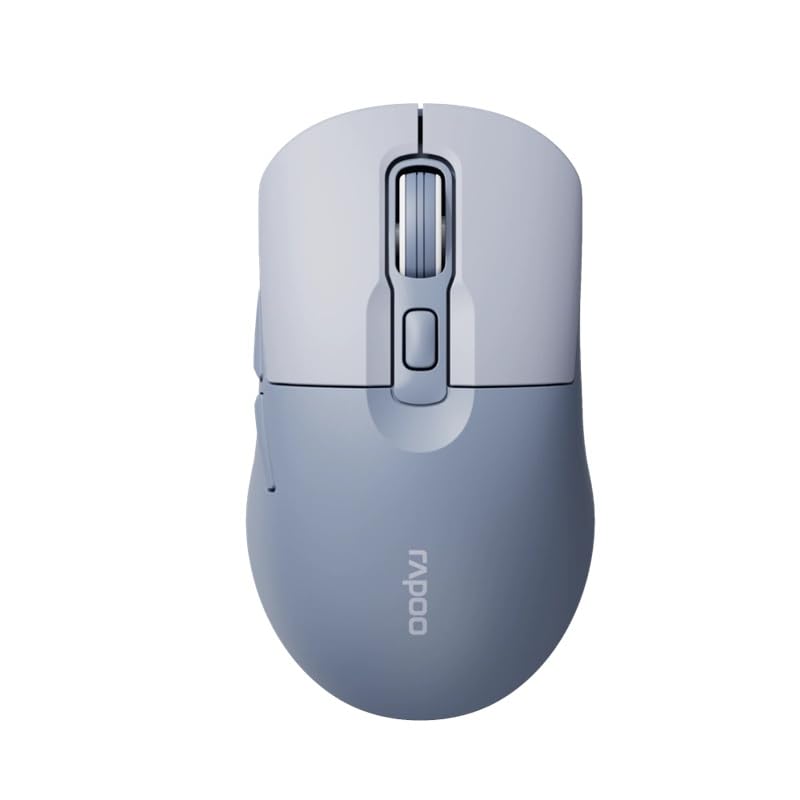
Image: The Rapoo M308 Multi-mode Wireless Mouse in blue, showcasing its ergonomic, ambidextrous design with a scroll wheel and multiple buttons.
- Butonul din stânga: Funcția standard de clic stânga.
- Butonul din dreapta: Funcția standard de clic dreapta.
- Rotiță de defilare: Pentru derulare și funcțiile de clic din mijloc.
- Butonul DPI: Ajustează sensibilitatea cursorului (DPI).
- Mode Switch Button/Indicator: Switches between connected devices (2.4G, Bluetooth 1, Bluetooth 2) and indicates current mode.
- Butoane laterale: Forward/Backward navigation (programmable).
- Compartiment baterie: Located on the underside, holds 2 AA batteries.
- USB Receiver Slot: Located inside the battery compartment for storage.
Înființat
1. Instalarea bateriei
- Deschideți capacul compartimentului bateriilor de pe partea inferioară a mouse-ului.
- Introduceți cele două baterii AA, asigurându-vă că polaritatea este corectă (+/-).
- Închideți capacul compartimentului bateriei.
2. Connecting via 2.4 GHz Wireless
- Remove the USB receiver from its storage slot inside the battery compartment.
- Conectați receptorul USB la un port USB disponibil de pe computer.
- Turn on the mouse. The mouse should automatically connect to your computer. The mode indicator light will show a steady green light for a few seconds.
3. Conectarea prin Bluetooth
The M308 mouse supports two Bluetooth connections (BT1 and BT2).
- Porniți mouse-ul.
- Press the mode switch button to select either Bluetooth 1 (blue light flashes slowly) or Bluetooth 2 (blue light flashes slowly).
- Press and hold the mode switch button for 3 seconds until the blue light starts flashing rapidly. This indicates the mouse is in pairing mode.
- Pe computer sau dispozitiv, accesați setările Bluetooth și căutați dispozitive noi.
- Select "Rapoo M308" from the list of available devices to pair.
- Once paired, the blue light will become steady for a few seconds and then turn off.
Instrucțiuni de operare
Comutarea între dispozitive
The Rapoo M308 allows you to connect to up to three devices (one 2.4G wireless and two Bluetooth devices) and switch between them.
- Briefly press the mode switch button to cycle through the connected devices: 2.4G (green light), Bluetooth 1 (blue light), Bluetooth 2 (blue light).
- The indicator light will briefly illuminate in the corresponding color to confirm the selected mode.
Ajustare DPI
Press the DPI button (usually located behind the scroll wheel) to cycle through different DPI settings. This changes the cursor speed and sensitivity. The indicator light may flash to show the current DPI level (e.g., one flash for low DPI, two for medium, etc.).
Întreţinere
- curatenie: Folosiți o lavetă moale și uscată pentru a curăța mouse-ul. Pentru murdăria persistentă, uscați ușor.amp Se poate folosi o cârpă, dar asigurați-vă că nu pătrunde umezeală în dispozitiv.
- Înlocuire baterie: When the mouse performance degrades or the indicator light signals low battery, replace the two AA batteries following the installation steps.
- Depozitare: Când nu îl utilizați pentru perioade lungi de timp, opriți mouse-ul pentru a conserva bateria. Depozitați receptorul USB în interiorul mouse-ului pentru a preveni pierderea.
Depanare
- Mouse-ul nu răspunde:
- Verificați dacă mouse-ul este pornit.
- Asigurați-vă că bateriile sunt instalate corect și nu sunt descărcate. Înlocuiți-le dacă este necesar.
- For 2.4G connection, ensure the USB receiver is securely plugged into a working USB port. Try a different USB port.
- For Bluetooth connection, ensure the mouse is in the correct Bluetooth mode (BT1 or BT2) and successfully paired with your device. Re-pair if needed.
- Mișcarea cursorului este neregulată sau lentă:
- Curățați senzorul optic de pe partea inferioară a mouse-ului.
- Asigurați-vă că utilizați mouse-ul pe o suprafață adecvată (nereflectorizantă, netransparentă).
- Ajustați setarea DPI folosind butonul DPI.
- Cannot switch between devices:
- Ensure all devices are properly connected (2.4G receiver plugged in, Bluetooth devices paired).
- Briefly press the mode switch button to cycle through modes. A long press will initiate Bluetooth pairing mode.
Specificații
| Nume de marcă | Rapoo |
| Model | M308 |
| Tehnologia de conectivitate | Bluetooth 5.0, frecvență radio de 2.4 GHz |
| Caracteristici speciale | Ușoare |
| Detectarea mișcării | Optic |
| Cantitate de butoane | 4 |
| Orientarea mâinii | Ambidextru |
| Utilizări recomandate | Birou |
| Dispozitive compatibile | Calculator personal, Laptop |
| Greutatea articolului | 50 de grame |
| Sistem de operare | Linux, Mac, Windows |
| Durata de viață a bateriei | 12 luni |
| Numărul de baterii | 2 AA (Inclus) |
| Sursa de alimentare | Alimentat cu baterie |
| Sistem de operare minim necesar | Mac OS 14 Sonoma, Windows 11 |
| Material | Plastic |
| Țara de origine | China |
| Componente incluse | Mouse |
Garanție și suport
The Rapoo M308 Multi-mode Wireless Mouse comes with a 2 an garanție de la data achiziției. Această garanție acoperă defectele de fabricație și defecțiunile în condiții normale de utilizare.
For technical support, warranty claims, or further assistance, please refer to the contact information provided on the Rapoo official website or your local distributor's support channels. Please retain your proof of purchase for warranty validation.