
OHAYO X10 Max
OHAYO X10 Max Bluetooth Speaker Instruction Manual
Welcome to your new OHAYO X10 Max Portable Bluetooth Speaker.
1. Informații importante privind siguranța
- Nu expuneți difuzorul la temperaturi extreme sau la lumina directă a soarelui pentru perioade lungi de timp.
- Țineți difuzorul departe de surse de căldură, obiecte ascuțite și materiale corozive.
- Do not disassemble, repair, or modify the speaker yourself. Contact qualified service personnel if needed.
- Asigurați-vă că capacul portului de încărcare este închis etanș atunci când utilizați difuzorul în apropierea apei pentru a-i menține gradul de impermeabilitate IPX7.
- Folosiți doar cablul de încărcare furnizat sau un cablu USB-C certificat pentru încărcare.
2. Conținutul pachetului
- 1 x OHAYO X10 Max Bluetooth Speaker (White)
- 1 x USB-C Charging Cable (charging plug not contained)
- 1 x cablu AUX de 3.5 mm
- 1 x Manual de utilizare
- 1 x Snur
3. Produs terminatview
The OHAYO X10 Max is a versatile portable Bluetooth speaker designed for high-quality audio and durability. It features a powerful 25W sound output with active bass, IPX7 waterproofing, and a long-lasting 24-hour battery. Enjoy dynamic sound with colorful RGB lighting effects, dual pairing for stereo sound, and multiple input modes.
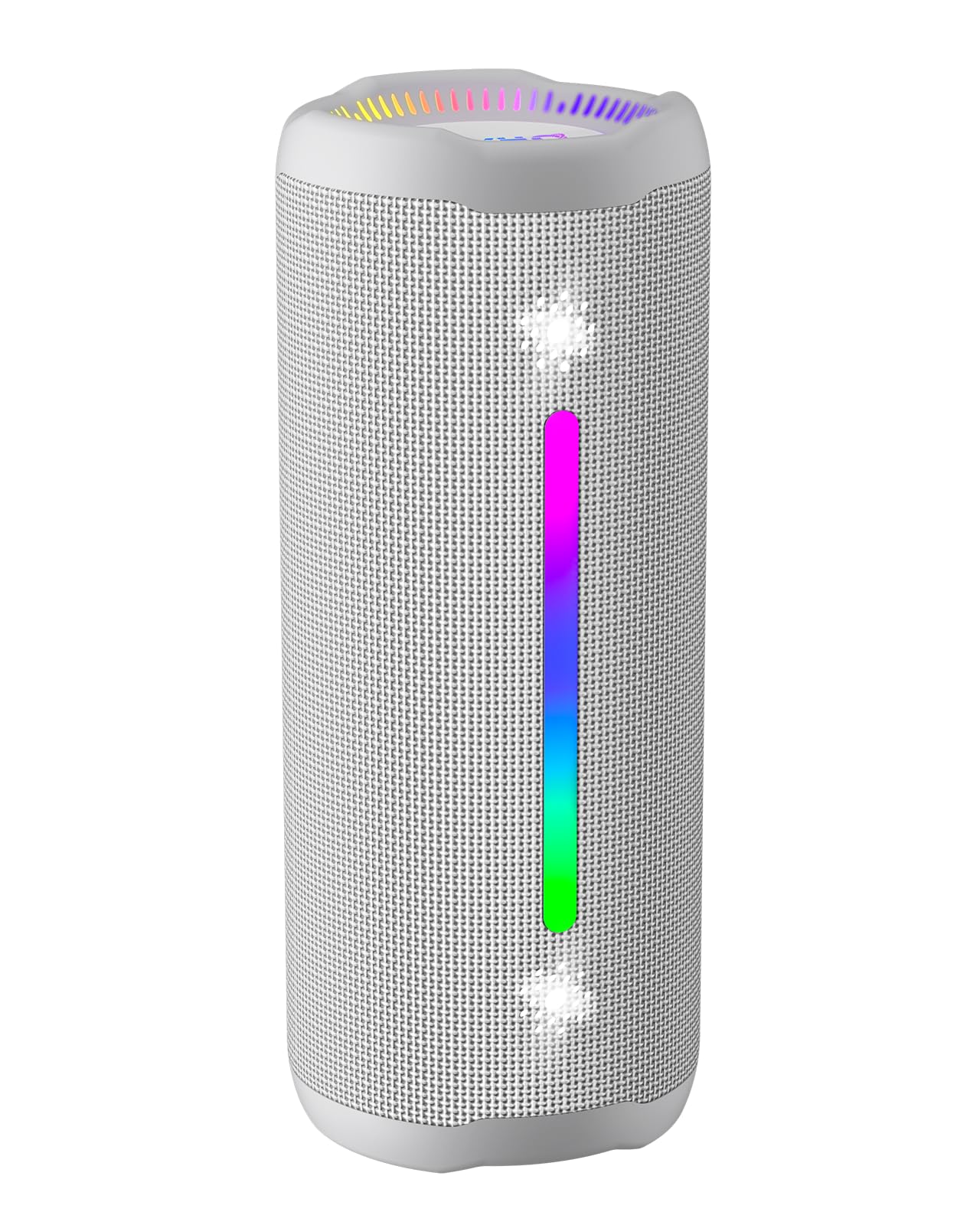
Figure 3.1: OHAYO X10 Max Bluetooth Speaker (White)

Figure 3.2: OHAYO X10 Max Bluetooth Speaker - Fully upgraded from appearance to performance.

Figure 3.3: 25W Deep Bass Sound - Independent channel design for accurate audio performance.

Figure 3.4: 6 Dazzling RGB Light Effects - Syncs with music for an immersive experience.

Figure 3.5: IPX7 Waterproof - Highly sealed design for use in various environments.

Figure 3.6: 24H Ultra-Long Battery Life - 6600mAh battery for extended playback.
4. Controale și indicatori
The OHAYO X10 Max features intuitive controls for easy operation.

Figura 4.1: Panou de control și porturi
- Buton de alimentare: Press and hold to power on/off. Short press to switch between input modes (Bluetooth, AUX, TF Card, USB-Audio).
- Mărire volum (>): Apăsați scurt pentru a crește volumul. Apăsați lung pentru următoarea piesă.
- Reducere volum (<): Apăsare scurtă pentru a reduce volumul. Apăsare lungă pentru piesa anterioară.
- Buton de bas: Press to activate/deactivate Bass Boost mode.
- Buton Redare/Pauză/Apelare: Apăsare scurtă pentru a reda/pauză muzică. Apăsare scurtă pentru a răspunde/încheia apeluri. Apăsare lungă pentru a respinge apeluri. Apăsare dublă pentru a activa asistentul vocal.
- Indicatoare luminoase pentru baterie: Four LED lights indicate battery level.
- RGB Light Strip: Displays various colorful lighting effects.
- Port de încărcare (USB-C): Pentru încărcarea difuzorului.
- Port AUX-in: Pentru conexiune audio prin cablu.
- Slot pentru carduri TF: Pentru redarea muzicii direct de pe un card MicroSD.
5. Configurare
5.1 Încărcarea difuzorului
Before first use, fully charge the speaker. Connect the provided USB-C charging cable to the speaker's charging port and the other end to a 5V/2A USB power adapter (not included). The battery indicator lights will blink during charging and remain steady when fully charged.
5.2 Pornire/Oprire
Press and hold the Power button for approximately 3 seconds to turn the speaker on or off. A voice prompt will confirm the action.
5.3 Asociere Bluetooth
- Turn on the speaker. It will automatically enter Bluetooth pairing mode, indicated by a blinking blue LED.
- Activați Bluetooth pe dispozitivul dvs. (smartphone, tabletă etc.).
- Caută "X10 Max" in your device's Bluetooth list and select it to connect.
- După conectare, o solicitare vocală va confirma asocierea cu succes.
5.4 Împerechere stereo True Wireless (TWS)
To achieve a true wireless stereo experience, you can pair two OHAYO X10 Max speakers together.

Figura 5.1: Împerechere stereo True Wireless
- Ensure both X10 Max speakers are powered on and not connected to any other Bluetooth device.
- Pe un difuzor (acesta va fi difuzorul principal), apăsați de două ori butonul de pornire/oprire. Acesta va intra în modul de asociere TWS.
- The two speakers will automatically connect to each other. A voice prompt will confirm successful TWS pairing.
- Acum, conectați dispozitivul la difuzorul principal prin Bluetooth, așa cum este descris în secțiunea 5.3.
5.5 Conectare prin AUX
Use the provided 3.5mm AUX cable to connect the speaker to devices without Bluetooth capability.
Figure 5.2: 4 Input Modes - Including AUX, TF, and USB-Audio.
- Conectați un capăt al cablului AUX la portul AUX-in al difuzorului.
- Conectați celălalt capăt la ieșirea audio a dispozitivului.
- The speaker will automatically switch to AUX mode. If not, short press the Power button to cycle through modes until AUX mode is activated.
5.6 Utilizarea cardului TF
Insert a MicroSD (TF) card with MP3/WAV/FLAC/WMA audio files into the TF card slot. The speaker will automatically switch to TF card mode and begin playback. Short press the Power button to cycle through modes if needed.
5.7 Using USB-Audio
Connect the speaker to a computer using the USB-C cable. The speaker can function as an external audio output device for your computer. Short press the Power button to cycle through modes if needed.
6. Instrucțiuni de utilizare
6.1 Redarea muzicii
- Redare/Pauză: Apăsați scurt butonul Redare/Pauză/Apel.
- Controlul volumului: Short press the Volume Up (>) or Volume Down (<) buttons.
- Următoarea piesă: Long press the Volume Up (>) button.
- Pista anterioară: Long press the Volume Down (<) button.
6.2 Funcția de amplificare a basului
Press the 'BASS' button to activate or deactivate the enhanced bass mode. This feature provides deeper and richer low frequencies for a more impactful audio experience.
6.3 moduri de lumină RGB
The speaker features dynamic RGB lighting. The lights will automatically sync with the music beat. To turn the lights on/off, refer to the specific control instructions in your quick start guide or experiment with the mode button if available.
6.4 Apeluri hands-free
When connected via Bluetooth to your smartphone, the speaker can be used for hands-free calls.

Figura 6.1: Funcția de apelare hands-free
- Răspundeți/Terminați apelul: Apăsați scurt butonul Redare/Pauză/Apel.
- Respinge apelul: Apăsați lung butonul Redare/Pauză/Apel.
- Activați Asistentul vocal: Double press the Play/Pause/Call button.
7. Întreținere
- curatenie: Ștergeți difuzorul cu un soft moale, damp pânză. Nu utilizați substanțe chimice dure sau produse de curățare abrazive.
- Depozitare: Depozitați difuzorul într-un loc răcoros și uscat, ferit de lumina directă a soarelui și de temperaturi extreme, atunci când nu îl utilizați pentru perioade lungi de timp.
- Îngrijirea bateriei: Pentru a prelungi durata de viață a bateriei, încărcați difuzorul cel puțin o dată la trei luni dacă nu îl utilizați în mod regulat.
8. Depanare
| Problemă | Cauza posibila | Soluţie |
|---|---|---|
| Difuzorul nu pornește. | Baterie descărcată. | Încărcați complet difuzorul. |
| Nu se poate conecta prin Bluetooth. | Difuzorul nu este în modul de asociere; Bluetooth-ul dispozitivului este dezactivat; este prea departe de dispozitiv. | Ensure speaker is in pairing mode (blinking blue LED). Turn on device Bluetooth. Move device closer to speaker (within 10 meters). |
| Niciun sunet sau volum redus. | Volum prea mic pe difuzor sau pe dispozitiv; mod de introducere incorect. | Increase volume on both speaker and device. Check if the correct input mode (Bluetooth, AUX, TF) is selected. |
| Împerecherea TWS a eșuat. | Speakers too far apart; one speaker already connected to another device. | Ensure speakers are close to each other. Disconnect any existing Bluetooth connections before TWS pairing. |
| Distorsiunea sunetului. | Volum prea mare; baterie descărcată. | Reduceți volumul. Încărcați difuzorul. |
9. Specificații
| Caracteristică | Caietul de sarcini |
|---|---|
| Numele modelului | x10Max |
| Versiune Bluetooth | 5.3 |
| Tehnologia comunicațiilor fără fir | Bluetooth |
| Putere maximă de ieșire difuzor | 35 Watts (25W effective) |
| Capacitatea bateriei | 6600 mAh |
| Timp de joacă | Up to 24 hours (varies with volume and light use) |
| Nivel de rezistență la apă | IPX7 (impermeabil) |
| Vol. De intraretage | 5 volți (DC) |
| Raspuns in frecventa | 20 KHz |
| Raportul semnal-zgomot | 80 dB |
| Tip de driver audio | Driver dinamic |
| Diametrul wooferului | 75 milimetri |
| Diametrul tweeterului | 26 milimetri |
| Dimensiunile produsului | 2.95" D x 2.95" L x 7.28" H |
| Greutatea articolului | 450 de grame (15.9 uncii) |
| Material | Acrilonitril butadien stiren (ABS), aluminiu |
| Metoda de control | Buton de apăsare |
| Caracteristici speciale | Bass Boost, AUX, Hi-Res Audio, 24-Hour Playtime, IPX7 Waterproof, TF Card Port, Dual Passive Radiators, Hands-free, True Wireless Stereo Pairing, Shockproof |
10. Garanție și asistență
The OHAYO X10 Max Bluetooth Speaker comes with an extended warranty. For specific warranty details and to register your product, please refer to the information provided in your quick start guide or contact OHAYO customer support.
For technical support or customer service inquiries, please contact OHAYO Direct. Contact information may be found in your product packaging or on the official OHAYO website-ul.
11. Videoclip oficial al produsului
Video 11.1: Official OHAYO Portable Bluetooth Speaker overview by OHAYO Direct. This video highlights key features and design elements of the speaker.
Ask a question about this manual
Ask about setup, troubleshooting, compatibility, parts, safety, or missing instructions. Manuals+ will review the question and use this page’s manual context to help answer it.