
Introducere
The EcoVolt PowerMax 6000 is a high-capacity portable power station designed to provide reliable power for various applications, from home emergencies to outdoor activities. Featuring a 3600Wh capacity and 6000W AC output (9000W surge), it supports both 120V and 240V dual voltage output. This manual provides essential information for the safe and efficient operation of your PowerMax 6000.
Instrucțiuni importante de siguranță
Please read and understand all safety instructions before operating the PowerMax 6000. Failure to follow these instructions may result in electric shock, fire, or serious injury.
- Nu dezasamblați, reparați sau modificați unitatea.
- Păstrați unitatea departe de surse de căldură, lumina directă a soarelui și materialele inflamabile.
- Asigurați o ventilație adecvată în timpul utilizării pentru a preveni supraîncălzirea.
- Nu expuneți unitatea la apă sau alte lichide.
- Folosiți doar accesorii și cabluri de încărcare aprobate.
- A nu se lăsa la îndemâna copiilor.
Conținutul pachetului
Verificați dacă toate articolele enumerate mai jos sunt incluse în pachetul dumneavoastră:
- PowerMax 6000 power station
- 4 × 200W solar panels
- Cablu de încărcare AC
- Cablu de incarcare auto
- Cablu de incarcare solar
- Manual de utilizare
- Card de garantie
Produs terminatview
The PowerMax 6000 is designed for versatility and ease of use. It features multiple output ports, a clear display, and a durable construction.
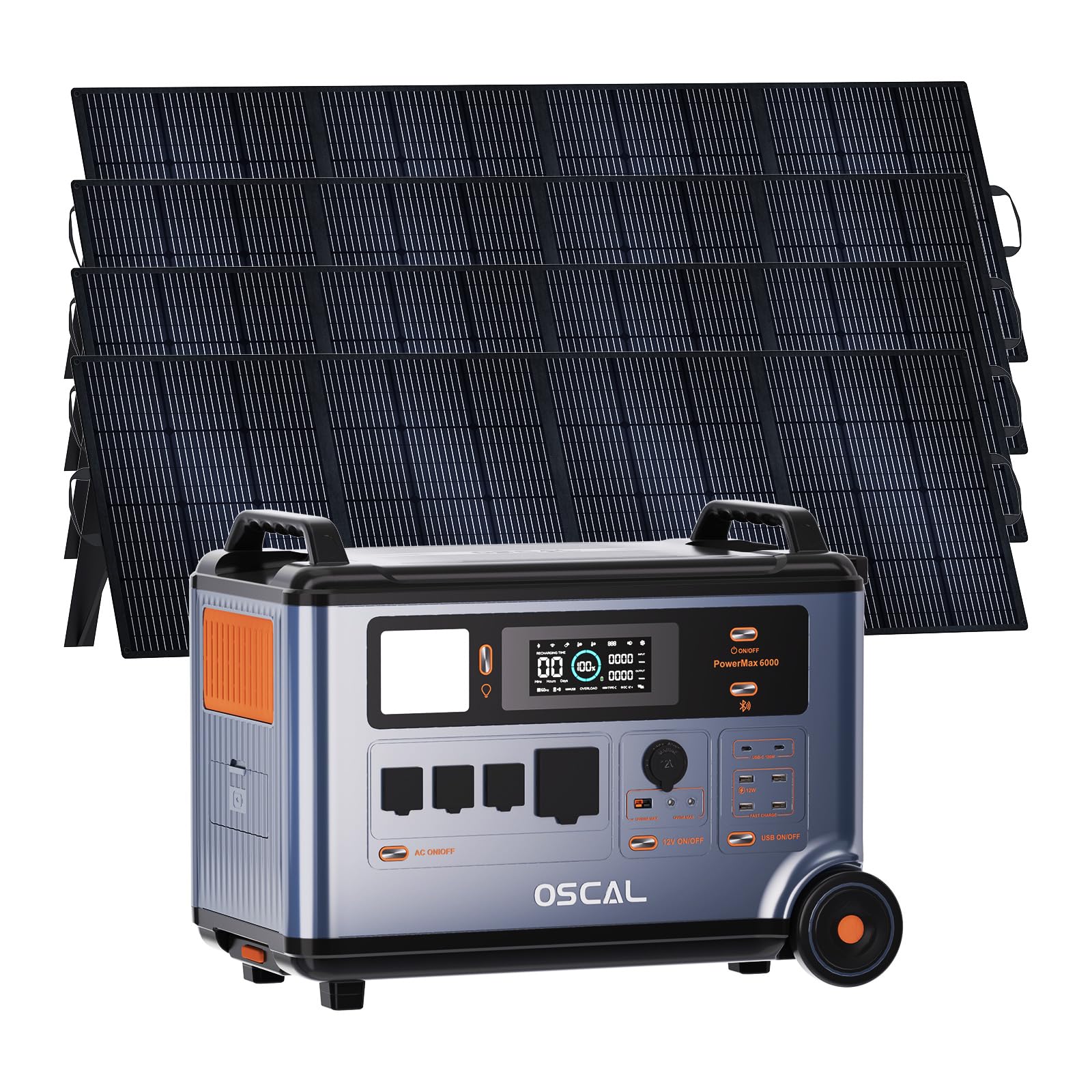
Image: The EcoVolt PowerMax 6000 solar generator shown with four 200W solar panels, highlighting its complete portable power solution.
Caracteristici cheie:
- Capacitate mare: Baterie LiFePO4 de 3600Wh pentru alimentare extinsă.
- Ieșire puternică: 6000W AC output (9000W surge) with 120V/240V dual voltage suport.
- Încărcare rapidă: 2200W AC input and 2400W MPPT solar input for rapid recharging.
- Functionalitate EPS: 5-8ms fast switchover for uninterruptible power supply during outages.
- Control inteligent: Monitor and control via a dedicated smartphone application.
- Baterie durabilă: LiFePO4 battery with advanced BMS, offering up to 3500 cycles and a 25-year service life.

Imagine: O imagine detaliată view of the PowerMax 6000's control panel, showing the display and various ports.
Ghid de instalare
1. Despachetarea și inspecția:
Carefully remove all components from the packaging. Inspect the PowerMax 6000 and accessories for any signs of damage. If any items are missing or damaged, contact customer support immediately.
2. Încărcare inițială:
Before first use, fully charge the PowerMax 6000. Connect the AC charging cable to the unit and a standard wall outlet. The display will indicate the charging status. A full charge typically takes approximately 1.96 hours using AC input.
3. Connecting Solar Panels:
For solar charging, connect the provided solar charging cables to the solar panels and then to the PowerMax 6000's solar input port. Ensure the solar panels are placed in direct sunlight for optimal charging efficiency.

Image: Illustration showing the connection of solar panels to the PowerMax 6000 for charging.
Instrucțiuni de operare
1. Pornire/Oprire:
Press and hold the main power button to turn the unit on or off. The display will illuminate upon activation.
2. Utilizarea ieșirilor de curent alternativ:
The PowerMax 6000 provides 4 AC output ports. Press the AC power button to activate the AC outlets. Plug your appliances into the appropriate 120V or 240V outlets. The unit automatically detects and supports dual voltagieșire.

Image: The PowerMax 6000 connected to a household, demonstrating its 120V/240V dual voltage output capability to power various home appliances.
3. Using DC and USB Outputs:
Activate the DC or USB power buttons to use the respective ports. The unit includes Anderson output, USB-A, USB-C, Car Power Output, and DC5521 ports for various devices.
4. Metode de încărcare:
- Încărcare AC: Connect to a wall outlet using the AC charging cable. Supports up to 2200W input.
- Încărcare solară: Connect solar panels to the solar input port. Supports up to 2400W MPPT solar input.
- Încărcarea mașinii: Use the car charging cable to charge from your vehicle's 12V outlet.
- Alte metode: The PowerMax 6000 can also be recharged via wind turbine, water turbine, diesel generator, or EV charging station (accessories sold separately).
Video: This video demonstrates the various charging methods for the PowerMax 6000, including solar, wind, water, AC, diesel generator, and EV charging station, showcasinversatilitatea sa.
5. EPS (Emergency Power Supply) Function:
În cazul unei alimentăritage, the PowerMax 6000 automatically switches to battery power within 5-8 milliseconds, ensuring uninterrupted operation for connected devices. This feature is ideal for sensitive electronics and critical equipment.

Image: The PowerMax 6000 illustrating its 5-8ms fast UPS switchover, ensuring continuous power for essential devices like CPAP machines, home office setups, and emergency equipment.
6. Controlul aplicației:
Download the OSCAL application on your smartphone to monitor and control the PowerMax 6000 remotely. The app allows you to check power usage, battery status, and activate/deactivate outputs.

Image: A smartphone screen showing the OSCAL application interface, used for monitoring and controlling the PowerMax 6000 power station.
Video: This video demonstrates the remote monitoring and control capabilities of the PowerMax 6000 via its smart app, including signal light communication.
Întreţinere
1. Curățare:
Wipe the unit with a dry, soft cloth. Do not use abrasive cleaners or solvents. Ensure all ports are free from dust and debris.
2. Depozitare:
When not in use for extended periods, store the PowerMax 6000 in a cool, dry place, away from direct sunlight and extreme temperatures. It is recommended to charge the unit to 50-80% every 3-6 months to maintain battery health.
3. Îngrijirea bateriei:
The LiFePO4 battery is designed for longevity. Avoid fully discharging the battery frequently to prolong its lifespan. The integrated Battery Management System (BMS) protects against overcharge, over-discharge, over-voltage, over-current, short-circuit, and temperature fluctuations.
Depanare
| Problemă | Cauza posibila | Soluţie |
|---|---|---|
| Unitatea nu pornește. | Bateria este complet descărcată. | Conectați la priza de curent alternativ și încărcați timp de cel puțin 30 de minute. |
| Ieșirea de curent alternativ nu funcționează. | Ieșirea CA nu este activată; Protecția la suprasarcină s-a declanșat. | Press the AC power button; Reduce the load on the AC outlets. |
| Solar charging is slow or not working. | Insufficient sunlight; Incorrect panel connection; Dirty panels. | Ensure panels are in direct sunlight; Check cable connections; Clean solar panels. |
| Probleme de conectare la aplicație. | Bluetooth/Wi-Fi dezactivat; Aplicația nu este actualizată. | Ensure Bluetooth/Wi-Fi is enabled on your device; Update the OSCAL app to the latest version. |
If you encounter issues not listed here or if the problem persists, please contact EcoVolt customer support.
Specificatii tehnice
| Caracteristică | Detaliu |
|---|---|
| Marca | EcoVolt |
| Numele modelului | PowerMax 6000 |
| Wattage | 6000 Watts (Running) / 9000 Watts (Starting) |
| Tip de combustibil | Solar |
| Sursa de alimentare | Electric cu fir |
| Voltage | 110V / 120V / 240V Split Phase |
| Tip baterie | LiFePO4 |
| Capacitate | 3600Wh |
| Intrare AC | 2200W Max |
| Intrare solară | 2400W MPPT Max |
| Prize de putere totală | 14 |
| Material | Metal |
| Caracteristica specială | Fast Charging, EPS Uninterruptible Power Supply, App Control |
Garanție și suport
The EcoVolt PowerMax 6000 comes with a 5 an garanție. For technical support, warranty claims, or any questions regarding your product, please refer to the contact information provided on your warranty card or visit the official EcoVolt website-ul.
You can also find additional support and FAQs within the OSCAL smartphone application.