
Introducere
This manual provides detailed instructions for the setup, operation, and maintenance of your LIGE EF19-A Smartwatch. This device features a 1.85-inch HD display, Bluetooth calling capabilities, extensive health monitoring, and over 100 sports modes. It is designed for durability with IP68 waterproofing and a robust build. Please read this manual thoroughly to ensure proper use and to maximize the functionality of your smartwatch.
1. Configurare
1.1 Conținutul pachetului
- 1 x LIGE EF19-A Smartwatch
- 2 x Watch Straps (1 steel, 1 silicone)
- 1 x cablu de încărcare USB
- 1 x cablu de încărcare tip C
- 1 x Strap Adjuster (Regulator)
- 1 x Manual de utilizare
1.2 Încărcarea ceasului inteligent
Înainte de prima utilizare, încărcați complet ceasul inteligent.
- Conectați cablul magnetic de încărcare la contactele de încărcare de pe spatele ceasului inteligent.
- Connect the other end of the charging cable (USB or Type-C) to a compatible power source (e.g., USB wall adapter, computer USB port, power bank, car charger).
- Afișajul ceasului va indica starea de încărcare. O încărcare completă durează de obicei aproximativ 2 ore.

Image: The smartwatch connected to a charging cable, illustrating its 1000 mAh battery capacity and charging process.
A fully charged battery provides up to 7-15 days of normal use and up to 50 days in standby mode.
1.3 Instalarea și asocierea aplicației
To access all features, download the companion app on your smartphone. The smartwatch is compatible with Android 5.1 and higher, and iOS 9.0 and higher.
- Scan the QR code provided in the manual or on the watch packaging, or search for the app name (usually specified in the quick start guide) in your phone's app store (Google Play Store for Android, Apple App Store for iOS).
- Instalați aplicația și creați un cont dacă vi se solicită.
- Asigurați-vă că Bluetooth este activat pe smartphone-ul dvs.
- Open the app and follow the on-screen instructions to add your device. The app will search for your smartwatch.
- Select your smartwatch (e.g., "EF19-A" or similar Bluetooth name) from the list of available devices to pair.
- Confirm the pairing request on both your smartphone and smartwatch if a prompt appears.
1.4 Strap Installation/Adjustment
The smartwatch comes with two interchangeable straps: a steel strap and a silicone strap.
- Pentru a atașa o curea: Align the spring bar with the lug holes on the watch body and slide the pin into place.
- Pentru a scoate o curea: Locate the small lever on the spring bar, pull it inwards, and gently detach the strap from the watch body.
- For the steel strap: Use the provided strap adjuster (regulator) to remove or add links for a comfortable fit. Refer to the specific instructions for the strap adjuster if needed.
2. Instrucțiuni de utilizare
2.1 Navigare de bază
- Touch screen: Glisați stânga/dreapta, în sus/jos pentru a naviga prin meniuri și funcții. Atingeți pentru a selecta.
- Buton(e) lateral(e): Typically, one button serves as a power on/off, back, or home button. Long press for power options, short press to return to the watch face or previous screen.
2.2 Apeluri și notificări Bluetooth
Once paired with your smartphone, the smartwatch allows you to manage calls and receive notifications.
- Efectuarea/Primirea apelurilor: When a call comes in, the watch will display the caller ID. You can answer or reject calls directly from the watch. You can also dial numbers or select contacts from the watch interface.
- Notificări de mesaje: Receive notifications for SMS, Facebook, WhatsApp, Twitter, TikTok, and other apps directly on your watch. Swipe down from the watch face to view notificări recente.

Image: The smartwatch showing an incoming call, message notifications, and the voice assistant interface.
2.3 Monitorizarea sănătății
Ceasul inteligent monitorizează continuu diverse valori ale stării de sănătate.
- Ritmul cardiac: Access the heart rate monitoring function to view ritmul cardiac actual și datele istorice.
- Oxigenul din sânge (SpO2): Măsurați-vă nivelul de oxigen din sânge.
- Calitatea somnului: The watch automatically tracks your sleep patterns, including deep sleep, light sleep, and wake times. View detailed sleep reports in the companion app.
- Nivel de stres: Monitorizează-ți nivelul de stres pe parcursul zilei.
- Antrenamentul de respirație: Engage in guided breathing exercises to help manage stress.

Image: A user wearing the smartwatch, with the display showing real-time heart rate, blood oxygen saturation, and breathing exercise prompts.
Nota: This device is not a medical device. Health monitoring data is for reference only and should not be used for medical diagnosis or treatment.
2.4 de moduri sportive
The smartwatch supports over 100 sports modes for tracking your physical activity.
- Navigate to the "Workout" or "Sports" menu on your watch.
- Select your desired activity (e.g., running, cycling, swimming, hiking, yoga, badminton, basketball, golf).
- Ceasul va începe să urmărească parametri precum pașii, distanța, caloriile arse și ritmul cardiac.
- End the workout by following the on-screen prompts. Detailed summaries are available on the watch and in the companion app.

Image: A person cycling while wearing the smartwatch, with the display showing steps, distance, calories, and heart rate for different sports activities.
2.5 Funcția torței
The smartwatch includes a built-in torch function for instant illumination.
- Access the torch function from the quick settings menu or app list.
- It offers different modes such as constant light, warning mode, and SOS mode.
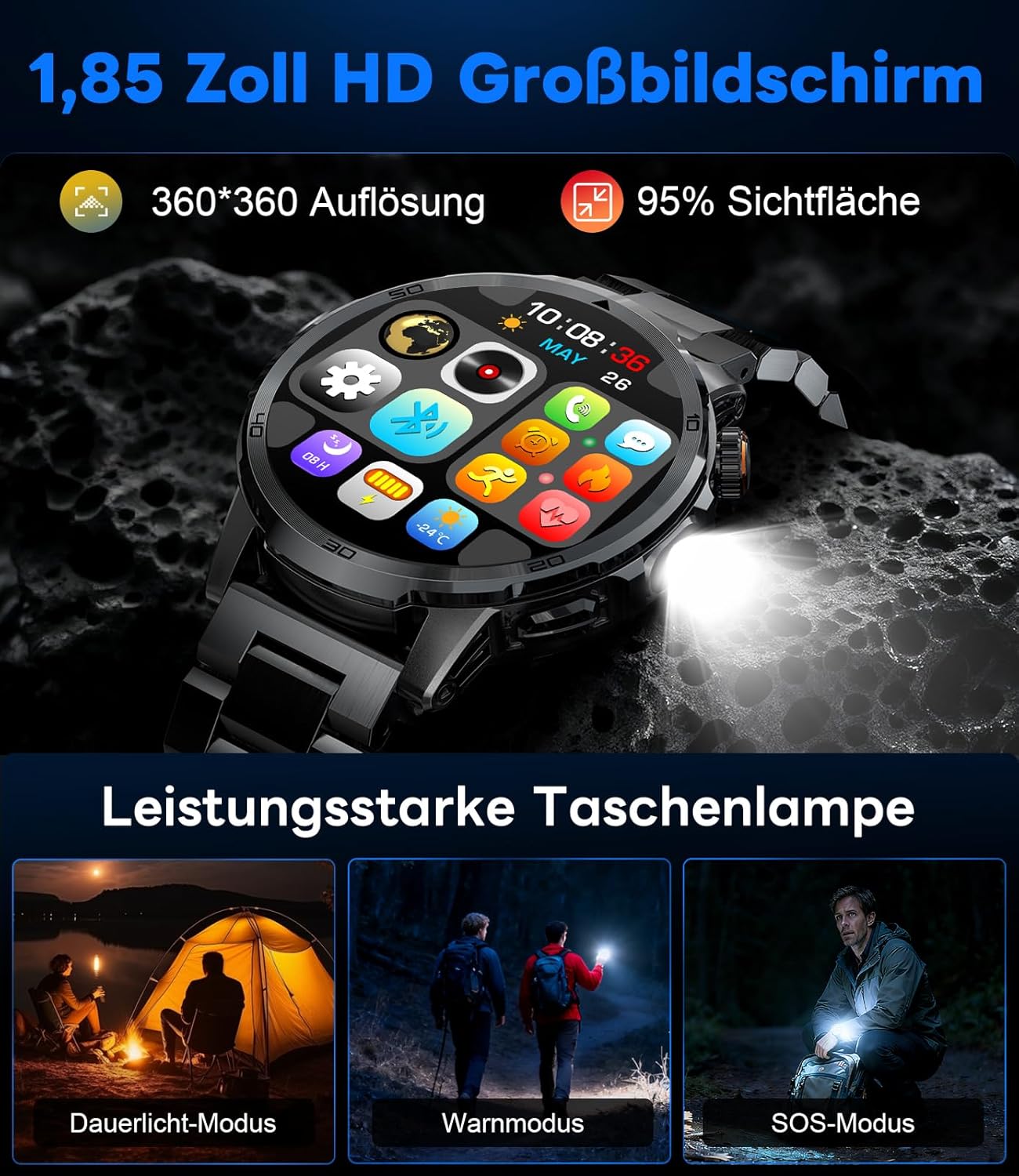
Image: The smartwatch displaying its 1.85-inch HD screen and demonstrating its powerful flashlight feature with different modes.
2.6 Alte funcții
- Asistent vocal: Activate the voice assistant to control your phone or get information (e.g., "What's the weather?").
- Controlul muzicii: Control music playback on your smartphone (play, pause, skip tracks, adjust volume) directly from your watch.
- Controlul camerei: Folosește ceasul ca declanșator de la distanță pentru camera smartphone-ului tău.
- Prognoza meteo: View condițiile și prognozele meteorologice actuale.
- Alarme și cronometre: Setați alarme și utilizați funcțiile cronometru/temporizator.
- Memento de băutură: Setează mementouri pentru a bea apă.
- Vizionați fețele: Customize your watch face from over 100 options or upload your own photos via the app.

Image: The smartwatch interface displaying icons for music control, flashlight, camera control, weather, alarm, and drink reminders.

Image: A selection of diverse watch faces available for customization on the LIGE EF19-A Smartwatch.
3. Întreținere
3.1 Curățare
- Regularly clean your smartwatch and straps with a soft, dry, lint-free cloth.
- Dacă este necesar, utilizați un damp o lavetă cu săpun delicat, apoi ștergeți-o.
- Evitați utilizarea substanțelor chimice dure, a produselor de curățare abrazive sau a solvenților, deoarece acestea pot deteriora finisajul și garniturile ceasului.
- Asigurați-vă că contactele de încărcare sunt curate și uscate înainte de încărcare.
3.2 Rezistență la apă (IP68)
The LIGE EF19-A Smartwatch is IP68 waterproof, meaning it is resistant to dust and can withstand immersion in water up to 1.5 meters for up to 30 minutes.
- It is suitable for daily use, such as hand washing, rain, and shallow water swimming.
- Avoid using the watch in hot water, saunas, or steam rooms, as steam can penetrate the seals and cause damage.
- Nu apăsați butoanele sub apă.
- After exposure to water, wipe the watch dry before charging or using.

Image: The smartwatch highlighting its robust military-grade design, including resistance to temperature extremes, shock, dust, and IP68 water resistance.
4. Depanare
4.1 Ceasul nu se pornește
- Asigurați-vă că ceasul este complet încărcat. Conectați-l la încărcător timp de cel puțin 30 de minute.
- Try long-pressing the side button for 10-15 seconds to force a restart.
4.2 Nu se poate realiza asocierea cu smartphone-ul
- Asigurați-vă că Bluetooth este activat pe smartphone-ul dvs.
- Ensure the smartwatch is within Bluetooth range (typically 10 meters).
- Reporniți atât smartphone-ul, cât și ceasul inteligent.
- Check if the app has the necessary permissions (location, Bluetooth, etc.).
- If previously paired, try "forgetting" the device in your phone's Bluetooth settings and re-pairing through the app.
4.3 Date inexacte privind sănătatea
- Asigurați-vă că ceasul este purtat strâns pe încheietura mâinii, la aproximativ lățimea unui deget deasupra osului încheieturii mâinii.
- Evitați mișcarea excesivă în timpul măsurătorilor.
- Curățați senzorul de pe spatele ceasului.
- Factorii de mediu și fiziologia individuală pot afecta valorile măsurate.
4.4 Notificări care nu apar
- Verificați dacă ceasul este asociat cu succes cu smartphone-ul.
- Check notification settings within the companion app to ensure desired apps are enabled for notifications.
- Asigură-te că setările de notificare ale telefonului permit aplicației asociate să afișeze notificări.
- Make sure your phone is not in "Do Not Disturb" mode.
5. Specificații
| Caracteristică | Caietul de sarcini |
|---|---|
| Numărul de model | EF19-A |
| Afişa | 1.85-inch IPS HD Touch Screen, 360x360 pixels |
| Capacitatea bateriei | Litiu polimer de 1000 mAh |
| Durata de viață a bateriei (utilizare normală) | 7-15 zile |
| Durata de viață a bateriei (standby) | Până la 50 de zile |
| Timp de încărcare | Aproximativ. 2 ore |
| Conectivitate | Bluetooth 5.2 |
| Rezistenta la apa | IP68 (impermeabil) |
| Capacitate de stocare a memoriei | 128 MB |
| Dispozitive compatibile | Android 5.1+ / iOS 9.0+ Smartphones |
| Monitorizarea sănătății | Heart Rate, Blood Oxygen, Sleep Quality, Stress Level |
| Moduri sportive | 100+ (e.g., Running, Cycling, Swimming, Hiking, Yoga) |
| Caracteristici suplimentare | Bluetooth Calls, Message Notifications, Torch, Voice Assistant, Music Control, Camera Control, Weather, Alarms, Timers, Drink Reminder, Customizable Watch Faces |
| GPS | Prin Smartphone |
| Publicul țintă | Bărbați |
6. Informații despre garanție
The LIGE EF19-A Smartwatch comes with a 2 an garanție de la data achiziției. Această garanție acoperă defectele de fabricație și defecțiunile în condiții normale de utilizare.
Garanția nu acoperă:
- Damage caused by improper use, accident, abuse, neglect, or unauthorized modification.
- Normal wear and tear, including scratches, dents, or cosmetic damage.
- Damage caused by exposure to extreme temperatures, liquids (beyond IP68 rating), or corrosive environments.
- Damage to accessories (straps, charging cables) unless defective upon receipt.
To claim warranty service, please retain your proof of purchase and contact customer support.
7. Asistență pentru clienți
If you encounter any issues or have questions regarding your LIGE EF19-A Smartwatch that are not covered in this manual, please contact our customer support team.
- Refer to the contact information provided on the product packaging or the official LIGE website-ul.
- When contacting support, please provide your product model number (EF19-A) and a detailed description of the issue.