
Introducere
This manual provides comprehensive instructions for the setup, operation, maintenance, and troubleshooting of your T-Wolf T60 Wired 60% Mechanical Keyboard. Please read this manual carefully before using the product to ensure proper function and longevity.
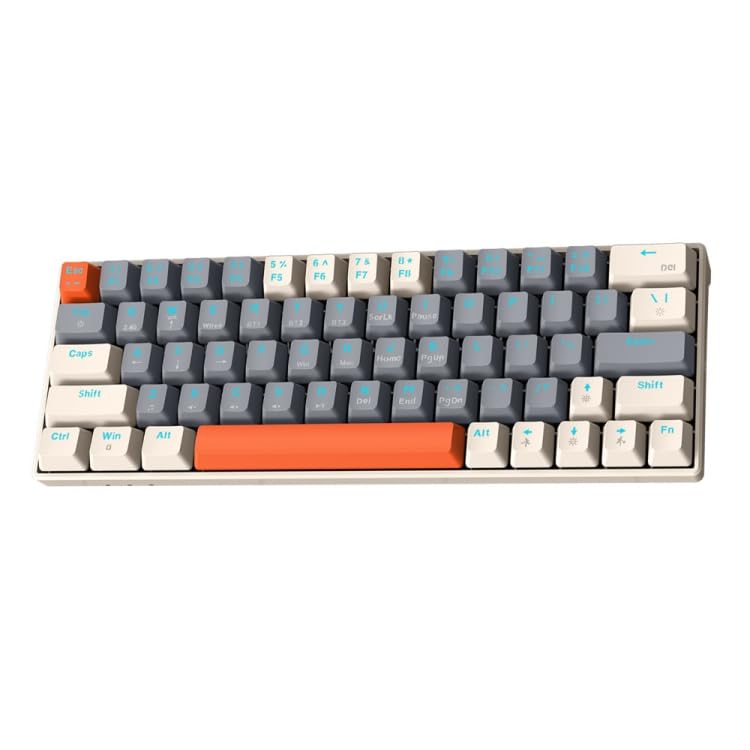
Image: T-Wolf T60 Wired 60% Mechanical Keyboard. This image displays the compact design of the keyboard, highlighting its 63-key layout and wired connectivity.
Înființat
- Unboxing: Carefully remove the keyboard and all included accessories from the packaging. Verify that all components are present: T-Wolf T60 keyboard and USB-C to USB cable.
- Conectarea tastaturii:
- Localizați portul USB-C de pe tastatură.
- Insert the USB-C end of the provided cable into the keyboard's USB-C port.
- Insert the USB-A end of the cable into an available USB 2.0 port on your computer (PC, desktop, or laptop).
- Instalare driver: The T-Wolf T60 keyboard is plug-and-play. Your operating system should automatically detect and install the necessary drivers. No manual driver installation is typically required.
- Test inițial: Open a text editor or word processor and type to confirm the keyboard is functioning correctly.
Operațiunea
The T-Wolf T60 is a 60% mechanical keyboard with 63 keys, designed for efficient typing and gaming. It features RGB backlighting and multi-key anti-ghosting.
- Funcții de bază ale tastelor: All standard alphanumeric and symbol keys function as expected. Due to the compact 60% layout, some functions (like F-keys, arrow keys, and navigation keys) are accessed via a Function (Fn) key combination. Refer to the keyboard's keycap legends for specific Fn key combinations.
- Iluminare de fundal RGB: Tastatura dispune de iluminare de fundal RGB personalizabilă.
- To cycle through different lighting modes, use the designated Fn key combination (e.g., Fn + \ or Fn + P).
- To adjust brightness, use the designated Fn key combination (e.g., Fn + Up/Down arrow keys, if available via Fn layer).
- To change lighting speed, use the designated Fn key combination (e.g., Fn + Left/Right arrow keys, if available via Fn layer).
- Multi-Key Anti-Ghosting: This feature ensures that multiple simultaneous key presses are registered accurately, which is beneficial for fast-paced gaming and complex commands.
Întreţinere
Proper maintenance helps extend the lifespan of your keyboard.
- curatenie:
- Deconectați tastatura de la computer înainte de curățare.
- Folosește o recipient cu aer comprimat pentru a îndepărta praful și resturile dintre capacele tastelor.
- Ștergeți tastele și suprafața tastaturii cu o lavetă moale și ușor tamponată.amp, lavetă fără scame. Evitați umiditatea excesivă.
- Do not use harsh chemicals, abrasive cleaners, or solvents, as these can damage the keyboard's finish and keycap legends.
- Depozitare: Când nu este utilizată pentru perioade lungi de timp, depozitați tastatura într-un mediu curat și uscat, ferit de lumina directă a soarelui și de temperaturi extreme.
- Îngrijirea cablului: Avoid bending or twisting the USB-C cable excessively to prevent internal damage.
Depanare
If you encounter issues with your T-Wolf T60 keyboard, refer to the following common solutions:
- Tastatura nu răspunde:
- Asigurați-vă că este conectat corect cablul USB-C atât la tastatură, cât și la computer.
- Încercați să conectați tastatura la un alt port USB al computerului.
- Testați tastatura pe un alt computer pentru a determina dacă problema este cu tastatura sau cu configurația originală a computerului.
- Reporniți computerul.
- RGB Backlighting Not Working or Incorrect:
- Asigurați-vă că tastatura este conectată corect și primește alimentare.
- Try cycling through the RGB modes using the Fn key combinations mentioned in the Operation section.
- Check if the brightness is set to maximum.
- Cheile nu se înregistrează sau tastează de două ori:
- Clean the keyboard thoroughly, especially around the affected keys, using compressed air.
- Asigurați-vă că nu există resturi blocate sub capacele tastelor.
- Dacă problema persistă, poate indica o defecțiune hardware.
Specificații
| Caracteristică | Detaliu |
|---|---|
| Marca | LUPUL-T |
| Model | T60 |
| Tehnologia de conectivitate | USB-C (cu fir) |
| Dispozitive compatibile | PC, desktop, laptop |
| Descrierea tastaturii | Jocuri, Mecanice |
| Numărul de chei | 63 |
| Caracteristici speciale | RGB Backlighting, Multi-Key Anti-Ghosting |
| Material | Plastic |
| Aspectul tastaturii | QWERTY |
Garanție și suport
Pentru informații despre garanție și asistență tehnică, vă rugăm să consultați documentația furnizată odată cu achiziția sau să contactați direct distribuitorul/producătorul. Păstrați dovada achiziției pentru reclamații în garanție.
Manufacturer: T-Wolf