
1. Introducere
This manual provides detailed instructions for the FULODE X1-16C 16-Channel Audio Mixer. Please read this manual thoroughly before operating the device to ensure proper usage and to maximize its performance and longevity. This professional audio console is designed for various applications including studio recording, live performances, DJ events, and karaoke.

2. Informații de siguranță
To prevent electric shock, fire, or damage to the device, please observe the following safety precautions:
- Nu deschideți dispozitivul casing. Apelați la personal calificat pentru toate lucrările de service.
- Asigurați-vă că sursa de alimentare voltage corespunde cerințelor specificate pe dispozitiv.
- Keep the device away from water, moisture, and excessive heat.
- Do not operate the device if the power cord is damaged or frayed.
- Deconectați întotdeauna sursa de alimentare înainte de curățare sau efectuarea de lucrări de întreținere.
- Utilizați numai atașamente/accesorii specificate de producător.
3. Conținutul pachetului
Verificați dacă toate articolele sunt prezente în colet:
- FULODE X1-16C 16-Channel Audio Mixer
- Power Adapter (AC 90-240V, 50-60Hz)
- Manual de utilizare
4. Produs terminatview: comenzi și conexiuni
The FULODE X1-16C mixer features a comprehensive layout for intuitive control over your audio. Familiarize yourself with the various inputs, outputs, and control elements.

4.1 Controale panoului frontal
- Composite Interface: Combination XLR/TRS input for microphones and line-level signals.
- Comutator fantomă: Activează alimentarea phantom de +48V pentru microfoanele cu condensator.
- Ajustarea câștigului: Controls the input sensitivity of each channel.
- Treble/Midrange/Bass Adjustment (3-Band EQ): Equalization controls for high, mid, and low frequencies on each channel.
- AUX Adjustment: Controls the auxiliary send level for external effects or monitor mixes.
- Adjustment of Effect: Controls the amount of internal DSP effect applied to the channel.
- Pan Balance: Ajustează poziția stereo a semnalului canalului.
- Channel Mute Switch: Dezactivează sau activează sunetul canalului individual.
- Channel Volume Pusher: Fader to control the output level of each channel.
- Reverberation Effect Selection: Knob to select from 99 built-in DSP effects.
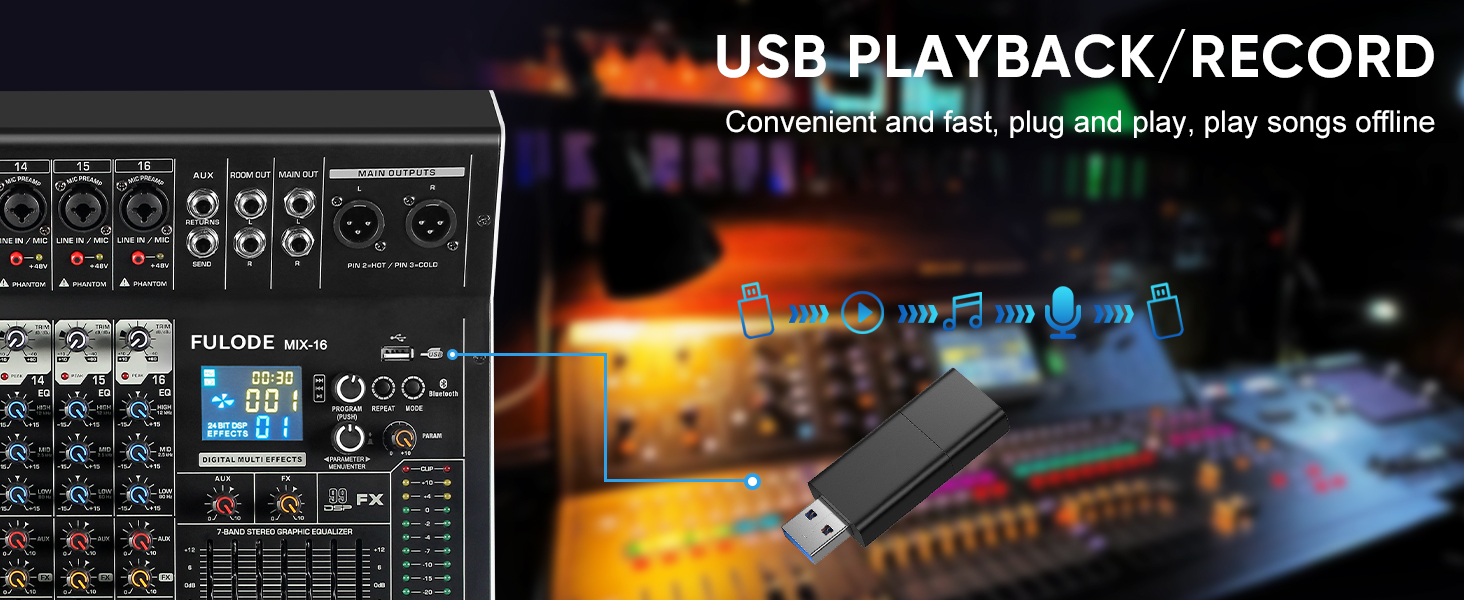
- Redare USB/MP3: Section for USB drive and Bluetooth audio input, with transport controls and digital display.
- Indicator luminos de nivel: Afișaj vizual al nivelurilor de ieșire.
- Main Channel Seven Segment Balance: Graphic equalizer for the main stereo output.
- Monitor Volume Adjustment: Controlează volumul ieșirii pentru căști.
- Effect Main Volume Adjustment: Controls the overall level of the selected DSP effect.
- Left/Right Main Volume Adjustment: Faders for the main stereo output.
- Earphone Monitoring Interface: 1/4" jack for headphone monitoring.
- MP3 Main Volume Adjustment: Controls the output level of the USB/MP3/Bluetooth section.
4.2 Conexiuni la panoul din spate
- Întrerupător: Pornește sau oprește mixerul.
- Interfață de alimentare: Se conectează la adaptorul de alimentare furnizat.
5. Configurare
Follow these steps for initial setup of your FULODE X1-16C Audio Mixer.
5.1 Conexiune la alimentare
- Asigurați-vă că întrerupătorul de alimentare al mixerului este în poziția OPRIT.
- Connect the power adapter to the Power Interface on the rear panel of the mixer.
- Plug the power adapter into a suitable AC power outlet (110V).
- Turn the mixer's power switch to the ON position. The digital display should illuminate.
5.2 Conectarea microfoanelor și instrumentelor
- For microphones or line-level instruments, connect them to the Composite Interface (XLR or 1/4" TRS) on the desired channel.
- Dacă folosiți un microfon cu condensator, apăsați butonul Comutator fantomă (+48V) for that specific channel. An indicator light will confirm activation.
- Reglați Ajustarea câștigului knob for each input channel to achieve an optimal signal level without clipping.

5.3 Conectarea dispozitivelor de ieșire
- Conectați difuzoarele principale sau ampmai vie la Main Output Interface (XLR or 1/4" TRS) on the top right of the mixer.
- For monitoring, connect headphones to the Earphone Monitoring Interface.
6. Instrucțiuni de utilizare
6.1 Controlul canalului
- Câştig: Adjust the input gain for each channel to prevent clipping (indicated by the PEAK LED) and ensure a strong signal.
- EQ cu 3 benzi: Use the HI, MID, and LOW knobs to shape the tone of each input.
- AUX: Control the amount of signal sent to the auxiliary output for external effects or monitor mixes.
- FX: Adjust the level of the internal DSP effect applied to the channel.
- TIGAIE: Position the channel's signal in the stereo field (left to right).
- Mut: Press the MUTE button to instantly silence a channel.
- Canal Fader: Use the fader to control the overall volume of the channel in the main mix.
6.2 Efecte DSP
The mixer includes 99 built-in 24-bit DSP effects for enhancing your sound.
- Utilizați Reverberation Effect Selection knob to browse through the 99 available effects (e.g., Warm Room, Bright Room, Hall, Plate, Chorus, Delay). The digital display will show the selected effect number.
- Apăsați butonul pentru a confirma selecția.
- Reglați Effect Main Volume Adjustment to control the overall wet/dry mix of the effects.
- Use the individual channel's FX knob to send more or less of that channel's signal to the effects processor.

6.3 USB/MP3/Bluetooth Playback
The mixer supports audio playback from USB drives and Bluetooth-enabled devices.
- Redare USB: Introduceți o unitate USB care conține MP3 files into the USB port. Use the transport controls (Play/Pause, Skip) and the MP3 Main Volume Adjustment pentru a controla redarea.
- Conexiune Bluetooth: Press the MODE button on the USB/MP3 section until 'BT' appears on the digital display. On your smart device, search for 'MIX-BT' (or similar) and pair. Once connected, you can stream audio wirelessly to the mixer.


6.4 Ieșire principală și monitorizare
- Utilizați Left/Right Main Volume Adjustment faders to control the overall output level of the mix.
- The Indicator luminos de nivel provides visual feedback on the main output levels. Adjust faders to keep levels within the optimal range (avoiding red/clipping).
- The Main Channel Seven Segment Balance (graphic EQ) allows for fine-tuning the overall frequency response of your main mix.
- Reglați Monitor Volume Adjustment for comfortable listening through headphones.

6.5 Demonstrație video oficială a produsului
Watch this video for a visual demonstration of the FULODE mixer's features and operation. Note: The video features a MIX-12 model, which shares many similar functionalities with the X1-16C.
7. Întreținere
Întreținerea corespunzătoare asigură longevitatea și performanța optimă a mixerului dumneavoastră.
- curatenie: Use a soft, dry cloth to wipe the surface of the mixer. Do not use liquid cleaners or solvents, as they may damage the finish or internal components.
- Depozitare: Store the mixer in a cool, dry place away from direct sunlight and extreme temperatures. If storing for extended periods, cover the unit to protect it from dust.
- Ventilare: Asigurați o ventilație adecvată în jurul mixerului pentru a preveni supraîncălzirea. Nu blocați orificiile de ventilație.
8. Depanare
If you encounter issues with your FULODE X1-16C mixer, refer to the following common problems and solutions:
| Problemă | Cauza posibila | Soluţie |
|---|---|---|
| Fără putere | Power cable not connected; Power switch off; Faulty power adapter/outlet | Check power cable connection; Ensure power switch is ON; Try a different power outlet or adapter. |
| Niciun sunet de la un canal | Channel muted; Gain too low; Cable issue; Phantom power not activated (for condenser mics) | Check MUTE button; Increase Gain; Verify cable connections; Activate +48V phantom power if needed. |
| Niciun sunet de la ieșirea principală | Main faders down; Output cables disconnected; Amplifier/speakers off | Raise Main Volume faders; Check output cable connections; Ensure amplifier/speakers are powered on and connected. |
| Bluetooth nu se conectează | Mixer not in Bluetooth mode; Device too far; Already connected to another device | Press MODE until 'BT' appears; Ensure device is within 33 ft; Disconnect from other devices. |
| Sunet distorsionat | Gain too high (clipping); EQ settings extreme; Faulty cable/microphone | Reduce Gain (ensure PEAK LED is not constantly lit); Adjust EQ to neutral or moderate settings; Test with different cables/microphones. |
9. Specificații
Technical specifications for the FULODE X1-16C 16-Channel Audio Mixer:
- Model: X1-16C
- Număr de canale: 16
- Efecte DSP: 99 built-in 24-bit effects
- Egalizare: 3-band EQ per channel, 7-band graphic EQ on main output
- Puterea fantomă: +48V (comutabil per canal)
- Conectivitate: USB (playback/recording), Bluetooth, XLR, 1/4" TRS
- Sursa de alimentare: Electric cu fir
- Voltage: 110 volți (AC)
- Dimensiuni produs: 39.5 cm adâncime x 48 cm lățime x 10.5 cm înălțime
- Greutatea articolului: 18.16 lire (8.24 kg)
10. Garanție și asistență
For warranty information and technical support, please refer to the documentation included with your purchase or contact FULODE customer service through their official channels. Keep your proof of purchase for any warranty claims.