
1. Introducere
This manual provides detailed instructions for the safe and effective use of your MESTEK Pinless Wood Moisture Meter, model WM710-001. This device is designed for non-destructive measurement of moisture content in various materials including wood, drywall, masonry, and other building materials. Please read this manual thoroughly before operation and retain it for future reference.
2. Informații de siguranță
- Always operate the device within its specified temperature and humidity ranges.
- Do not expose the meter to extreme temperatures, direct sunlight, or high humidity.
- Evitați să scăpați dispozitivul sau să îl supuneți la impacturi puternice.
- Țineți aparatul departe de apă și alte lichide.
- Nu încercați să deschideți sau să modificați dispozitivul. Reparațiile trebuie efectuate numai de către personal calificat.
- Aruncați bateriile conform reglementărilor locale. Nu amestecați baterii vechi cu baterii noi sau tipuri diferite de baterii.
- Acest dispozitiv nu este o jucărie. A nu se lăsa la îndemâna copiilor.
3. Produs terminatview
3.1 Componente
The MESTEK WM710-001 Pinless Wood Moisture Meter features a robust design for reliable moisture detection.
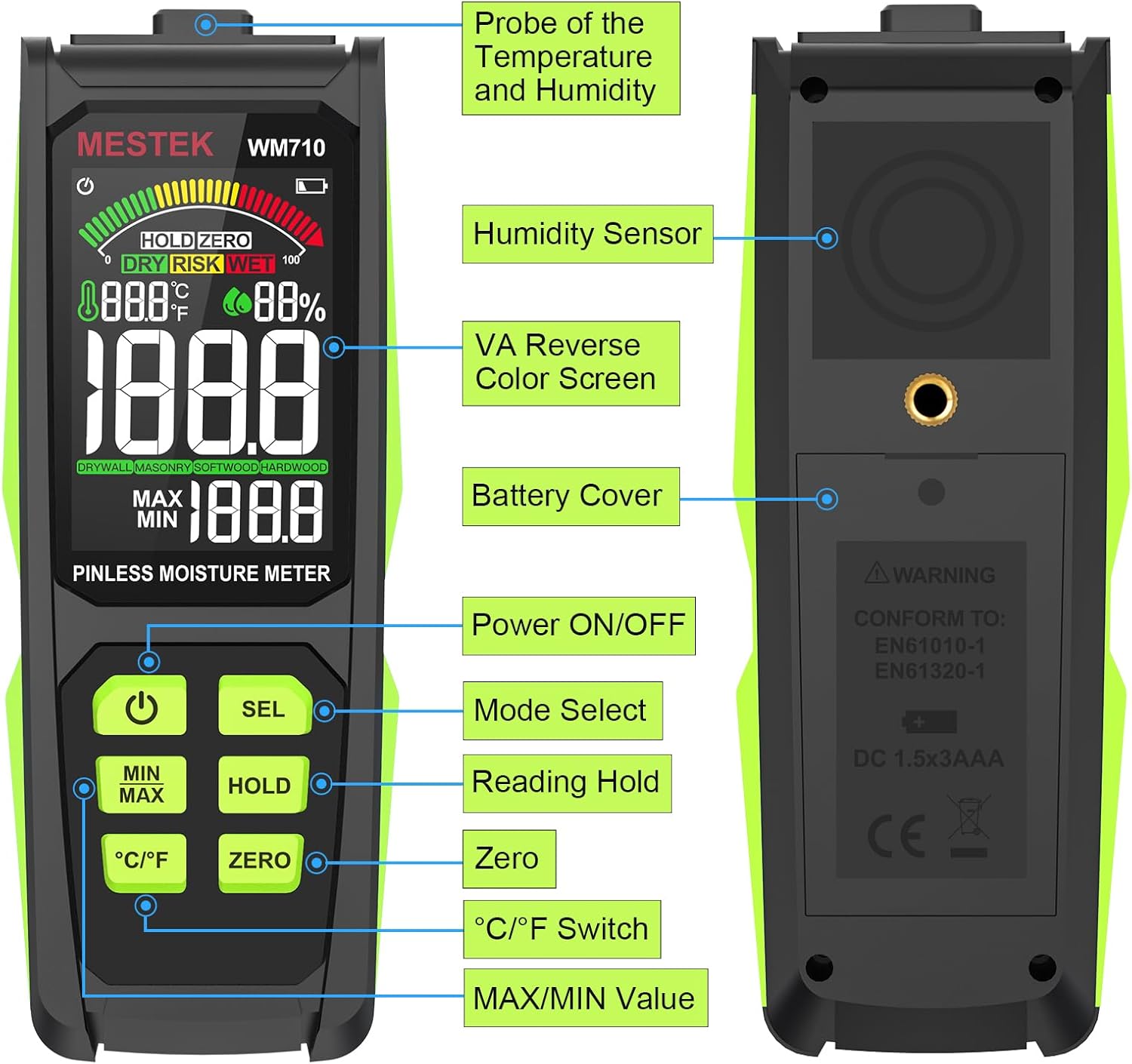
Imagine: Pesteview of the MESTEK WM710-001 Pinless Moisture Meter, highlighting its key components such as the probe, display, and control buttons.
- Probe of Temperature and Humidity: Situat în partea de sus a dispozitivului.
- Senzor de umiditate: Situat pe spatele dispozitivului.
- VA Reverse Color Screen: High-definition display for clear readings.
- Capacul bateriei: Located on the back for battery access.
- Buton de pornire / oprire: Pentru a porni sau opri dispozitivul.
- Mode Select (SEL) Button: To switch between material modes.
- Reading Hold (HOLD) Button: To freeze the current measurement on the display.
- Butonul Zero: For zero calibration.
- Buton comutare °C/°F: To toggle between Celsius and Fahrenheit for temperature display.
- MAX/MIN Value Button: La view maximum and minimum recorded measurements.
3.2 Caracteristici de afișare
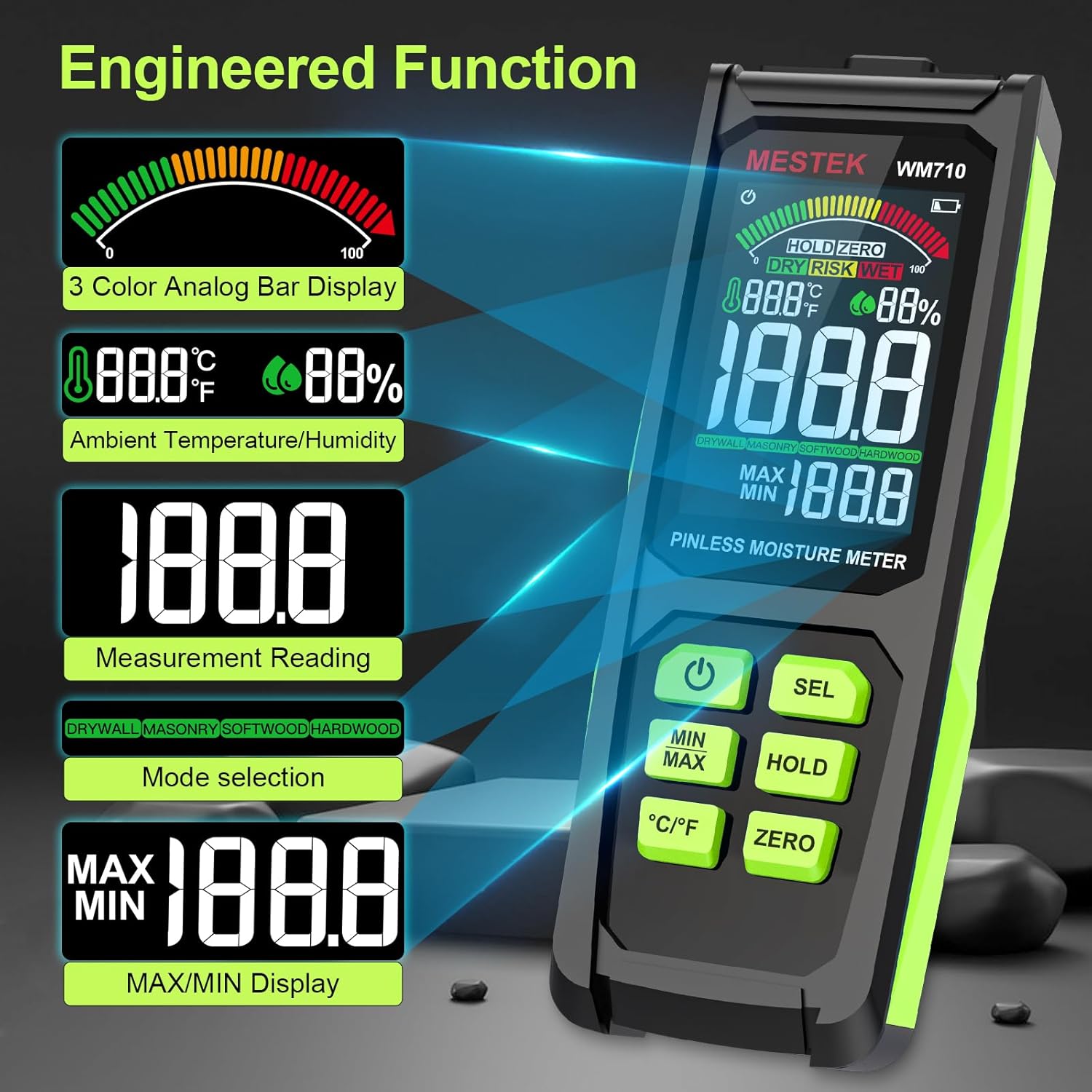
The meter is equipped with a 3-inch HD color screen that provides clear and intuitive information.

Imagine: The MESTEK WM710-001 display illustrating various engineered functions including the 3-color analog bar, ambient temperature/humidity, measurement reading, mode selection, and MAX/MIN display.
- 3-Color Analog Bar Display: Visually indicates moisture levels as DRY (Green), RISK (Yellow), or WET (Red).
- Ambient Temperature/Humidity: Displays current environmental temperature and humidity.
- Measurement Reading: Shows the numerical moisture content.
- Mode Selection Indicator: Displays the currently selected material mode (Drywall, Masonry, Softwood, Hardwood).
- MAX/MIN Display: Shows the highest and lowest recorded moisture values.
- Indicator baterie: Afișează nivelul curent al bateriei.
- HOLD Indicator: Apare când funcția HOLD este activă.
- ZERO Indicator: Appears when zero calibration is active.
4. Configurare
4.1 Instalarea bateriei
The MESTEK WM710-001 requires three (3) AAA batteries for operation.
- Localizați capacul bateriei pe spatele dispozitivului.
- Use a small screwdriver (often included) to loosen the screw securing the battery cover.
- Scoateți capacul bateriei.
- Insert three new AAA batteries, ensuring correct polarity (+/-) as indicated inside the battery compartment.
- Puneți la loc capacul bateriei și strângeți șurubul.
Nota: Un indicator de baterie descărcată va apărea pe afișaj atunci când bateriile trebuie înlocuite.

Imagine: The MESTEK WM710-001 Pinless Moisture Meter shown with its included accessories: a carrying case, user manual, three AAA batteries, and a small screwdriver for battery compartment access.
5. Instrucțiuni de utilizare
5.1 Pornire/Oprire
Apăsați tasta Pornire/Oprire button to turn the meter on. The device will perform a self-test and be ready for measurement within approximately 3 seconds. Press and hold the Pornire/Oprire button again to turn the meter off. The device also features an auto power-off function to conserve battery life after a period of inactivity.

Imagine: Un prim plan view of the power button on the MESTEK WM710-001, indicating its function for turning the device on and off.
5.2 Selectarea modului
The meter offers different modes for various materials to ensure accurate readings.
- Porniți contorul.
- Apăsați scurt pe SEL button to cycle through the available material modes: Drywall, Masonry, Softwood, and Hardwood.
- Select the mode that corresponds to the material you are testing. The selected mode will be indicated on the display.
Imagine: The MESTEK WM710-001 display demonstrating non-invasive detection and the process of switching between Drywall, Masonry, Softwood, and Hardwood modes using the "SEL" button.
5.3 Efectuarea unei măsurători
The WM710-001 uses a non-destructive induction method to measure moisture.
- Ensure the correct material mode is selected (refer to Section 5.2).
- Place the back of the meter (where the sensor is located) flat against the surface of the material you wish to measure.
- The meter will display the moisture content reading. The maximum measuring depth is approximately 0.78 inches (20 mm).
- Observe the 3-color analog bar for a quick visual indication of moisture levels (Green for DRY, Yellow for RISK, Red for WET). An audible alarm will sound if the "WET" threshold is exceeded.

Imagine: The MESTEK WM710-001 in use, demonstrating accurate moisture measurement on wood logs, showing the digital reading and the analog bar.

Imagine: The MESTEK WM710-001 being used to measure moisture in various materials, including drywall, masonry, softwood, and hardwood, illustrating its wide range of applications.
5.4 Funcția HOLD
Apăsați tasta ȚINE button to freeze the current measurement on the display. This is useful when taking readings in hard-to-reach areas where the display cannot be easily viewed. Press the ȚINE Apăsați din nou butonul pentru a elibera citirea și a relua măsurarea în timp real.

Imagine: Un prim plan view of the HOLD button and the "HOLD ZERO" indicator on the MESTEK WM710-001 display, showing how to retain a measurement reading.
5.5 ZERO Calibration
The ZERO function allows for calibration to ensure accuracy.
- Hold the meter in the air, away from any materials.
- Apăsați tasta ZERO button. The display should show a reading close to 0.0.
- This calibrates the meter for ambient conditions before taking measurements.
5.6 MAX/MIN Value
Apăsați tasta MINIM MAXIM button to display the maximum or minimum moisture reading recorded during a measurement session. Pressing it repeatedly will cycle between MAX, MIN, and current readings.
5.7 Afișajul temperaturii și umidității
The meter also displays ambient temperature and humidity. Press the ° C / ° F buton pentru a comuta între unitățile de temperatură Celsius și Fahrenheit.

Imagine: Un prim plan view of the °C/°F button on the MESTEK WM710-001, illustrating the ability to switch between Celsius and Fahrenheit temperature units.
6. Moduri și intervale de măsurare
The MESTEK WM710-001 provides specific moisture content ranges for different material types, categorized by visual and audible indicators.

Imagine: The MESTEK WM710-001 Humidity Alarm comparison table, showing the moisture percentage ranges for DRY (Green), RISK (Yellow), and WET (Red) conditions across different measurement modes: Drywall, Masonry, Softwood, and Hardwood.
| Modul de măsurare | Green / DRY | Yellow / RISK | Red / WET |
|---|---|---|---|
| PERETE DE SECURITATE | 0.0 ~ 17.9 | 18.0 ~ 35.9 | 36.0 ~ 54.0 |
| ZIDĂRIE | 0.0 ~ 11.9 | 12.0 ~ 23.9 | 24.0 ~ 36.0 |
| LEMNUL DE MOȘINE | 0.0 ~ 31.9 | 32.0 ~ 63.9 | 64.0 ~ 100 |
| LEMN tare | 0.0 ~ 31.9 | 32.0 ~ 63.9 | 64.0 ~ 100 |
Nota: These ranges are indicative. Always consider other factors and professional advice for critical moisture assessments.
7. Întreținere
- curatenie: Ștergeți dispozitivul cu o lavetă moale și uscată. Nu utilizați substanțe de curățare abrazive sau solvenți.
- Depozitare: When not in use for extended periods, remove the batteries to prevent leakage. Store the meter in its protective cloth bag in a cool, dry place, away from direct sunlight and extreme temperatures.
- Înlocuire baterie: Înlocuiți bateriile imediat ce apare indicatorul de baterie descărcată pentru a asigura citiri precise.
8. Depanare
| Problemă | Cauza posibila | Soluţie |
|---|---|---|
| Contorul nu pornește. | Baterii descărcate sau instalate incorect. | Verificați polaritatea bateriilor. Înlocuiți-le cu baterii AAA noi. |
| Citiri inexacte sau inconsistente. | Incorrect mode selected; meter not properly zeroed; sensor not flat on surface; material too thick for pinless measurement. | Ensure correct material mode. Perform ZERO calibration. Ensure sensor is flush with the surface. Note maximum measuring depth is 20mm. |
| Afișajul este întunecat sau pâlpâie. | Baterie descărcată. | Înlocuiți bateriile. |
| Alarma sonoră sună frecvent. | Material moisture content is in the "WET" range. | This indicates high moisture. Refer to the Measurement Modes and Ranges table for specific thresholds. |
| "Out of Range" alarm. | Moisture content exceeds the meter's maximum measurable range. | The material is extremely wet. The meter cannot provide a precise numerical value beyond its range. |
9. Specificații
| Caracteristică | Detaliu |
|---|---|
| Numărul de model | WM710-001 |
| Tip de măsurare | Pinless, Non-destructive Induction |
| Adâncimea maximă de măsurare | 0.78 inchi (20 mm) |
| Interval de măsurare | 0.0 - 100.0 (material dependent) |
| Precizia măsurătorilor | ±4% |
| Precizia temperaturii | ±2.0°C / 3°F |
| Precizia umidității | ±5.0% RH |
| Afişa | 3-inch HD Color LCD with 3-color analog bar |
| Sursa de alimentare | Baterii alcaline 3 x AAA |
| Componente incluse | Moisture meter, batteries, carrying case, screwdriver, user manual |
| Greutatea articolului | 10.2 uncii |
| Dimensiuni pachet | 7.76 x 3.23 x 1.77 inci |
10. Garanție și asistență
The MESTEK WM710-001 Pinless Wood Moisture Meter comes with a 3-year replacement warranty. If you encounter any issues with your device, please contact MESTEK customer support for assistance.
For support inquiries, please refer to the contact information provided with your product packaging or visit the official MESTEK website-ul.