
1. Introducere
The T-WOLF G520 is a high-performance wired gaming mouse designed for precision and comfort. It features a USB2.0 wired connection, 7 customizable buttons, and dynamic RGB lighting. This manual provides essential information for setting up, operating, and maintaining your G520 gaming mouse.
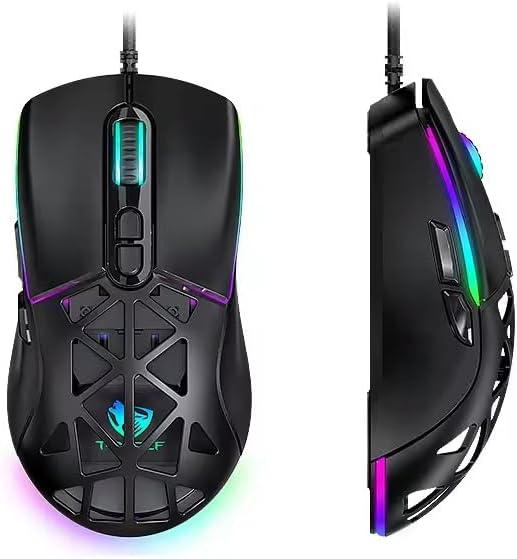
Figure 1: T-WOLF G520 Gaming Mouse (Front and Side View)
2. Caracteristicile produsului
- Conexiune: Wired USB2.0 for stable and responsive performance.
- Tip senzor: Optical sensor for accurate tracking.
- Setări DPI: Adjustable DPI from 800 to 12800 (800 / 1600 / 3200 / 4800 / 6400 / 12800).
- Rata de sondare: 1000Hz for rapid response times.
- Butoane: 7 programmable buttons (Left, Right, Middle, Forward, Back, DPI+, DPI-).
- Iluminare RGB: 13 dynamic RGB lighting modes.
- Durabilitate: 10 million click lifespan for micro switches.
- Cablu: 1.5m braided cable for enhanced durability and tangle resistance.
- Proiecta: Lightweight honeycomb structure and ergonomic shape for comfortable grip and ventilation.
- Personalizare: Magnetic interchangeable back cover.

Figura 2: Caracteristici cheie de mai susview
3. Conținutul pachetului
- T-WOLF G520 Gaming Mouse Unit
- Interchangeable Magnetic Back Covers (2 types)

Figure 3: G520 Mouse with Interchangeable Back Covers
4. Instrucțiuni de configurare
- Connect the USB connector of the T-WOLF G520 gaming mouse to an available USB 2.0 port on your computer.
- The mouse is Plug & Play compatible and does not require additional drivers for basic functionality. Your operating system will automatically detect and install the necessary drivers.
- Once detected, the mouse will be ready for use.
5. Instrucțiuni de utilizare
5.1 Funcțiile butoanelor
The T-WOLF G520 mouse features 7 buttons with the following default functions:
- Butonul din stânga: Funcția de clic primară.
- Butonul din dreapta: Funcție de clic secundar (meniu contextual).
- Buton din mijloc / Rotiță de derulare: Scroll up/down, click for universal scroll or other functions.
- Buton înainte: Navighează înainte în web browsere sau file exploratori.
- Butonul Înapoi: Navighează înapoi în web browsere sau file exploratori.
- Buton DPI+: Crește sensibilitatea DPI.
- Buton DPI: Reduce sensibilitatea DPI.
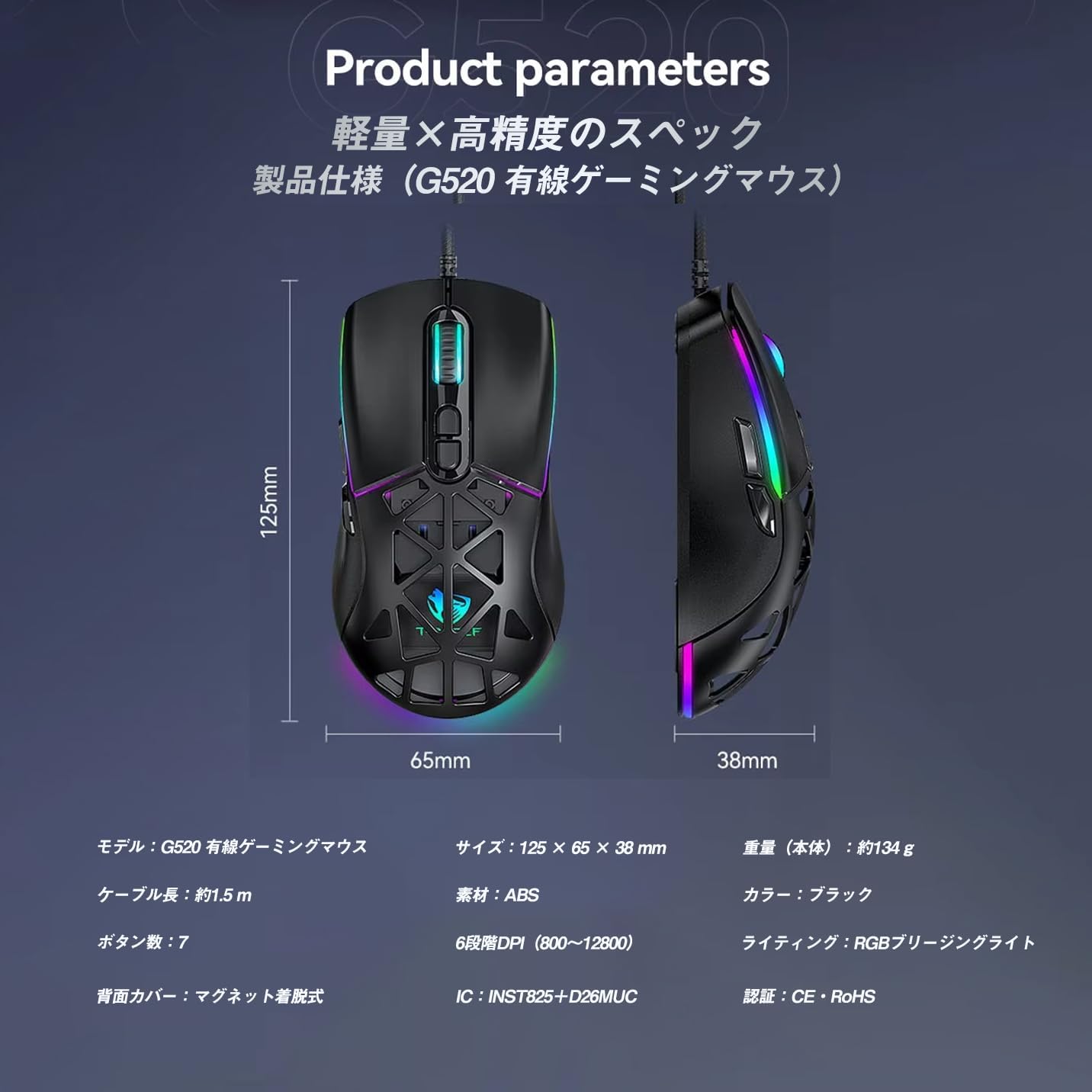
Figure 4: G520 Button Layout
5.2 Ajustare DPI
The mouse supports 6 adjustable DPI levels. To change the DPI, press the DPI+ or DPI- buttons located on the top of the mouse. Each press will cycle through the available DPI settings: 800, 1600, 3200, 4800, 6400, and 12800.

Figura 5: Niveluri de ajustare DPI
5.3 Controlul iluminării RGB
The T-WOLF G520 features 13 RGB lighting modes. To change the RGB lighting mode, press and hold the Butonul Înapoi iar cel DPI- Buton simultaneously for approximately 3 seconds. Repeat this action to cycle through the different lighting effects.
5.4 Magnetic Back Cover
The mouse comes with two types of magnetic back covers that can be easily interchanged. To remove a cover, gently lift it from the back of the mouse. To attach a cover, align it with the mouse body and allow the magnets to secure it in place.

Figure 6: Magnetic Back Cover Exchange
6. Întreținere
- curatenie: Folosiți o lavetă moale și uscată pentru a curăța mouse-ul. Pentru murdăria persistentă, uscați ușor.amp se poate folosi o lavetă, asigurându-vă că nu pătrunde lichid în mouse.
- Evitați lichidele: Nu scufundați mouse-ul în apă și nu îl expuneți la umiditate excesivă.
- Depozitare: Depozitați mouse-ul într-un loc răcoros și uscat, ferit de lumina directă a soarelui și de temperaturi extreme.
- Îngrijirea cablului: Avoid bending or twisting the braided cable excessively to prevent damage.
7. Depanare
- Mouse-ul nu răspunde:
- Asigurați-vă că cablul USB este conectat corect la portul USB al computerului.
- Încercați să conectați mouse-ul la un alt port USB.
- Reporniți computerul.
- DPI-ul nu se modifică:
- Ensure you are pressing the correct DPI+ or DPI- buttons.
- The mouse cycles through 6 fixed DPI levels; there is no software adjustment.
- RGB Lighting Not Working/Changing:
- Asigurați-vă că mouse-ul este conectat corect.
- Țineți apăsat butonul Butonul Înapoi şi DPI- Buton simultaneously for 3 seconds to cycle through modes.
- Probleme de urmărire:
- Curățați senzorul optic de pe partea inferioară a mouse-ului.
- Folosiți mouse-ul pe o suprafață curată și uniformă sau pe un mouse pad.
8. Specificații
| Caracteristică | Caietul de sarcini |
|---|---|
| Model | G520 |
| Tip conexiune | Wired USB2.0 |
| Tip senzor | Optic |
| Setări DPI | 800 / 1600 / 3200 / 4800 / 6400 / 12800 |
| Rata de sondare | 1000 Hz |
| Numărul de butoane | 7 |
| Lungimea cablului | 1.5 m (împletit) |
| Dimensiuni (L×L×H) | 124 × 65 × 40 mm |
| Greutate | Aproximativ. 132 g |
| Vol. De operaretage / Curent | 5V / 150mA |
| Iluminat | RGB (13 de moduri) |
| Material | Plastic (ABS) |
| Sistem de operare compatibil | Windows 10, Windows 11, Mac OS, Linux (OS standard, no driver required) |

Figura 7: Diagrama specificațiilor produsului
9. Garanție și asistență
This product is covered by a standard manufacturer's warranty. Please refer to your purchase documentation for specific warranty terms and conditions. For technical support or warranty claims, please contact the retailer or the manufacturer's customer service.