
1. Introducere
Mulțumesc pentru achizițieasing the WOOPKER AK50 Home Audio Stereo Amplifier. Acest amplifier is designed to provide high-quality audio for your home theater, garage, or other personal audio setups. It features Bluetooth 5.0 connectivity, USB and SD card inputs, RCA inputs, and two microphone inputs for versatile use. Please read this manual carefully before operating the device to ensure proper use and to maximize its performance.
2. Instrucțiuni de siguranță
- Sursa de alimentare: Asigurați-vă că sursa de alimentare voltage matches the requirements specified on the amplifier. Use only the provided power cable.
- Ventilare: Do not block any ventilation openings. Place the ampLiifier într-o zonă bine ventilată pentru a preveni supraîncălzirea.
- Apă și umiditate: Nu expuneți amplifier to rain, moisture, or dripping/splashing liquids. Do not place objects filled with liquids, such as vases, on the apparatus.
- Surse de caldura: Păstrați ampîncălzitorul departe de surse de căldură, cum ar fi calorifere, registre de căldură, sobe sau alte aparate (inclusiv ampliificatori) care produc căldură.
- curatenie: Deconectați amplifier from the power outlet before cleaning. Use a dry cloth for cleaning.
- Service: Nu încercați să reparați singur acest produs. Consultați toate lucrările de service către personalul calificat de service.
- Impedanta difuzorului: Ensure connected speakers have an impedance between 4-16 ohms. Connecting speakers with incorrect impedance may damage the ampmai în viață.
3. Conținutul pachetului
Verificați dacă toate articolele enumerate mai jos sunt incluse în pachetul dumneavoastră:
- 1x WOOPKER AK50 Audio Ampmai în viață
- 1x cablu de alimentare
- 1x Manual de utilizare
- 1x Remote Control (Note: Battery for remote is not included. Please purchase 2x AAA batteries separately.)

Image: Package contents of the AK50 amplifier, showing the main unit, power cable, user manual, and remote control.
4. Produs terminatview
4.1 Panoul frontal

Imagine: Detaliată view of the AK50 amplifier's front panel, highlighting the USB/SD port, LED display, control buttons, microphone inputs, and various adjustment knobs.
- Port USB/SD: For connecting USB flash drives or SD cards.
- Display LED: Shows current mode, track number, or volume level.
- Butonul de mod: Switches between input modes (Bluetooth, USB/SD, RCA, FM).
- Butonul anterior: Sare la piesa/postul anterior.
- Buton Redare/Pauză: Redă sau întrerupe redarea audio.
- Butonul Următorul: Sare la următoarea piesă/post.
- Buton de ciclu: Repetă melodia sau lista de redare curentă.
- Volumul microfonului: Reglează volumul microfoanelor conectate.
- Buton Echo: Activates/deactivates or adjusts microphone echo effect.
- Mic Input Jacks (MIC1, MIC2): Mufe de 6.35 mm pentru conectarea microfoanelor.
- Buton de bas: Ajustează ieșirea audio de joasă frecvență.
- Buton Treble: Ajustează ieșirea audio de înaltă frecvență.
- Volumul principal: Controlează volumul general de ieșire al ampmai în viață.
4.2 Panoul din spate

Imagine: Detaliată view of the AK50 amplifier's back panel, showing all input and output connections, including power inputs and speaker terminals.
- Mufă antenă FM: Conectați antena FM inclusă pentru recepția radio.
- Întrerupător: Întoarce ampmai viață pornită sau oprită.
- Audio Input Jacks (AUX, LINE): RCA inputs for connecting external audio sources (e.g., CD player, DVD player, TV).
- Speaker Output Jacks: Terminals for connecting passive speakers (4-16 ohms).
- DC 12V/5A Power: Alternative DC power input.
- AC 90-240V Power: Main AC power input.
5. Configurare
5.1 Conexiune difuzor
Follow these steps to connect your passive speakers to the ampmai în viață:
- Before connecting the speakers, identify the positive and negative terminals. The positive terminal is typically red, and the negative terminal is black.
- Press the clasp on the back of the AK50 amplifier's speaker output terminals and insert the bare speaker wires. Ensure the positive wire from the speaker connects to the positive terminal on the amplifier, and the negative wire to the negative terminal.
- Ensure a secure connection for both left and right channels.
- Atenţie: Avoid plugging and unplugging USB drives, SD cards, RCA audio cables, or speaker cables while the ampLifierul este pornit.

Image: Speaker connection diagram, illustrating the proper wiring of passive speakers to the amplifier and RCA input connections for other devices.
5.2 Conexiune la alimentare
Connect the provided power cable to the AC 90-240V power input on the back panel of the amplifier, then plug the other end into a standard wall outlet.
6. Instrucțiuni de utilizare
6.1 Pornire/Oprire
Flip the Power Switch on the back panel to the 'ON' position to power on the amplifier. Flip it to 'OFF' to power off.
6.2 Moduri de introducere
Apăsați tasta Modul button on the front panel or the remote control to cycle through available input modes: Bluetooth, USB, SD, RCA (AUX/LINE), and FM Radio.
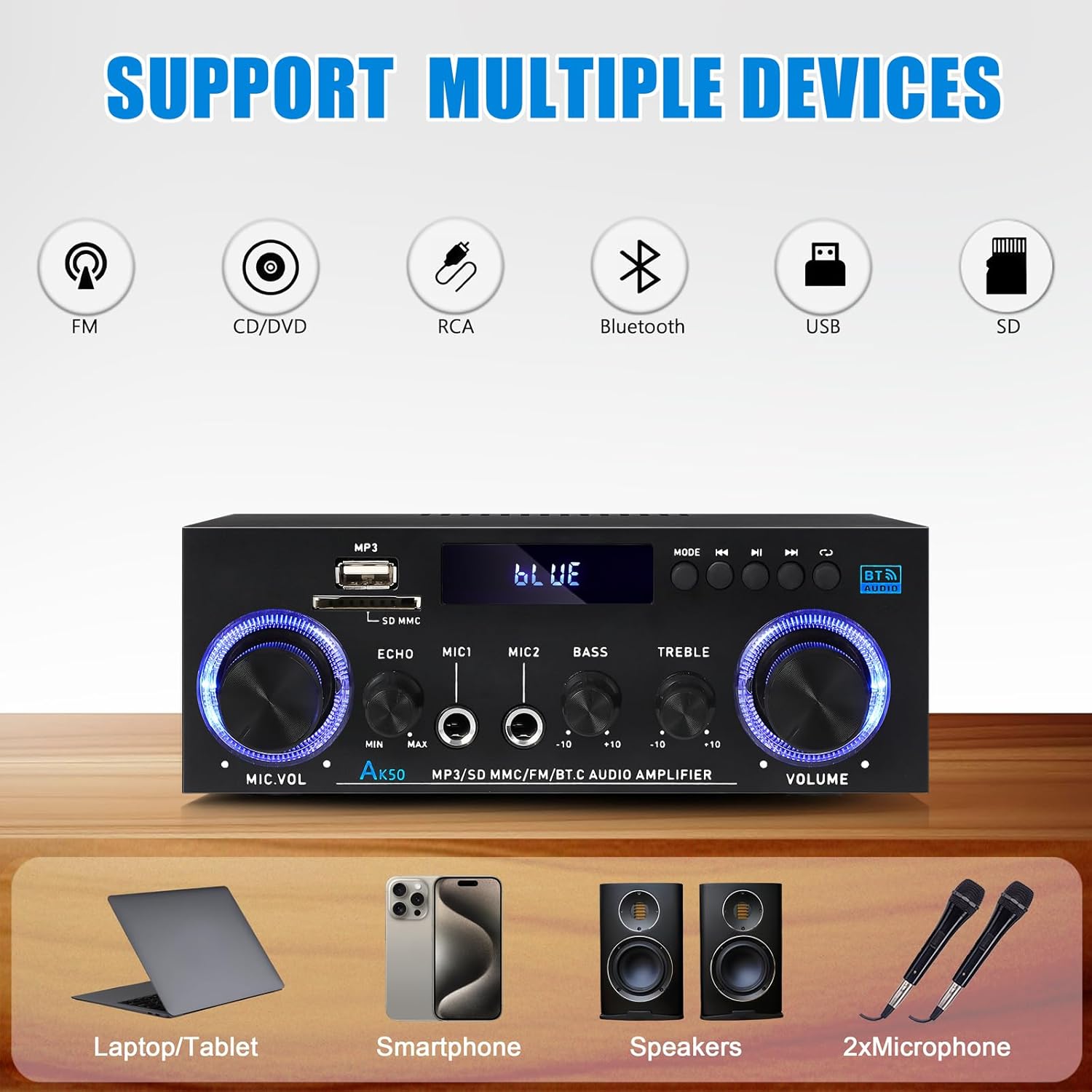
Image: Visual representation of the AK50 amplifier's compatibility with various input sources like FM, CD/DVD, RCA, Bluetooth, USB, and SD.
6.2.1 Mod Bluetooth
- Comutați amplifier to Bluetooth mode using the Modul buton. Afișajul LED va afișa „ALBASTRU”.
- Pe dispozitivul mobil (smartphone, tabletă, laptop), activați Bluetooth și căutați dispozitivele disponibile.
- Select 'AK50' from the list of devices to pair. Once paired, you will hear a confirmation sound, and the LED display will indicate a successful connection.
- Acum puteți reda sunet de pe dispozitiv prin intermediul ampmai în viață.

Image: Demonstrates connecting a mobile device to the AK50 amplifier via Bluetooth for wireless music streaming.
6.2.2 Mod USB/Card SD
- Introduceți o unitate flash USB sau un card SD care conține fișiere MP3 files into the respective port on the front panel.
- Comutați amplifier to USB or SD mode using the Modul buton. The ampLifer va detecta automat și va începe să redea sunetul files.
- Utilizați Anterior, Următorul, și Redare/Pauză butoane pentru a controla redarea.
6.2.3 RCA (AUX/LINE) Input Mode
- Connect external audio devices (e.g., CD player, DVD player, TV, computer) to the AUX or LINIA RCA input jacks on the back panel using an RCA audio cable.
- Comutați amplifier to the corresponding RCA input mode using the Modul buton.
- Audio from the connected device will now play through the ampmai în viață.
6.2.4 Intrare microfon
- Conectați până la două microfoane la MIC1 şi MIC2 mufele de intrare de pe panoul frontal.
- Reglați volumul microfonului folosind butonul Volumul microfonului butonul.
- Utilizați Ecou button to add or remove an echo effect to the microphone audio.

Image: Two individuals using microphones connected to the AK50 amplifier, demonstrating its dual microphone support for karaoke or public speaking.
6.2.5 Modul radio FM
- Conectați antena FM inclusă la FM ANT jack on the back panel.
- Comutați amplifier to FM Radio mode using the Modul buton.
- Utilizați Anterior şi Următorul butoane pentru a scana posturile de radio.
6.3 Controlul volumului și tonului
- Volumul principal: Rotiți cea mai mare VOLUM knob on the front panel to adjust the overall output volume.
- Controlul basului: Utilizați BASS knob to increase or decrease the low-frequency response of the audio.
- Control înalte: Utilizați TRIPLA knob to increase or decrease the high-frequency response of the audio.

Imagine: Prim-plan view of the Bass and Treble adjustment knobs, indicating their function in sound customization.
6.4 Utilizarea telecomenzii
The included remote control allows for convenient operation from a distance. Insert 2x AAA batteries (not included) into the remote before use.
- Buton de alimentare: Întoarce amplifier on/off (standby).
- Butonul de mod: Cycles through input modes.
- Volum sus/jos: Reglează volumul principal.
- Anterioara Urmatoarea: Skips tracks or tunes FM stations.
- Redare/Pauză: Redă sau întrerupe sunetul.
- Butoane numerice: For direct track selection (USB/SD) or FM station input.

Image: A user operating the AK50 amplifier with its remote control, demonstrating ease of volume and input adjustment.
6.5 Demonstrație video
Watch this video for a demonstration of the AK50 Stereo Audio Amplifier's sound and control features.
Video: A demonstration of the AK50 Stereo Audio Amplifier, showcasing its sound output and the functionality of its controls, including volume and tone adjustments.
7. Întreținere
- curatenie: Utilizați o cârpă moale și uscată pentru a șterge exteriorul amplifier. Do not use liquid cleaners or aerosol sprays.
- Ventilare: Verificați periodic dacă orificiile de ventilație sunt lipsite de praf și resturi pentru a asigura o circulație adecvată a aerului.
- Depozitare: Dacă stocați amppentru o perioadă lungă de timp, deconectați-l de la sursa de alimentare și depozitați-l într-un loc răcoros și uscat.
8. Depanare
| Problemă | Cauza posibila | Soluţie |
|---|---|---|
| Fără putere | Cablul de alimentare nu este conectat; Întrerupătorul este oprit; Defecțiune la priză. | Asigurați-vă că cablul de alimentare este conectat corect; Porniți întrerupătorul de alimentare; Testați priza cu un alt dispozitiv. |
| Fără ieșire de sunet | Incorrect input mode; Speaker wires loose/incorrectly connected; Volume too low; Mute activated; Faulty audio source. | Select correct input mode; Check speaker connections (positive/negative); Increase Master Volume; Ensure not muted; Test with a different audio source. |
| Bluetooth nu se conectează | Amplifier not in Bluetooth mode; Device not in pairing mode; Amplifier already paired with another device; Out of range. | Comutator amplifier to Bluetooth mode; Ensure device's Bluetooth is on and discoverable; Disconnect from other devices; Move device closer to ampmai în viață. |
| Nu se redă cardul USB/SD | Incorect file formatare; Cardul/unitatea nu au fost introduse corect; Corupte files. | Asigura files are MP3 format; Reinsert card/drive; Try a different USB/SD card. |
| Recepție radio FM slabă | Antena nu este conectată; Semnal slab. | Connect FM antenna securely; Adjust antenna position for better reception. |
9. Specificații
| Caracteristică | Caietul de sarcini |
|---|---|
| Model | AK50 |
| Putere de ieșire de vârf | 500W + 500W |
| Putere nominală de ieșire (RMS) | 60W x 2 |
| Canale | Stereo pe 2.0 canale |
| Versiune Bluetooth | 5.0 |
| Interfețe de intrare | Bluetooth, USB, SD Card, RCA (AUX/LINE), 2x MIC |
| Interfață de ieșire | Speaker Output (4-16 Ohm) |
| Controlul tonului | Bas, înalte |
| Caracteristici microfon | Volume, Echo Control |
| Alimentare electrică | AC 90-240V or DC 12V/5A |
| Dimensiuni (L x l x H) | Aproximativ. 7.09 x 5.47 x 2.56 inchi (180 x 139 x 65 mm) |
| Greutatea articolului | 1.5 livre (aprox. 680 g) |
10. Garanție și asistență
WOOPKER products are designed and manufactured to the highest quality standards. For warranty information or technical support, please refer to the contact details provided with your purchase or visit the official WOOPKER webPăstrați bonul fiscal ca dovadă a achiziției.