
1. Introducere
This manual provides detailed instructions for the setup, operation, and maintenance of your WOOPKER AK50 Stereo Amplifier. Please read this manual thoroughly before using the product to ensure proper functionality and to extend its lifespan.
1.1 Produs terminatview
The WOOPKER AK50 is a multi-function 2-channel stereo amplifier designed for home audio systems. It features Bluetooth 5.0 connectivity, FM radio, USB and SD card playback, and multiple input options for various audio sources. It is suitable for driving passive speakers in home theater, studio, or karaoke setups.

Image 1.1: WOOPKER AK50 Stereo AmpLifter și telecomandă
This image displays the WOOPKER AK50 stereo amplifier, a compact black unit with blue illuminated knobs, alongside its black remote control. The amplifier features a central LED display, USB and SD card slots, microphone inputs, and controls for volume, bass, and treble.
1.2 Caracteristici cheie
- Putere de iesire: Provides a maximum output of 400W + 400W, compatible with 4-16 inch passive speakers.
- Opțiuni de intrare versatile: Supports Bluetooth, AUX, MIC, USB, and SD card inputs. Connects to external devices such as CD/DVD players, TVs, PCs, smartphones, and projectors.
- Bluetooth 5.0: Integrated Bluetooth 5.0 for stable wireless audio streaming. Optimal connection range is within 30 feet (10 meters) without obstructions.
- Comenzi de ton: Independent knobs for adjusting Bass, Treble, Microphone Volume, and Echo effects.
- Telecomanda: Includes a remote for convenient adjustment of input modes and volume from a distance.
2. Instrucțiuni importante de siguranță
Pentru a reduce riscul de electrocutare, incendiu sau vătămare corporală, vă rugăm să respectați următoarele măsuri de siguranță:
- Nu expuneți acest aparat la ploaie sau umezeală.
- Nu deschideți c.asing. Apelați la personal calificat pentru toate lucrările de service.
- Asigurați o ventilație corespunzătoare. Nu blocați nicio deschidere de ventilație.
- Așezați unitatea pe o suprafață stabilă, plană.
- Țineți unitatea departe de lumina directă a soarelui, surse de căldură și praf excesiv.
- Disconnect the power cord from the wall outlet if the unit is to be left unused for a long period.
- Nu folosiți unitatea cu mâinile ude.
3. Conținutul pachetului
Verificați dacă toate articolele enumerate mai jos sunt incluse în pachetul dumneavoastră:
- WOOPKER AK50 Stereo Ampmai în viață
- Telecomanda
- Cablu de alimentare
- Antena FM
- Manualul utilizatorului (acest document)
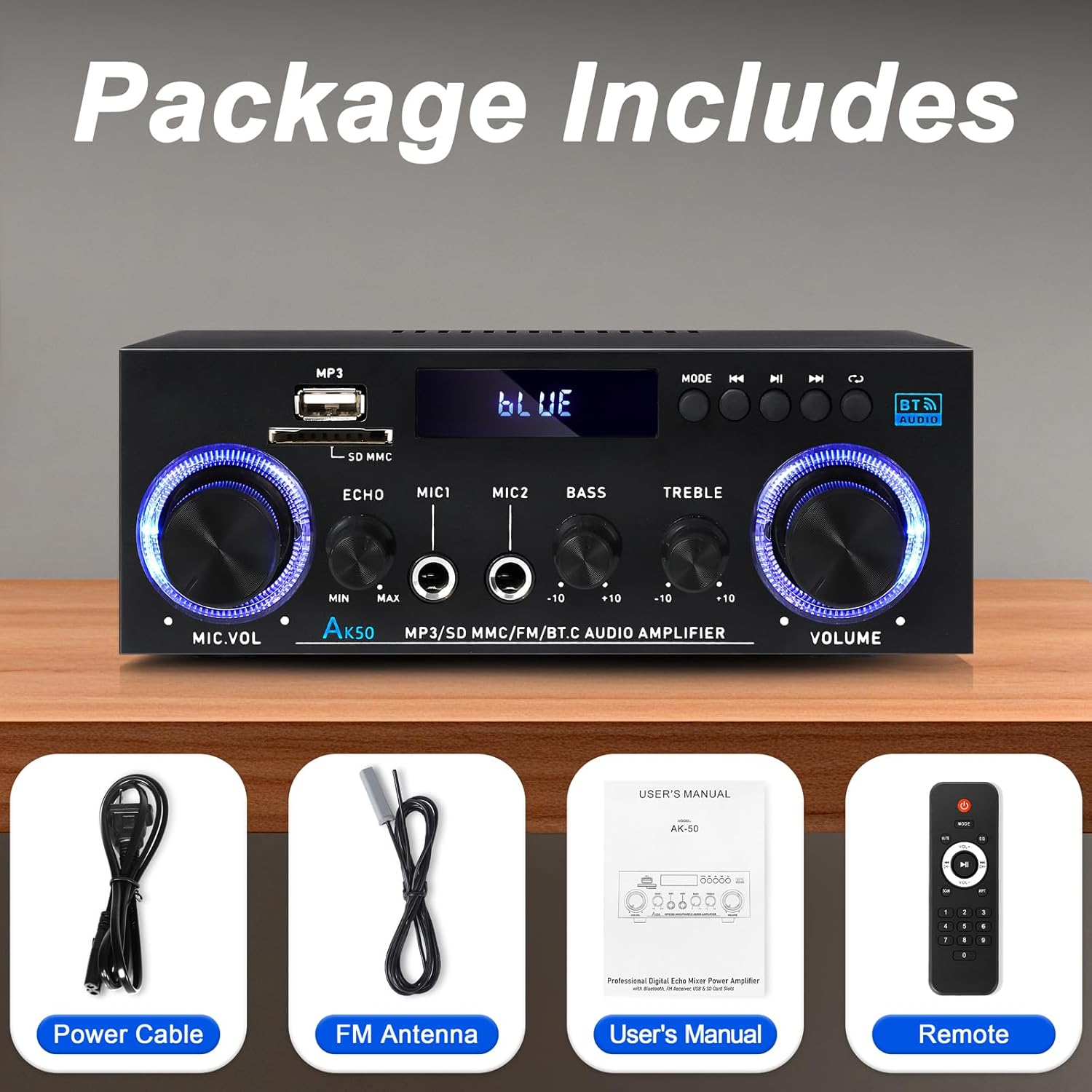
Imaginea 3.1: Accesorii incluse
This image shows the items included in the WOOPKER AK50 package: the amplifier unit, a power cable, an FM antenna, a user's manual, and a remote control.
4. Aspectul produsului
4.1 Panoul frontal

Image 4.1: Front Panel Controls and Indicators
This diagram illustrates the front panel of the AK50 amplifier, highlighting its various controls and ports. Key features include the USB/SD port, LED display, mode selection buttons, microphone inputs, and rotary knobs for microphone volume, echo, bass, treble, and master volume.
- Port USB/SD: Pentru redarea audio filede pe unități USB sau carduri SD.
- Display LED: Afișează modul curent, informații despre piesă și alți indicatori de stare.
- Butonul de mod: Switches between input modes (Bluetooth, AUX, USB, SD, FM).
- Butonul anterior: Navigates to the previous track/station.
- Buton Redare/Pauză: Controlează redarea pentru USB/SD/Bluetooth.
- Butonul Următorul: Navigates to the next track/station.
- Buton de ciclu: Repeats playback mode for USB/SD.
- Buton de volum microfon: Reglează volumul microfoanelor conectate.
- Butonul pentru eco: Ajustează efectul de ecou pentru microfoane.
- Mic Input Jacks (MIC1, MIC2): Mufe de 6.35 mm pentru conectarea microfoanelor.
- Buton de bas: Ajustează ieșirea audio de joasă frecvență.
- Buton Treble: Ajustează ieșirea audio de înaltă frecvență.
- Butonul de volum principal: Controlează volumul general de ieșire.
4.2 Panoul din spate

Image 4.2: Rear Panel Connections
This diagram details the rear panel of the AK50 amplifier, showing the various input and output terminals. It includes the FM antenna jack, power switch, audio input/output jacks, speaker output terminals, and power input ports.
- Mufă antenă FM: Connects to the included FM antenna for radio reception.
- Întrerupător: Întoarce amplifier PORNIT sau OPRIT.
- Audio Input Jacks (AUX/LINE): RCA jacks for connecting external audio sources (e.g., CD player, TV).
- Terminale de ieșire pentru difuzor: Connects to passive speakers (4-16Ω impedance).
- Intrare alimentare CC 12V/5A: For DC power supply (if applicable, check model specifications).
- AC 90-240V Power Input: Connects to the main power supply using the provided power cable.
5. Ghid de instalare
Follow these steps to set up your AK50 Stereo Ampmai în viață:
5.1 Conexiune difuzor
- Asigurați ampLifizerul este oprit și deconectat de la priza de alimentare.
- Conectați-vă difuzoarele pasive la Terminale de ieșire a difuzoarelor on the rear panel. Ensure correct polarity (red to red, black to black) for each speaker.
- The ampLifer-ul acceptă difuzoare cu o impedanță de 4-16 Ω.
5.2 Conectarea sursei audio
You can connect various audio sources to the AK50 ampmai în viață:
- Intrare AUX/LINE: Use RCA cables to connect devices like CD players, DVD players, TVs, or PCs to the Audio Input Jacks pe panoul din spate.
- Card USB/SD: Insert a USB flash drive or SD card (pre-loaded with audio files) into the respective port on the front panel.
- Bluetooth: Consultați Secțiunea 6.3 pentru instrucțiuni de asociere Bluetooth.
- Antena FM: Conectați antena FM inclusă la Mufă antenă FM pe panoul din spate pentru recepție radio. Extindeți antena pentru un semnal mai bun.
5.3 Conexiune la alimentare
- Conectați cablul de alimentare furnizat la Alimentare de intrare AC 90-240V pe panoul din spate.
- Conectați celălalt capăt al cablului de alimentare la o priză de perete adecvată.
- Asigurați Comutator de alimentare on the rear panel is in the OFF position before plugging in.

Imaginea 5.1: Example Diagrama de conectare
This image illustrates various connection possibilities for the AK50 amplifier, including connecting to speakers, a CD player, a DVD player, a PC/laptop, and a TV/Blu-ray player. It also shows the FM antenna and power connections.
6. Instrucțiuni de utilizare
6.1 Pornire/Oprire
After all connections are made, flip the Comutator de alimentare on the rear panel to the ON position. The LED display on the front panel will illuminate.
6.2 Selectarea modului
Apăsați tasta Butonul de mod on the front panel or the remote control to cycle through the available input modes: Bluetooth, AUX, USB, SD, and FM.
6.3 Controlul volumului și tonului
- Volumul principal: Rotiți Buton Master Volume pentru a regla nivelul general al sunetului.
- Bass/Treble: Utilizați Buton pentru bas şi Buton Treble to fine-tune the low and high frequencies of the audio output.
- Volum/Ecou microfon: If microphones are connected, use the Butonul de volum al microfonului to adjust their volume and the Butonul pentru eco to add an echo effect.

Image 6.1: Bass and Treble Controls
This image highlights the Bass and Treble control knobs on the front panel of the AK50 amplifier, indicating their function in adjusting audio frequencies.
6.4 Asociere Bluetooth
- Comutați amplifier to Bluetooth mode using the Butonul de mod. The LED display will show "BLUE" or a similar indicator, and the unit will enter pairing mode.
- Pe dispozitivul compatibil Bluetooth (de exemplu, smartphone, tabletă), activați Bluetooth și căutați dispozitivele disponibile.
- Select "AK50" (or similar device name) from the list to pair.
- Odată asociat, amplifier will indicate a successful connection, and you can play audio from your device.
- Maintain a distance of within 30 feet (10 meters) for optimal Bluetooth performance.

Image 6.2: Bluetooth Connection
This image demonstrates the Bluetooth pairing process, showing a smartphone displaying available Bluetooth devices and the AK50 amplifier in Bluetooth mode, indicating a successful connection.

Image 6.3: Bluetooth Range
This image illustrates the effective Bluetooth range of the AK50 amplifier, indicating a maximum distance of 32 feet (10 meters) for stable wireless connection between the amplifier and a paired device.
6.5 Redare USB/SD
Insert a USB drive or SD card into the corresponding slot. The ampLiferul va comuta automat în modul USB/SD și va începe să redea sunetul files. Folosește Anterior, Redare/Pauză, și Următorul butoane pentru a controla redarea.
6.6 Funcționarea radioului FM
- Comutați amplifier to FM mode using the Butonul de mod.
- The ampAparatul va scana și stoca automat posturile FM disponibile.
- Utilizați Anterior şi Următorul buttons to navigate between stored stations.
- Adjust the FM antenna position for optimal reception.
6.7 Utilizarea telecomenzii
The included remote control allows for convenient operation of the amplifier from a distance. Ensure the plastic isolation sheet is removed from the battery compartment before first use.

Image 6.4: Remote Control
This image displays the remote control for the AK50 amplifier, showing buttons for power, mode selection, EQ, volume adjustment, track navigation, and numerical input for direct track selection.
7. Întreținere
Întreținerea corespunzătoare asigură longevitatea și performanța optimă a mașinii dumneavoastră ampmai în viață:
- curatenie: Folosiți o lavetă moale și uscată pentru a curăța exteriorul unității. Nu utilizați produse de curățare lichide sau substanțe chimice abrazive.
- Ventilare: Asigurați-vă că orificiile de ventilație sunt lipsite de praf și resturi pentru a preveni supraîncălzirea.
- Depozitare: Dacă stocați amppentru o perioadă lungă de timp, scoateți-l din priză și depozitați-l într-un loc răcoros și uscat.
- Cablu de alimentare: Regularly inspect the power cord for any damage. If damaged, discontinue use and replace it with an appropriate cord.
8. Depanare
If you encounter issues with your AK50 amplifier, consultați următoarele probleme și soluții comune:
| Problemă | Cauza posibila | Soluţie |
|---|---|---|
| Fără putere | Cablul de alimentare nu este conectat; Întrerupătorul este oprit; Priza de alimentare este defectă. | Check power cable connection; Turn power switch ON; Test outlet with another device. |
| Fără ieșire de sunet | Speakers not connected; Incorrect input mode; Volume too low; Audio source issue. | Check speaker connections and polarity; Select correct input mode; Increase master volume; Verify audio source is playing. |
| Bluetooth nu se conectează | Amplifier not in Bluetooth mode; Device not in pairing mode; Too far from ampmai în viață. | Comutator amplifier to Bluetooth mode; Ensure device Bluetooth is ON and searching; Move device closer to ampmai în viață. |
| Telecomanda nu funcționează | Battery isolation sheet not removed; Batteries depleted; Obstruction between remote and ampmai în viață. | Remove plastic sheet; Replace batteries; Ensure clear line of sight to ampreceptorul IR al dispozitivului de iluminat. |
| Recepție FM slabă | FM antenna not connected or positioned incorrectly. | Connect FM antenna securely; Adjust antenna position for better signal. |
Dacă problema persistă după ce încercați aceste soluții, vă rugăm să contactați serviciul de asistență pentru clienți.
9. Specificații
| Caracteristică | Caietul de sarcini |
|---|---|
| Numărul de model | AK50 |
| Marca | WOOPKER |
| Putere de ieșire | 400 wați (vârf) |
| Configurare canal de sunet surround | 2.0 canale |
| Tehnologia de conectivitate | Bluetooth 5.0, Auxiliary (RCA), USB, SD Card |
| Dispozitive compatibile | Speakers, Smartphones, Tablets, PCs, CD/DVD Players |
| Mod ieșire audio | Stereo |
| Culoare | Negru |
| Greutatea articolului | 1.98 lire sterline |
| Dimensiuni pachet | 8.66 x 7.87 x 3.54 inci |
10. Garanție și asistență
For warranty information or technical support, please refer to the documentation provided at the time of purchase or contact WOOPKER customer service through their official channels. Keep your purchase receipt as proof of purchase.