
Introducere
This manual provides essential information for the safe and efficient use of your Getac B300 G7 Fully Rugged Notebook. Please read this manual thoroughly before operating the device and retain it for future reference.
The Getac B300 G7 is designed for demanding environments, featuring MIL-STD-810G and IP65 certifications for resistance against shock, vibration, dust, and water.
Înființat
1. Despachetarea și inspecția inițială
Carefully remove the notebook and all accessories from the packaging. Inspect the device for any signs of damage. If any damage is found, contact your vendor immediately.
2. Conectarea puterii
Before initial use, ensure the battery is fully charged. Connect the AC adapter to the notebook's DC-in jack and then to a power outlet.
- Adaptor CA: 90W
- Baterie: Li-on 10.8V

Figure 1: Left side of the Getac B300 G7, showing various ports including the power input.
3. Prima pornire
Press the power button to turn on the notebook. The device will boot into Windows 11 Pro. Follow the on-screen instructions to complete the initial setup of the operating system.
4. Conectarea perifericelor
The Getac B300 G7 offers multiple ports for connecting external devices:
- USB 3.0: 3 ports for connecting USB devices like external drives, keyboards, or mice.
- LAN (RJ45): Pentru conexiune la rețea prin cablu.
- HDMI: Pentru conectarea la afișaje externe.
- External VGA: Pentru conectarea la afișaje externe mai vechi.
- Port serial: 2 ports for legacy device connectivity.
- Microphone (Mini-jack): Pentru intrare de microfon extern.
- Audio Output (Mini-jack): Pentru căști sau difuzoare externe.
- Conector de andocare: Pentru conectarea la o stație de andocare compatibilă.
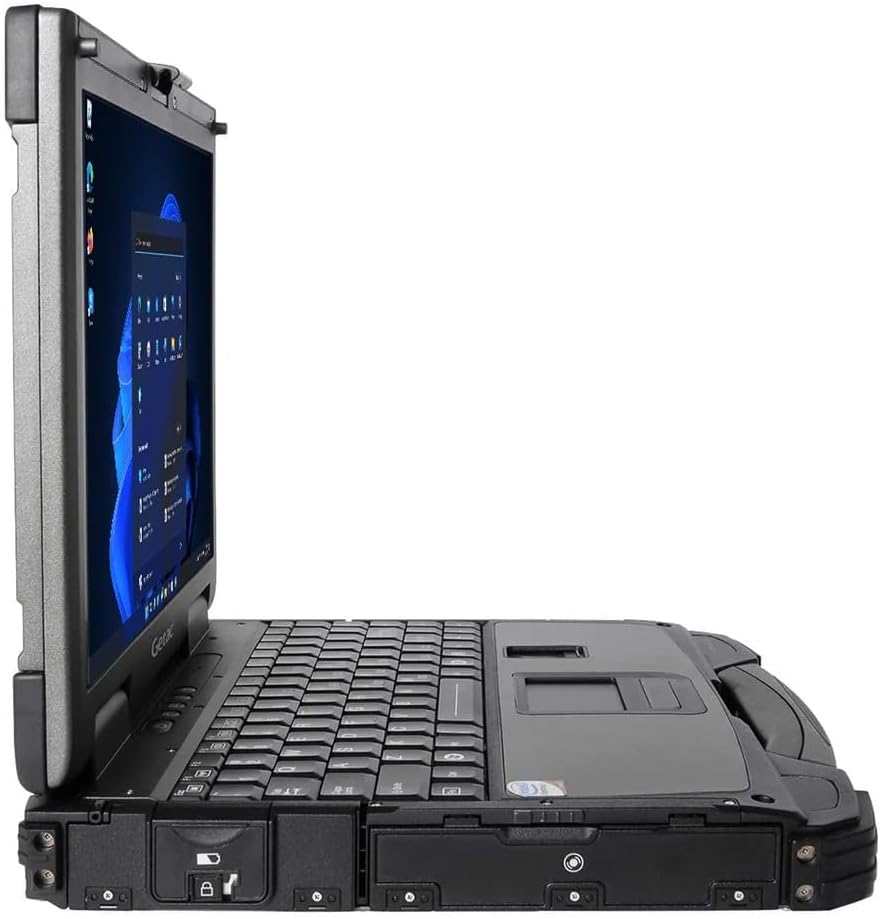
Figure 2: Right side of the Getac B300 G7, showing additional ports.
Operating the Notebook
1. Pornire/Oprire
- Pentru a porni: Apăsați butonul de pornire situat pe dispozitiv.
- Pentru a opri: Use the Windows Start menu to select 'Shut down'. Avoid forced shutdowns unless necessary to prevent data loss.
2. Display and Touchscreen
The notebook features a 13.3-inch TFT LCD XGA (1024 x 768) touchscreen display with 700 nits brightness. You can interact with the display using your finger or a compatible stylus (not included).
- Gesturi de atingere: Standard Windows 11 touch gestures are supported.
- Reglarea luminozității: Adjust display brightness through Windows settings or dedicated function keys (if available).
3. Tastatură și dispozitive de intrare
The Getac B300 G7 includes a backlit keyboard for use in low-light conditions. The integrated touchpad can be used for cursor control. An Insertable Smartcard Reader is also available for secure access applications.
- Controlul luminii de fundal: Use the appropriate function key combination to toggle or adjust keyboard backlight.
- Smartcard Reader: Insert your smartcard into the designated slot for authentication or data access.
4. Unitate optică
The notebook is equipped with a DVD Super Multi Drive. This allows you to read and write various CD and DVD formats.
- Introducerea unui disc: Gently push the disc into the drive until it clicks into place.
- Ejectarea unui disc: Use the eject button on the drive or the eject option in Windows File Explorator.
5. Sistem de operare
Your Getac B300 G7 comes with Windows 11 Pro pre-installed. Refer to Microsoft's documentation for detailed information on using Windows 11 Pro features and functionalities.
Întreţinere
1. Cleaning the Notebook
- Exterior: Folosiți un moale, damp cloth with a mild cleaning solution. Avoid harsh chemicals or abrasive materials.
- Afişa: Use a microfiber cloth specifically designed for screens. Do not spray cleaners directly onto the screen.
- Porturi: Asigurați-vă că orificiile sunt lipsite de praf și resturi. Folosiți aer comprimat dacă este necesar, ținând recipientul în poziție verticală.
2. Îngrijirea bateriei
Pentru a maximiza durata de viață a bateriei și performanța:
- Evitați temperaturile extreme.
- Nu descărcați complet bateria frecvent.
- If storing the notebook for an extended period, charge the battery to approximately 50-60% before storage.
3. Caracteristici robuste
While the B300 G7 is designed to be rugged, proper care is still essential:
- Ensure all port covers are securely closed to maintain IP65 dust and water resistance.
- Avoid unnecessary drops or impacts, even though the device is MIL-STD-810G certified.
- Clean any mud or dirt from the casing promptly.

Figura 3: Sus view of the Getac B300 G7, showcasindatorită designului său robust.
Depanare
This section addresses common issues you might encounter with your Getac B300 G7 notebook.
1. Notebook Does Not Power On
- Asigurați-vă că adaptorul de curent alternativ este conectat corect atât la notebook, cât și la o priză funcțională.
- Verify the battery is charged. If the battery is completely drained, it may take a few minutes of charging before the notebook can power on.
- Try removing and reinserting the battery (if user-removable) to reset it.
2. Probleme de afișare
- Fără afișare: Connect an external monitor to the HDMI or VGA port to check if the issue is with the internal display.
- Dim display: Adjust the brightness settings in Windows or using the keyboard function keys.
- Ecranul tactil nu răspunde: Restart the notebook. If the issue persists, check for driver updates in Windows Device Manager.
3. Peripheral Devices Not Working
- Ensure the device is properly connected to the correct port.
- Try connecting the device to a different port or another computer to rule out device malfunction.
- Check Windows Device Manager for any driver issues related to the peripheral.
4. Probleme de performanță a sistemului
- Închideți aplicațiile inutile care rulează în fundal.
- Asigurați-vă că Windows și driverele sunt actualizate.
- Rulați o curățare a discului și o defragmentare (pentru HDD-uri, nu este necesar pentru SSD-uri).
- Verificați dacă există programe malware sau viruși.
Specificații
| Caracteristică | Descriere |
|---|---|
| Numele modelului | B300 G7 |
| Procesor | Intel Core i5-8350U (1.7 GHz, up to 3.6 GHz with Turbo Boost, 6MB Cache) |
| RAM | 16GB DDR4 (2400 MHz), Max 32GB |
| Depozitare | SSD de 512 GB |
| Afişa | 13.3-inch TFT LCD XGA (1024 x 768), 700 nits, Touchscreen |
| Grafică | Grafică Intel UHD 620 integrată |
| Sistem de operare | Windows 11 Pro |
| Unitate optică | DVD Super Multi Drive |
| Porturi | USB 3.0 x 3, LAN (RJ45), HDMI, External VGA, Serial Port x 2, Microphone (Mini-jack), Audio Output (Mini-jack), DC-in Jack, Docking Connector |
| Caracteristici speciale | Backlit Keyboard, Insertable Smartcard Reader |
| Rugged Certification | MIL-STD-810G, IP65 |
| Dimensiuni (L x l x H) | 11.9 cm x 10.35 cm x 2.36 cm |
| Greutate | 7.7 lbs |
| Conectivitate | Ethernet (No Wi-Fi, No Bluetooth) |
| Articole incluse | Li-on battery 10.8V, AC Adapter 90W |

Figura 4: Sus view of the Getac B300 G7, highlighting its robust casing and integrated handle for portability.
Informații despre garanție
This Getac B300 G7 notebook comes with a garanție limitată de 90 de zileAceastă garanție acoperă defectele de materiale și de fabricație în condiții normale de utilizare pe durata perioadei de garanție.
Garanția nu acoperă:
- Daune cauzate de accident, abuz, utilizare greșită, inundație, incendiu, cutremur sau alte cauze externe.
- Damage caused by operating the product outside the permitted or intended uses described by Getac.
- Damage caused by service performed by anyone who is not an authorized service provider.
- Products or parts that have been modified to alter functionality or capability without the written permission of Getac.
For specific terms and conditions, please refer to the warranty documentation provided with your purchase or contact your vendor.
Sprijin
If you encounter issues that cannot be resolved using the troubleshooting guide in this manual, please contact your vendor or an authorized service center for assistance. When contacting support, please have your model number (B300 G7) and serial number ready.
For the latest drivers, software updates, and additional support resources, please visit the official Getac support website-ul.


