
1. Introducere
The Roland XPS-10X is a portable performance keyboard designed for musicians seeking high-quality sounds and versatile features. This manual provides essential information for setting up, operating, maintaining, and troubleshooting your instrument.
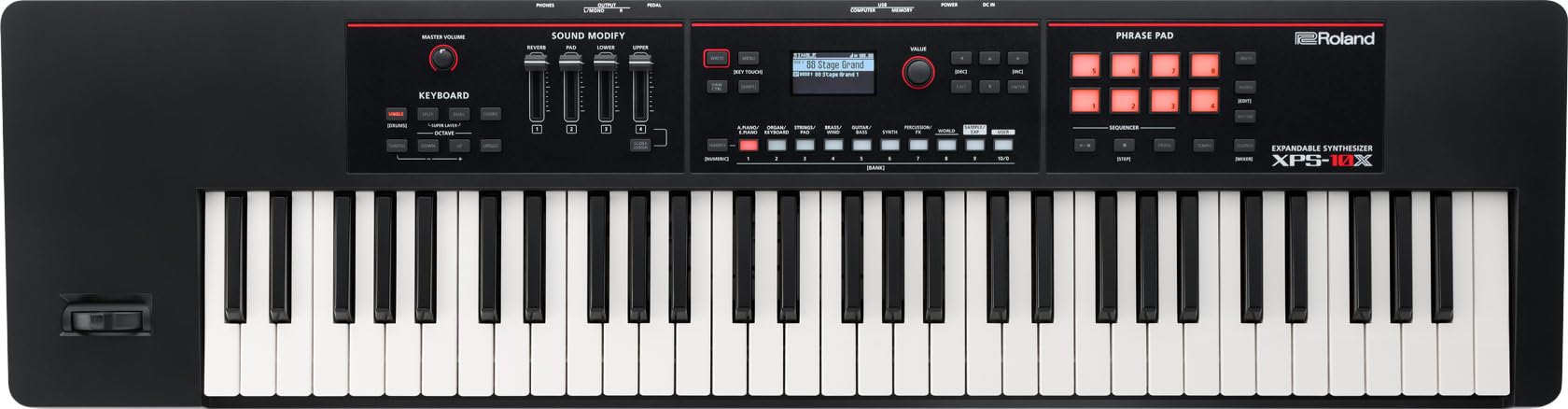
Figura 1: Față view of the Roland XPS-10X Expandable Synthesizer, showcasing its 61-note keyboard and control panel.
Caracteristici cheie:
- Portable performance keyboard with high-quality sounds and features.
- Over 1600 sounds driven by Roland technology, including regional folk instruments.
- World Expansion series via Roland Cloud and XPS Tone Loader app for global instruments.
- Three expansion slots and memory for up to 12 minutes of user samples.
- Streamlined panel interface with intuitive controls.
- Audio Player function with pitch and time-stretch support.
- Accessible user scale settings for performance ease.
- Robust hardware design.
- Quick tone selection and speedy sound creation.
- Eight-track step sequencer for easy phrase creation.
2. Configurare
2.1 Despachetarea
Carefully remove the XPS-10X from its packaging. Ensure all components are present: the synthesizer unit, AC adapter, and this user manual. Retain the packaging for future transport or storage.
2.2 Conexiune la alimentare
- Connect the supplied AC adapter to the DC IN jack on the rear panel of the XPS-10X.
- Conectați adaptorul de curent alternativ la o priză electrică standard.
- Ensure the power switch is in the OFF position before connecting.
2.3 Conexiuni audio
Connect your headphones or external audio system to the appropriate jacks on the rear panel.
- Jack PHONES: Connect stereo headphones (3.5mm or 6.35mm jack).
- OUTPUT (L/MONO, R) Jacks: Conectați-vă la un amplifier, mixer, or audio interface using standard 1/4-inch cables. Use L/MONO for mono output.
2.4 Conexiune USB
The XPS-10X features USB ports for connecting to a computer or USB memory device.
- USB COMPUTER Port (Type B): Conectați-vă la un computer pentru comunicare MIDI.
- USB MEMORY Port (Type A): Connect a USB flash drive for data storage, loading samples, or using the Audio Player function.

Figure 2: Rear panel connections, including DC IN, USB ports, and audio output jacks.
3. Instrucțiuni de utilizare
3.1 Pornire/Oprire
- Ensure all connections are secure and volume levels on connected audio equipment are low.
- Press the POWER switch on the rear panel to turn on the XPS-10X.
- To turn off, press the POWER switch again.
3.2 Selectarea sunetului
The XPS-10X offers over 1600 sounds. Use the CATEGORY buttons (e.g., PIANO, ORGAN, SYNTH) and the VALUE dial to browse and select tones. The display will show the currently selected sound.

Figure 3: Detail of the control panel, highlighting sound category buttons and the display for tone selection.
3.3 Sound Creation and Modification
The XPS-10X allows for quick tone selection and sound creation. Use the dedicated sliders and buttons in the 'SOUND MODIFY' section to adjust parameters like reverb, pad, and other effects. You can also create layers and splits, dynamic arpeggios, and chords.
3.4 Using Expansion Slots and World Expansion Series
Expand your sound library with the World Expansion series. These can be installed via Roland Cloud or the XPS Tone Loader app. The XPS-10X has three expansion slots and memory for up to 12 minutes of user samples.

Figure 4: The Roland Cloud app interface, used for managing and installing World Expansion sounds.
3.5 Audio Player Function
The Audio Player function allows you to play WAV/AIFF files from a USB memory device. You can adjust pitch and time-stretch to match vocals or adjust tempo, enhancing your performance.
3.6 Eight-Track Step Sequencer and Phrase Pad
Create phrases and backing music using the eight-track step sequencer. The Phrase Pad allows you to trigger WAV/AIFF files from a USB drive, with independent pitch and speed control.

Figure 5: Close-up of the Phrase Pad section, used for triggering audio and sequencing.
4. Întreținere
4.1 Curățare
To clean the XPS-10X, use a soft, dry cloth. For stubborn dirt, a slightly damp cloth with mild, non-abrasive cleaner can be used, followed by a dry cloth. Avoid using harsh chemicals, solvents, or abrasive materials, as these can damage the finish.
4.2 Depozitare
When not in use for extended periods, store the synthesizer in a cool, dry place away from direct sunlight, extreme temperatures, and high humidity. Consider using a dust cover or an optional carrying bag (like the CB-V61) to protect the instrument.
5. Depanare
5.1 Fără sunet
- Verificați dacă alimentarea este pornită și dacă butonul de volum este dat la maxim.
- Ensure headphones or external speakers are properly connected and their volume is adjusted.
- Verify that a sound is selected and not muted.
- Check cable connections for damage or improper insertion.
5.2 Probleme legate de alimentare
- Confirm the AC adapter is securely connected to both the XPS-10X and a working power outlet.
- If using a power strip, ensure it is switched on.
5.3 Unresponsive Controls
- Încercați să reporniți unitatea oprind-o și apoi pornind-o din nou.
- If the issue persists, consult the Roland support website pentru asistență suplimentară.
6. Specificații

Figure 6: Dimensions of the Roland XPS-10X.
| Caracteristică | Detaliu |
|---|---|
| Marca | Roland |
| Numele modelului | XPS-10X BK |
| Numărul de chei | 61 |
| Nivel de calificare | Profesional |
| Caracteristici speciale | Digital Display, Digital Effects, Headphone Jack, Portable, Step Sequencer |
| Tip conector | 3.5mm Jack, 6.35mm Jack, USB Type A, USB Type C |
| Tehnologia de conectivitate | USB |
| Tipul sursei de alimentare | Electric cu fir |
| Greutatea articolului | 4.6 kilograme |
| Dimensiuni articol (D x L x H) | 26.8A x 100.2L x 9.3Î centimetri |
| UPC | 761294522547 |
| Țara de origine | China |
7. Informații despre garanție
The Roland XPS-10X Expandable Synthesizer comes with a 1 ani garanție from the date of purchase. This warranty covers manufacturing defects under normal use. Please retain your proof of purchase for warranty claims. For detailed terms and conditions, refer to the warranty card included with your product or visit the official Roland website-ul.
8. Suport
For further assistance, technical support, or service inquiries, please visit the official Roland website or contact your local Roland distributor. Online resources often include FAQs, driver downloads, and additional documentation.
Producător: Roland Corporation


