
1. Introducere
Thank you for choosing the PROSTER Digital Angle Finder. This professional inclinometer and protractor gauge is designed for precise angle measurements in various applications, including woodworking, construction, and home improvement projects. Its strong magnetic base, clear LCD VA display, and dual measurement modes ensure accuracy and ease of use.
Please read this manual thoroughly before operating the device to ensure proper usage and to maximize its lifespan.
2. Informații de siguranță
- Keep the device away from water or other liquids. Do not immerse.
- Avoid exposing the device to extreme temperatures, humidity, or direct sunlight for prolonged periods, as this may affect accuracy.
- Handle with care to prevent drops or impacts that could damage internal components.
- Ensure batteries are inserted correctly according to polarity markings. Remove batteries if the device will not be used for an extended period.
- A nu se lăsa la îndemâna copiilor.
3. Produs terminatview
Caracteristici cheie:
- Professional Digital Inclinometer: Accurately measures angles from 0-90° across 4 surfaces. Error Range: ±0.1-0.2°, Resolution: 0.05°.
- 2 Measurement Modes: Absolute/Relative Zero Function for seamless comparative measurements.
- Unități duale: Displays measurements in degrees (°) and percentage (%).
- Baza magnetica puternica: Adsorbs firmly onto iron surfaces for stability and improved safety.
- Clear LCD VA Display: Easy-to-read readings from any angle, even in varying light conditions, with a reading flip function.
- Funcția Hold: Captures and freezes measurements for convenient recording.
- Indicație baterie descărcată: Alerts you to replace batteries in time.
- Oprire automată: Saves battery life after 3 minutes of inactivity.
Componente incluse:
- 1 x Digital Level Box
- 1 x șurubelniță
- 2 x baterie AAA
Diagrama produsului:
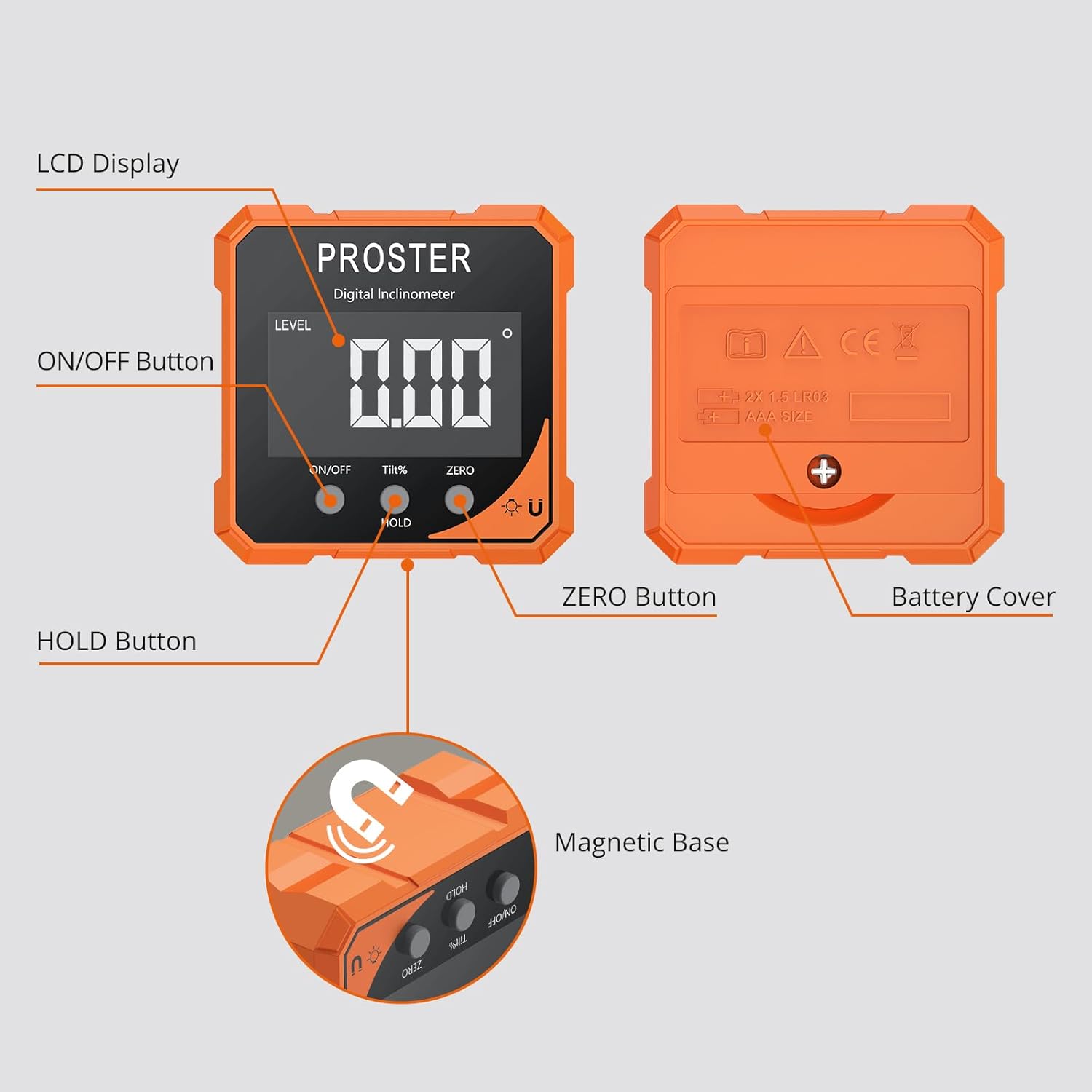
Figura 3.1: Detaliat view of the Digital Angle Finder with labeled components.
4. Configurare
Instalare baterie:
- Localizați capacul bateriei pe spatele dispozitivului.
- Folosiți șurubelnița furnizată pentru a deschide compartimentul bateriei.
- Introduceți 2 baterii AAA, asigurându-vă că polaritatea este corectă (+/-).
- Close the battery cover and secure it with the screwdriver.
Dispozitivul este acum gata de utilizare.
5. Instrucțiuni de utilizare
Pornire/Oprire:
- Pentru a porni: Apăsați scurt pe ON/OFF button. The LCD display will light up.
- A opri: Țineți apăsat butonul ON/OFF button for approximately 3 seconds. The device will also automatically shut off after 3 minutes of inactivity to conserve battery.
Measurement Modes (Absolute/Relative):
The device offers two measurement modes:
- Măsurare absolută (ABS): This mode measures the angle relative to a true horizontal plane (0°). The 'LEVEL' indicator will be displayed.
- Relative Measurement (ZERO): This mode allows you to set any surface as a temporary 0° reference point.
Pentru a comuta între moduri: Apăsați scurt pe ZERO button. The 'LEVEL' indicator will appear for absolute mode and disappear for relative mode.
Conversia unității:
The device can display angles in degrees (°) or percentage (%).
- Pentru a schimba unitățile: Apăsați scurt pe TILT% button to toggle between degrees and percentage.
Funcția Hold:
To freeze the current measurement on the display:
- Apăsați scurt pe ȚINE button. The 'HOLD' indicator will appear on the screen.
- To release the hold and resume live measurement, short press the ȚINE butonul din nou.
Magnetic Base Usage:
The strong magnetic base allows the device to attach securely to metallic surfaces, providing hands-free operation and stability during measurements.

Figure 5.1: Using the strong magnetic base for stable measurements.
Reading Flip Function:
The display automatically rotates to ensure upright readings, regardless of the device's orientation.

Figure 5.2: The display automatically flips for convenient reading.
Operational Examples:
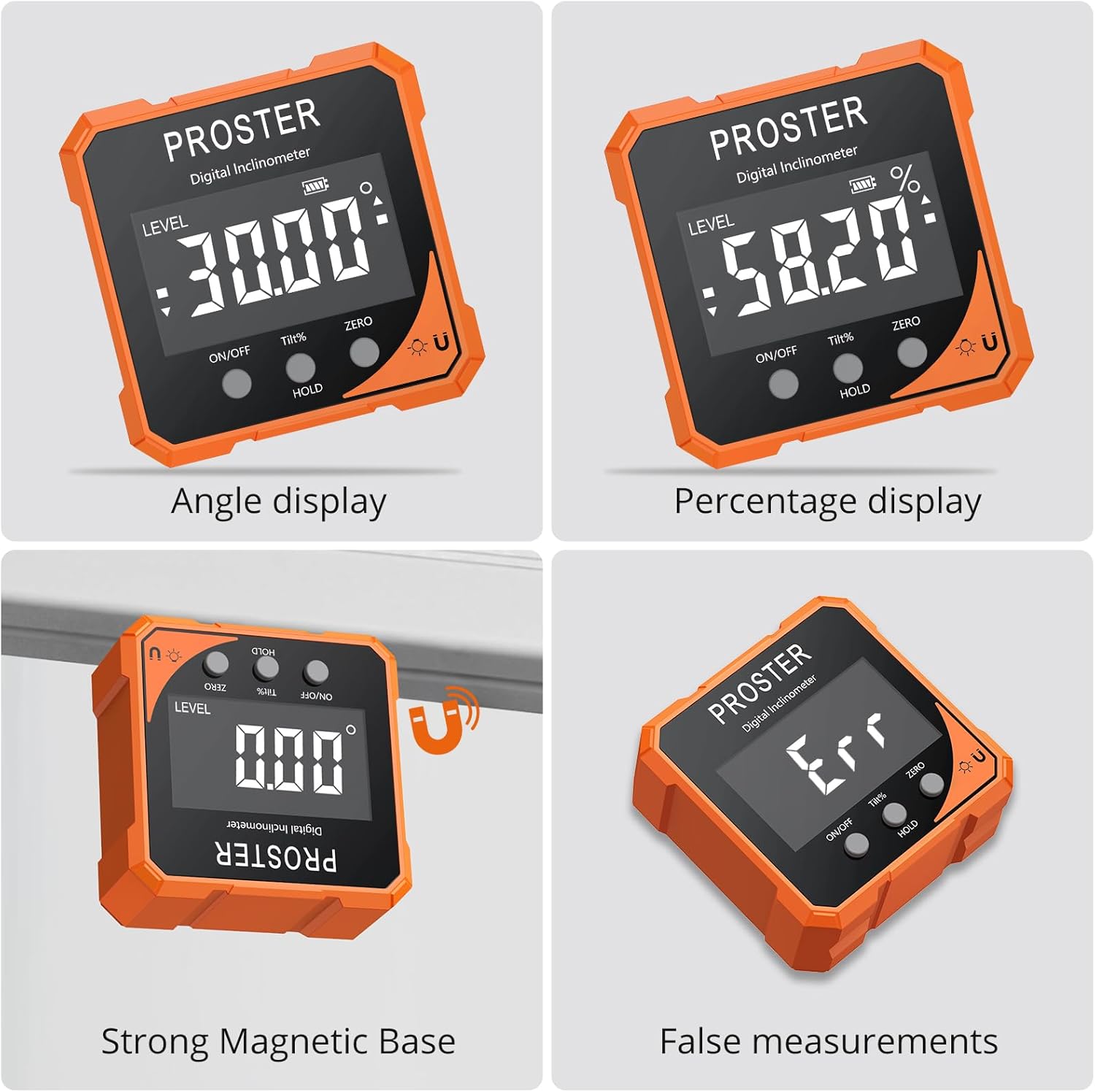
Angle display in degrees.

Angle display in percentage.

Measuring an angle on a wooden surface.

Measuring a saw blade angle.
Video Demonstrations:
XUNTOP USB Charging Digital Level Box Angle Finder (General Operation)
This video demonstrates the general operation and display features of a similar digital angle finder, including how it measures angles and its magnetic capabilities.
BINTA Small Digital Angle Finder Gauge (General Use)
This video illustrates various applications and the magnetic functionality of a compact digital angle finder.
Lytool Digital Angle Gauge (General Use)
This video showcases the practical use of a digital angle gauge for different measurement tasks.
Portable Digital Angle Finder for Precision Measurement (General Use)
This video demonstrates the portability and precision measurement capabilities of a digital angle finder.
6. Calibrare
For optimal accuracy, it is recommended to calibrate the device periodically or if you suspect inaccurate readings.
Procedura de calibrare:
- Opriți dispozitivul.
- Apăsați și țineți apăsat butonul ZERO buton.
- În timp ce continui să ții ZERO butonul, apăsați butonul ON/OFF buton pentru a porni dispozitivul.
- "CAL1" will appear on the screen.
- Place the device on a stable, flat, and level surface.
- Follow the on-screen prompts (CAL1, CAL2, etc.) and rotate the device 180 degrees as instructed, ensuring it remains on a stable surface.
- Once calibration is complete, the display will show 0.00°.
Notă importantă: During calibration, the surface should be stable and level. The inclination of the surface should not exceed 3 degrees, and the position of each calibration step should be consistent.
Calibration Video:
Digital Magnetic Angle Finder Calibration
This video provides a visual guide on how to calibrate a digital magnetic angle finder for accurate measurements.
7. Întreținere
- Curățați dispozitivul cu o lavetă moale și uscată. Nu utilizați substanțe de curățare abrazive sau solvenți.
- Store the device in a dry place, away from dust and direct sunlight.
- Remove batteries if the device is not used for an extended period to prevent leakage and damage.
8. Depanare
- Device not functioning properly: Check the battery level and replace if necessary. Try resetting the device by removing and reinserting the batteries.
- Citiri inexacte: Recalibrate the device following the steps in Section 6. Ensure the device is placed on a stable, level surface during measurement. Be aware that temperature fluctuations, humidity, or extreme conditions can affect accuracy over time.
- "Err" displayed: This typically indicates that the device is tilted forward or backward more than 30 degrees, exceeding its optimal measurement range for certain functions. Adjust the device's position.
9. Specificații
| Atribut | Detaliu |
|---|---|
| Marca | PROSTER |
| Model | Level Box Orange |
| Material | Aluminiu, plastic |
| Culoare | Portocale |
| Modul de operare | Automat |
| Greutatea articolului | 0.1 kilograme |
| Interval de măsurare | 0-90° (across 4 surfaces) |
| Rezoluţie | 0.05° |
| Precizie | ±0.1-0.2° |
| Sursa de alimentare | 2 x baterii AAA |
| Oprire automată | 3 minute de inactivitate |
10. Garanție și asistență
PROSTER products are manufactured to high-quality standards. For specific warranty information, please refer to the warranty card included with your purchase or contact PROSTER customer support.
If you encounter any issues or have questions regarding your Digital Angle Finder, please contact our customer support team for assistance. Contact details can typically be found on our official website-ul sau pe ambalajul produsului.