
1. Introducere
The Retevis RB666S is a user-friendly, rechargeable two-way radio designed for clear and reliable communication. It is ideal for family activities, hiking, camping, and other outdoor adventures. This manual provides detailed instructions on how to set up, operate, and maintain your RB666S walkie talkie.

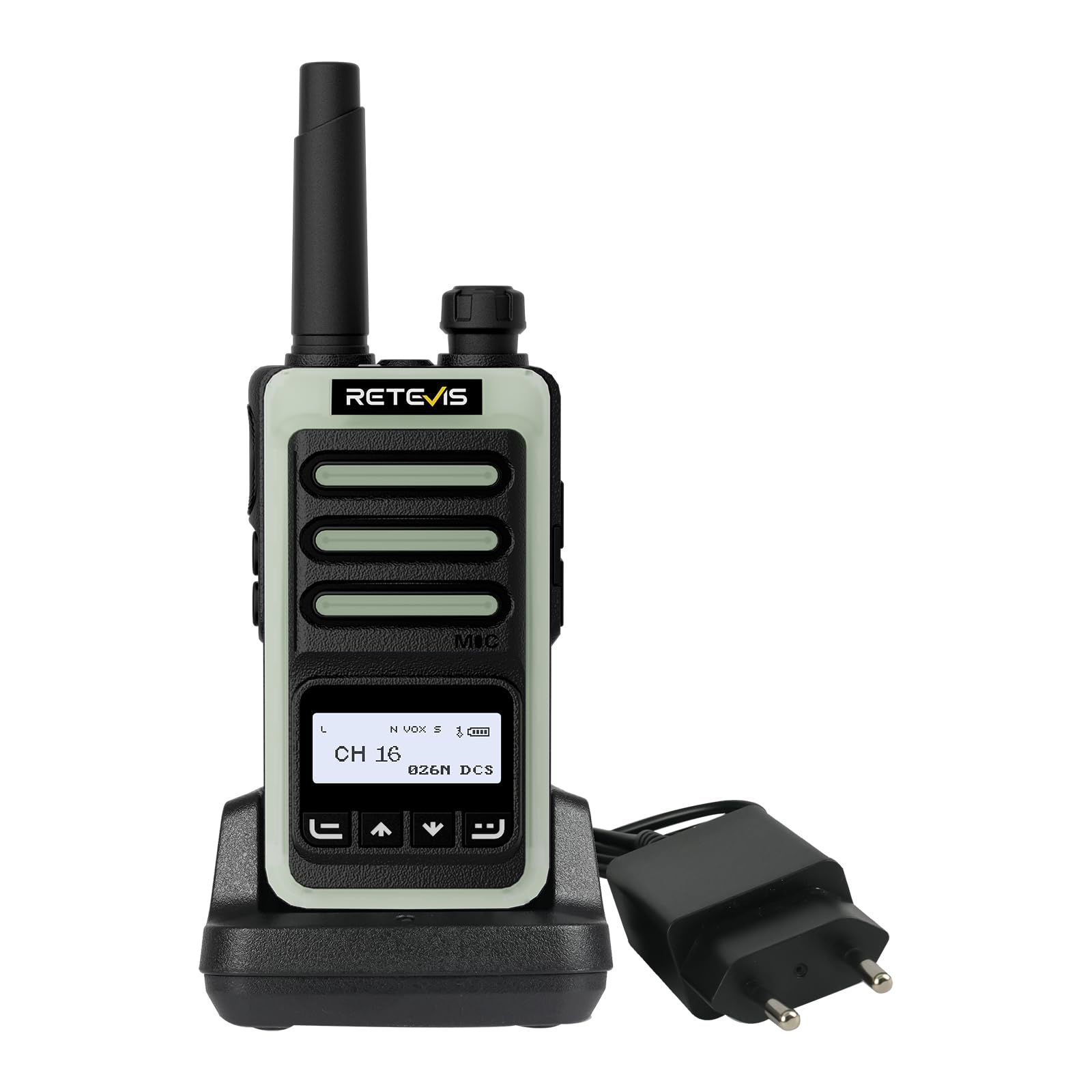
The Retevis RB666S walkie talkie is designed for easy communication during outdoor activities.
2. Conținutul pachetului
Vă rugăm să verificați cu atenție coletul pentru a vă asigura că sunt prezente toate articolele:
- 1 x RB666S Walkie Talkie
- 1 x baterie
- 1 x suport de încărcare
- 1 x cablu de încărcare tip C
- 1 x adaptor
- 1 x Clip de curea
- 1 x Snur
- 1 x Manual de utilizare

All components included in the RB666S package.
3. Produs terminatview
3.1 Componente
Familiarize yourself with the main components of your RB666S walkie talkie:

Detaliat view of the RB666S walkie talkie components.
- Buton Pornit/Oprit/Volum: Rotiți pentru a porni/opri și a regla volumul.
- Lanternă: Lumină LED integrată.
- Port de încărcare: Port de tip C pentru încărcare directă.
- Indicator luminos: Afișează starea (de exemplu, transmitere, recepție, încărcare).
- Buton PTT (Apăsare pentru a vorbi): Apăsați și mențineți apăsat pentru a transmite vocea.
- Side Button 1: Multi-function button, typically for emergency alarm.
- Side Button 2: Multi-function button, typically for flashlight activation.
- MIC: Microfon pentru introducerea vocii.
- Ecran de afișare: 1.3-inch LCD for channel, battery, and signal information.
- Buton de meniu: Accesează opțiunile de meniu.
- Up/Channel+ Button: Navigates up or changes channel.
- Down/Channel- Button: Navigates down or changes channel.
- Butonul Înapoi: Returns to previous screen or exits menu.
4. Configurare
4.1 Instalarea bateriei
- Asigurați-vă că stația walkie-talkie este oprită.
- Localizați capacul compartimentului bateriilor din spatele unității.
- Glisați capacul în jos și scoateți-l.
- Insert the battery, aligning the contacts correctly.
- Puneți la loc capacul compartimentului bateriei și glisați-l în sus până când se fixează în poziție cu un clic.
4.2 Atașarea clemei de curea și a șnurului
- Atașați clema de curea în slotul special de pe spatele radioului pentru o transportare convenabilă.
- Thread the lanyard through the loop on the top or side of the radio for added security.
5. Încărcarea dispozitivului
Before first use, fully charge the battery. The RB666S offers two convenient charging methods:
5.1 Utilizarea suportului de încărcare
- Connect the adapter to the charging cradle and plug it into a power outlet.
- Place the walkie talkie into the charging cradle. Ensure the charging contacts align.
- The indicator light on the radio or cradle will show the charging status (e.g., red for charging, green for fully charged).
5.2 Using the Type-C Cable
- Connect the Type-C charging cable to the charging port on the side of the walkie talkie.
- Plug the other end of the cable into a compatible USB power source (e.g., wall adapter, car charger, power bank, PC).
- Indicatorul luminos va arăta starea de încărcare.
O încărcare completă durează aproximativ 1 oră, oferind peste 14 hours of autonomy și peste 46 hours of standby time.
Fast charging in 1 hour using the cradle.

Versatile Type-C charging options.
6. Operare de bază
6.1 Pornire/Oprire și Reglare Volum
- Pentru a porni, rotiți butonul Pornit/Oprit/Volum în sensul acelor de ceasornic până când auziți un clic.
- Pentru a opri, rotiți butonul în sens invers acelor de ceasornic până când auziți un clic.
- Reglați volumul rotind același buton.
6.2 Ecran LCD
The 1.3-inch LCD screen provides essential information at a glance:
- Numărul canalului: Indicates the current communication channel.
- Nivel baterie: Afișează încărcarea rămasă a bateriei.
- Puterea semnalului: Displays the strength of the received signal.

Clear 1.3-inch LCD screen for essential information.
6.3 Selectarea unui canal
Use the Up/Channel+ and Down/Channel- buttons to select your desired communication channel. Ensure all radios in your group are on the same channel.
6.4 Transmisie și recepție
- La transmite, press and hold the PTT (Push-to-Talk) button. Speak clearly into the microphone. The indicator light will typically glow red.
- La primi, release the PTT button. The indicator light will typically glow green when a signal is received.

Intuitive 4-button layout for easy control.
7. Caracteristici avansate
7.1 Clear Sound Quality
The RB666S is engineered to provide clear audio, ensuring every word is heard distinctly, even in noisy outdoor environments like windy trails or busy campsite-uri.

Enjoy clear sound quality for effective communication.
7.2 Funcția VOX (Centrală operată vocal)
The VOX function allows for hands-free transmission. When activated, the radio will automatically transmit when it detects your voice, eliminating the need to press the PTT button.

Hands-free communication with VOX function.
7.3 Împerechere cu o singură atingere
Simplify connecting with other compatible radios using the one-touch pairing feature. Refer to the specific instructions for pairing in the full manual if available.

Effortless connection with one-touch pairing.
7.4 CTCSS/DCS (Continuous Tone-Coded Squelch System / Digital Coded Squelch)
Utilize CTCSS/DCS codes to filter out unwanted signals and ensure more private communication within your group. This feature helps to reduce interference from other users on the same channel.

Enhanced privacy with CTCSS/DCS codes.
7.5 lanterne cu LED
The integrated LED flashlight provides illumination for navigating in low-light conditions. Briefly press Side Button 2 to activate or deactivate the flashlight.

Illuminate your path with the built-in LED flashlight.
7.6 Fluorescent Design
The RB666S features a fluorescent design, making it highly visible and easy to locate in low-light outdoor environments, enhancing safety during nighttime activities.

High visibility in low light with fluorescent design.
7.7 Alarmă de urgență
For added safety, the RB666S includes an emergency alarm function. Long-press Side Button 1 to activate the alarm, alerting others to your situation.

Activate the emergency alarm for enhanced safety.
7.8 Channel Lock / Keypad Lock
To prevent accidental channel changes or button presses, you can activate the channel lock or keypad lock feature. This ensures stable communication, especially during active use like climbing or cycling.

Maintain stable communication with channel lock.
8. Întreținere
- curatenie: Folosiți un moale, damp o lavetă pentru curățarea exteriorului radioului. Nu utilizați substanțe chimice dure sau produse de curățare abrazive.
- Depozitare: Store the walkie talkie in a cool, dry place away from direct sunlight and extreme temperatures. Remove the battery if storing for extended periods.
- Îngrijirea bateriei: Avoid fully discharging the battery frequently. Recharge regularly to prolong battery life.
- Evitați apa: While designed for outdoor use, avoid submerging the radio in water unless specified as waterproof.
9. Depanare
| Problemă | Cauza posibila | Soluţie |
|---|---|---|
| Radioul nu pornește | Bateria este descărcată sau nu este instalată corect. | Încărcați bateria sau reinstalați-o corect. |
| Nu se poate transmite sau primi | Incorrect channel selected; out of range; battery low. | Ensure correct channel; move closer to other radios; charge battery. |
| Calitate audio slabă | Volume too low; interference; microphone/speaker obstructed. | Adjust volume; move away from interference sources; check microphone/speaker. |
| Tastatura nu răspunde | Blocarea tastaturii este activată. | Deactivate keypad lock (refer to specific instructions in the full manual). |
10. Specificații
- Marca: Retevis
- Număr de model: RB666S
- Număr de canale: 16
- Baterie: 1 x 12V (inclus)
- Voltage: 7.4 volți
- Dimensiunile produsului (A x L x Î): 2.5 x 5.3 x 9.5 cm (0.98 x 2.09 x 3.74 țoli)
- Afişa: Ecran LCD de 1.3 inchi
- Încărcare: Type-C Fast Charging, Charging Cradle
- Caracteristici speciale: LED Flashlight, Fluorescent Design, Emergency Alarm, VOX, CTCSS/DCS, Channel Lock
11. Garanție și asistență
11.1 Informații despre garanție
Retevis offers a 2 an garanție pentru corpul radioului și o 1 an garanție for accessories. We also provide a Politică de returnare fără motiv în 30 de zile. Beyond the warranty period, maintenance services are available, with buyers responsible for associated costs.
11.2 Asistență pentru clienți
For any questions, issues, or support needs, please contact us through Amazon. We are committed to responding to your inquiries within 12 hours.
11.3 Informații de siguranță
For important safety guidelines, please refer to the official safety information document: Informații de siguranță (PDF)