
1. Introducere
This manual provides detailed instructions for the installation, operation, and maintenance of your UNITOPSCI 8 Core 4G+64G Android 15 Car Stereo. Please read this manual thoroughly before using the product to ensure proper function and safety. Keep this manual for future reference.
2. Informații de siguranță
- Instalare profesională recomandată: Installation of this car stereo requires technical knowledge and experience. It is highly recommended to have it installed by a qualified professional.
- Compatibilitate vehicul: This unit is designed specifically for Honda Civic models from 2013 to 2017. Verify compatibility with your vehicle's center console before installation.
- Alimentare electrică: Ensure the vehicle's power supply is disconnected before beginning installation to prevent electrical shock or damage.
- Cablaj: Follow the provided wiring diagram carefully. Incorrect wiring can cause damage to the unit or vehicle.
- Operarea în timpul conducerii: Nu utilizați unitatea într-un mod care vă distrage atenția de la condus. Acordați întotdeauna prioritate siguranței rutiere.
- Temperatură: Evitați expunerea unității la temperaturi extreme sau la lumina directă a soarelui pentru perioade lungi de timp.
3. Conținutul pachetului
Verificați dacă toate articolele sunt prezente în colet:
- 1 x Radio auto
- 1 x cablu de alimentare
- 1 x spate mașină View Camera foto
- 1 x Set de scule de instalare
- 1 x Antenă GPS
- 1 x Cablu de intrare pentru camera spate
- Cablu 1 x RCA
- 2 x cablu USB
- 1 x Manual de utilizare
- 1 x Microfon
- 1 x Original Car USB & Radio Adapter Cable
- 1 x Decodor Canbus

4. Produs terminatview
4.1 Caracteristici cheie
- Sistem de operare: Android 15
- Procesor: Qualcomm 8-Core Chip
- Memorie: 4 GB RAM + 64 GB ROM
- Afişa: 9-inch 1280x720P IPS Capacitive Touchscreen
- Conectivitate: Bluetooth 5.1, Dual-Band WiFi (2.4GHz & 5GHz)
- Integrare smartphone: Wireless/Wired Apple CarPlay, Wireless/Wired Android Auto, Mirror Link
- Audio: Built-in DSP (Digital Sound Processor)
- Navigare: GPS Navigation (supports online and offline maps)
- Radio: Radio FM/RDS
- Suport pentru cameră: AHD Backup Camera (included)
- Caracteristici suplimentare: Steering Wheel Control (SWC), Built-in Cooling Fan, Picture-in-Picture, Customizable UI.


5. Ghid de instalare
5.1 Verificare înainte de instalare
Before proceeding with installation, ensure your Honda Civic's center console matches the compatible design. Refer to the image below for guidance.
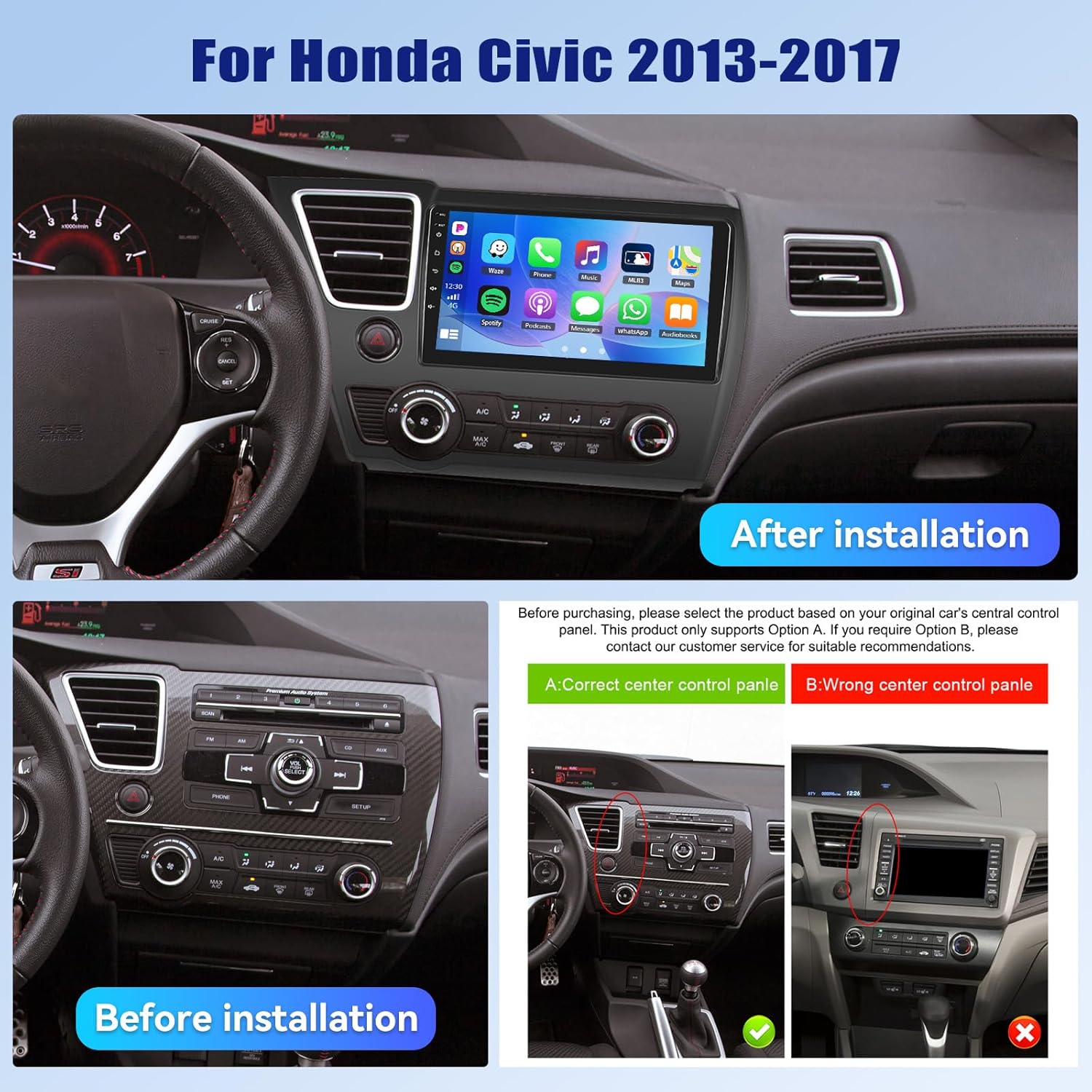
5.2 Schema electrică
A detailed wiring diagram is typically included with your product. Connect the power cable, speaker wires, GPS antenna, USB cables, rear camera input, and other accessories according to the diagram. Ensure all connections are secure to prevent malfunctions.
5.3 Instalare fizică
- Scoateți cu grijă sistemul stereo original al mașinii și panourile de ornamente.
- Connect the new car stereo's wiring harness to the vehicle's existing harness, matching colors and connectors.
- Instalați antena GPS într-un loc cu lumină naturală view a cerului.
- Route the rear camera cable and install the camera (if applicable).
- Montați în siguranță noul sistem stereo auto în deschizătura de pe bord.
- Reinstalați toate panourile de finisaj.
- Reconnect the vehicle's power supply.
6. Configurare inițială
Upon first power-on, the system may guide you through an initial setup process. This typically includes:
- Selectarea limbii: Alegeți limba preferată.
- Ora și data: Setați fusul orar, data și ora corecte.
- Conexiune WiFi: Connect to a stable Wi-Fi network to enable online features and app downloads.
- Calibrare GPS: Allow the GPS system to acquire satellite signals for accurate positioning.
7. Instrucțiuni de utilizare
7.1 Personalizarea interfeței utilizator
The car stereo offers various customization options for its user interface.
- Shaderlab Topics: Adjust the UI color and font color to your preference.
- Window Design: Select from different themes (Card, SplitView, Wallpaper) and layouts for easy operation.
- 3D Car Dynamic Effects: Customize the displayed 3D car model, including its color and type (Car, MPV, SUV).


7.2 Bluetooth 5.1
Connect your smartphone via Bluetooth for hands-free calling, music playback, and access to your phone's contacts and call history. Bluetooth 5.1 offers improved range and stability.

Radio FM/RDS 7.3
Tune into your favorite radio stations. The RDS (Radio Data System) feature provides additional information such as station name, song title, and traffic updates where available.

CarPlay wireless 7.4 și Android Auto
Connect your iPhone or Android smartphone wirelessly or via USB to access CarPlay or Android Auto. This allows for hands-free calls, navigation, music streaming, and voice commands (Siri or Google Assistant).

Video 7.1: Wireless CarPlay Radio Operation Guide with Qualcomm Chips. This video demonstrates the setup and usage of the Wireless CarPlay feature on the UNITOPSCI car stereo, highlighting its responsiveness and ease of use.
7.5 Legătură în oglindă
Mirror Link allows you to display your smartphone screen directly onto the car stereo. Android users can also control their phone applications directly from the car's touchscreen.
7.6 Navigare GPS
The unit supports both online and offline navigation. Connect to Wi-Fi for real-time traffic updates and precise route guidance. Pre-installed maps or downloadable map applications can be used.

7.7 DSP Audio Processing
The built-in Digital Sound Processor (DSP) allows for advanced audio tuning. Adjust equalization, sound field modes, and speaker settings to achieve strong bass, soft midrange, and clear treble for a personalized audio experience.

7.8 Cooling Fan Settings
The integrated cooling fan system helps maintain optimal operating temperature for the radio. You can monitor the temperature and adjust fan settings (e.g., Auto/On) to ensure stable performance.
7.9 Picture-in-Picture (PIP)
The Picture-in-Picture feature allows you to view video content simultaneously while performing other operations, such as navigation or music playback.
Cameră video marșarier 7.10 AHD
The included AHD wide-angle backup camera provides clear night vision and is waterproof. It assists with parking by displaying a real-time view of the area behind your vehicle with parking guidelines. Note: Does not support original car camera.

7.11 Controlul volanului (SWC)
Utilize your vehicle's existing steering wheel buttons to control various functions of the car stereo, such as adjusting volume, changing tracks, and answering calls. This enhances convenience and safety while driving.

7.12 Ecran împărțit
The split-screen function allows for simultaneous display of two applications, such as navigation and music, for convenient multitasking.
8. Depanare
| Problemă | Cauza posibila | Soluţie |
|---|---|---|
| Unitatea nu pornește | Cablare incorectă; Siguranță arsă; Alimentare insuficientă. | Check power connections and fuses. Ensure proper voltage. Consult a professional if unsure. |
| Nici un sunet | Cablurile difuzorului sunt deconectate; Volum prea scăzut; Funcția de dezactivare a sunetului este activă. | Verify speaker connections. Increase volume. Deactivate mute. Check DSP settings. |
| Bluetooth nu se conectează | Bluetooth off on phone/unit; Device not in pairing mode; Interference. | Ensure Bluetooth is enabled on both devices. Put unit in pairing mode. Try pairing in a different location. |
| Semnal GPS pierdut/inexact | GPS antenna obstructed; Antenna faulty; Software issue. | Relocate GPS antenna to a clear area. Check antenna connection. Update navigation software. |
| Ecranul tactil nu răspunde | System frozen; Screen calibration needed. | Reporniți unitatea. Dacă problema persistă, efectuați o resetare la setările din fabrică (consultați meniul de setări). |
| Camera din spate nu afișează | Camera cable disconnected; Camera faulty; Incorrect settings. | Check camera input cable connection. Verify camera power. Ensure reverse gear signal is connected. |
9. Specificații
- Greutatea articolului: 4.36 lire sterline
- Dimensiuni pachet: 15.35 x 9.65 x 3.35 inci
- Dimensiunea afișajului: 9 inchi
- Dimensiunea ecranului: 9 inchi
- Sistem de operare: Android
- Capacitate de stocare a memoriei: 64 GB
- Tip ecran tactil: Capacitiv
- Tehnologie de conectivitate: Bluetooth, WiFi
- Tip hartă: America de Nord, la nivel mondial
- Mod de ieșire audio: Stereo
10. Garanție și asistență
UNITOPSCI offers the following support for this product:
- Garantie: 1-Year Manufacturer's Warranty.
- Garanția de rambursare a banilor: Serviciu de rambursare a banilor în 30 de zile.
- Serviciu de înlocuire: 12-month replacement service.
- Asistență post-vânzare: Dedicated 24/7 professional after-sales team available to assist with installation or usage inquiries.
For online support, please contact: UNITOPSCI@126.com